Become a MacRumors Supporter for $50/year with no ads, ability to filter front page stories, and private forums.
Status
The first post of this thread is a WikiPost and can be edited by anyone with the appropiate permissions. Your edits will be public.
If CarPlay isn’t connecting, forcing you to hand hold your phone for navigation, and the voice directions either have the entire first 10 seconds cut off or the last 5 seconds cut off which then forces you to actually look at your phone…

Yeah that’s Apple’s fault.
I wonder how some people would have survived before 2007.
It’s Apples fault THEIR software isn’t working correctly.
It’s YOUR RESPONSIBILITY to ensure you’re never a danger to yourself or your surroundings when driving, NOT the CarPlay devs.
YOU are responsible for what YOU do, don’t put the blame anywhere else.
Unless you use SD or lane assist, it’s 100% up to you to maintain safety, not someone in Cupertino… nobody forces you to look at your phone while driving, YOU CHOOSE TO.
If Apple Maps doesn’t work properly, use Google Maps or Maps.Me for the time being.

Don‘t forget, having CarPlay is a convenience, not a necessity and not a right.
Not being hurt or having your property damaged by someone too preoccupied with their phone, that’s a right. And by law you’re supposed to protect this right.
Period.
 
Last edited:
Folks, is anyone having problems with your autocorrect? I noticed it is very unreliable since ios 26, but on 26.1 and 26.2 it's becoming complicated... Already reset the dictionary a couple of times - it seems to fix it, but I feel it degrades with time... Any tips?
 
  • Like
Reactions: Parowdy
Right! You got it.. Now, I can only speak for myself 😉 but let's just assume that some people that do use CarPlay may very soon find that it suddenly doesn't work after an update. Sure, I understand responsibility.. Lets just hope everyone else on the road feels as concerned.
I completely get that broken CarPlay is an annoyance.
But how do people without it drive their cars, eh?
They just do.
The driver is always responsible when driving, not some Apple dev team. If the software doesn’t work correctly, don’t use it. You want to use it, make sure you’re safe while doing so. You can’t make sure you’re safe, don’t use it.
It’s that simple, at least it should be. But considering that many people fail to understand the reasons behind stop signs and speed limits, you’re probably right that some drivers may very well be distracted by CarPlay not working properly.
For some, road safety seems optional. Until they get hurt. It’s almost unfortunate that cars are more safe from the inside sometimes.
 
RC2 on the iPhone Air for the most part removes the lag from checking the widget screen and going back to Home Screen.

Before this all versions of ios26 had the super jagged laggy animation on iPhone Air. Glad it’s fixed!
 
Folks, is anyone having problems with your autocorrect? I noticed it is very unreliable since ios 26, but on 26.1 and 26.2 it's becoming complicated... Already reset the dictionary a couple of times - it seems to fix it, but I feel it degrades with time... Any tips?

AutoCorrect is and has been absolute garbage for years. In my experience it actually gets worse year over year. Many people have posted just how bad it is, so you are not on your own.

It boggles my mind how crApple, with all their supposed skills and experience, have monumentally screwed the pooch on this.
 
But how do people without it drive their cars, eh?
They just do.
I'm glad you also seem to be in the group that seems to think rules on paper are all that's needed. Sure, I'll be safe, I always am.. I'm referring to human nature and "everyone else".. There's clearly a problem a lot of people are having with CarPlay, whether some here insist THEY don't have an issue so there shouldn't be one anymore, is another story.. But if everyone just assumes people will behave in a safe way, they're sadly mistaken. Is it Apple's responsibility to make sure people drive safely? Of course not! But when they provide a tool in their car that's worked for, in my case 7 years, and then all of a sudden it doesn't work? Way to go just assuming ALL people will pay attention and obey the law. Again, sounds good on paper, but.... yeah no.
 
Guys this is the home screen lag i am facing on a 17 Pro Max that was never fixed. after swiping up in an app and swiping between home screens, it drops frames and stutters

 
AutoCorrect is and has been absolute garbage for years. In my experience it actually gets worse year over year. Many people have posted just how bad it is, so you are not on your own.

It boggles my mind how crApple, with all their supposed skills and experience, have monumentally screwed the pooch on this.
Its definitely got worse over the years. I thought it was me going a bit mad making mistakes which annoyed me as I'm a bit of a stickler for spelling and grammar. Then I realised it was autocorrect actually changing words that I had typed (and spelled correctly) to something completely unrelated or irrelevant.
 
Its definitely got worse over the years. I thought it was me going a bit mad making mistakes which annoyed me as I'm a bit of a stickler for spelling and grammar. Then I realised it was autocorrect actually changing words that I had typed (and spelled correctly) to something completely unrelated or irrelevant.

Exactly this. Using dictation, I used to be able to speak hashtags but now it displays what I say correctly, ie #AppleArePoo but then when I stop dictation, it changes it to Hashtag Apple are poo.

Up until crapOS 26, this worked faultlessly but yet another regression, as it only works maybe one in ten times.
 
AutoCorrect is and has been absolute garbage for years. In my experience it actually gets worse year over year. Many people have posted just how bad it is, so you are not on your own.

It boggles my mind how crApple, with all their supposed skills and experience, have monumentally screwed the pooch on this.
It got "Liza" instead of "Lisa" in something I dictated, and offered me "lucid," lease" and "leased" instead of the oh-so-obvious "Lisa" as options.
 
What makes this situation even weirder, is that iOS is the only version that received 2 RC builds.

iPadOS, MacOS, VisionOS and WatchOS all have RC1 builds.
 
Definitely not a good look for Apple software team. This is the longest waiting period for a .2 update.

I see it getting worse for Apple's software, rather than getting better.
 
  • Like
Reactions: iLuddite
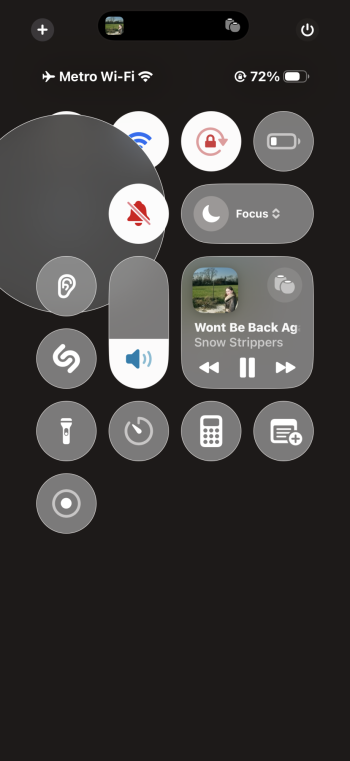
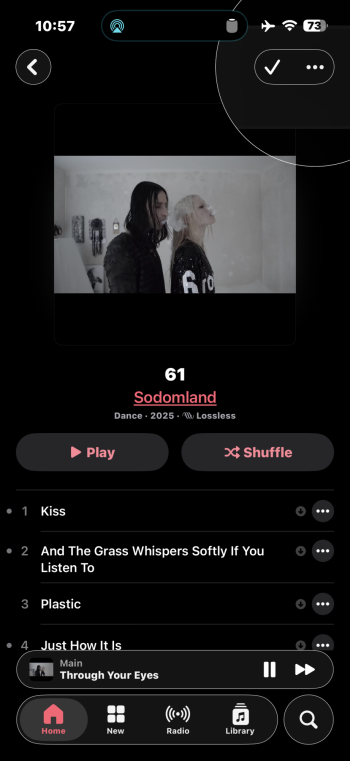
At this rate I just hope the long-press/ellipsis button visual artifact when using Prefer Cross-Fade Transitions bug is fixed in the first 26.3 beta 🤷 Crazy that it’s made its way into both release candidates.

Here’s what I’m talking about (the circular popup thingy that appears upon a Control Center long-press or after pressing and dismissing the ellipsis (…) button menu across various apps when Settings > Accessibility > Motion > Reduce Motion > Prefer Cross-Fade Transitions is enabled:

IMG_0234.png
IMG_0237.png

I submitted feedback betas ago—FB21067417 (Long-Press/Ellipsis Button Visual Artifact)—on November 17. Recent Similar Reports has recently gone from “more than 10” to “none,” so that doesn’t bode well. 🤡
 
At this rate I just hope the long-press/ellipsis button visual artifact when using Prefer Cross-Fade Transitions bug is fixed in the first 26.3 beta 🤷 Crazy that it’s made its way into both release candidates.

Here’s what I’m talking about (the circular popup thingy that appears upon a Control Center long-press or after pressing and dismissing the ellipsis (…) button menu across various apps when Settings > Accessibility > Motion > Reduce Motion > Prefer Cross-Fade Transitions is enabled:

View attachment 2586886
View attachment 2586887

I submitted feedback betas ago—FB21067417 (Long-Press/Ellipsis Button Visual Artifact)—on November 17. Recent Similar Reports has recently gone from “more than 10” to “none,” so that doesn’t bode well. 🤡
Oh crap.. meant to post in speculation thread. Sorry bruvs
 
At this rate I just hope the long-press/ellipsis button visual artifact when using Prefer Cross-Fade Transitions bug is fixed in the first 26.3 beta 🤷 Crazy that it’s made its way into both release candidates.

Here’s what I’m talking about (the circular popup thingy that appears upon a Control Center long-press or after pressing and dismissing the ellipsis (…) button menu across various apps when Settings > Accessibility > Motion > Reduce Motion > Prefer Cross-Fade Transitions is enabled:

View attachment 2586886
View attachment 2586887

I submitted feedback betas ago—FB21067417 (Long-Press/Ellipsis Button Visual Artifact)—on November 17. Recent Similar Reports has recently gone from “more than 10” to “none,” so that doesn’t bode well. 🤡
did this appear in 26.2? I can't reproduce it in 26.1
 
Register on MacRumors! This sidebar will go away, and you'll see fewer ads.