It did for me on 17P with public release. Not for RC.normal or bug? stolen device protection ist still deactivated after update to iOS 26.4. i thought this will be automatically enabled with iOS 26.4

Got a tip for us?
Let us know
Become a MacRumors Supporter for $50/year with no ads, ability to filter front page stories, and private forums.
iOS 26.4 ― Bug Fixes, Changes, and Improvements
- Thread starter Banglazed
- WikiPost WikiPost
- Start date
- Sort by reaction score
You are using an out of date browser. It may not display this or other websites correctly.
You should upgrade or use an alternative browser.
You should upgrade or use an alternative browser.
- Status
- The first post of this thread is a WikiPost and can be edited by anyone with the appropiate permissions. Your edits will be public.

UpsideDownEclair
Suspended
That one’s a dude churning out AI slop summaries of this (real) GitHub repo: blacktop/ipsw-diffsBtw, does anyone else check this site posts about updates? They’re quite deep into the system and mention a huge change on the media analysis daemon that could mean better efficiency and less crashes:

iOS 26.4 Deep Analyze of Changes
iOS 26.4 arrives with a focused MediaAnalysis fix, storekitd rebuild, and rare SMC firmware update affecting performance and stability.onejailbreak.com


Yptcn
macrumors 68020
Same for me , I thought so too.normal or bug? stolen device protection ist still deactivated after update to iOS 26.4. i thought this will be automatically enabled with iOS 26.4

jdavid_rp
macrumors 6502a
Oof. Seemed quite interestingThat one’s a dude churning out AI slop summaries of this (real) GitHub repo: blacktop/ipsw-diffs

yeahtyeaht
macrumors 6502a

Jakimo
macrumors 6502a
I did the same.. and then realized, I'm better with it. I hold to 70% and enjoy the other features of the softwareFinally. I can uninstall AlDente.
So yah, if you only want a limiter - nothing else is needed. But as for me, I already own AlDente (and BatFi) and prefer to have the other features and to go lower than 70%
If you do end up using AlDente (or BatFi) - turn off optimized charging and set the Mac's settings to 100%

NoGood@Usernames
macrumors 6502
Go on without me, y’all! I’ll catch up eventually! 😆
About 20 seconds later it jumped directly to “preparing update” lol

sbailey4
macrumors 601
Its not.Does anybody know if this is safe to install using Apple Devices?
ValerieDurden
macrumors 6502a
This was one of the fastest installs I’ve seen so far, granted it was only 620.8MB but I was shocked.View attachment 2616408
Go on without me, y’all! I’ll catch up eventually! 😆
About 20 seconds later it jumped directly to “preparing update” lol

Travis299
macrumors 6502
15PM & 16P update iOS 26.4 (23E246) and no problems.

StumpyBloke
macrumors 603
Someone help since updated now all my hue lights and switches don’t work in the home app it says no response, I restarted my hue pro hub and also changed home hub to Apple TV and still nothing?
Long-term issue which only affects the Hue Bridge Pro. Chances are you’ll have to remove the bridge from Apple Home and add it again. That’s what I had to do. Apparently Apple is aware of it as is Phillips, yet still no update. It is up to Apple to fix issue, but let’s be honest, they aren’t exactly known for being adept or in any hurry to fix any issues.

john991
macrumors 601
I had this issue with RC had to unlink hue and relink hue in the hue app. Then add the lights back into each room manually. PainSomeone help since updated now all my hue lights and switches don’t work in the home app it says no response, I restarted my hue pro hub and also changed home hub to Apple TV and still nothing?
StumpyBloke
macrumors 603
I had this issue with RC had to unlink hue and relink hue in the hue app. Then add the lights back into each room manually. Pain
Absolutely. I had to reprogram all of my automations, and special usage on some of my switches. My house is completely Phillips Hue so when things like this happen, it’s an absolute nightmare.
But to add insult to injury, adding another device to the Hue bridge may cause the issue again.

James6s
macrumors 68020
This release version feels even slicker than the RC on my iPhone 17. Super fast 👌🏻
john991
macrumors 601
Yup mine too.my iMessage on my mac is BROKEN now!!! since updating, it asks me to login, i logged in with my username and password, it opens and within 10 seconds it crashes, then asks me to log in AGAIN! what the heck??

sw1tcher
macrumors 604
I keep pressing Update, but the Carrier Settings don't want to update.
US Mobile
Carrier 69.0
Don't know if it's a carrier issue or iOS 26.4 issue.
I've rebooted/force restarted iPhone like 3 times already. And I've turned off and then on the "Turn On This Line" toggle too. Nothing.

Stupid me for thinking it'd be safe to update since it's a xx.4 release. Let's see what other bugs I encounter.
US Mobile
Carrier 69.0
Don't know if it's a carrier issue or iOS 26.4 issue.
I've rebooted/force restarted iPhone like 3 times already. And I've turned off and then on the "Turn On This Line" toggle too. Nothing.
Stupid me for thinking it'd be safe to update since it's a xx.4 release. Let's see what other bugs I encounter.
Guess I'm living dangerously then since I'm still on 18.7.2.
Shame on Apple for not providing updates for those of us who do not want to update yet. Apple didn't use to be this way. History has taught me to wait until the xx.4 release if updating.
Last edited:
imagineadam
macrumors 68000
Did not turn on for me either. But that’s ok. Was going to turn it back off anyway!normal or bug? stolen device protection ist still deactivated after update to iOS 26.4. i thought this will be automatically enabled with iOS 26.4

klasma
macrumors G4
You can search for an app in Spotlight Search and then open it from there, and also move it somewhere else from there.I've lost the icon for one of my banking apps. When I open the folder, the icon disappears, but if I close it, it's visible in the thumbnail. This didn't happen in the RC version.

teeshot44
macrumors 65816
Mine was activated. It had previously been off.normal or bug? stolen device protection ist still deactivated after update to iOS 26.4. i thought this will be automatically enabled with iOS 26.4
maccafromla
macrumors newbie
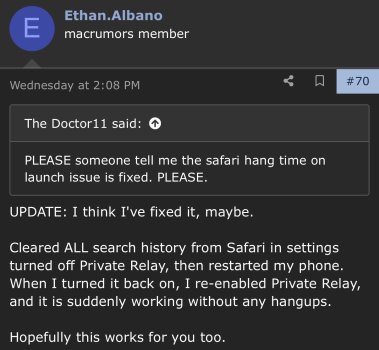
Does anyone else have a 15 second delay when opening safari and loading first tab? Then after a couple of tabs being opened it works normally. I’ve moved to 26.4 hoping it would be fixed but it’s still there 🙁 I’ve tried many things advised. It’s only safari. Firefox works fine for example. (13P)

Maloney~888
macrumors 6502a
My location not working since updating. Google maps, weather etc!’
Edit: changed location and tried my mobile signal instead of WiFi and now all good! 😅
Edit: changed location and tried my mobile signal instead of WiFi and now all good! 😅
Last edited:

eveluvsrainbows
macrumors 6502a
No such issue on my prev. 16 Pro Max or my 17 Pro Max.Absolutely incredible that they released this with the icon redraw again, like in the first versions of 26. Really awful. Where is the QC Apple?
Try this workaround by @Ethan.AlbanoDoes anyone else have a 15 second delay when opening safari and loading first tab? Then after a couple of tabs being opened it works normally. I’ve moved to 26.4 hoping it would be fixed but it’s still there 🙁 I’ve tried many things advised. It’s only safari. Firefox works fine for example. (13P)