ValerieDurden
macrumors 6502a
I’ve always done that lol, but yeah this is the best way.This was in the last beta. Hold down the AppStore icon and choose updates. Much quicker.

I’ve always done that lol, but yeah this is the best way.This was in the last beta. Hold down the AppStore icon and choose updates. Much quicker.


View attachment 2614763
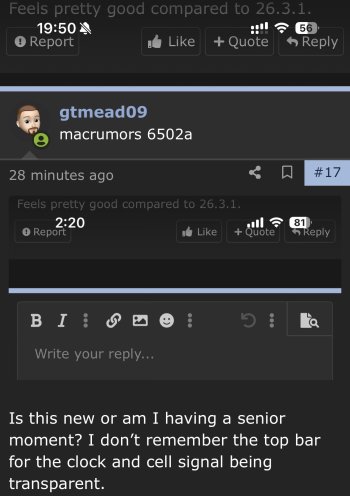
Is this new or am I having a senior moment? I don’t remember the top bar for the clock and cell signal being transparent.

I can’t talk for myself; but I think I read people having that issue with the favourites tab.Tell me if it’s only me. Phone app is broken. When i tap to call a contact from contacts tab it says call failed. It works ok from recents tab. Same happens from contacts app.

I don’t think anyone can answer that as you’re the only one who still uses it.It would be great to know if this is safe to install with Apple Devices!


iOS is only for apple devices you silly gooseIt would be great to know if this is safe to install with Apple Devices!
Loaded the RC via Public Beta on iPhone 16 Pro.
Noticed that in settings/about/iOS Version, it no longer lists the build number. It just says 26.4.
Anyone else seeing this?
AHHH....that's it. Thanks!If you tap on 26.4 it will give you the exact number.
iOS is only for apple devices you silly goose
Click on the part that says 26.4, it’ll show the build numberLoaded the RC via Public Beta on iPhone 16 Pro.
Noticed that in settings/about/iOS Version, it no longer lists the build number. It just says 26.4.
Anyone else seeing this?
I’m not looking forward to being the guinea pig though I suspect that will probably end up being the case. I will give it a couple of days, but it would be nice to possibly get feedback from one other person in the meantime considering the risky history of Apple’s often-times broken nonfunctional software.I don’t think anyone can answer that as you’re the only one who still uses it.

Seems that the blue of the background/website is less than in previous versions.View attachment 2614763
Is this new or am I having a senior moment? I don’t remember the top bar for the clock and cell signal being transparent.
I know, thought I’d try be funny since he’s always bringing up that utility lolApple Devices is a Windows utility for dealing with… Apple devices. 😉
Same with everyone here. Which is why they moved on to better alternatives.I’m not looking forward to being the guinea pig though I suspect that will probably end up being the case. I will give it a couple of days, but it would be nice to possibly get feedback from one other person in the meantime considering the risky history of Apple’s often-times broken nonfunctional software.

Oh, it’s been like that for me for a very long time. Definitely since the iOS 26 beta cycle, can’t recall if it was that way before. I figured that’s just how it is, though I can’t understand exactly why it would have such a long slow startup. For reference I have about ~40 or so tabs left open at all times.I am still having my previously documented issues with Safari in this RC. New feedback supported, FB22274055, as the old feedback, FB22107446, went from “more than 10” to “none” in recent similar reports.
For those that don’t know, I and a few others have been having issues when Safari is launched “fresh” (i.e. not loaded in the background). It takes 20+ seconds to begin loading any web page. Once it’s loaded, Safari works as expected, but as soon as it is closed/no longer kept in memory, same issue. Disabling extensions, Private Relay, and WiFi Assist have not helped.
Unbearably bad.
