
Got a tip for us?
Let us know
Become a MacRumors Supporter for $50/year with no ads, ability to filter front page stories, and private forums.
iOS 26.5 Beta 2 ― Bug Fixes, Changes, and Improvements
- Thread starter Banglazed
- WikiPost WikiPost
- Start date
- Sort by reaction score
You are using an out of date browser. It may not display this or other websites correctly.
You should upgrade or use an alternative browser.
You should upgrade or use an alternative browser.
- Status
- The first post of this thread is a WikiPost and can be edited by anyone with the appropiate permissions. Your edits will be public.

d245770q
macrumors 6502
Well yes, if they are issues for you then of course… but I wouldn’t put bug fixes in the “exciting” category! Liquid Glass is here to stay. They aren’t going to bin it off after 1 year. Look back at iOS7… that got refinements. And iOS7 was a far worse mess than what we have with Liquid Glass. Personally I love Liquid Glass.. but appreciate it’s all down to taste.Liquid Glass is a mess and ui stutter on m4 iPad Pro, they can work on that, iOS 27 is also gonna be minor just new Siri and ai and thats it


MCKLMT
macrumors 6502a

koutaishii
macrumors newbie
There seem to be two different builds for iOS 26.5 Beta 2:
- OTA via Settings app: 23F5054h (stable and recommended)
- IPSW from developer portal: 23F5054d
My experience on two devices:
1. First device: OTA first (h build) → tried 3uTools with d build → stuck long time on “Preparing to restore data” but eventually booted → OTA again safely returned to h build.
2. Second device: Clean installed Beta 1 revised via IPSW → then OTA to Beta 2 → landed cleanly on h build.
After evening JST, d build IPSW became much harder to install.
Both devices are now stable on 23F5054h.
Has anyone else run into this IPSW/d build issue? Any news on a revised build?
Thanks!
- OTA via Settings app: 23F5054h (stable and recommended)
- IPSW from developer portal: 23F5054d
My experience on two devices:
1. First device: OTA first (h build) → tried 3uTools with d build → stuck long time on “Preparing to restore data” but eventually booted → OTA again safely returned to h build.
2. Second device: Clean installed Beta 1 revised via IPSW → then OTA to Beta 2 → landed cleanly on h build.
After evening JST, d build IPSW became much harder to install.
Both devices are now stable on 23F5054h.
Has anyone else run into this IPSW/d build issue? Any news on a revised build?
Thanks!

slomtbr
macrumors 6502
Using the IPSW, my update failed, and the phone went into recovery mode.There seem to be two different builds for iOS 26.5 Beta 2:
- OTA via Settings app: 23F5054h (stable and recommended)
- IPSW from developer portal: 23F5054d
My experience on two devices:
1. First device: OTA first (h build) → tried 3uTools with d build → stuck long time on “Preparing to restore data” but eventually booted → OTA again safely returned to h build.
2. Second device: Clean installed Beta 1 revised via IPSW → then OTA to Beta 2 → landed cleanly on h build.
After evening JST, d build IPSW became much harder to install.
Both devices are now stable on 23F5054h.
Has anyone else run into this IPSW/d build issue? Any news on a revised build?
Thanks!
But it's nice to have all newly downloaded apps and files on your phone now and then, right?
All's well after the OTA update.

vince22
macrumors 6502a
same here, I was on 26.5 beta 1, updating thru IPSW failed due to an error, i was force to downgrade to 26.4.1, OTA update to 26.5 beta 2 no issues, stay away from IPSW for now.Using the IPSW, my update failed, and the phone went into recovery mode.
But it's nice to have all newly downloaded apps and files on your phone now and then, right?
All's well after the OTA update.
koutaishii
macrumors newbie
Thanks for the reply!
Yes, the d build IPSW became much harder to install after evening JST on 3uTools.
My first device luckily booted after long “Preparing to restore data” screen, but I switched back to h via OTA for stability.
Has anyone found a working h build IPSW file yet? Or is Apple planning to release a revised build soon?
Both my devices are stable on 23F5054h now.
Yes, the d build IPSW became much harder to install after evening JST on 3uTools.
My first device luckily booted after long “Preparing to restore data” screen, but I switched back to h via OTA for stability.
Has anyone found a working h build IPSW file yet? Or is Apple planning to release a revised build soon?
Both my devices are stable on 23F5054h now.

Cobold
macrumors 65816
Or you just could've recovered using 26.5 beta1 ipsw? No need to start from scratch. That's what I did after failed ipsw-update to beta 2.Using the IPSW, my update failed, and the phone went into recovery mode.
But it's nice to have all newly downloaded apps and files on your phone now and then, right?
All's well after the OTA update.
slomtbr
macrumors 6502
I had to choice after the phone entered recovery mode.Or you just could've recovered using 26.5 beta1 ipsw? No need to start from scratch. That's what I did after failed ipsw-update to beta 2.
Cobold
macrumors 65816
Of course you had: by pressing and holding ALT and clicking on recovery (on a Windows PC) or pressing and holding command and clicking recovery on a Mac lets you chose a specific .ipsw-file to recover from. 🙂I had to choice after the phone entered recovery mode.


iOSBry
macrumors 6502a
Was just about to ask that.Does anyone know if the IPSW works now?
Same as yesterday so most likely no…Was just about to ask that.

ProbablyDylan
macrumors 68040
Also, does the keyboard still have a blue hue when Tinted is enabled?
Yes.


d123
macrumors 68020
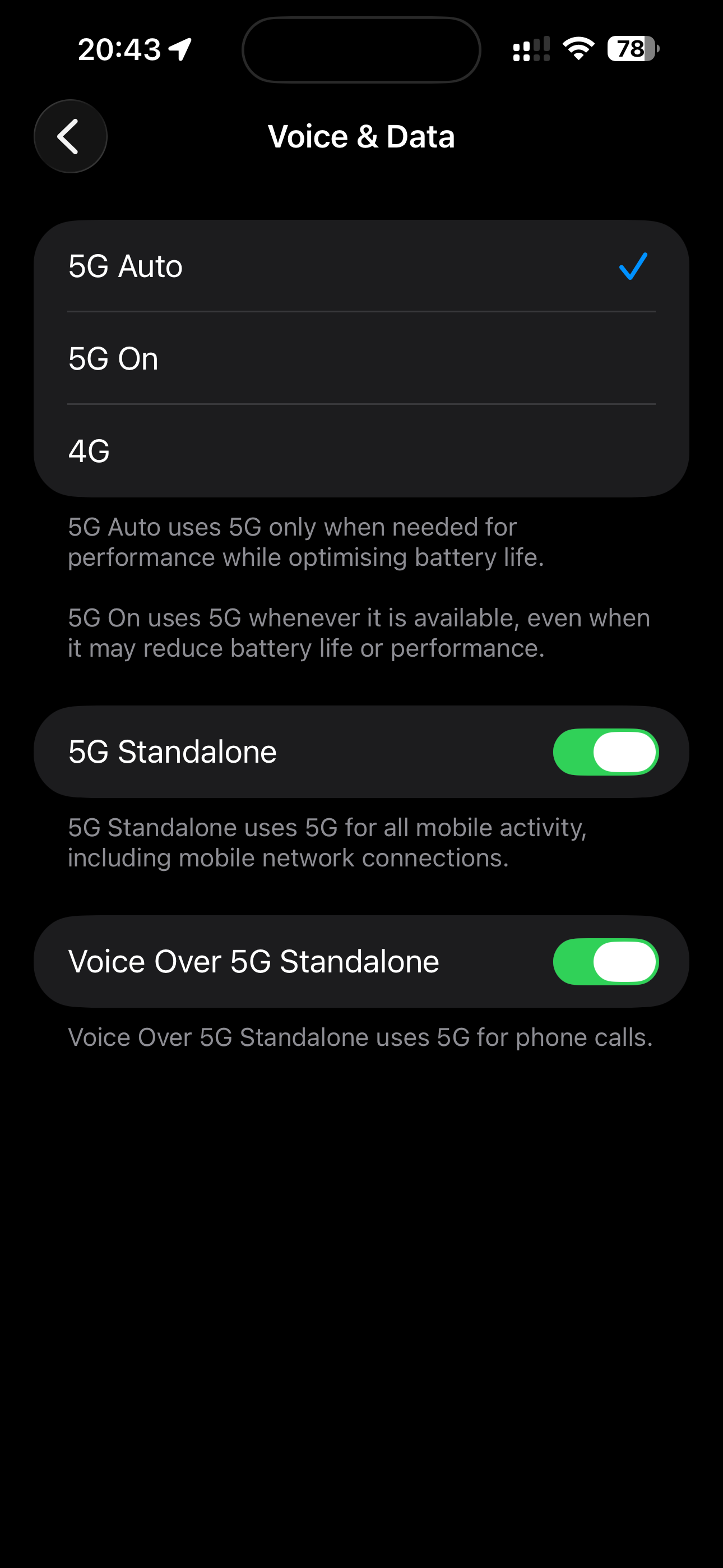
Not sure if anyone else has noticed but 26.5 b2 has enabled VoNR for o2 UK. Carrier version is now 69.5.2

funkdoc23
macrumors 6502
Looks like apple corrected the IPSW build to h on the developer site.

slomtbr
macrumors 6502
Showing "d" on the Releases page, but the individual IPSWs show "h"Looks like apple corrected the IPSW build to h on the developer site.
koutaishii
macrumors newbie
Update / Follow-up on the two builds issue:
Apple has finally added the correct h build IPSW files on the Developer download page.
The model list (including iPhone 17 Pro Max) now appears properly and I was able to start downloading 23F5054h IPSW.
At launch, only the d build (23F5054d) was available on the Developer site.
This caused many users (including me) to experience long “Preparing to restore data” screens and installation failures with 3uTools, especially after evening JST.
My experience:
- Device 1: OTA first (h) → tried d build with 3uTools → stuck for a long time on restore screen but eventually booted → OTA again safely returned to h build.
- Device 2: Clean installed Beta 1 revised → OTA to Beta 2 → landed on stable h build.
Both devices are currently stable on 23F5054h via OTA.
Now that the proper h IPSW is available, has anyone tried installing it yet?
Did it install cleanly without the previous issues?
Thanks!
Apple has finally added the correct h build IPSW files on the Developer download page.
The model list (including iPhone 17 Pro Max) now appears properly and I was able to start downloading 23F5054h IPSW.
At launch, only the d build (23F5054d) was available on the Developer site.
This caused many users (including me) to experience long “Preparing to restore data” screens and installation failures with 3uTools, especially after evening JST.
My experience:
- Device 1: OTA first (h) → tried d build with 3uTools → stuck for a long time on restore screen but eventually booted → OTA again safely returned to h build.
- Device 2: Clean installed Beta 1 revised → OTA to Beta 2 → landed on stable h build.
Both devices are currently stable on 23F5054h via OTA.
Now that the proper h IPSW is available, has anyone tried installing it yet?
Did it install cleanly without the previous issues?
Thanks!
koutaishii
macrumors newbie
Update / Follow-up:
Just finished installing the h build (23F5054h) IPSW on my iPhone 17 Pro Max while keeping user data.
It went smoothly compared to the earlier d build attempts. No long “Preparing to restore data” stuck this time.
Both of my devices are now running stable 23F5054h:
- One via OTA
- One via the newly available h IPSW
Apple seems to have fixed the IPSW issue by adding the proper h build to the Developer site.
Has anyone else successfully installed the h IPSW yet?
How was your experience?
Thanks!
Just finished installing the h build (23F5054h) IPSW on my iPhone 17 Pro Max while keeping user data.
It went smoothly compared to the earlier d build attempts. No long “Preparing to restore data” stuck this time.
Both of my devices are now running stable 23F5054h:
- One via OTA
- One via the newly available h IPSW
Apple seems to have fixed the IPSW issue by adding the proper h build to the Developer site.
Has anyone else successfully installed the h IPSW yet?
How was your experience?
Thanks!
MCKLMT
macrumors 6502a
Successfully installed the 23F5054h ipsw!Update / Follow-up:
Just finished installing the h build (23F5054h) IPSW on my iPhone 17 Pro Max while keeping user data.
It went smoothly compared to the earlier d build attempts. No long “Preparing to restore data” stuck this time.
Both of my devices are now running stable 23F5054h:
- One via OTA
- One via the newly available h IPSW
Apple seems to have fixed the IPSW issue by adding the proper h build to the Developer site.
Has anyone else successfully installed the h IPSW yet?
How was your experience?
Thanks!
koutaishii
macrumors newbie
Thanks! Glad it worked.Successfully installed the 23F5054h ipsw!
Both devices are now stable on 23F5054h.
The h IPSW installed much smoother than the d build did.
Anyone else having success with the new h IPSW?