Become a MacRumors Supporter for $50/year with no ads, ability to filter front page stories, and private forums.
I find it disappointing that the Music app in 2025, is STILL considerably worse than iTunes, when it comes to responsiveness and functionality for searches in a large music library.

So Apple wanted to get rid of iTunes because it was "too bloated"? Yet, it performs significantly better than Music, even now years later.

Same. I got a "new" machine with Sequoia and begrudgingly gave the Music app a try with a moderately sized music collection and it fails to correctly add files, the navigation is clunky, and album art has a mind of its own. It really doesn't seem to be aimed at playing your own media collection.

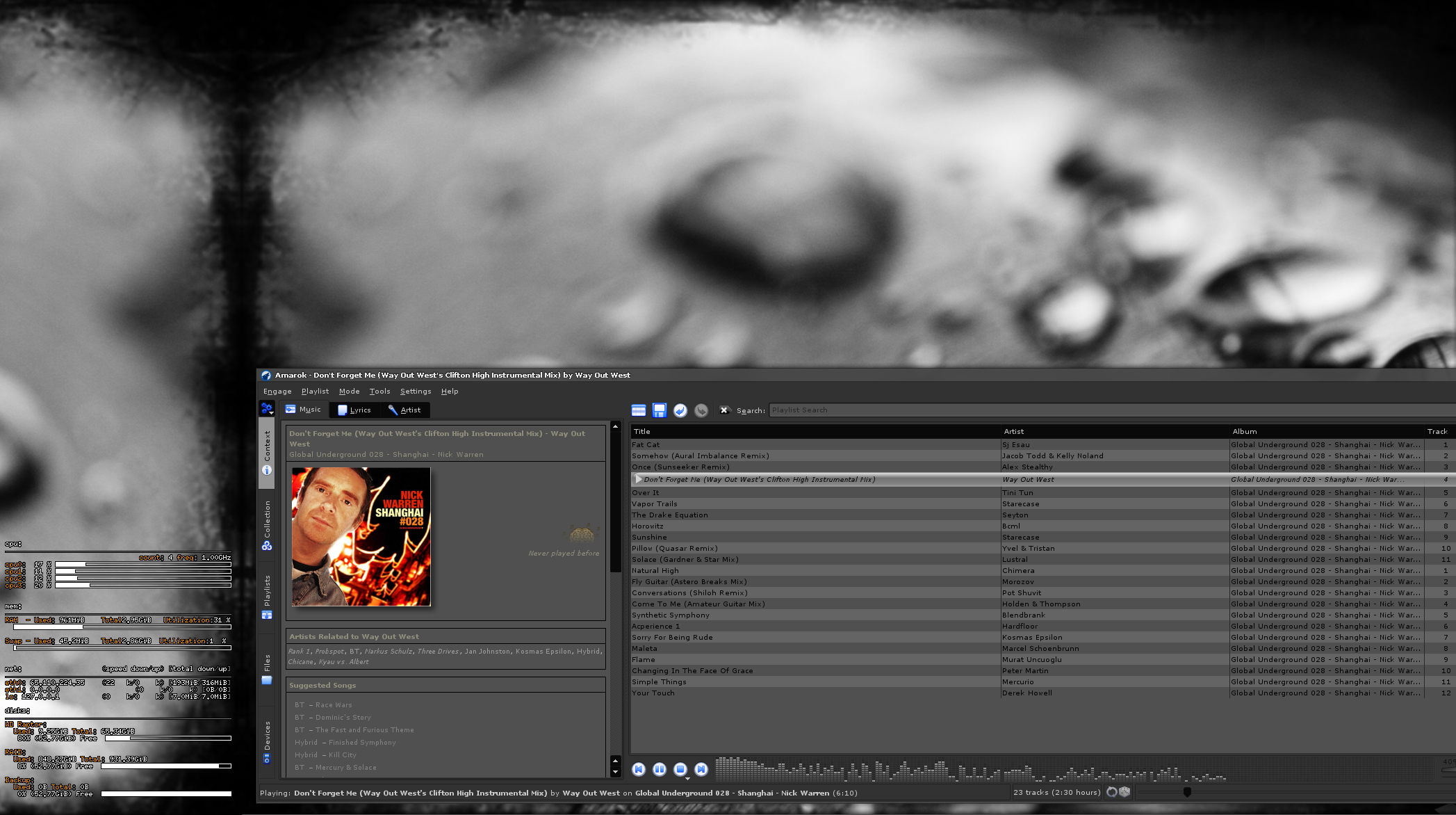
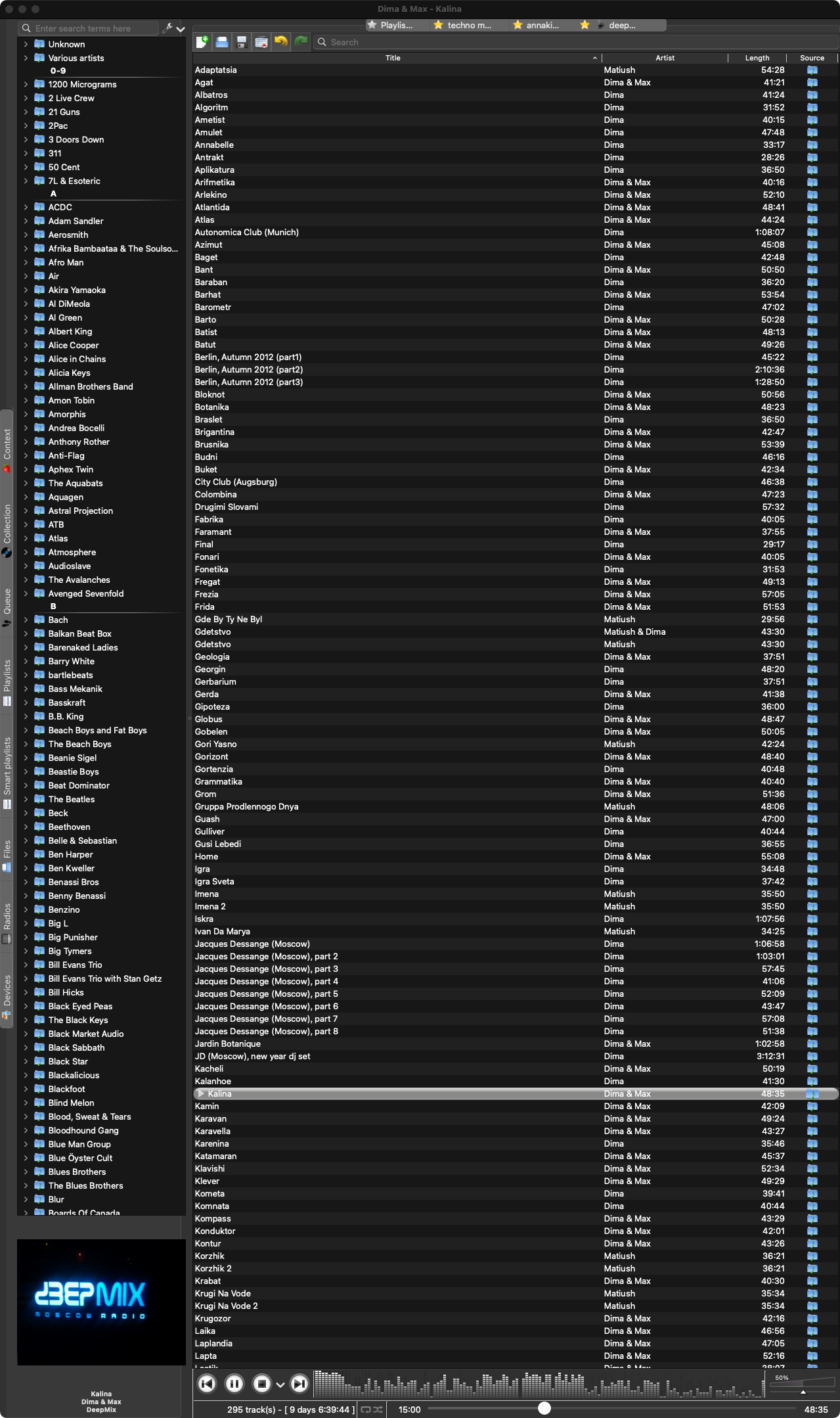
I'm giving Strawberry a try - it's a throwback to Amarok 1.x if anyone used it on Linux/OSX in the past
 
  • Like
Reactions: vascanj and Peter_M
From the developer of Retroactive:
"If you connect an Apple device to your Mac, and see "iTunes cannot read the contents of the device. Go to the Summary tab in device preferences and click Restore to restore this device to factory settings":
You may have installed iTunes with Retroactive 1.4 or earlier.
Once you reinstall iTunes using the latest version of Retroactive, iTunes should be able to read the contents of your device as expected.
At the end of the installation process, Retroactive will ask you about iPod syncing. If you need to sync with iPod devices, click "Enable Full Disk Access"."
https://github.com/cormiertyshawn895/Retroactive#syncing-with-a-device

Same. I got a "new" machine with Sequoia and begrudgingly gave the Music app a try with a moderately sized music collection and it fails to correctly add files, the navigation is clunky, and album art has a mind of its own. It really doesn't seem to be aimed at playing your own media collection.

I'm giving Strawberry a try - it's a throwback to Amarok 1.x if anyone used it on Linux/OSX in the past
For the Mac version can you buy outright or do you have to subscribe monthly for Strawberry ?

How are you finding it ?

I've currently stayed on 13.7.2 because .3 doesn't work but at some point I'll be looking at a new iMac so wondering whether Strawberry may be a solution on the new one instead of the god awful Music app.
 
I did a one-time purchase not a subscription - happy to support the developer

I like it but I was also a huge fan of the old Amarok, it worked great with large collections and supports formats like FLAC no problem. The interface hasn't diverged too much given nearly 20 years

2008 Amarok 1.4
incognito-20080503.png


2025 Strawberry 1.2
incognito-20250306.png
 
  • Like
Reactions: Airsculpture
Thanks for that and aware of some of them. Use Colibri and tried a lot of the others.

All have issues really, either they are just players or when they are also libraries, they have issues like missing artwork or unrecognised files or not registering metadata.

Plus the need for Home Sharing without duplicating effort.
 
Hi
Any of you know what is happening with iTunes 12.9.5 and MacOs Ventura?

I can't open it anymore. It doesn't matter if I disconnecte my external hard drive where my main library is, or if I press the "option" key to create a new library.

Today I just realised that it won't open anymore. This morning I connected my iPhone 15 Pro with iOS 18.3.1 to copy some albums from my iTunes library (as I usually do every now and then) and my iMac with Ventura 13.7.4 asked me to download some software in order to communicate with my iPhone. I don't know if that's the reason why this unexpected issue.

Anyone is experiencing the same problem?

Cheers!!
 
Any of you know what is happening with iTunes 12.9.5 and MacOs Ventura?
If you have installed iTunes with retroactive, follow the steps from https://forums.macrumors.com/threads/itunes-12-6-5-3-on-macos-catalina-10-15.2184518/post-33709318

This morning I connected my iPhone 15 Pro with iOS 18.3.1 to copy some albums from my iTunes library (as I usually do every now and then) and my iMac with Ventura 13.7.4 asked me to download some software in order to communicate with my iPhone.
iTunes can no longer read iOS devices on macOS 14.7.4 and above.
 
If you have installed iTunes with retroactive, follow the steps from https://forums.macrumors.com/threads/itunes-12-6-5-3-on-macos-catalina-10-15.2184518/post-33709318


iTunes can no longer read iOS devices on macOS 14.7.4 and above.
OMG!!!
Thank you, thank you, thank you very much!!
I ran every line with "sudo" at the beginning and it worked. Now I can open iTunes 12.9.5.5 again.
The only annoying issue is getting this -42408 error every time I open iTunes. Any way of getting rid of it??

I hope my iPhone with iOS 18.3.2 will be able to load albums from my iTunes library.
 
If you have installed iTunes with retroactive, follow the steps from https://forums.macrumors.com/threads/itunes-12-6-5-3-on-macos-catalina-10-15.2184518/post-33709318


iTunes can no longer read iOS devices on macOS 14.7.4 and above.
I guess you typed 14.7.4 by mistake and it’s actually 13.7.4 because that’s my Ventura version and even though iTunes is working again it doesn’t recognise my iPhone 15 Pro.

It’s a pity because my main reason for getting a 512Gb device was to fill it with hundreds of lossless albums from my huge iTunes library.

Maybe it’s time to give up and start using Music instead. Last night I made some tests and the Ventura version is not that bad compared to the one in Catalina. I still prefer iTunes, but in a few months I’m planning to buy a new Mac and with current machines with Sequoia there’s no way of using Retroactive so… bye bye iTunes.

Cheers!!
 
don't those "geniuses" understand that people are reverting to itunes because they're doing something wrong? how do they fix it? ban through code signing the old app. ffs.

music's library mode is a pita compared to itunes.
apple lossles music is a joke, for it is always downsampled.

anyway. the main issue with otooling itunes instead of patching system's blacklist plist is that apple remote doesn't work.

btw, don't think i posted the blacklist patch. sip partial disable is required. updates wipe this.

for this to work itunes.zip must be present in /applications/ and disk1s1 be the same in your case

mkdir ~/livemount
sudo mount -o nobrowse -t apfs /dev/disk1s1 ~/livemount
sudo /usr/libexec/PlistBuddy -c 'Delete :LaunchOverrides:com.apple.iTunes' /Users/user/livemount/System/Library/CoreServices/CoreTypes.bundle/Contents/Resources/Exceptions.plist
sudo bless --folder ~/livemount/System/Library/CoreServices --bootefi --create-snapshot
cd /Applications
unzip -o iTunes.zip
sudo reboot
 
Last edited by a moderator:
Good news, I’ve re-enabled SIP and tested the install_name_tool solution.
iTunes 12.9.5.5 works on Apple Silicon with SIP enabled.
Instead of just removing the signature, I've sign it with an ad-hoc signature:

Code:
install_name_tool -change @executable_path/../Frameworks/libgnsdk_dsp.3.06.1.dylib /Applications/iTunes.app/Contents/Frameworks/libgnsdk_dsp.3.06.1.dylib /Applications/iTunes.app/Contents/MacOS/iTunes
install_name_tool -change @executable_path/../Frameworks/libgnsdk_manager.3.06.1.dylib /Applications/iTunes.app/Contents/Frameworks/libgnsdk_manager.3.06.1.dylib /Applications/iTunes.app/Contents/MacOS/iTunes
install_name_tool -change @executable_path/../Frameworks/libgnsdk_musicid.3.06.1.dylib /Applications/iTunes.app/Contents/Frameworks/libgnsdk_musicid.3.06.1.dylib /Applications/iTunes.app/Contents/MacOS/iTunes
install_name_tool -change @executable_path/../Frameworks/libgnsdk_submit.3.06.1.dylib /Applications/iTunes.app/Contents/Frameworks/libgnsdk_submit.3.06.1.dylib /Applications/iTunes.app/Contents/MacOS/iTunes
install_name_tool -change @executable_path/../Frameworks/libgnsdk_dsp.3.06.1.dylib /Applications/iTunes.app/Contents/Frameworks/libgnsdk_dsp.3.06.1.dylib /Applications/iTunes.app/Contents/Frameworks/libgnsdk_dsp.3.06.1.dylib
install_name_tool -change @executable_path/../Frameworks/libgnsdk_dsp.3.06.1.dylib /Applications/iTunes.app/Contents/Frameworks/libgnsdk_dsp.3.06.1.dylib /Applications/iTunes.app/Contents/Frameworks/libgnsdk_musicid.3.06.1.dylib
install_name_tool -change @executable_path/../Frameworks/libgnsdk_dsp.3.06.1.dylib /Applications/iTunes.app/Contents/Frameworks/libgnsdk_dsp.3.06.1.dylib /Applications/iTunes.app/Contents/Frameworks/libgnsdk_submit.3.06.1.dylib
install_name_tool -change @executable_path/../Frameworks/libgnsdk_manager.3.06.1.dylib /Applications/iTunes.app/Contents/Frameworks/libgnsdk_manager.3.06.1.dylib /Applications/iTunes.app/Contents/Frameworks/libgnsdk_dsp.3.06.1.dylib
install_name_tool -change @executable_path/../Frameworks/libgnsdk_manager.3.06.1.dylib /Applications/iTunes.app/Contents/Frameworks/libgnsdk_manager.3.06.1.dylib /Applications/iTunes.app/Contents/Frameworks/libgnsdk_musicid.3.06.1.dylib
install_name_tool -change @executable_path/../Frameworks/libgnsdk_manager.3.06.1.dylib /Applications/iTunes.app/Contents/Frameworks/libgnsdk_manager.3.06.1.dylib /Applications/iTunes.app/Contents/Frameworks/libgnsdk_submit.3.06.1.dylib

sudo codesign -fs - --deep /Applications/iTunes.app

It’s probably best to put the commands in a script file (sh), rather that copy-pasting them one by one.

Thanks to @rotoyouoio and @crystall1nedev for the solution.
https://github.com/cormiertyshawn895/Retroactive/issues/388
I've wanted to say thank you for quite some time. I successfully got iTunes to run on both my Intel and M-series Macs a few years ago by using the steps described earlier in the thread and then again after some point update when combined with above commands in an sh script file.

My iPhone started having errors connecting to iTunes on one of my computers after a point update, but it works fine on one of my other Intel Macs. Not a big loss considering how functional and legible iTunes remains.
 
  • Like
Reactions: bogdanw
don't those "geniuses" understand that people are reverting to itunes because they're doing something wrong? how do they fix it? ban through code signing the old app. ffs.

music's library mode is a pita compared to itunes.
apple lossles music is a joke, for it is always downsampled.

anyway. the main issue with otooling itunes instead of patching system's blacklist plist is that apple remote doesn't work.

btw, don't think i posted the blacklist patch. sip partial disable is required. updates wipe this.

for this to work itunes.zip must be present in /applications/ and disk1s1 be the same in your case

mkdir ~/livemount
sudo mount -o nobrowse -t apfs /dev/disk1s1 ~/livemount
sudo /usr/libexec/PlistBuddy -c 'Delete :LaunchOverrides:com.apple.iTunes' /Users/user/livemount/System/Library/CoreServices/CoreTypes.bundle/Contents/Resources/Exceptions.plist
sudo bless --folder ~/livemount/System/Library/CoreServices --bootefi --create-snapshot
cd /Applications
unzip -o iTunes.zip
sudo reboot
damn I try doing this now I cannot run any iTunes by using the scripts here or retroactive
I thought I would be able to sync my iPod by doing this but now I just made everything worse lol

Screenshot 2026-05-20 at 22.08.57.png
 
I'm sorry, I did't post the correct link. It's post 20 from that thread https://forums.macrumors.com/threads/itunes-12-6-5-3-on-apple-silicon.2354390/post-33685483
I've just tested it and it still works in the latest Tahoe (26.4). Delete iTunes from Applications before running it.

AppleScript:
set theDMG to choose file with prompt "Please select iTunes dmg file:" of type {"dmg"}
do shell script "hdiutil mount " & quoted form of POSIX path of theDMG
do shell script "pkgutil --expand /Volumes/iTunes/Install\\ iTunes.pkg ~/tmp"
do shell script "hdiutil unmount /Volumes/iTunes/"
do shell script "cd ~/tmp/iTunesX.pkg; cat Payload | gunzip -dc |cpio -i; ditto ~/tmp/iTunesX.pkg/Applications/iTunes.app ~/tmp/iTunes.app;"
do shell script "plutil -replace CFBundleGetInfoString -string 'iTunes 13.9.9' ~/tmp/iTunes.app/Contents/Info.plist"
do shell script "plutil -replace CFBundleShortVersionString -string 13.9.9 ~/tmp/iTunes.app/Contents/Info.plist"
do shell script "plutil -replace CFBundleVersion -string 13.9.9 ~/tmp/iTunes.app/Contents/Info.plist"
do shell script "ditto ~/tmp/iTunes.app /Applications/iTunes.app"
do shell script "rm -r ~/tmp"
do shell script "codesign --force --deep --sign - /Applications/iTunes.app"
do shell script "open /Applications/iTunes.app"
 
  • Like
Reactions: peoux
Thank you! That worked!

I tried looking in here but I couldn't find anything about the iTunes 9.2.1. That was never tested by you guys, no? Just the 10.7 onwards
 
I tried looking in here but I couldn't find anything about the iTunes 9.2.1. That was never tested by you guys, no? Just the 10.7 onwards
iTunes 9.2.1 can't work on Catalina and newer versions of macOS because the executable is 32-bit Intel (i386) and PowerPC (ppc).
iTunes 9.2.1 might work on Mojave and previous versions of macOS.
 
Register on MacRumors! This sidebar will go away, and you'll see fewer ads.