

Hey guys,
I'm having issues activating Home Sharing in iTunes (12.6.2) on my Mac Mini running Mavericks. I'm aware that iCloud/Apple ID two factor authentication for anything pre-Yosemite is a bit tricky, but I managed to log in to my account for everything else but Home Sharing.
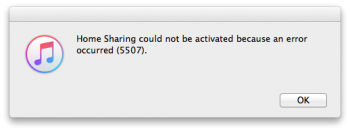
The computer is authorized and I'm signed in to the iTunes Store with my Apple ID. If I now try to activate Home Sharing (File > Home Sharing > Turn On Home Sharing) and enter my Apple ID and password, I do receive the two-factor code on my other devices but also instantly receive this error from iTunes: "Home Sharing could not be activated because an error occured (5507)."
I followed these suggestions and just tried to add the code from the previous attempt to my password on the next try but then I simply get "Home Sharing could not be activated because the Apple ID or password was incorrect". Does anyone have an idea what the issues could be here?
Thanks a lot, V
I'm having issues activating Home Sharing in iTunes (12.6.2) on my Mac Mini running Mavericks. I'm aware that iCloud/Apple ID two factor authentication for anything pre-Yosemite is a bit tricky, but I managed to log in to my account for everything else but Home Sharing.
The computer is authorized and I'm signed in to the iTunes Store with my Apple ID. If I now try to activate Home Sharing (File > Home Sharing > Turn On Home Sharing) and enter my Apple ID and password, I do receive the two-factor code on my other devices but also instantly receive this error from iTunes: "Home Sharing could not be activated because an error occured (5507)."
I followed these suggestions and just tried to add the code from the previous attempt to my password on the next try but then I simply get "Home Sharing could not be activated because the Apple ID or password was incorrect". Does anyone have an idea what the issues could be here?
Thanks a lot, V
