Become a MacRumors Supporter for $50/year with no ads, ability to filter front page stories, and private forums.
For whatever reason(s), nobody has out for purchase a 5K 27" or 6K 32" display with a refresh rate substantially higher than 60-Hz that I'm aware of. IIRC, Viewsonic has one that can supposedly do 75-Hz, but when I did some reading online, sounded like that wasn't fully reliable and 70-Hz could be a safer bet to run it.

Even if it's technically feasible to make a 5K 27" display, I'm curious as to whether Thunderbolt 4 would drive it well (e.g.: would Display Stream Compression (DSC) be needed). I say that because a display that relied on TB 5/USB4-V2 would limit the potential buyer pool.

And how much extra will making it 120-Hz over 60-Hz cost?

One indirect bit of evidence about feasibility I'm inferring from is that no competitor is doing this (aside from Viewsonic that I know of, and that sounds kinda weak). Seems like LG or BenQ could've jacked up that refresh rate and garnered themselves a lot of attention for a ground breaking unique offering with wider versatility (e.g.: for gaming), but no, it's not happening.

If a 90-Hz display looks meaningfully superior to an otherwise same spec.'d 60-Hz display, that might be good enough (and doable).

It will have Thunderbolt 5 which has enough bandwidth for 6k 120 hz.
 
Basic to this threads topic, does Kuycon even supply firmware updates? Seems reading here it is a bit of a mixed bag?
 
I asked Kuycon about firmware upgrades when I received mine. They told me it doesn't need one!
If I recall correctly, the user guide says “don’t use this unless we tell you to” (it comes with a flash drive with firmware on it) — I think there are repair situations where a technician would need it, but not the end user.
 
Last edited:
It will have Thunderbolt 5 which has enough bandwidth for 6k 120 hz.
But the base M4 series and pre-M4 series Macs don't. Macs are already a fraction of the overall PC market, as are people willing to pay $1,600+ for a 27" display. To then cut your target demographic further by making your display fully operable on condition of Thunderbolt 5...might not appeal.

A key demographic valuing high refresh rates is gamers, and the Mac's utility as a gaming system has long been derided (compared to PCs; there is some good stuff!). In theory it could also be used with an Xbox or PlayStation, etc., but with the ASD Apple made a Mac-focused product that doesn't lend itself to such usage.

In theory they could offer it anyway, with the stipulation with TB4 it's 60-Hz and with TB5 120-Hz, but risk drawing the ire of people who resent paying inflated Apple pricing for capability they can't make full use of.

Perhaps if it were 120-Hz either way, but used DSC with TB4 or no DSC with TB5, that could work.

I hope Apple pulls this off. It would bring competitive pressure against other 'retina-class' display vendors to up their refresh rates, and many consumers would like to see that.
 
I doubt there's a good way to get any concrete figures, but has anyone heard how well the Kuycon 6K 32" is selling internationally? Maybe somebody's talked to staff at Kuycon?

I ask because it's taken long enough for more 6K 32" options (besides Apple's XDR and the Dell) to come to market, now much more affordably, and I'm curious as to whether early user demand is driving enough profit to encourage strong growth in this segment or it's going to stay a small niche for the next few years.

Tying into some of the other discussion, if the current 60-Hz retina-class displays yield strong sales it might help drive advancement into future 120-Hz models. On the other hand, if the current models don't move well, that could be bad news.
 
Could I ask what distance you are viewing the monitor from? Can you see everything on the screen at once, or is it normal to only be able to focus on one area while missing something else, such as notifications in the top-right corner?

For context, I have a small desk (80 × 60 cm).

I know that people like to update new hardware immediately to get the most out of their new purchase.

BUT with monitors, this is usually not necessary! Only if there is a problem should you consider whether a firmware update makes sense, but if everything is working to your satisfaction, there is currently no need for one.
I asked Kuycon about firmware upgrades when I received mine. They told me it doesn't need one!
Thanks! I asked them and they said it is on the latest firmware.
 
About free shipping from Alibaba, a real person took over 15mn later:),
Screen ordered, shipping to Belgium, going from a 24” led Cinema Display, should be a nice upgrade!
Not too concerned about the glossy in the last video review posted here he seems to have tons of all kind of lights behind him
Bonjour/hallo Vaeraudio, I am also in Belgium Brussels, and was thinking buying this monitor too (Kuycon G32P). May I contact you to see your opinion ? Many thanks
 
Basically M3/M4 TB4 Macs can’t drive a 6K monitor at RGB 4.4.4 because MacOS doesn’t appear to support DSC over TB4. So you can only get YCbCr 4.2.2.
You need a M4 Pro/Max CPU, with TB5 - which doesn’t require DSC, but also seems to support it - to get full RGB colour resolution.

It’s not clear if it’s a ‘bug’, or just that Apple feels that they have already engineered a ‘solution’ for their own 5K/6K monitors, using dual channel TB3, so don’t really want to allow the lowest tier products to have higher tier functionality. 🙁

Or maybe their engineering decisions make it difficult to allow the facility, like the problems with 5K2K/60Hz at HiDPI - which appear to conflict with their frame buffer design for their own 6K solution.
 
Last edited:
Basically M3/M4 TB4 Macs can’t drive a 6K monitor at RGB 4.4.4 because MacOS doesn’t appear to support DSC over TB4. So you can only get YCbCr 4.2.2.
You need a M4 Pro/Max CPU, with TB5 - which doesn’t require DSC - to get full RGB colour resolution.

It’s not clear if it’s a ‘bug’, or just that Apple feels that they have already engineered a ‘solution’ for their own 5K/6K monitors, using dual channel TB3, so don’t really want to allow the lowest tier products to have higher tier functionality. 🙁

Or maybe their engineering decisions make it difficult to allow the facility, like the problems with 5K2K at over 60Hz at HiDPI - which appear to conflict with their frame buffer design for their own 6K solution.

So how does that affect picture quality in general day to day use? Or will you only notice that with photo or video editing?
 
  • Like
Reactions: splifingate
Basically M3/M4 TB4 Macs can’t drive a 6K monitor at RGB 4.4.4 because MacOS doesn’t appear to support DSC over TB4. So you can only get YCbCr 4.2.2.
You need a M4 Pro/Max CPU, with TB5 - which doesn’t require DSC, but also seems to support it - to get full RGB colour resolution.

It’s not clear if it’s a ‘bug’, or just that Apple feels that they have already engineered a ‘solution’ for their own 5K/6K monitors, using dual channel TB3, so don’t really want to allow the lowest tier products to have higher tier functionality. 🙁

Or maybe their engineering decisions make it difficult to allow the facility, like the problems with 5K2K at over 60Hz at HiDPI - which appear to conflict with their frame buffer design for their own 6K solution.
This is not correct.

DSC is supported in macOS on the Asus 6K and LG 6K on TB4/DP1.4, with full 6K 4:4:4 support.
 
  • Like
Reactions: drrich2
@EugW "
This is not correct.
DSC is supported in macOS on the Asus 6K and LG 6K on TB4/DP1.4, with full 6K 4:4:4 support."


OK. I oversimplified, as the Kuycon is a USB-C Alt-mode monitor.
The Asus 6K is TB4 and the LG Ultrafine is TB5.

TB monitors transport the DP video stream in a tunnelled protocol, so the video stream is reconstituted in the monitor by the TB controller chip. This seems to be able to provoke the Mac to accept the DSC mode, presumably because DSC is mandated by the TB4/5 standard..

The video stream to the Kuycon is 'controlled' by the Mac's TB4 port, and the 'bug' is preventing the Mac from outputting a DSC stream.

So the TB4 Mac's Alt-mode function has a 'bug'/feature?, but Intel's TB4/5 controller chip doesn't.

This may be down to Kuycon, or, more likely, down to Apple. ?.

It could be the Acer 6K monitor, also USB-C I think, may escape this problem by being 6016x3384*, which just scrapes in under the DP1.4 HBR3x4 bandwidth limit of 8.1x4=32.4Gbps (x 0.8 to account for 8b/10b transport coding overhead) = 25.92Gbs?
6144x3456 is apparently just over?
(I'm 'repeating things that I cannot prove myself' 😵‍💫)

* Presumably why Apple settled on 6016x3384, plus they also manipulated the 8/10 encoding factor?
 
Last edited:
Have you tested this yourself, or do you constantly repeat things that you cannot prove yourself?
I have tested this myself on the LG 6K.

OK. I oversimplified, as the Kuycon is a USB-C Alt-mode monitor.
The Asus 6K is TB4 and the LG Ultrafine is TB5.

TB monitors transport the DP video stream in a tunnelled protocol, so the video stream is reconstituted in the monitor by the TB controller chip. This seems to be able to provoke the Mac to accept the DSC mode, presumably because DSC is mandated by the TB4/5 standard..

The video stream to the Kuycon is 'controlled' by the Mac's TB4 port, and the 'bug' is preventing the Mac from outputting a DSC stream.

So the TB4 Mac's Alt-mode function has a 'bug'/feature?, but Intel's TB4/5 controller chip doesn't.

This may be down to Kuycon, or, more likely, down to Apple. ?.

It could be the Acer 6K monitor, also USB-C I think, may escape this problem by being 6016x3384*, which just scrapes in under the DP1.4 HBR3x4 bandwidth limit of 8.1x4=32.4Gbps (x 0.8 to account for 8b/10b transport coding overhead) = 25.92Gbs?
6144x3456 is apparently just over?
(I'm 'repeating things that I cannot prove myself' 😵‍💫)

* Presumably why Apple settled on 6016x3384, plus they also manipulated the 8/10 encoding factor?
I have tested this on the LG’s DisplayPort input too using a cheap Monoprice USB-C to DisplayPort adapter, and 4:4:4 still works fine, at native 6144x3456. I don’t own a DP 2.1 Mac. My Apple Silicon Macs are TB 4 / DP 1.4.

M4 MacBook Air --> TB 4 cable --> Plugable TB 4 hub --> Monoprice USB-C DP adapter --> DP cable --> LG 6K DP input:

IMG_0939.jpeg <-- Click to enlarge
 
  • Like
Reactions: PaulD-UK
M4 MacBook Air --> TB 4 cable --> Plugable TB 4 hub --> Monoprice USB-C DP adapter --> DP cable --> LG 6K DP input:

View attachment 2586484 <-- Click to enlarge
This may be a dumb question, but I don’t understand why everyone uses their phone to take imperfect pictures of the screen when doing these chroma-subsampling tests. Wouldn’t a screen shot capture it perfectly? I mean, the question is about how macOS is handling the color, about the signal that is being sent to the display, right? So it should be captured in a screen shot, right?
 
@tenthousandthings
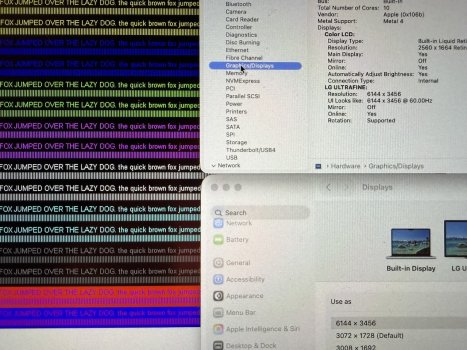
No. The methodology of the test is to put individual coloured pixel image points (hence the need for a 100% image, displayed on full screen resolution), onto individual screen pixel RGB points, and then showing how 4.2.2 (or 4.2.0) compression is withholding the colour signal to specific pixels.

4.2.2 means every other adjacent horizontal colour data point is missing, and 4.2.0 means both adjacent horizontal and vertical data are lost.

The effect only happens on the screen (where it can be photographed), because a screenshot is a record of the frame buffer contents, which is always 10bit 4.4.4.
Because the compression happens on output, when the video stream data is reduced and sent out to fit what the cable can carry and the monitor can display.
 
Last edited:
@tenthousandthings and @PaulD-UK,

Regarding the frame buffer and screenshots: Interestingly, if I connect my old 2017 Intel Core m3 12" MacBook to that 6K monitor, the frame buffer is actually 6.7K at 6720x3780, because it will internally render that at 2X scaling to what "looks like" 3360x1890 (which is the default HiDPI resolution in macOS for some reason). However, the MacBook can't actually output that. Instead it takes that 6.7K frame buffer and then just downscales it to 4K 3840x2160 for final output. The monitor then takes that 4K input signal and rescales it back up to 6144x3456 for final display. Screenshots are the full 6720x3780 though.
 
Last edited:
Will probably pull the trigger soon on this one, but can someone help me understand what are the potential deal breakers of G32P that will surprise me? Or those who have bought it, what made you pull the trigger eventually?
 
So how does that affect picture quality in general day to day use? Or will you only notice that with photo or video editing?

Personally, I only notice--when setting my G32P to 1:1 (6144x3456), and viewing the rtings dot com chroma-444.png (and peeping the zoomed-in pixels from a hand-held photo-snap from my iPhone 13-Mini)--that anything might potentially be 'not-perfect'.

This being said: in every circumstance I use it, the G32P display is quite lovely :)
 
Apologies for the crude diagram. For those who have the monitor. Does the circled bracket angle up and down? For me, the whole monitor slides up and down the main shaft. The monitor can be angled easily. But the circled bracket doesn't angle itself up and down to fine-tune the height in the same way that I think the Pro Display XDR does. It may be that the bracket needs loosening slightly? Just don't want to force it or break anything by meddling!

View attachment 2534518
Did you ever find out? I tried to adjust it and it looks like it is fixed. I also checked YouTube videos and I couldn't find a YouTuber who actually adjusted the hinge.
 
Will probably pull the trigger soon on this one, but can someone help me understand what are the potential deal breakers of G32P that will surprise me? Or those who have bought it, what made you pull the trigger eventually?
I like the glossy display and build quality is excellent. I use it with my Mac Mini M4 pro. connected via TB5 cable. I did test also using an HDMI cable and works great as well. It is comparable to my Apple Studio Display.
 
Register on MacRumors! This sidebar will go away, and you'll see fewer ads.