
Got a tip for us?
Let us know
Become a MacRumors Supporter for $50/year with no ads, ability to filter front page stories, and private forums.
LG 31MU97 4k Display
- Thread starter Zorn
- Start date
- Sort by reaction score
You are using an out of date browser. It may not display this or other websites correctly.
You should upgrade or use an alternative browser.
You should upgrade or use an alternative browser.
Does anyone know the difference between the 31MU97-B and the 31MU97C-B? I know the second is a commercial display but I'm not quite sure what that means in this case as the specs are all identical. And since I'm finding the latter for almost $100 cheaper on Amazon, I wanted to make sure I'm getting the correct one for standard home use. Thanks.
Last edited:
SheridanMac
macrumors member
Also, looks like Newegg has the 31MU97Z-B on sale for $849.
http://www.newegg.com/Product/Product.aspx?Item=N82E16824025267
I've been eyeing both this and the Dell P2715Q. So much more has been written about the Dell that it seems like a safer choice in a lot of ways, but the sheer size of the LG is so compelling. With the Dell I could see myself wanting a second display down the road, but 31" at 4K seems like it could really work for the long haul.
If we can get a 4K 31" monitor for $849 today, I wonder what Black Friday holds in store...
http://www.newegg.com/Product/Product.aspx?Item=N82E16824025267
I've been eyeing both this and the Dell P2715Q. So much more has been written about the Dell that it seems like a safer choice in a lot of ways, but the sheer size of the LG is so compelling. With the Dell I could see myself wanting a second display down the road, but 31" at 4K seems like it could really work for the long haul.
If we can get a 4K 31" monitor for $849 today, I wonder what Black Friday holds in store...
MacRumoren
macrumors member
Has anyone gotten LG's "True Color Finder" app to work on El Capitan? The latest v2.10 release was back in April 17, 2015 and I can't even install it. I get some kind of "this version of software is not compatible with your Mac."

gnaegi
macrumors newbie
J just bought a new MacBook Pro 15", mid 2015 edition and a 31MU97B-Z.
It sucks.
What works:
What does not work:
The 50Hz resolutions are not usable as I can only access them by alt-clicking the 'scale' radio button and then checking the 'low resolution mode' checkbox. The problem is that I have to do this every time I plug in the thunderbolt cable. It does not work at all on the login screen or when closing the lid of the MPB. When I plug in the Thunderbolt cable the screen just goes black.
And, the two 50Hz resolutions are not usable for me, 4096x2160 is too small and 2048x1080 too large. I'd like to scale to something in between.
It runs on AMD Radeon R9 M370X.
What bothers me most: my colleague has an 2013 MBP and there it works out of the box! How can it be that a newer MBP does not work at all while an other model just works. Of course he has another graphics card inside.
Can someone confirm that the monitor works with a 2015 MBP with AMD Radeon R9 M370X using Thunderbolt in a Plug&Play manner with all the resolutions @60Hz?
Thanks.
It sucks.
What works:
- HDMI all resolutions @24Hz
- Thunderbolt/Display Port: 4096x2160 and 2048x1080 @50Hz
What does not work:
- Thunderbolt/Display Port: all other resolutions @50Hz, not a single resolution @60Hz
The 50Hz resolutions are not usable as I can only access them by alt-clicking the 'scale' radio button and then checking the 'low resolution mode' checkbox. The problem is that I have to do this every time I plug in the thunderbolt cable. It does not work at all on the login screen or when closing the lid of the MPB. When I plug in the Thunderbolt cable the screen just goes black.
And, the two 50Hz resolutions are not usable for me, 4096x2160 is too small and 2048x1080 too large. I'd like to scale to something in between.
It runs on AMD Radeon R9 M370X.
What bothers me most: my colleague has an 2013 MBP and there it works out of the box! How can it be that a newer MBP does not work at all while an other model just works. Of course he has another graphics card inside.
Can someone confirm that the monitor works with a 2015 MBP with AMD Radeon R9 M370X using Thunderbolt in a Plug&Play manner with all the resolutions @60Hz?
Thanks.

José Almeida
macrumors member
I have the same setup.
Macbook Pro middle 2015 with AMD Radeon and had several problems with the 4K monitors.
Tested abou t 5 diferente cables, Monitors. Samsung 4k and Asus 4K. Some do flickering others do shadows.
So I would be also interest in knowing if anyone else with tis setup works..
Thanks,
Macbook Pro middle 2015 with AMD Radeon and had several problems with the 4K monitors.
Tested abou t 5 diferente cables, Monitors. Samsung 4k and Asus 4K. Some do flickering others do shadows.
So I would be also interest in knowing if anyone else with tis setup works..
Thanks,
J just bought a new MacBook Pro 15", mid 2015 edition and a 31MU97B-Z.
It sucks.
What works:
- HDMI all resolutions @24Hz
- Thunderbolt/Display Port: 4096x2160 and 2048x1080 @50Hz
What does not work:
- Thunderbolt/Display Port: all other resolutions @50Hz, not a single resolution @60Hz
The 50Hz resolutions are not usable as I can only access them by alt-clicking the 'scale' radio button and then checking the 'low resolution mode' checkbox. The problem is that I have to do this every time I plug in the thunderbolt cable. It does not work at all on the login screen or when closing the lid of the MPB. When I plug in the Thunderbolt cable the screen just goes black.
And, the two 50Hz resolutions are not usable for me, 4096x2160 is too small and 2048x1080 too large. I'd like to scale to something in between.
It runs on AMD Radeon R9 M370X.
What bothers me most: my colleague has an 2013 MBP and there it works out of the box! How can it be that a newer MBP does not work at all while an other model just works. Of course he has another graphics card inside.
Can someone confirm that the monitor works with a 2015 MBP with AMD Radeon R9 M370X using Thunderbolt in a Plug&Play manner with all the resolutions @60Hz?
Thanks.
gnaegi
macrumors newbie
Update to my previous post: I returned the LG monitor after a day of hassle and bought the EIZO EV3237 instead.
What a difference! Image quality is so much better and everything works just out of the box. Colors are more accurate and sharpness is a huge difference. The EIZO looks crystal clear and sharp in all scaling modes. I found the LG a bit fuzzy.
The only drawback: no thunderbolt. This is a bummer, but I bought a thunderbold dock to fix this. The 200+ missing pixels at the side - well this is really not an issue for me.
Regarding price: the EIZO was 100 bucks more, worth every penny.
Very happy with the monitor. If you have a MBP 2015, consider the EIZO EV3237 instead of the LG 31MU97.
What a difference! Image quality is so much better and everything works just out of the box. Colors are more accurate and sharpness is a huge difference. The EIZO looks crystal clear and sharp in all scaling modes. I found the LG a bit fuzzy.
The only drawback: no thunderbolt. This is a bummer, but I bought a thunderbold dock to fix this. The 200+ missing pixels at the side - well this is really not an issue for me.
Regarding price: the EIZO was 100 bucks more, worth every penny.
Very happy with the monitor. If you have a MBP 2015, consider the EIZO EV3237 instead of the LG 31MU97.

turbineseaplane
macrumors Penryn
Update to my previous post: I returned the LG monitor after a day of hassle and bought the EIZO EV3237 instead.
What a difference! Image quality is so much better and everything works just out of the box. Colors are more accurate and sharpness is a huge difference. The EIZO looks crystal clear and sharp in all scaling modes. I found the LG a bit fuzzy.
The only drawback: no thunderbolt. This is a bummer, but I bought a thunderbold dock to fix this. The 200+ missing pixels at the side - well this is really not an issue for me.
Regarding price: the EIZO was 100 bucks more, worth every penny.
Very happy with the monitor. If you have a MBP 2015, consider the EIZO EV3237 instead of the LG 31MU97.
I honestly have no idea what you were doing wrong… I've been using the LG for a full year now and it's crystal-clear and gorgeous and the colors are amazing.
Hi
I just purchased this display a month and so far i've been running with some minor issue.
My machine is a nMP 6 core D700 graphics.
I have a dual monitor setup.
LG 34UM95 and this LG 31MU97
Both monitors are using Thunderbolt connection with Apple branded Thunderbolt cable.
Thunderbolt loses connection on the 31MU97 at times.
The display will say No Signal and shut down....however, under system preferences it still show the monitor being connected.
Under about this mac, it still show both monitors are being connected.
The only way to fix this issue is to flick the power switch on the back of the 31MU97 Off and On again to regain signal.
Tried to switch the cables and only the 31MU97 monitor is having this issue.
has anyone running into this issue? do i have a faulty monitor?
Thanks!
I just purchased this display a month and so far i've been running with some minor issue.
My machine is a nMP 6 core D700 graphics.
I have a dual monitor setup.
LG 34UM95 and this LG 31MU97
Both monitors are using Thunderbolt connection with Apple branded Thunderbolt cable.
Thunderbolt loses connection on the 31MU97 at times.
The display will say No Signal and shut down....however, under system preferences it still show the monitor being connected.
Under about this mac, it still show both monitors are being connected.
The only way to fix this issue is to flick the power switch on the back of the 31MU97 Off and On again to regain signal.
Tried to switch the cables and only the 31MU97 monitor is having this issue.
has anyone running into this issue? do i have a faulty monitor?
Thanks!
Attachments

Last edited:
For those interested, it looks like the 31MU97Z is $799 new on newegg right now for the rest of the evening:
http://www.newegg.com/Product/Product.aspx?Item=N82E16824025267
http://www.newegg.com/Product/Product.aspx?Item=N82E16824025267

I just want to update the thread. Got a 31MU97Z and it works perfectly with my late 2013 rMBP with GPU.
The installation was basically plug and play like Apple's TBD. I plugged all my USB/TB peripherals to the monitor, got a thunderbolt cord to the MBP, hooked up the power cable and everything worked as they should. Full resolution@60hz. (or so I think... I can't notice any lag as I experience with lower rate when I first moved to 4K) 🙂
The installation was basically plug and play like Apple's TBD. I plugged all my USB/TB peripherals to the monitor, got a thunderbolt cord to the MBP, hooked up the power cable and everything worked as they should. Full resolution@60hz. (or so I think... I can't notice any lag as I experience with lower rate when I first moved to 4K) 🙂
turbineseaplane
macrumors Penryn
I'm just really hoping that the 5K version in the exact same form factor is close.
It's been nearly a year since we heard about LG working on that exact panel.
It's been nearly a year since we heard about LG working on that exact panel.
Can anyone with the LG 31MU97 try out to see if they can replicate the problem I'm having?
My setup usually works flawlessly... 0 complains. But one thing that I have noticed is that, if I power down the monitor or the MBP, with the TB cable still connected, the MBP would take longer to load, and when it does load OSX, there's nothing on the monitor (no signal).
The funny thing is that everything connected to the monitor still work... USB and TB peripherals. And I can see everything (including the monitor) in the system report... but no signal and no additional screen shown in display option.
To solve it, I need to restart the MBP, with no TB connected, it would load up very quickly, and once it boot into OSX, I plug the TB cable on, and everything is back to normal.
My setup usually works flawlessly... 0 complains. But one thing that I have noticed is that, if I power down the monitor or the MBP, with the TB cable still connected, the MBP would take longer to load, and when it does load OSX, there's nothing on the monitor (no signal).
The funny thing is that everything connected to the monitor still work... USB and TB peripherals. And I can see everything (including the monitor) in the system report... but no signal and no additional screen shown in display option.
To solve it, I need to restart the MBP, with no TB connected, it would load up very quickly, and once it boot into OSX, I plug the TB cable on, and everything is back to normal.
Recently I have little problem, about wake from sleep, sometimes after wake from sleep the monitor cannot up and still black screen, I need to unplug and plug the DP cable to another TB port to make it work, another case is after I use HDMI port then switch back to DP, same problem happen. After I call LG support, they said maybe cable problem, ask me change the cable. Anyone got the same problem, is it really becoz DP cable problem??

bleckett
macrumors newbie
Read through everything here and still not clear about what's the best cable connection setup to use.
Running El Cap with all recent updates on cylinder MacPro. MP is about 8 feet from the monitor and I would like to use the monitor as a central hub for USB3 portal drives, audio in/out (Skype), AND get 4096x2160 @60hz (not 50hz).
Anyone have a similar setup or can offer cable suggestions?
Thanks!
Running El Cap with all recent updates on cylinder MacPro. MP is about 8 feet from the monitor and I would like to use the monitor as a central hub for USB3 portal drives, audio in/out (Skype), AND get 4096x2160 @60hz (not 50hz).
Anyone have a similar setup or can offer cable suggestions?
Thanks!
bleckett
macrumors newbie
Recently I have little problem, about wake from sleep, sometimes after wake from sleep the monitor cannot up and still black screen, I need to unplug and plug the DP cable to another TB port to make it work, another case is after I use HDMI port then switch back to DP, same problem happen. After I call LG support, they said maybe cable problem, ask me change the cable. Anyone got the same problem, is it really becoz DP cable problem??
I just got the monitor today, set it up, and I'm getting the same problem. After the MacPro (cylinder) goes to sleep for awhile, it doesn't wake up. I can switch to a dual display or turn off DP1.2 in the monitor's settings and the screen will appear. But of course this is a lower refresh or resolution. When switching back, it doesn't get a single and goes to sleep.
I'm using the cable LG supplied and I have another cable as well (Fosmon MINI DisplayPort Cable 10 ft). I guess things are still not up to snuff yet.
I just got the monitor today, set it up, and I'm getting the same problem. After the MacPro (cylinder) goes to sleep for awhile, it doesn't wake up. I can switch to a dual display or turn off DP1.2 in the monitor's settings and the screen will appear. But of course this is a lower refresh or resolution. When switching back, it doesn't get a single and goes to sleep.
I'm using the cable LG supplied and I have another cable as well (Fosmon MINI DisplayPort Cable 10 ft). I guess things are still not up to snuff yet.
After update to 10.11.3 then the problem gone.
I'm having exactly the same problem. If you disable System Integrity Protection, it will let you install, but it still doesn't recognize the USB connection for calibration. I ended up removing it (you need to also remove an item from the root-level /Library/LaunchItems directory so it doesn't try to launch) and then re-enabling SIP.
It's a shame, because the built-in calibration works very well.
It's a shame, because the built-in calibration works very well.
Has anyone gotten LG's "True Color Finder" app to work on El Capitan? The latest v2.10 release was back in April 17, 2015 and I can't even install it. I get some kind of "this version of software is not compatible with your Mac."
MacRumoren
macrumors member
I'm having exactly the same problem. If you disable System Integrity Protection, it will let you install, but it still doesn't recognize the USB connection for calibration. I ended up removing it (you need to also remove an item from the root-level /Library/LaunchItems directory so it doesn't try to launch) and then re-enabling SIP. It's a shame, because the built-in calibration works very well.
I really just don't understand why a company as big as LG, and for a product that is currently being sold as their top-of-the-line, there isn't a proper update for its main companion app to run on OSX.
Nobody is holding these big corporations accountable I guess. I am sure there is a violation in there somewhere when their ads for these 4K monitors keep mentioning internal calibration and Mac compatibility, when the app doesn't even install or run.
Anybody knows any lawyers? It's sad but maybe this is the only way to get their attention at our expense.
cshelswell
macrumors newbie
The 31MU97 is dropping in price as we approach Black Friday - Amazon lists the 31MU97B-Z below $950 now.
Has anyone gotten full res 4096x2160 on a classic Mac Pro? All the reports above are for the new Mac Pro, or for Windows.
I've got it running full res @ 60hz but I did have to drop in an Nvidia GTX980 for that. I got it off mac vid cards
I have a 2013 Macbook Air (OSX 10.11.5, Intel i7, HD 5000, 8gb RAM). I would like to get 4096x2160 or 2048x1080 HiDPI working via a mini Displayport to mini Displayport cable (version 1.2).
So far I have tried SwitchResX Custom Resolution and mac-pixel-clock-patch-V2 described in this How-To: Drive a 4K display at 60 Hz on the 2016 MacBook guide.
I was able to get 2048x1080 at 59HZ, but NOT HiDPI.
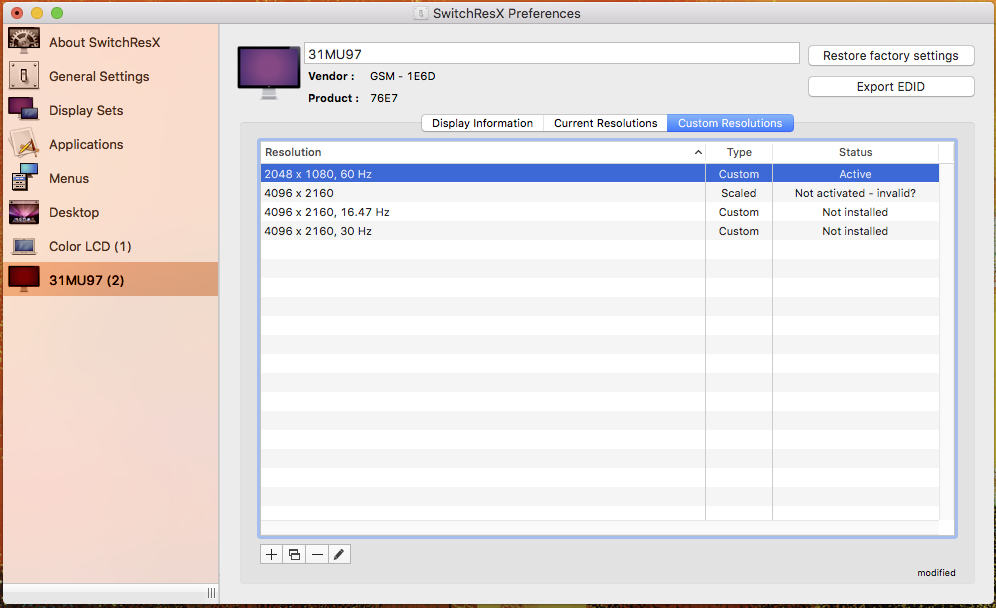
I know this may be a long shot, but if anyone knows how to get 4096x2160, even at 30Hz, please help!
So far I have tried SwitchResX Custom Resolution and mac-pixel-clock-patch-V2 described in this How-To: Drive a 4K display at 60 Hz on the 2016 MacBook guide.
I was able to get 2048x1080 at 59HZ, but NOT HiDPI.
I know this may be a long shot, but if anyone knows how to get 4096x2160, even at 30Hz, please help!

rdav
macrumors 6502
Did you contact the Author of the IOKit Patch (on GitHub)?
https://github.com/Floris497/mac-pixel-clock-patch-V2
"If you wan't to request new functions for this script feel free to open an issue with the request."
Perhaps it can be updated.
https://github.com/Floris497/mac-pixel-clock-patch-V2
"If you wan't to request new functions for this script feel free to open an issue with the request."
Perhaps it can be updated.
Last edited:
Did you contact the Author of the IOKit Patch (on GitHub)?
https://github.com/Floris497/mac-pixel-clock-patch-V2
"If you wan't to request new functions for this script feel free to open an issue with the request."
Perhaps it can be updated.
Ok I will do that, thanks.
