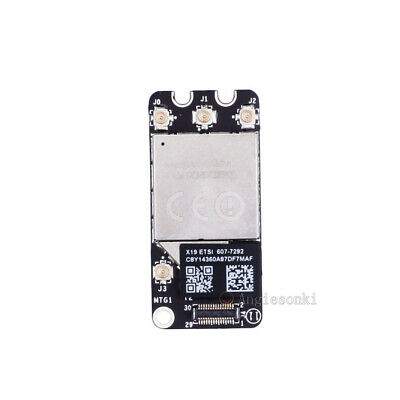
Check the FeatureUnlock GitHub page yourself. I would go with the fully supported BMC94360xxx modules.Will universal control work on a macbook pro 2011 13 late with this card?
Last edited:
Check the FeatureUnlock GitHub page yourself. I would go with the fully supported BMC94360xxx modules.Will universal control work on a macbook pro 2011 13 late with this card?
I had already checkedCheck the FeatureUnlock GitHub page yourself.
| MacBookPro8,1 | Wi-Fi 4 + BT 2.1 EDR | Upgrade to BCM94331 |
PermissionError: [Errno 13] Permission denied: '/Users/Shared/.com.dortania.opencore-legacy-patcher.plist'PermissionError: [Errno 13] Permission denied: '/Users/Shared/.com.dortania.opencore-legacy-patcher.plist'
[721] Failed to execute script 'OpenCore-Patcher' due to unhandled exception!
What am I doing wrong and why wont OCLP install again when I click on the download? Totally confused! Thanks
rm /Users/Shared/.com.dortania.opencore-legacy-patcher.plistThanks, thought I would try it against to see if I get more luck. Doing a fresh install now. Is there anything obvious I've done wrong?PermissionError: [Errno 13] Permission denied: '/Users/Shared/.com.dortania.opencore-legacy-patcher.plist'
Try to delete the file manually from Terminal in advance using:
rm /Users/Shared/.com.dortania.opencore-legacy-patcher.plist
(copy and paste and confirm command by pressing enter key)
Thank you for your reply, I was going to have a USB Drive with a Catalina Installer on and use that to boot from to update my firmware, but this sounds a simpler way to get the updates.If you are going to put Monterey on this machine, you may want to consider keeping your Catalina install and putting Monterey on a separate partition or separate volume (if a separate volume instead of partition for OCLP Monterey is also possible—I'm not sure). Until later this year, machines that natively run Catalina like the MBP 9,2 will still be getting firmware updates sometimes when you do the Catalina security update. You will want to receive those firmware updates bundled with the security updates. Up-to-date firmware will help your machine run [OCLP Monterey] as well as possible.
You don’t need to install Big Sur first, per my knowledge.
I would do a clean install of Monterey on a separate partition (or a separate volume if that is good too—you can double check the partition vs. volume issue in the docs, I imagine.)
I reverted to Beta 2, and all is working just like before. It's OS-related problem.After updating to Beta 3 (OCLP 0.4.6), on iMac 13.2, successful reboot and login, installing post-install patches and final reboot, the posinstall doesn't work. No graphic acceleration. I received these 2 messages. After applying the root patches, as suggested by OLCp, it still doesn't work. I need some help please.
Seems similar to mine. I've got a Mac mini 5,1. On first boot of usb, OpenCore automatically detects it's not installed on the hard drive and offers to install. However once done after rebooting via efi SSD the OpenCore application just doesn't open and bounces up and down. When you try to reinstall it, it does nothing apart from bounce up and down. Just reinstalling now to try again. Love the Hamilton reference lol!Could you look in your accumulated box of tricks and see if there is anything that can help:
1. Update to 0.4.6 from 0.4.5 on my ancient 2011 MBP8,2? Tried 3 nvram resets, reran the nvram code to disable the discrete and problematic Radeon gpu again, & downloaded the new 0.4.6 version. It will not run, just bounces like Hamilton's F1 car, and then settles down. Doesn't even throw up any apologies. I think (not sure) that is because the nvram resets didn't clear out the 0.4.5 installed on the EFI partition of the 128GB Apple SSD. The post-install root patches were applied using 0.4.5.
2. Also, the bluetooth absolutely refuses to connect to either a battery magic mouse or a white older rechargeable magic mouse. Using the somewhat erratic trackpad with my old shacking hands is driving me nuts!
I was hoping the 0.4.6 update would help with these issues, but I am stuck out in the middle of the pond without a paddle!
'Tis enough to make me want to buy a new MacBook Air!!
I reverted to Beta 2, and all is working just like before. It's OS-related problem.
Ok so it's now working perfectly. Did a fresh install, deleted that line and installed to disk. Opencore now loads off the SSD, rather than not loading at all. Wonder why none of the guides mention deletingThanks, thought I would try it against to see if I get more luck. Doing a fresh install now. Is there anything obvious I've done wrong?
This was/is a local problem. Something must have changed the access flags in a way a normal user could not change the file there.Ok so it's now working perfectly. Did a fresh install, deleted that line and installed to disk. Opencore now loads off the SSD, rather than not loading at all. Wonder why none of the guides mention deleting
rm /Users/Shared/.com.dortania.opencore-legacy-patcher.plist
Same configuration (iMac 13.2 late 2012 quad i7) and exactly the same problemHowever, same installation onto iMac 13,2 (late 2012, quad i7) resulted in login window loop as described in your post.
I used 0.4.6 release and 0.4.7n, and neither resolved the problem.
I had that a long while ago when switching between TUI and GUI of a version built from source.This was/is a local problem. Something must have changed the access flags in a way a normal user could not change the file there.
Yep surprised this has been missed. Anyway all good now, really appreciate the help sorting this on the thread here.This was/is a local problem. Something must have changed the access flags in a way a normal user could not change the file there.
You need to install OpenCore on the EFI internal partition, and when powering on the system, hold Option key, then select EFI boot and hold Command key to mark as launcher, from there whenever power on or restart, it will proceed correctly .Hi All,
Mac mini 2012 I7 16gb, Installed Monterey 12.4 using latest OLCP TUI on 12/6 all working fine post install script running no issues or problems graphics nice and smooth. However after a couple of days booted up the mac to be met by the no entry sign which goes into a loop of booting.
Wondered if anyone else has had this issue and if there is any known fix?
Personally, I would suspect bad disk. I’ve been there. Many times. There’s no more quality control testing, it went away decades ago. Cost analysis found it’s cheaper to do warranty exchanges than test units at the factory. Just exchange it.Not really. I've check that today on windows 10 and disk is not visible. Now I don't know is that disk problem or case. I've order new better case and will see. That Ugreen one start's heating after plug in. I hope that didn't burn the disk.
The bare bones Catalina install volume I created on external SSD for getting firmware updates currently occupies 34 GB, with 7.2 GB allocated for unmounted 'other volumes'. So you'd better make it bigger, maybe 50 GB. I did a clean install and just created an admin login. Did not migrate any data or apps other than installing SilentKnight.Would 30gb be enough for the Catalina install partition?
This one and lower. It's a problem with Beta 3. Developers are aware.Anyone help me with this problem? I'm running Monterey 21G5046c on a 2012 iMac13,1 in safe mode because when I try to install the post install patches onto an external drive, I get the following:
An error occurred!
0:188: execution error: Volume on disk2s1 failed to mount
If you think the volume is supported but damaged, try the "readOnly" option
(1)
Traceback (most recent call last):
File "gui_main.py", line 747, in <lambda>
File "gui_main.py", line 794, in install_oc_process
File "install.py", line 180, in install_opencore
File "utilities.py", line 556, in check_boot_mode
File "plistlib.py", line 883, in loads
File "plistlib.py", line 869, in load
plistlib.InvalidFileException: Invalid file
I can mount to the external drive no problem in finder. This also happens with the TUI. Note: the reason I booted to safe mode is because the login screen locks up and eventually shows a black screen, then back to the login screen. Safe mode allows me to get past that problem. However, even if I install the post install patches on the internal drive (SSD), it does not fix the login problem. I'm running OCLP TUI and GUI 0.4.5 with 22G5046c and have never had a problem this entire time with Monterey on this iMac.

There is an update to 0.4.7 out.This one and lower. It's a problem with Beta 3. Developers are aware.
I reverted back to Beta 2 and have no problems now. I have no idea if 0.4.7 works around this, but there's something goofy with 21G5046c OCLP does not play nice with.There is an update to 0.4.7 out.
![]()
Release 0.4.7 · dortania/OpenCore-Legacy-Patcher
This release is a simple bug fix, see 0.4.6's release notes for previous changes and noteworthy updates: With the initial developer beta of macOS Ventura, we've seen many drastic changes to the pa...github.com
13,2, to be preciseAlso, something interesting about this, I was able to update my 2009 Core2Duo Mac mini to Beta 3 without any problems at all. I was using 0.4.5, installed the post install patches and it's up and running without a problem. So, something weird with the iMac13,1 here.