No need for apologies, we are all figuring this out a we go. For our part we have seen some issues with updating from system settings on and off for quite some time an sometimes opted for the app folder install strategy then with good results. Good luck.Apologies, figuring all this out for the first time. 😅 All my other/previous OCLP machines update fine from System Settings for these sorts of point releases.

Got a tip for us?
Let us know
Become a MacRumors Supporter for $50/year with no ads, ability to filter front page stories, and private forums.
macOS 15 Sequoia on Unsupported Macs Thread
- Thread starter flagers
- WikiPost WikiPost
- Start date
- Sort by reaction score
You are using an out of date browser. It may not display this or other websites correctly.
You should upgrade or use an alternative browser.
You should upgrade or use an alternative browser.
- Status
- The first post of this thread is a WikiPost and can be edited by anyone with the appropiate permissions. Your edits will be public.


JulianStaples
macrumors regular
Well, the good news is that I got it to work. I'm just...not quite sure how. 😅 Downloaded the full pkg from MrMacintosh, but before running that I thought I'd give Terminal one final go having spotted I used a '-r' as a reboot/restart command instead of '-R'. Which I think is wrong. 😳
All of a sudden, Terminal found 15.7.7 somewhere on the system (not the downloaded pkg, that was still waiting to be extracted in my Downloads folder), immediately rebooted and installed it. Re-ran root patches once the install was done, and here we are. 😀

All of a sudden, Terminal found 15.7.7 somewhere on the system (not the downloaded pkg, that was still waiting to be extracted in my Downloads folder), immediately rebooted and installed it. Re-ran root patches once the install was done, and here we are. 😀
imacker2011
macrumors regular
Congratulations! Yeah, I remember updating through system settings to be strange with OCLP Macs. Sometimes it took ages until something happened. I remember posts where people let the system stand over night and in the morning the update went mysteriously through. Because I have several Macs to update, it makes sense to download the installer only once anyhow; that's why I switched to using a USB stick created with the OCLP app.Well, the good news is that I got it to work. I'm just...not quite sure how. 😅 Downloaded the full pkg from MrMacintosh, but before running that I thought I'd give Terminal one final go having spotted I used a '-r' as a reboot/restart command instead of '-R'. Which I think is wrong. 😳
All of a sudden, Terminal found 15.7.7 somewhere on the system (not the downloaded pkg, that was still waiting to be extracted in my Downloads folder), immediately rebooted and installed it. Re-ran root patches once the install was done, and here we are. 😀
JulianStaples
macrumors regular
Congratulations! Yeah, I remember updating through system settings to be strange with OCLP Macs. Sometimes it took ages until something happened. I remember posts where people let the system stand over night and in the morning the update went mysteriously through. Because I have several Macs to update, it makes sense to download the installer only once anyhow; that's why I switched to using a USB stick created with the OCLP app.
Yeah, even via System Settings on my other OCLP machine(s), I'm used to the update hanging for a long time at the infamous non-moving '35 minutes remaining...' preparing update screen (I've learned the hard way not to start an OCLP update half an hour before I'm planning to go to bed...). It's just that Terminal doesn't seem to give any hint that it's even preparing anything. Just gets to 100% downloaded and then goes back to a fresh command prompt. 🫤
Might have to try your USB stick approach with 15.7.8. ☺️

xboxbml
macrumors 6502a
I've replaced my Wifi/BT card twice after going to Sequoia.. Wifi would work but BT would die. I'm on Sonoma till it dies...Hello, I tried to look here but there is so many results on wifi...
I have not used my 2012 MBP 15" for about month. It is on latest OCLP and 15.7.3. When I woke it up I got no wifi with icon with exclamation mark and greyed wifi switch.
I tried boot in safe mode, no change.
Bluetooth can be turned on but in minute it turns off again.
Ethernet works normally
I tried to check system profiler and it looks like HW is there but I am not sure how to make sure WIFI card is active.
What can I do to make better diagnostic?
I did new post install patch but no change.
I had try to boot from some other drive yet if it work.
Thanks a lot for advice

basslik
macrumors 6502a
Anyone have any issues with 15.7.7 on a Mac Pro>5,1.

Mystere65
macrumors regular
What kind of problems?Anyone have any issues with 15.7.7 on a Mac Pro>5,1.

dogen
macrumors member
While on the topic of the joys and sorrows of updates, I'll add that my MBAs update smoothly, by and large, OTA, but the iMac is another matter because its boot system is on an external SSD. With the iMac I've had better luck with a USB installer, though that can glitch too.
Amid the 15.7.7 update the installation rebooted into a screen offering a boot into target disk mode; the external SSD wasn't offered as an option. After consulting a robot (Gemini in this case) I forced a shutdown, rebooted into the EFI partition, reset the NVRAM, and rebooted with the option key, fingers crossed I'd see a macOS Installer icon. Happily, I did, and the installation went according to Hoyle after that.
Amid the 15.7.7 update the installation rebooted into a screen offering a boot into target disk mode; the external SSD wasn't offered as an option. After consulting a robot (Gemini in this case) I forced a shutdown, rebooted into the EFI partition, reset the NVRAM, and rebooted with the option key, fingers crossed I'd see a macOS Installer icon. Happily, I did, and the installation went according to Hoyle after that.

kkinto
macrumors 6502
Nope, all good here, can't say the same for the Safari update (but I reverted it)Anyone have any issues with 15.7.7 on a Mac Pro>5,1.

MacRumors3590
macrumors 6502
none yet.Anyone have any issues with 15.7.7 on a Mac Pro>5,1.

PropClear
macrumors regular
Yes no problems with OCLP 2.5.0n OTA update without issues...
PeterHolbrook
macrumors 68000
Is there a known reason why OCLP 2.5.0 hasn't been released yet? As far as I can see, its development has been frozen for several months now. Is there a realistic expectation that it will be released in the coming weeks or months?

Bigwaff
Contributor
Only the OCLP team can answer these questions. Anyone else will be speculating.Is there a known reason why OCLP 2.5.0 hasn't been released yet? As far as I can see, its development has been frozen for several months now. Is there a realistic expectation that it will be released in the coming weeks or months?
basslik
macrumors 6502a
basslik
macrumors 6502a
none yet.
MacRumors3590
You have the same setup I have. May I ask, which version of OCLP did you use?, THANKS
iMac-Oldschool
macrumors regular
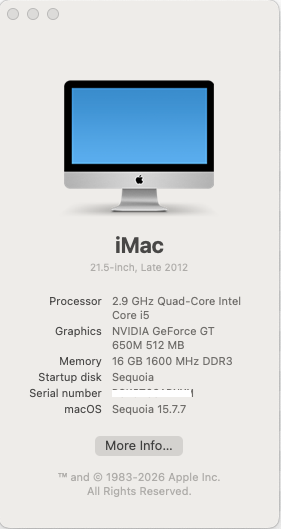
Sequoia 15.7.7, as shown in screen shots.
Safari 26.5 and Safari Technology Preview 26.0 both crash when accessing specific websites. Attached error report was generated by BBC.com. The websites belong to legitimate commercial undertakings and work without problems on all the other installations in the Signature.
Safari 26.5 and Safari Technology Preview 26.0 both crash when accessing specific websites. Attached error report was generated by BBC.com. The websites belong to legitimate commercial undertakings and work without problems on all the other installations in the Signature.
Attachments

MacRumors3590
macrumors 6502
OCLP 2.4.1 / SEQUOIA 15.7.7 runs greatMacRumors3590
You have the same setup I have. May I ask, which version of OCLP did you use?, THANKS
basslik
macrumors 6502a
15.7.7 running solid on my 5,1 with the latest Pro Tools 2026.4, also is a little snappier.😉

rehkram
macrumors 65816
15.7.8 just showed up as available for OTA update. That is all I know at this point. I've downloaded it for install on a supported MM 8,1 2018
later: build # is 24G806. So far so good on the supported MM 8,1. Planning to update the unsupported rMBP 10,1 2012 later tonight unless I detect any problems in the meantime.
next day: Installed fine on rMBP 10,1 2012
later: build # is 24G806. So far so good on the supported MM 8,1. Planning to update the unsupported rMBP 10,1 2012 later tonight unless I detect any problems in the meantime.
next day: Installed fine on rMBP 10,1 2012
Last edited:
PropClear
macrumors regular
Also installing on several machines seems good so far using OCLP2.5.0n...
No problems on all 15.7.7 machines (MacPro's & MBP's & MacMini's) so far with 15.7.8 (24G806) - all fine!
OTA without problems.
No problems on all 15.7.7 machines (MacPro's & MBP's & MacMini's) so far with 15.7.8 (24G806) - all fine!
OTA without problems.
Last edited:

K two
macrumors 68020
macOS 15.7.8RC installed atop 15.7.7 OTA, OCLP 2.5.0n runs as expected. Build #24G806. 👏
👏
 👍
👍
👏👍
TimothyR734
macrumors 68030
Successfully installed after a few road bumps along the way using OCLP 2.4.1

basslik
macrumors 6502a
My 5,1 running smooth with 15.7.7, although I did not update safari, and what's the verdict on Safari 26.5 with OCLP?
MacMorrison
macrumors 6502
I just updated Safari 26.5 - it seemed to work without issues.
basslik
macrumors 6502a
you on a 5,1 ?I just updated Safari 26.5 - it seemed to work without issues.
Thanks