Become a MacRumors Supporter for $50/year with no ads, ability to filter front page stories, and private forums.

jsgrrchg

macrumors newbie
Original poster
Captura de pantalla 2026-02-04 a las 18.05.47.png


I’ve always been a fan of apps that play ambient sound mixes. So far, the best one I’ve found is Moodist because of its huge sound library (https://moodist.mvze.net/). However, it’s a web app, and I personally prefer native apps. There are several alternatives out there, some of them under subscription, others with bloated interfaces or small libraries of sound.

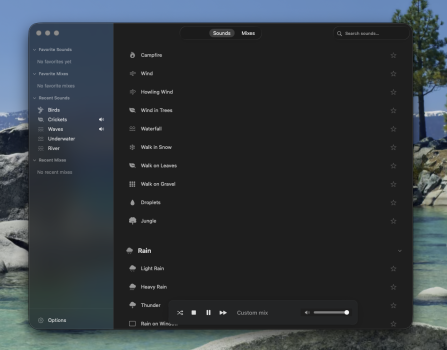
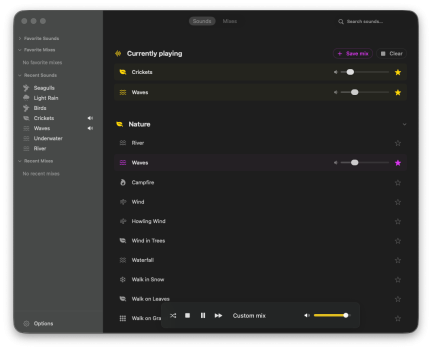
Since Moodist is open source, I cloned the repositories and tried porting it to Swift with the help of Cursor. At first it was just for personal use and learning how to code, but the result turned out to be way better than expected. The main difference from the Moodist web version is that this macOS version includes a collection of mixes and behaves more like a traditional audio player. The mixes were generated with AI, so there’s quite a bit of redundancy , I'll be making some cleaning in the Mixes section after I'm done with the core functionality of the app and bug fixing. Here's how it looks like:

I’m not a developer, and I don’t work in the tech sector. That said, I’m fairly tech-savvy, and I approached this project by first studying the best ways to implement things. While some of it was definitely vibe-coded, the code itself wasn’t neglected, it was cleaned up and refactored several times, with today's update being a big one only focused on optimizing.

I’m sure the code isn’t perfect, but the project is fast, functional, and open to improvement on GitHub. More than anything, it’s been a genuinely fun learning process, and I still find it impressive that I was able to build this with AI without knowing a single line of code beforehand, now I know a lot more how code works in general, and I appreciate even more the work you developers do, writing code is hard AF.

Here's the repository from Github: https://github.com/jsgrrchg/MoodistMac

If you’re a developer and would like to collaborate, please get in touch — I’d love to have professional eyes reviewing the code and helping improve it. My goal is simply to make the best open-source ambient noise app for macOS and eventually release it free on the App Store.

If you’re not a developer, please give it a try and let me know what you think. I’ll be keeping an eye out for bug reports and feedback.
 
I've just downloaded and immediately found a bug. I can't drag the volume slider in the overlay at the bottom. IT grabs and drags the whole window.

Looks interesting so I'll have a play and let you know what I think.

Here's how it looks in Tahoe. The sidebar is a HUGE improvement on the actual Tahoe sidebar. Whether intentional or not keep it! lol. Note the extra button space at the top though looks wrong.

M4 MacMini Tahoe 26.2
 

Attachments

  • Screenshot 2026-02-05 at 11.09.45.png
    Screenshot 2026-02-05 at 11.09.45.png
    596.2 KB · Views: 105
Last edited by a moderator:
Thank u so much for trying it! with those bugs you mentioned, I have a few more that I need to address like the auto dark/light mode. I'll be pushing a new beta within today and tomorrow, this fixes are quick to make, the app checks for updates by itself at start or you can do it manually in the global menus or options window.

About the sidebar, you mean this? Yeah I'm not doing the native Tahoe sidebar, it looks like ****, it was an intentional choice, and for Tahoe also I'll be fixing the Sounds&Mixes at the tittle bar, on Sequoia it looks fine.
Thanks again for your feedback!
 

Attachments

  • 1770302199981.png
    1770302199981.png
    15.7 KB · Views: 51
  • Like
Reactions: TumbleDryer
I've just downloaded and immediately found a bug. I can't drag the volume slider in the overlay at the bottom. IT grabs and drags the whole window.

Looks interesting so I'll have a play and let you know what I think.

Here's how it looks in Tahoe. The sidebar is a HUGE improvement on the actual Tahoe sidebar. Whether intentional or not keep it! lol. Note the extra button space at the top though looks wrong.

M4 MacMini Tahoe 26.2
My friend, I published a beta 4, there are no major bugs at the moment, please let me know what you think you can update directly in the app (the update windows was improved, in Beta 3 looks terrible).
 
I don't see a difference between the default Text size Medium and Extra large. I restarted the app after changing the setting. MoodistMac Version 1.0 Beta 4 (4) on macOS 15.7.3 Dark Mode, transparency disabled in macOS and the app.
 
I don't see a difference between the default Text size Medium and Extra large. I restarted the app after changing the setting. MoodistMac Version 1.0 Beta 4 (4) on macOS 15.7.3 Dark Mode, transparency disabled in macOS and the app.
That menu I haven't implemented it yet because it breaks the UI, Im still trying to figure it out. I'll remove the option in the next update to avoid confusion. Can I ask you what you think about the app apart from this bug? Thank you for testing.
 
Changing accent colours gives some funky results. For instance I changed from auto to Purple and things changed to Purple then I clicked yellow and got this. Some items retain the previous colour. Setting back to auto fixes it but if you then select another colour plus one after that I tend to get a mix of the two.

Beta 4
 

Attachments

  • Screenshot 2026-02-06 at 11.37.06.png
    Screenshot 2026-02-06 at 11.37.06.png
    150.1 KB · Views: 63
Changing accent colours gives some funky results. For instance I changed from auto to Purple and things changed to Purple then I clicked yellow and got this. Some items retain the previous colour. Setting back to auto fixes it but if you then select another colour plus one after that I tend to get a mix of the two.

Beta 4
Thank you, I already fixed it in the unreleased Beta 5. I’ll push it today or tomorrow. I’m also adding around 40 more sounds to the app.
Can I ask you guys how large (in MB) you’d be comfortable with the app being? I’m keeping the files as small as possible.
 

Thank you, it’s still far from that. Right now it’s around 140 MB. Beta 4 is only 116 MB, and I’m compressing everything using a standard bitrate and sample rate with MP3 to optimize space.

The new sounds are INSANE. That’s one of the great benefits of open source, I can use so many libraries. If you guys want a specific sound, please let me know!

The app itself uses very little CPU, and memory stays stable at around 250–300 MB, with occasional spikes up to 400 MB due to audio buffers when changing mixes or sounds fast. I could reduce resource usage further by refactoring how buffers are handled in the backend, but that would come with a performance cost (lag when switching mixes for example).

What do you think about the current system resource usage? If you can, please try testing it with Activity Monitor. At the moment, the app has no memory leaks and can stay open indefinitely.

Also, if you guys can stress-test the app by adding as many sounds as possible, let me know how it behaves and the breaking point, please also let me know what chip do you have. I’m considering limiting how many sounds can be played at the same time.
 
My suggestion would be to make the app small and the sounds downloadable. I have no interest in hearing dogs barking
🙂

This was my original idea, to build something like Spotify but for ambient sound. However, it would require a cloud service, and at this point I don’t want to pay for something I’m giving away for free. If the app becomes more popular and people donate to help cover a cloud service, I’d happily develop this feature but it would take time, I'm just starting to learn coding. Right now, I’m really having trouble reaching more people. If you guys can help by sharing it, I’d be forever grateful. Here are the download stats, if you want to have a laugh.

1770407460512.png


Your comment also made me think about giving users the option to remove existing sounds via a context menu or block them from being used by the random custom mix function.
 
I'm not a developer, but you can ask for help in the dedicated section https://forums.macrumors.com/forums/apple-programming.135/
Thank u! I'll do that after the first stable 1.0, I'm going to add to the itinerary implementing this feature in the 2.0. This would need a BIG rewrite of the app, and I don't have the confidence or the knowledge yet on how to do it, but I will, is a too good of an idea to not do it.
 
I’ve just released a new update. A lot of changes were made, and I’ll be keeping an eye out for your feedback, issues, errors, bugs, and suggestions. The mixes and their configurations were edited manually (it took me almost the entire afternoon, lol), and they’re now consistent. I’ve also found a way to make the app even more memory efficient. It now stays around 200 to 250 MB, with no spikes this time. Thank you so much for helping me test the app.


Enjoy the new sounds and mixes!!
 
  • Like
Reactions: TumbleDryer
Im not a developer either and not really knowing much about GitHub and how it works etc it took me years to find out that a packaged application is often hidden behind the quite inconspicuous 'releases' label. For years I've been trying to compile apps myself as that is the most obvious form of downloading from GitHub. If it was made clearer a precompiled app is available you might get more downloads from people interested in checking it out but who aren't exactly coder types. That's not your fault that's just how GitHub presents itself - the 'releases' label doesn't even look like a button just a data point. To a non coder type like myself when presented with the innards of the app front and centre with no obvious means of downloading a precompiled app its quite a turn off when you want to quickly download an interesting app to try it out. Now I know where to look it's fine but maybe put in your GitHub description about how you can download it from the 'releases' section on the right. That way you might get more downloads.

Also I said 2gb as a maximum knowing both it was still relatively small but if you add more sounds (which you now have) it could quite easily expand in size. So 2gb was my 'limit' for a small lightweight app if that makes sense. 🙂

Bogdanw idea of allowing downloading of individual sounds is great so definitely look into that then you probably wont have to worry about the app size, its on the user then.

FYI Im loving the 'waves' and 'crickets' mix. Gives me quiet tropical beach vibes while I work.
 
Last edited by a moderator:
Im not a developer either and not really knowing much about GitHub and how it works etc it took me years to find out that a packaged application is often hidden behind the quite inconspicuous 'releases' label. For years I've been trying to compile apps myself as that is the most obvious form of downloading from GitHub. If it was made clearer a precompiled app is available you might get more downloads from people interested in checking it out but who aren't exactly coder types. That's not your fault that's just how GitHub presents itself - the 'releases' label doesn't even look like a button just a data point. To a non coder type like myself when presented with the innards of the app front and centre with no obvious means of downloading a precompiled app its quite a turn off. Now I know where to look it's fine but maybe put in your GitHub description about how you can download it from the 'releases' section on the right. That way you might get more downloads.

Also I said 2gb as a maximum knowing both it was still relatively small but if you add more sounds (which you now have) it could quite easily expand in size. So 2gb was my 'limit' for a small lightweight app if that makes sense. 🙂

Bogdanw idea of allowing downloading of individual sounds is great so definitely look into that then you probably wont have to worry about the app size, its on the user then.

FYI Im loving the 'waves' and 'crickets' mix. Gives me quiet tropical beach vibes while I work.


I’ll add a “Download the latest binary” section to the README, probably with a simple HTML button. For this reason I implemented auto updates with sparkle very early (Beta 2), so people don't need to go manually to Github.

This is one of the things I love most about GitHub. I started this project simply to learn how to code, and that was only possible because I could look behind other people’s work. Being able to read real projects, see how things are structured, and understand how they actually work felt like lifting a veil. It was an eye opening experience.

If you liked those, you will love the rainforest sound, is from the BBC sound library.

Also, can I ask you about bugs? did you find any? I couldn't. I think its ready for stable.
 
Last edited:
I’ll add a “Download the latest binary” section to the README, probably with a simple HTML button. For this reason I implemented auto updates with sparkle very early (Beta 2), so people don't need to go manually to Github.

This is one of the things I love most about GitHub. I started this project simply to learn how to code, and that was only possible because I could look behind other people’s work. Being able to read real projects, see how things are structured, and understand how they actually work felt like lifting a veil. It was an eye opening experience.

If you liked those, you will love the rainforest sound, is from the BBC sound library.

Also, can I ask you about bugs? did you find any? I couldn't. I think its ready for stable.
I haven't found any since Beta 5.
 
Would you guys be interested in a liquid glass implementation of the floating player for Tahoe users? Or do you prefer it simple like it is now?
 
not me : )
i like it simple as it's now

Thank you for the app. Will try it this week.

Thank you. Let me know what you think afterward. I also support the idea of leaving it as it is; I do not like all this liquid glass nonsense.
 
Hey everyone, Moodist has reached a stable release! I fixed the strange behavior when resizing the sidebar. Now the app is fully consistent in both behavior and appearance. Please let me know what you think. Thank you so much for helping me test the app, you’re the best.

In the next updates, I’ll be focusing on implementing a language manager and adding a Spanish translation (it’s my native language). Please let me know which languages you speak so I can prioritize them.

Have a lovely week.

 
Downloaded 1.0. Dragging the sidebar at the top of the window (possibly top 100px or so) it drags the whole window. Grab from below that then the side bar will resize. It seems a bit janky though, not smooth sliding. There is a bug in Tahoe where the grab icon fails (a lot) probably not related to that but something to bear in mind.

Oh and can we get a palm tree icon for the saved mixes please. I like my tropical paradise mixes. 🙂
 
Register on MacRumors! This sidebar will go away, and you'll see fewer ads.