@Scott Baret I went through this exact same exercise before upgrading my 2019 Intel MBP (16" i9 8-core 64GB 5500M 8GB VRAM). The reason I remained on Intel for so long was the need to run x86 VMs. I finally went with a new MBP once work no longer required x86, but some lessons along the way are applicable to the Neo you are considering.
Net-net: The Neo will be fine for your use case, but keep in mind a few caveats about Parallels/VMs.
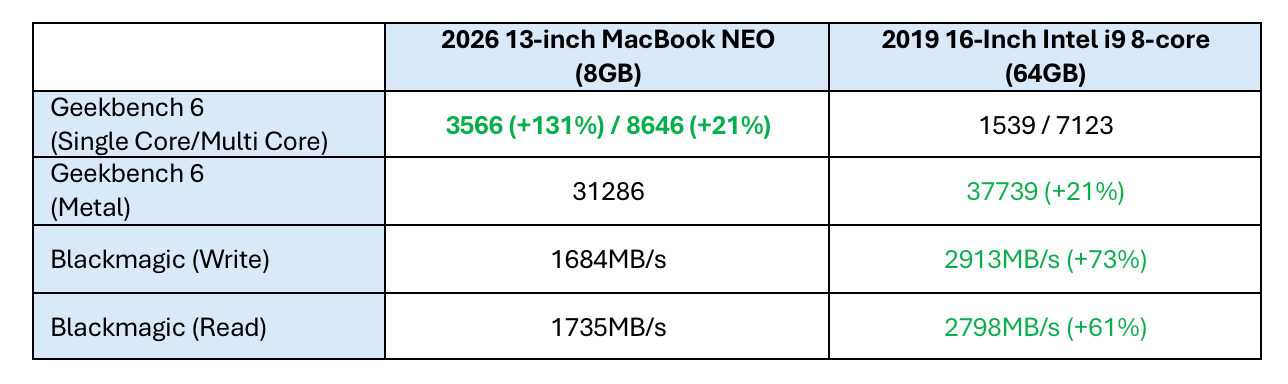
In general, the MacBook Neo will outperform a fully loaded 2019 Intel MBP for daily tasks. For GPU-intensive tasks, depending on the GPU, the Intel MBP might have a slight edge (Neo will wipe the floor with your MBP if you only have Intel Integrated Graphics). But for sustained workloads, the Neo advantage disappears quickly when it has to throttle and will not be able to keep up with the Intel MBP (but then again, the Neo won’t sound like a hair dryer either). Your use case is quite light and you didn't mention any sustained workloads like compiling or video rendering so you will be fine with the Neo.
One thing to note, the Neo SSD will be 50%-70% slower than a 2019 Intel MBP SSD. This last component will affect Parallels as much or more than the 8GB of memory. This is because Parallels caches a lot of files to make a VM responsive. Fewer files will be cached due to limited memory and the slower SSD will simply take longer to serve up the files that can’t be cached. Worse case scenario is when using Parallels and another program or two making macOS initiate SSD swap. Then responsiveness will start to slow. Again, it doesn't sound like a scenario you will run into that often (just don't run Teams and Parallels at the same time lol).
1) Microsoft Office 2019. It will work fine and continue to work into the future. The latest installer does not require Rosetta. As folks may know, installing a perpetual license of Microsoft Office is tied to your Microsoft account. To install it on a different computer, you’ll have to go through a short “license transfer” dialogue with an automated support system. As long as you haven’t been trying to install it on a bunch of different computers in a short amount of time, it should automatically activate on the new MacBook Neo. If for some reason, Microsoft thinks you’re trying to get away with installing a single license on multiple computers, you’ll have to call a support number and go through some Q&A to promise not to install it on more than one computer. NOTE: Microsoft only allows the installer to run on the three most current macOS. However, each installer will install on the three macOS versions that were current AT THE TIME THE INSTALLER WAS RELEASED. For example, I have an older installer for Office 2019 that still installs on Monterey even though newer 2019 updates require Sonoma, Sequoia, and Tahoe. You can download older installers but they don’t accept newer feature or security updates (Auto Update will try to download newer updates but then tell you that you need to upgrade. You can delete MAU so that it doesn’t try to download updates, but I don’t recommend running older unsecure software unless it’s in a virtual machine). You shouldn't need to ever do this. Just download the most recent Office 2019 installer and use your Microsoft account to activate. Current/previous installers for Office 2016-2024 are here:
https://learn.microsoft.com/en-us/officeupdates/update-history-office-for-mac
2) Office, Teams, Email, FaceTime, Safari will all be fine with the Neo.
3) 8GB will not be a problem UNLESS you plan on running your VM along side all those other programs at the same time. You will want to close out Parallels if you have a Teams call lined up.
😉 But in general, you should be fine.
4) Parallels. Short answer: You will need to buy a newer version of Office for Windows and run it on ARM Win11 in Parallels 18 or higher. Parallels has a streamlined Win11 installation process and you can use any Windows 11 activation key (I used a retail Windows 11 key from the Microsoft Store to activate).
The main reason you will need a new version of Office is that 64-bit Win11 ARM does not support 16-bit code emulation and Office 2000 is 16-bit. Microsoft does not include NTVDM/wow32.dll in Win11 like it does in Win10 (and there is no ARM Win10 and you can't just copy wow32.dll into Win11 sadly), so 16-bit apps, and 32-bit apps with 16-bit installers, will just throw an error “Missing wow32.dll” if you try to run in ARM Windows 11.
I use Office apps on ARM Win11 in Parallels 26 on my M5 Pro and it runs better than Win11 on the work-issued Dell Latitude. I used Parallels 18 initially on Tahoe and it runs ARM Win11 fine on my M5 Pro. So if you have at least Parallels 18, you might not need to update Parallels (you need at least Parallels 17 to run Win11). Your Parallels activation key should work for 2 or 3 installs before reaching the limit (Parallels doesn’t say exactly how many times you can reuse an activation key, but I’ve successfully used a key on an Intel MBP, an M5, and an M5 Pro before being told I’d reached the limit and need to buy a new key - the key still works on those three machines, but won't work on any other machine). Keep in mind I have an M5 Pro with 64GB and a much faster SSD than the Neo, so of course performance is blazing fast. However, given what you need to do, I think performance will be more than satisfactory on the Neo for a single Win11 VM.
As others have noted, you can’t run x86/x64 OSes (WinXP/Vista/7/8/10/11) on Apple Silicon. Yes, there are some ways to EMULATE Windows 7/10/11 but they are dog slow, some ways use really technical workarounds for the average user, and I consider them more a proof-of-concept than anything else. There are no PRACTICAL ways for an average user to satisfactorily run x86/x64 on Apple Silicon or the Neo. Period. Exception: DOSBox-X is great for old school DOS and Win98 games.
Final note: You can also keep your Intel MBP around for the times you need x86 apps. I kept my 2019 15" MBP mainly because it was the last Intel model capable of running Mojave. So I have it set up with Mojave for a couple 32-bit Mac games and apps, and I have Parallels 18 on it to run Windows XP and Windows 7 VMs that support some older games.
Bottom line: If you can live with ARM Win11 and a newer version of Office, get the Neo, you won't be disappointed.