Become a MacRumors Supporter for $50/year with no ads, ability to filter front page stories, and private forums.
A quick question, InterWeb allowed me to change the "Theme" to a "Dark Theme", but I cannot seem to be able to access the hundreds of Themes in PowerFox like I could from InterWeb in the "Add-ons" "Themes" section. Is there a way to access the big selection of Themes available in InterWeb in PowerFox?

Thanks! Fun browser so far!!

:)
 
if you're running Lion you can also use Pale Moon and Firefox Dynasty, both work fine in my experience
I tried "Pale Moon" today and every site I tried to open it said was not secure (maybe I have to change something again in the about:config?) and the "Firefox Dynasty" I went to download said "Mac OS Mountain Lion" as a minimum. Is there a Lion version somewhere?

:)
 
there a button somewhere to go to the config options for idiots like me???)
These settings are highly technical and should not be modified in general as they can break the browser, and they shouldn’t need to be modified except in exceptional scenarios
 
I tried "Pale Moon" today and every site I tried to open it said was not secure (maybe I have to change something again in the about:config?) and the "Firefox Dynasty" I went to download said "Mac OS Mountain Lion" as a minimum. Is there a Lion version somewhere?

:)
silly question but is your date and time set correctly and are you on the latest security updates of lion? it sounds like either your clock is not right or you're missing certificates or smth
 
  • Like
Reactions: jjrtiger
silly question but is your date and time set correctly and are you on the latest security updates of lion? it sounds like either your clock is not right or you're missing certificates or smth
I fixed it, I had to apply the same about:config settings to Pale Moon to get it to work properly.

😃
 
View attachment 2593020
Hello, PowerFox

Happy new year!

I'm happy to introduce a new web browser for Mac OS X 10.6 Snow Leopard. It is vastly compatible, open-source, and includes everything InterWeb 55 has and much more.

View attachment 2593021

To refresh your memory, this includes:
- Excellent support for the modern web - JavaScript, CSS, and HTML standards - even better than before.
- WebGL
- Color emoji
- Support for modern video codecs - in particular, they are much more lightweight than before

For the first time, PowerFox also supports:
- Language Packs (Over 90 languages are available)
- Full OpenGL browser acceleration
- and much more!

From a technical standpoint, PowerFox is based on much newer code than InterWeb 55 and is much more maintainable for future development.

You can download a copy from http://powerfox.jazzzny.me/ - let me know how it goes!

Enjoy another year of web browsing on your Snow Leopard Mac, and thank you so much for all the support!

I also have future plans, which are already well underway, including a modern, lightweight email client based on Thunderbird with full Oauth2 support for services such as Gmail, and a PowerPC version of PowerFox for 10.5, based on the same codebase, meaning it will have the same level of modern web compatibility. Stay tuned!

- Jazzzny

(if you're wondering about the website, its to pay homage to TFF's old "spoof" website.)

What would it take for you to consider targeting 10.4 PowerPC for a future PowerFox release?
 
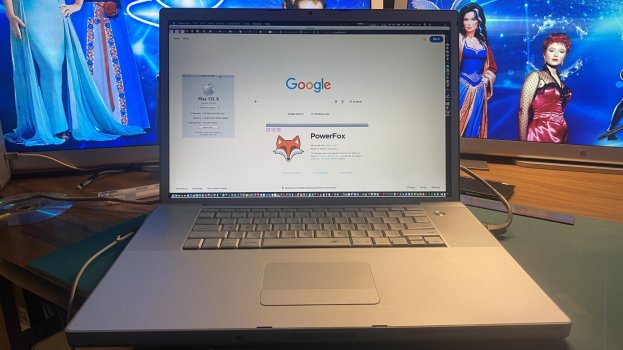
I am going to present this as 'proof of concept'. Right now, I'm having other issues with this Mac which has not been used for quite some time.

2026-01-06 13.18.09.jpg

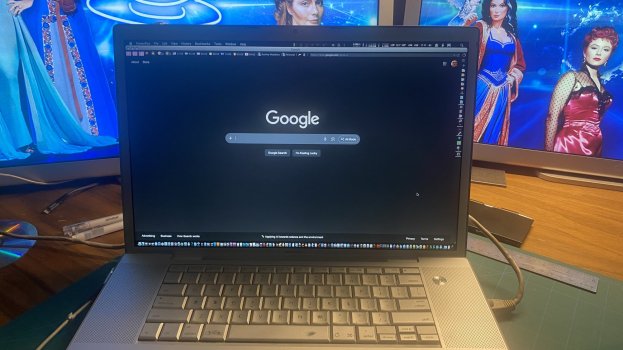
Since PowerFox seems to be some fork of Mozilla, I overwrote the profile in Application Support with my profile from TenFourFox Intel. This profile was copied over to my Intel 17" from my old Quad G5. It's got all my extensions, settings, etc from my PowerBook G4 era. And it still works.

Note that the graphical glitches in the top left are from a weather extension. It's a known bug that comes over from my PowerPC profile.

Now, if I can just get the Intel Mac to not freeze up because of whatever issues its got now, I might be able to work this.
 
I am going to present this as 'proof of concept'. Right now, I'm having other issues with this Mac which has not been used for quite some time.

View attachment 2593693

Since PowerFox seems to be some fork of Mozilla, I overwrote the profile in Application Support with my profile from TenFourFox Intel. This profile was copied over to my Intel 17" from my old Quad G5. It's got all my extensions, settings, etc from my PowerBook G4 era. And it still works.

Note that the graphical glitches in the top left are from a weather extension. It's a known bug that comes over from my PowerPC profile.

Now, if I can just get the Intel Mac to not freeze up because of whatever issues its got now, I might be able to work this.
Daaammmn….that’s a lot in your dock…. o_O
 
Daaammmn….that’s a lot in your dock…. o_O
Yeah, lol. :)

It comes from a time period where I'd put just about anything in my dock. I download a lot of stuff to try out and at that time if an app made the cut, it went in the dock.

Then Quicksilver came along and made launching apps much easier than hunting through the dock for the app I wanted. So, I stopped putting stuff in my dock. By that time, this Mac was no longer being used as a primary Mac so all the stuff in the dock stayed.

Now, I leave it in there because I need to remind myself whenever using this Mac about the apps I have installed. Some of those apps are old. Like Bowtie with iTunes - neither of which I use anymore, but I'd forget Bowtie was installed if I removed it from the dock.

Now, I'm so used to Quicksilver that on my primary Macs I have the dock disabled entirely. I hate it popping up whenever using an app and my curser is down at the bottom. And I don't want app windows to account for a hidden dock when I maximize them either.
 
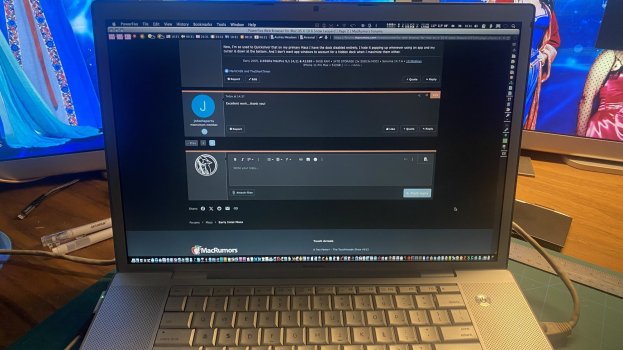
This post created on my 2006 17" MacBook Pro running Snow Leopard and PowerFox.

Wow. What's old is new again! I haven't used this profile setup with extensions in years!

2026-01-06 16.31.06.jpg

PS. For anyone who cares to know, the usual rich text formatting that is a problem with older browsers on the MR forums, PowerFox powered right through it! I saw zero lag to the point I didn't realize that the rich text editing was even on!
 
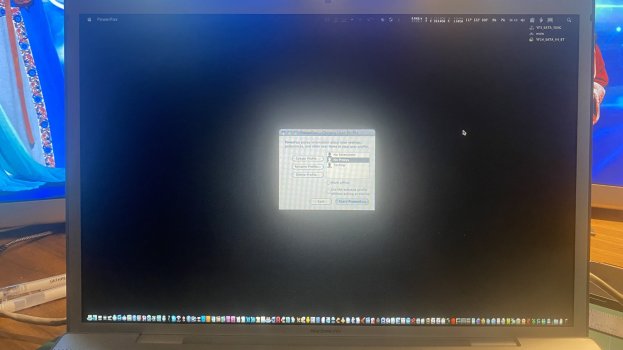
Powering up PowerFox. This is a profile manager deal I created years ago. It's set to let me choose my profile on startup. Glad to have it back!

2026-01-06 16.43.57.jpg

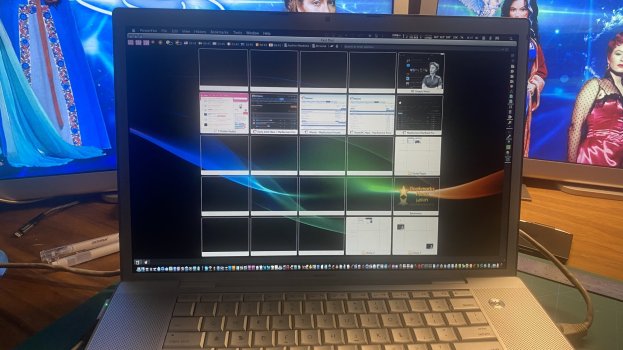
And this is my website shortcut extension, which I used for YEARS under Firefox and TenFour Fox. You can set your own keyboard shortcuts to launch a site. I'm not usually in here, but I had to get rid of a bunch of old sites. In any case, it allows me to use CMD+1, CMD+2, etc as keyboard shortcuts to get to websites - rather than having bookmarks displayed. You can also have folders of OTHER sites which you can also assign shortcuts.

You may also note that I have tabs on bottom and they are reduced to favicons. Those are other addons that prove they are working.

2026-01-06 16.45.29.jpg

Finally, as far as I can tell PowerFox is either close to or just as fast as Vivaldi on my MacPro.

PS. If anyone is interested - this all means that all the config tweaks and everything that was done in the PowerPC subforum for TenFourFox applies here. I have to assume too that the TenFourFoxPEP modes (sticky on the PowerPC subforum) would also apply.

This is awesome! Thanks OP!!!!!!
 
What would it take for you to consider targeting 10.4 PowerPC for a future PowerFox release?
I'm not sure if a 10.4 build would even be possible without a huge amount of effort - 10.5 is already incredibly limited in terms of API support and requires a lot of legacy code to be readded to the codebase, yet it is still leaps ahead of 10.4. Even simple things we take for granted in Mac development (such as CoreText) are completely unusable on 10.4.
 
I'm glad that you're finding the browser to be useful :)
Yes, my issue at the moment is not so much websites but figuring out which extensions are going to need to be dumped or updated (if that is even possible anymore). Near as I can tell, last updates for my extensions were some time in early 2016.

If I can get all this worked out, it would seem that this Mac goes back in my backpack and goes back to work with me. Right now I cannot login to Flipboard or Reddit, but that isn't the browser's fault. The interface on uMatrix isn't working right now so I can't set it to allow third party stuff to load.
 
Very cool project! So the PowerPC build is planned but no release as of yet? What are some of the biggest challenges you’re needing to overcome for a working PPC port?
 
What are some of the biggest challenges you’re needing to overcome for a working PPC port?
The majority of the hard work to get a PPC build going has already been done by another developer, dbsoft.
However, there still remain several bugs - some of which I was able to fix in my own code tree, which I wish to get contributed to dbsoft's branch.
However, the remaining bugs cause major usability problems. I was able to fix the bugs that also impact 10.6, as its incredibly easy for me to develop on my 2010 12-core Mac Pro. However, for the remaining 10.5 bugs, I am forced to do everything on my 2005 iBook G4, which is no screamer lol. It takes over 3 days to compile the PPC browser on the iBook, while it takes about 20 minutes to do the Intel build on my Mac Pro.

So, really, in short, it's incredibly difficult for me to do proper development for PPC at the moment - I can do it, but it is awfully slow. I tried to acquire some newer PPC hardware (namely, a DC or Quad), but it seems like nobody is willing to sell theirs on local marketplaces anymore. I saw a single Quad a while back, but it was priced at around $350 CAD, which in my opinion is an outrageous amount.
 
Last edited:
  • Like
Reactions: MacFoxG4 and srp
The majority of the hard work to get a PPC build going has already been done by another developer, dbsoft.
However, there still remain several bugs - some of which I was able to fix in my own code tree, which I wish to get contributed to dbsoft's branch.
However, the remaining bugs cause major usability problems. I was able to fix the bugs that also impact 10.6, as its incredibly easy for me to develop on my 2010 12-core Mac Pro. However, for the remaining 10.5 bugs, I am forced to do everything on my 2005 iBook G4, which is no screamer lol. It takes over 3 days to compile the PPC browser on the iBook, while it takes about 20 minutes to do the Intel build on my Mac Pro.

So, really, in short, it's incredibly difficult for me to do proper development for PPC at the moment - I can do it, but it is awfully slow. I tried to acquire some newer PPC hardware (namely, a DC or Quad), but it seems like nobody is willing to sell theirs on local marketplaces anymore.

Would love to pull your branch and take a look at the code. I have a Quad so I can probably iterate a bit faster than your iBook G4 :p

Is it based on a clean ESR release or is PowerFox in itself a fork of Interweb/TFF/similar? For JavaScript, is it a newer version of Spidermonkey or an improved version of the TFF JIT (or something else?)

What are some of the major usability issues you’re still working to resolve?

Send me a Git link and I can try to pull everything down later tonight.
 
This post created on my 2006 17" MacBook Pro running Snow Leopard and PowerFox.

Wow. What's old is new again! I haven't used this profile setup with extensions in years!

View attachment 2593729

PS. For anyone who cares to know, the usual rich text formatting that is a problem with older browsers on the MR forums, PowerFox powered right through it! I saw zero lag to the point I didn't realize that the rich text editing was even on!
Man, I used to have one of those. I miss that machine.
 
The majority of the hard work to get a PPC build going has already been done by another developer, dbsoft.
However, there still remain several bugs - some of which I was able to fix in my own code tree, which I wish to get contributed to dbsoft's branch.
However, the remaining bugs cause major usability problems. I was able to fix the bugs that also impact 10.6, as its incredibly easy for me to develop on my 2010 12-core Mac Pro. However, for the remaining 10.5 bugs, I am forced to do everything on my 2005 iBook G4, which is no screamer lol. It takes over 3 days to compile the PPC browser on the iBook, while it takes about 20 minutes to do the Intel build on my Mac Pro.

So, really, in short, it's incredibly difficult for me to do proper development for PPC at the moment - I can do it, but it is awfully slow. I tried to acquire some newer PPC hardware (namely, a DC or Quad), but it seems like nobody is willing to sell theirs on local marketplaces anymore. I saw a single Quad a while back, but it was priced at around $350 CAD, which in my opinion is an outrageous amount.
I've seen 2008 Mac Pros for ~$100-150, and since they can run 10.5.1, isn't it possible to compile for PPC and test through Rosetta on there?
 
Man, I used to have one of those. I miss that machine.
It's stuck between a rock and a hard place though. Snow Leopard is the maximum it can ever run as it's 32-bit. And 2GB ram is the max as well.

I still like it, but it's just a souped up version of my 17" DLSD.
 
Would love to pull your branch and take a look at the code. I have a Quad so I can probably iterate a bit faster than your iBook G4 :p
Sure, though my working tree right now is immensely messy, I've uploaded the tree to GitHub.

Is it based on a clean ESR release or is PowerFox in itself a fork of Interweb/TFF/similar? For JavaScript, is it a newer version of Spidermonkey or an improved version of the TFF JIT (or something else?)
PowerFox is based on the latest UXP code, which is a fork of Gecko. The JavaScript engine is a heavily improved version of Mozilla's engine from the fork point of UXP.

What are some of the major usability issues you’re still working to resolve?
Firstly, keyboard input into the browser is broken, however I believe that I have tracked down the cause and have a fix that I think may work. Secondly, the browser doesn't initialize properly when the OpenGL driver is too old. This isn't a problem on Intel as all GPUs, including the GMA 950, support an adequate OpenGL version. However, PPC Macs with GPUs such as the GeForce FX 5200 will run into the problem. Thirdly, the browser has a tendency to crash randomly, however I'm pretty sure that this is due to a combination of bad compiler and/or bad compiler flags that I am using for the PPC build.
 
isn't it possible to compile for PPC and test through Rosetta on there?
Unfortunately modern compilers really do push Rosetta 1 to its limits, I have had problems with the compiler and rest of the compilation toolchain just not working as expected.
 
Sure, though my working tree right now is immensely messy, I've uploaded the tree to GitHub.


PowerFox is based on the latest UXP code, which is a fork of Gecko. The JavaScript engine is a heavily improved version of Mozilla's engine from the fork point of UXP.


Firstly, keyboard input into the browser is broken, however I believe that I have tracked down the cause and have a fix that I think may work. Secondly, the browser doesn't initialize properly when the OpenGL driver is too old. This isn't a problem on Intel as all GPUs, including the GMA 950, support an adequate OpenGL version. However, PPC Macs with GPUs such as the GeForce FX 5200 will run into the problem. Thirdly, the browser has a tendency to crash randomly, however I'm pretty sure that this is due to a combination of bad compiler and/or bad compiler flags that I am using for the PPC build.
Found your GitHub and the `powerfox-browser` repo, but I don't see any additional branches (or source for that matter) - am I looking in the wrong place?
 
Register on MacRumors! This sidebar will go away, and you'll see fewer ads.