Become a MacRumors Supporter for $50/year with no ads, ability to filter front page stories, and private forums.
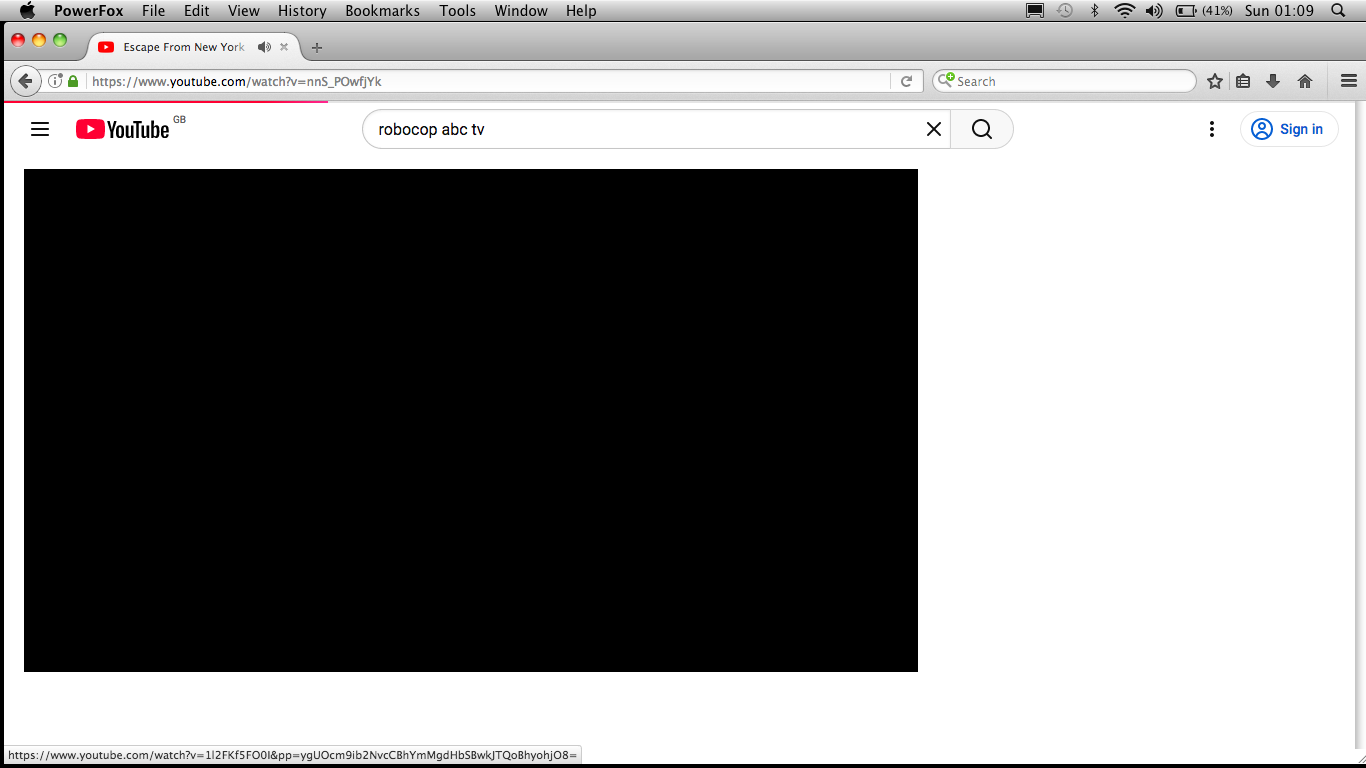
The manual method worked and I was able to export the desired data over to PowerFox. This is what I experienced on a 2010 C2D 2GB MBA:
Jqi2awq.png


The performance is noticeably slower and sluggish than that of Firefox running within Catalina on the same machine. Even with PF running solely, YouTube videos lag with the audio playing for several seconds before the video or anything else appears - as happened in the above screenshot. A YouTube page takes about 19 seconds to completely load.

uBlock Origin Legacy installed but then disappeared from the browser bar and didn't return even after it was reinstalled. These are early days, so I look forward to what are presumably teething troubles being ironed out in future updates. In the meantime, it's back to Catalina on this machine.

I'm happy to see that it's working for others.
I have yet to get back to my copied over (manual install) profile of TenFourFox Intel, which was copied over (years ago) from my TenFourFox profile on my Quad G5. So, I have not tested YouTube yet. And using YT wouldn't have been any sort of a thing back when actually using T4Fx on my Quad.

This is an intro to my following statement…you might try looking through My TenFourFox About Config Tweaks and my Addons for optimizing your configuration. This is in the PowerPC section, but as PowerFox is based off Mozilla this is all going to apply in some form or another. Also, the foxPEP sticky in the PowerPC section uses some of the stuff I stumbled over as well. It packages everything neatly and that can be used too.

My point is, and I'm making it here now, with PowerFox we seem to have suddenly been tossed into the TenFourFox/PowerPC era again, but for Intel and with an entirely different dev. That is the reason I am so excited - because I've been here before and this can be worked on the user side.

PS. I do believe that the foxPEP work was more geared towards YouTube. My work was specifically for my situation and it didn't include optimizing YT specifically, but YT may benefit from it.
 
Last edited:
  • Like
Reactions: Gloomy
The manual method worked and I was able to export the desired data over to PowerFox. This is what I experienced on a 2010 C2D 2GB MBA:

Jqi2awq.png


The performance is noticeably slower and sluggish than that of Firefox running within Catalina on the same machine. Even with PF running solely, YouTube videos lag with the audio playing for several seconds before the video or anything else appears - as happened in the above screenshot. A YouTube page takes about 19 seconds to completely load.

uBlock Origin Legacy installed but then disappeared from the browser bar and didn't return even after it was reinstalled. These are early days, so I look forward to what are presumably teething troubles being ironed out in future updates. In the meantime, it's back to Catalina on this machine.

I'm happy to see that it's working for others.
I thought I would try and replicate this on my MacBook Pro and yes, there was a small delay in the page loading (not the end of the world, about 5-6 seconds with only the audio playing/displaying the same black screen you encountered)

Once loaded, the video playback was flawless and synced up to the audio in 1080p (albeit 4:3 aspect ratio'd due to age of content) with 0 dropped frames! I tested both the Theater and Full Screen modes. This is on a 2011 MacBook Pro with a 4c/8t Core i7 which helps a lot with the CPU intensive aspect of YouTube, so perhaps unfair to compare these results to a Core 2 Duo. Just my tuppence!

Thanks again to @Jazzzny for the hard work on getting these browsers shipped. 😁
 

Attachments

  • Screen shot 2026-01-11 at 14.46.03.png
    Screen shot 2026-01-11 at 14.46.03.png
    887.7 KB · Views: 15
  • Like
Reactions: DouglasCarroll
It works on my old Snow Leopard machine, but it seems VERY laggy. Scrolling through a text-only page is very stuttery. Meanwhile InterWeb (which doesn't load as many sites) works very smoothly. I am using the 64-bit version on a C2D machine with 4 GB RAM. Would the 32-bit version potentially be better?
 
It works on my old Snow Leopard machine, but it seems VERY laggy. Scrolling through a text-only page is very stuttery. Meanwhile InterWeb (which doesn't load as many sites) works very smoothly. I am using the 64-bit version on a C2D machine with 4 GB RAM. Would the 32-bit version potentially be better?
Try turning off hardware acceleration in preferences -> advanced

Screen shot 2026-01-11 at 7.41.04 PM.png


Seems fine on my C2D w/2gb ram.
 
The manual method worked and I was able to export the desired data over to PowerFox. This is what I experienced on a 2010 C2D 2GB MBA:

Jqi2awq.png


The performance is noticeably slower and sluggish than that of Firefox running within Catalina on the same machine. Even with PF running solely, YouTube videos lag with the audio playing for several seconds before the video or anything else appears - as happened in the above screenshot. A YouTube page takes about 19 seconds to completely load.

uBlock Origin Legacy installed but then disappeared from the browser bar and didn't return even after it was reinstalled. These are early days, so I look forward to what are presumably teething troubles being ironed out in future updates. In the meantime, it's back to Catalina on this machine.

I'm happy to see that it's working for others.
Hi! I've found that using the vorapis v3 userscript/extension fixes most of these hiccups for me! Though do note that i'm using a 2009 imac with 12gb of ram.
 
Tiiiiny issue when having a different language on, i can't get to my addons page! :(
Captura de pantalla 2026-01-17 a las 14.28.02.png
Hello, I've fixed this with the Language Packs 26.1.0-hotfix release. You can download the new language pack from the PowerFox website or from https://github.com/Jazzzny/powerfox-languagepacks/releases/tag/26.1.0-hotfix

This goes for all Language Pack users - I found an issue with my script that created the language packs, so other pages might also be broken like this. Please update your language packs!

Enjoy :)
 
  • Like
Reactions: loby and Jazzzny
Hi! I'm having issues installing Greasemonkey (latest version i can install is 3.9 and i can't get StarTube on it with that version), specifically version 4.1 which is what i had in InterWeb 55. The installation box pops up with "(null) could not be installed because PowerFox doesn't support WebExtensions", is there any way i can fix this?
 
InterWeb55 is/was based off FF55 (which was the original "Mobius" rebase / fork point for Pale Moon 28 that was eventually scrapped in favor of UXP) that had experimental (partially working) WebExtension support. Current UXP and the browsers built from it do not support WebExtensions.
 
InterWeb55 is/was based off FF55 (which was the original "Mobius" rebase / fork point for Pale Moon 28 that was eventually scrapped in favor of UXP) that had experimental (partially working) WebExtension support. Current UXP and the browsers built from it do not support WebExtensions.
OHHHHH. i see. I'll stick to 3.9 for now, then.
 
@TheShortTimer Videos on YouTube take a few seconds to load on my 2010 MBA, but after that, playback is smooth and responsive. Then again, mine has double the RAM and is 200 MHz faster.

However, I still wouldn't use YouTube on this system or on faster systems either. I suggest inv.nadeko.net, s60tube.io.vn, or dirpy.com instead. Screw YouTube and their ads, JavaScript, algorithm, and buffering ads.

@Jazzzny Many thanks for PowerFox. You are great. :)
 
  • Like
Reactions: Gloomy
Have been trying, so far unsuccessfully, to install in High Sierra 10.13.6. To begin with, not seeing any addons in the addons pane, even though connected to internet.Can visit sites, albeit without any granular controls, which I would obtain from various addons, such as NoScript, Little Snitch, uBlock Origin - visiting uBO Legacy crashes the browser + other issues, such as no idea where the profile exists, if there even is one. Should I be able to run this in HS?
 
Thanks but

- not running InterWeb. Default browser in HS is 115.32esr. Need reliable browser when this esr version meets EOL, most likely end of March. Any way to import FF addons?

- Appears that most current extensions not supported, only legacy

- looked everywhere, but not seeing profile - would expect to see in /Library/Application Support - somewhere else?

-re addons: connected to internet, but no addons show in addons pane
Screen Shot 2026-01-26 at 11.27.31 AM.png
 
Last edited:
Look in Users/Your name/Library/Application Support/Basilisk which is where the profile will be ;)

@wicknix will know where you can get InterWeb addons that should work for you as I can't remember where mine came from.

Cheers :)

Hugh
 
Hi, little tidbit, but PowerFox tends to crash when trying to look at Instagram DMs! InterWeb doesn't crash, though, which i find odd. I don't mind switching between browsers, but it's definitely inconvenient, that's really all. PowerFox is SO much faster than InterWeb on basically everything else, definitely a head-scratcher
 
On another note, I've been able to bring up PowerFox for 10.5 Intel (thanks to the efforts of some upstream developers, namely dbsoft):

1769455986893.png


This will be a much needed improvement for 10.5 users, who have been stuck with the decade-old TenFourFox engine. I also intend to ship PowerPC builds after 10.5 Intel support is completed.
 
I would recommend using Firefox Dynasty on 10.8 and newer.
Have that and been running it since almost its inception. It's what I've been counting on when Firefox 115esr is finally EOL most likely end of March. However, looks like it's completely down the drain now. Been giving a 404 since last week, why I tried installing PF.
 
Register on MacRumors! This sidebar will go away, and you'll see fewer ads.