Become a MacRumors Supporter for $50/year with no ads, ability to filter front page stories, and private forums.

MacRumors

macrumors bot
Original poster


If your Mac's storage has been mysteriously shrinking recently and you use Google Chrome, you may have already identified the culprit. The browser has been downloading a 4GB AI model file onto computers without explicit user consent. Here's how to reclaim the space.
Chrome-Feature-22.jpg

The file in question is called "weights.bin," which powers Google's on-device Gemini Nano AI model – the engine behind Chrome features like scam detection, autofill suggestions, and the "Help Me Write" tool. Local models tend to be pretty big storage-wise, and this one is no different. The problem is that Google hasn't clearly signposted the fact that it's eating 4GB of your drive with training data.

The issue only recently came to light thanks to security researcher Alexander Hanff, who noticed that Chrome installs the model on any device meeting the minimum hardware requirements, only without prompting you whether you'd like it there in the first place.

How to Check if the File Is on Your Mac

The first thing to do is confirm that the model is actually taking up space on your machine. While there's no clear answer in Google's release notes, recent reports suggest that the file started appearing after updating to Chrome version 148.0.7778.97. Here's how you can find out if your computer was affected:
  1. Open Finder, then click Go in the menu bar.
  2. Hold the Option key and click Library in the dropdown menu.
  3. Open Application Support ➝ Google ➝ Chrome ➝ Default.
  4. Look for a folder named "OptGuideOnDeviceModel."
If the folder exists and contains a file called weights.bin, the model is installed. You can right-click the file and choose Get Info to confirm its size. If the folder isn't there, you can relax – Chrome hasn't downloaded the model to your Mac.

How to Remove the 4GB File for Good

Simply deleting weights.bin from Chrome's library folder isn't a long-term solution because Chrome will likely quietly re-download it the next time you launch the browser. To make the removal permanent, you need to disable Chrome's on-device AI features.
  1. Open Chrome.
  2. Click the three-dot menu in the top-right corner, then choose Settings.
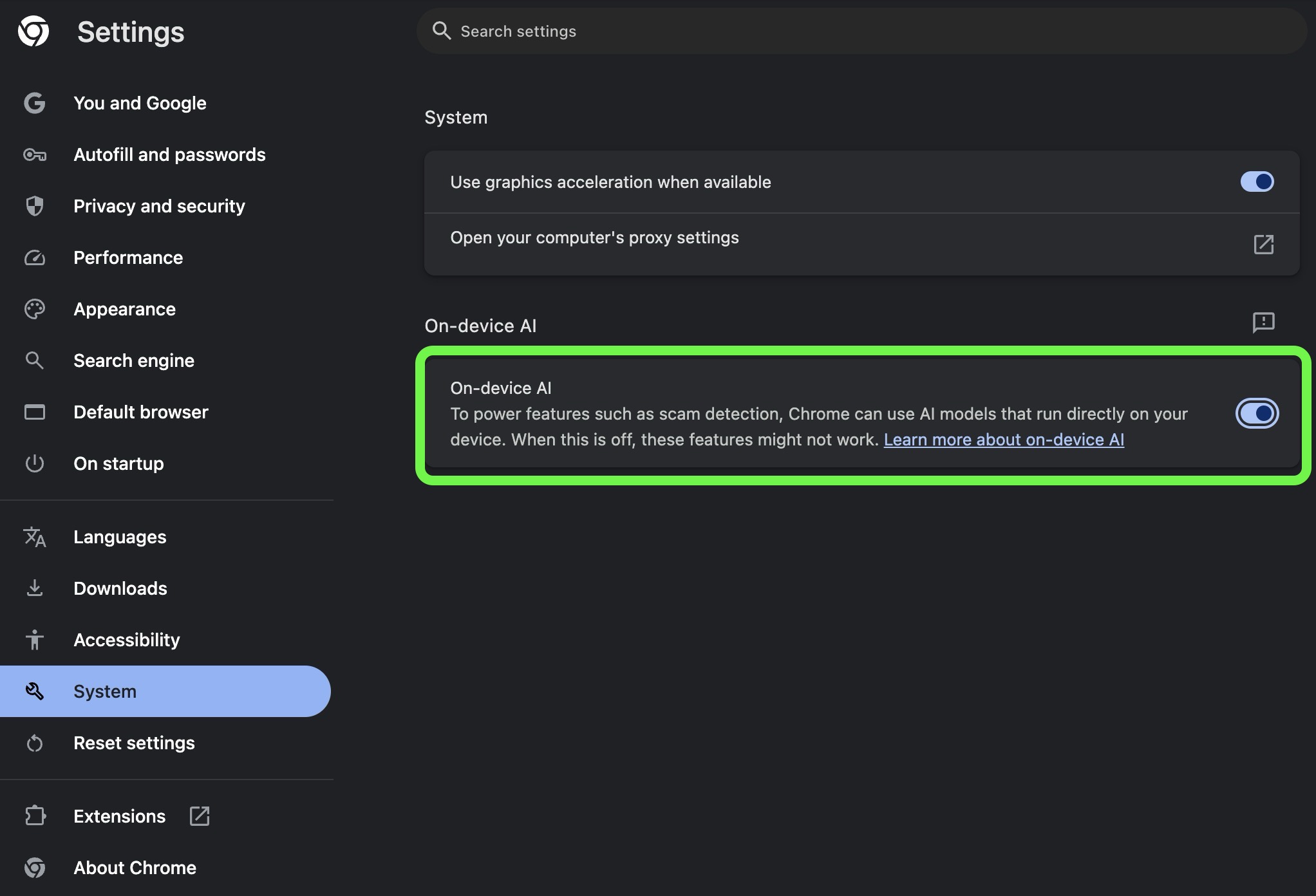
  3. In the left sidebar, click System.
  4. Toggle off On-device AI.
chrome-on-device-ai-4gb-file-toggle.jpg


Once this setting is switched off, Chrome will remove the model and should stop downloading it in future updates. Remember that deleting the model will also disable any Chrome features that rely on it.

If you don't see the toggle in Chrome's Settings, it likely hasn't propagated to your computer yet. In that case, type chrome://flags into Chrome's address bar and disable any AI-related flags you see, then delete the weights.bin file manually in Finder. If after that you're still concerned about the lack of consent, it might be worth switching to a different browser.

Article Link: Stop Chrome Browser From Downloading a Hidden 4GB AI File
 
  • Like
Reactions: sinbad21
The title should be:

"Stop using Chrome Browser"
It’s better than Safari. The Safari browser with the trackpad is a nuisance even in 26.5. Scrolling up or down can randomly stop, which never happens in Chrome or anywhere else in the OS. It seems if the trackpad detects even the slightest movement to the left/right, even if it’s imperceptible to you, it pauses the scrolling. Bloody pain.

My primary device is a PC, so I like using Chrome as it syncs everything even extensions.
 
It’s better than Safari. The Safari browser with the trackpad is a nuisance even in 26.5. Scrolling up or down can randomly stop, which never happens in Chrome or anywhere else in the OS. It seems if the trackpad detects even the slightest movement to the left/right, even if it’s imperceptible to you, it pauses the scrolling. Bloody pain.

Sorry to hear that.
I'm a Firefox user with, luckily, no such issues.

✌️
 
Fortunately, this hasn't happened to me yet. I don't even have that AI toggle. Though I don't use Chrome all that much - only if/when something doesn't work correctly on Safari or other browsers.
 
  • Like
Reactions: DocMultimedia
Just checked my secondary Mac and the file hasn't been landed to the local drive. There is no on-device AI section under Settings as well, could it be because I grabbed the Chrome enterprise?
 
I would like to see more about this scam detection. What exactly does it mean. How, since it's a local model, it can learn and protect you from future scams. I see the option on my Windows 11 Chrome installation.
 
Truly glad that I don’t need Chrome for any personal uses and haven’t used it in years on personal devices. The sad part is I was not surprised whatsoever at this finding.

Firefox is a wonderful alternative if you do not use Safari.
 
  • Love
Reactions: turbineseaplane
It is in the screenshot saying its used for scam detection.. How is that a bad thing for some avg user? We honestly need more of this, even from Apple on some level.. The levels of theft of peoples money, etc is really a serious issue.

Fun turn of events, the latest 26.5 removed OpenAI's Atlas browser saying it was a virus.. 🤣
 
  • Like
Reactions: robvalentine
It is in the screenshot saying its used for scam detection.. How is that a bad thing for some avg user? We honestly need more of this, even from Apple on some level.. The levels of theft of peoples money, etc is really a serious issue.

Fun turn of events, the latest 26.5 removed OpenAI's Atlas browser saying it was a virus.. 🤣

It's a good point ... and if anyone knows about snatching money from people, it's definitely Google.
 
could be worse, could be stuck with safari.

4gb is a lot, but then features take space, and scam detection is probably useful for non-techy people (and some users on here)
 
Register on MacRumors! This sidebar will go away, and you'll see fewer ads.