Become a MacRumors Supporter for $50/year with no ads, ability to filter front page stories, and private forums.
Google's business model makes its users its product. Local or not, that is not a company I want having an AI crawling around in my computer, and doing this stuff in the background as an opt-out and not an opt-in is just slimy.
 
  • Like
Reactions: p96 and Ad47uk
Here’s an easier way to stop Google from secretly downloading a 4 gb AI file. Download Brave browser. It’s Google Chrome without any of Google’s spyware and AI slop.

 
Here’s an easier way to stop Google from secretly downloading a 4 gb AI file. Download Brave browser.
So I get Brave's Leo and the flags to download Gemini too. That's twice the AI.

And on an iPhone, since Chrome is webkit, those with Chrome on iPhones DON’T get a 4 gig download.
Your iPhone already has local downloads of AI models. And it's bigger than 4 GB.
 
  • Like
Reactions: Ad47uk
Good ol’ we always have the option to opt out of it but “it is enabled by default without consent.”
Apple did that with their AI, or they re-enable it after it was disabled on updates. They seemed to have stopped doing that now, certainly on Macs, but I wonder if they will keep it disabled when they bring in the new sir app and stuff.

I use Zen as my browser, no AI rubbish in that, based on Friefox.

But it seems to be a thing of pushing stuff onto people. I remember a few years ago when MS tricked people into updating to Windows 10.
 
HAHAHA are people really using gogole chrome???? Just use safari...
When i first started using a Mac a couple of years ago or so, I thought I would give Safari a try. But it has issues with some sites and the feel of it is just so wrong. The tabs are in a strange place compared to other browsers. Saying that I now use a browser with vertical tabs.
I went back to Brave and Firefox, mainly firefox. Then someone told me about Zen. I have not used Chrome on a computer, or at least not on my computer for years.
 
If you don't like AI that's fine, but there is no reason to call other browsers an upgrade because they lack features.
Chrome also has some of the best tab management. I don't see any better browsers out there.
Zen in my opinion is better than Chrome or any other browser, for me anyway, because it is a simple browser with no bloat.
 
You do you, but just remember you are in the extreme minority.
Only because people go with the flow and have no idea what they are doing ghalf the time or what they are using. A lot of people used Chrome because it was downloaded with software on Windows machines. Edge is used a fair bit on Windows because it comes with Windows.
 
When i first started using a Mac a couple of years ago or so, I thought I would give Safari a try. But it has issues with some sites and the feel of it is just so wrong. The tabs are in a strange place compared to other browsers. Saying that I now use a browser with vertical tabs.
I went back to Brave and Firefox, mainly firefox. Then someone told me about Zen. I have not used Chrome on a computer, or at least not on my computer for years.
The only other one I tried and used a bit was sigmaos but now it’s discontinued I think (it was WebKit)


If your Mac's storage has been mysteriously shrinking recently and you use Google Chrome, you may have already identified the culprit. The browser has been downloading a 4GB AI model file onto computers without explicit user consent. Here's how to reclaim the space.

Chrome-Feature-22.jpg

The file in question is called "weights.bin," which powers Google's on-device Gemini Nano AI model – the engine behind Chrome features like scam detection, autofill suggestions, and the "Help Me Write" tool. Local models tend to be pretty big storage-wise, and this one is no different. The problem is that Google hasn't clearly signposted the fact that it's eating 4GB of your drive with training data.

The issue only recently came to light thanks to security researcher Alexander Hanff, who noticed that Chrome installs the model on any device meeting the minimum hardware requirements, only without prompting you whether you'd like it there in the first place.

How to Check if the File Is on Your Mac

The first thing to do is confirm that the model is actually taking up space on your machine. While there's no clear answer in Google's release notes, recent reports suggest that the file started appearing after updating to Chrome version 148.0.7778.97. Here's how you can find out if your computer was affected:
  1. Open Finder, then click Go in the menu bar.
  2. Hold the Option key and click Library in the dropdown menu.
  3. Open Application Support ➝ Google ➝ Chrome ➝ Default.
  4. Look for a folder named "OptGuideOnDeviceModel."
If the folder exists and contains a file called weights.bin, the model is installed. You can right-click the file and choose Get Info to confirm its size. If the folder isn't there, you can relax – Chrome hasn't downloaded the model to your Mac.

How to Remove the 4GB File for Good

Simply deleting weights.bin from Chrome's library folder isn't a long-term solution because Chrome will likely quietly re-download it the next time you launch the browser. To make the removal permanent, you need to disable Chrome's on-device AI features.
  1. Open Chrome.
  2. Click the three-dot menu in the top-right corner, then choose Settings.
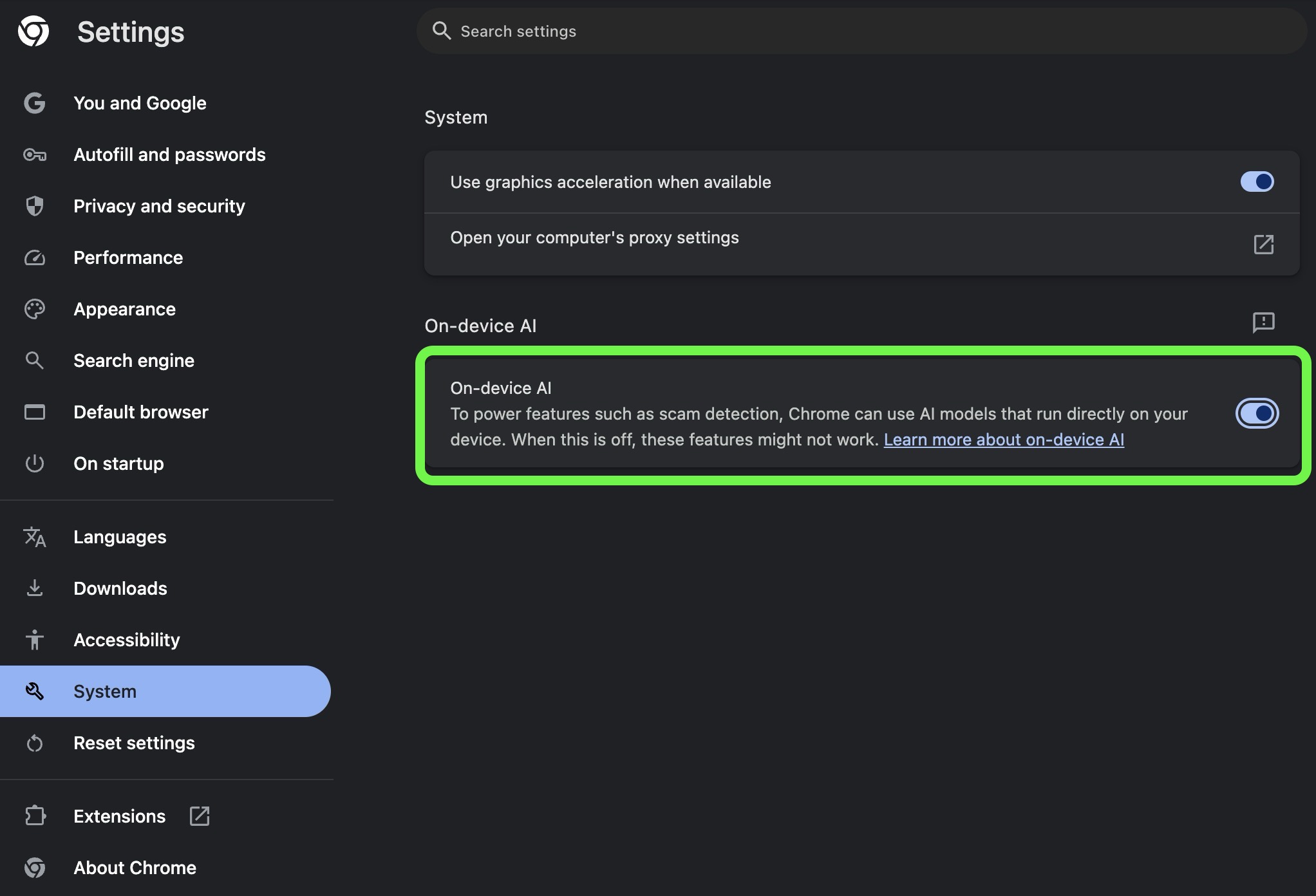
  3. In the left sidebar, click System.
  4. Toggle off On-device AI.
chrome-on-device-ai-4gb-file-toggle.jpg


Once this setting is switched off, Chrome will remove the model and should stop downloading it in future updates. Remember that deleting the model will also disable any Chrome features that rely on it.

If you don't see the toggle in Chrome's Settings, it likely hasn't propagated to your computer yet. In that case, type chrome://flags into Chrome's address bar and disable any AI-related flags you see, then delete the weights.bin file manually in Finder. If after that you're still concerned about the lack of consent, it might be worth switching to a different browser.

Article Link: Stop Chrome Browser From Downloading a Hidden 4GB AI File

I agree that 4GB is a lot of space to take from users without them knowing.

But if the average Mac user is struggling to spare 4GB, I think they have worse problems. 😂

Especially with how much data Mac OS can purge and throw to the Cloud.

For example my biggest storage hog is photos / videos (even with optimised storage turned on)

Next is music.

Handy tip actually, unless you have high grade speakers connected with a wire.

Drop your music quality on Apple Music (if you subscribe to it) from high res lossless to just lossless.

Your downloaded music library could use up to up to 80% less storage once the setting is changed but you’d have to remove downloads and re-download the music to ensure it’s using the smaller file format.

For example, my music library size went from 75GB to 29GB.

Arguably I haven’t re-downloaded every track but it’s given me a chance to only download the tracks I still listen to regularly.

Drop the limit on optimise music storage too.

For every day users, we most likely don’t have the hardware to fully benefit from high res lossless and or couldn’t tell the difference if our hardware could utilise it.
 
  • Like
Reactions: p96
Handy tip actually, unless you have high grade speakers connected with a wire.
Plus a very low noise wire-connected DAC and amplifier. Not sure my ears can tell the difference between high quality 320kbps and lossless on a very good system.
 
Plus a very low noise wire-connected DAC and amplifier. Not sure my ears can tell the difference between high quality 320kbps and lossless on a very good system.
Good point external Dacs can help too.

I’m no audiophile, so my knowledge is limited in this area.

But definitely seen the benefits of that change on 256GB iPhone.

Plus to this day, I have not noticed a difference in my music quality on AirPods Pro 2 or wired car play.

and if I’m wrong in this instance which is possible, I definitely can’t tell the difference and would prefer the extra storage space. 🙂
 
somehow every year google is finding news ways to make chrome worse and less user friendly. glad I dropped it, zero regrets with firefox.
 
But if I use Chrome, I likely want the AI, right? The Gemini integration is its main feature advantage right now. I don't need instructions on how to lobotomize my browser.

I like how you think 🙂

Do remember that this is, however, an important understanding for those who have limited storage; and a potential mitigation to the many "Why does my HD keep saying that I'm running out of space?!?" queries...

Personally, I have multiple TB of disk space available . . . there are those who have, maybe, 15GB free (and have to decide which personal photos they want to permanently delete just to d/l the latest OS Update).
 
  • Like
Reactions: HouseLannister
Register on MacRumors! This sidebar will go away, and you'll see fewer ads.