It feels the exact same as the iPad Pro M4/M5 and the MacBook Pro M4/M5Is the nanotexture on the XDR the same or different as the one on the displays (compared to eg a MBP M4 series)?

Got a tip for us?
Let us know
Become a MacRumors Supporter for $50/year with no ads, ability to filter front page stories, and private forums.
Studio Display XDR Impressions
- Thread starter gsilver
- Start date
- Sort by reaction score
You are using an out of date browser. It may not display this or other websites correctly.
You should upgrade or use an alternative browser.
You should upgrade or use an alternative browser.

While I haven't experienced the weird glitch or kernel panic issues that others have mentioned here and on YouTube, I’ve noticed that YouTube video playback (even in 60Hz mode) crashes Chrome whenever I scroll down to read the comments. It happens every time. The browser window starts to flash or refresh, and then everything becomes incredibly laggy.
I initially thought it was just a Chrome bug, but when I tested it with my old 4K 120Hz LG monitor, the issue didn't occur. The same thing happens after long scrolls on X (Twitter) or Instagram. I’m running an M3 Ultra Mac Studio using the cable that came with the display, and I have no other peripherals connected.
Most notably, Activity Monitor shows WindowServer constantly idling around 40% CPU usage. This XDR is clearly in dire need of an "SOS" firmware update. If nothing is released this week, it’s going straight back to Apple.
I initially thought it was just a Chrome bug, but when I tested it with my old 4K 120Hz LG monitor, the issue didn't occur. The same thing happens after long scrolls on X (Twitter) or Instagram. I’m running an M3 Ultra Mac Studio using the cable that came with the display, and I have no other peripherals connected.
Most notably, Activity Monitor shows WindowServer constantly idling around 40% CPU usage. This XDR is clearly in dire need of an "SOS" firmware update. If nothing is released this week, it’s going straight back to Apple.
deconstruct60
macrumors G5
[ 4K panel ]I'm a programmer that's very picky about displays. I have near sightedness and an astigmatism corrected with contact lenses.
I've been using an LG 32GS95UE 32" OLED
I tried everything to fix it including making it dimmer, disabling dithering, reducing refresh rate, reduced contrast, different office lighting, taking endless breaks, and nothing helped. Also the constant bother of doing things to avoid burn-in as a programmer is very inconvenient.
Everything included going to straight 2:1 'Retina' scaling? In part, because ...
The XDR absolutely blows the OLED away in most ways for me. It's FAR crisper for text even when using scaling due to the higher PPI, glossy finish, and RGB pixel arrangement.
Scaling seems to be a target usage.
deconstruct60
macrumors G5
To my understanding, it means, when connecting 2 XDRs, the 1st one can run a 5k120, but the 2nd one falls back to 5k60. When connecting 3 XDRs, none of them runs at 5k120, all fall back to 5k60.
From some reports it appears Apple has a 'race condition' problem. If both displays are initializing with system at the same time , Apple may not have a tie breaker for them. Single file daisy chaining probably helps but anything were they both are racing each other to complete initialization leads to quirks.
Probably fixable, but their 'does the right thing' fallbacks are probably specific to the subset of QA configurations they employed.
Last edited:

SRQrws
macrumors 6502
I shipped mine back to Apple today. Mine would go black every time I changed video presets. The only way to get it to respond was to disconnect/reconnect to AC power. This would occur again after the computer went through a sleep/wake cycle. I tried 3 different TB cables and contacted Apple support. They were not particularly helpful and indicated they had no reports of this issue. I really liked the display, but I don’t want the return window to expire while hoping for a software/firmware fix.Most notably, Activity Monitor shows WindowServer constantly idling around 40% CPU usage. This XDR is clearly in dire need of an "SOS" firmware update. If nothing is released this week, it’s going straight back to Apple.
I think Evdawg means something else, but as for me, my unit had bad uniformity even visible from straight on which is why I am returning it. I first thought i was just dealing with viewing angles but turns out it wasnt just viewing angle dependend, although stronger viewing angles made worse and made it stand out even more. Essentially the right 1/3 of the display was more greenish/darker. From very far away, about 3 feet, It was not barely visible but anything closer like 2 feet caused it was visible quite clearly. In even stronger viewing angles like on the picture you can see it very clearly:Hmm can you take a picture of it? I don't see anything I would call splotchy on white or the blue footer, they look very pure and uniform to me. Granted I am used to matte OLED which is like looking through a slightly dirty pane of glass lol.
I kind of think all of Apple's Mini LED displays have vignetting, my 2021 iPad Pro and MacBook Pro 2023 both have it to varying degrees.
Going to pick up annother one tomorrow. If its not better I fear its considered normal (which would be very dissapointing for a display of that price). Other than that I love the display.
Wow very clear greenish hue on the right. Are you going to open up the display and check it in the Apple Store? I hate when you have to go way above on your own time to deal with these things.
I think Evdawg means something else, but as for me, my unit had bad uniformity even visible from straight on which is why I am returning it. I first thought i was just dealing with viewing angles but turns out it wasnt just viewing angle dependend, although stronger viewing angles made worse and made it stand out even more. Essentially the right 1/3 of the display was more greenish/darker. From very far away, about 3 feet, It was not barely visible but anything closer like 2 feet caused it was visible quite clearly. In even stronger viewing angles like on the picture you can see it very clearly:
View attachment 2614188
Going to pick up annother one tomorrow. If its not better I fear its considered normal (which would be very dissapointing for a display of that price). Other than that I love the display.

AnInanimateCarbonRod
macrumors regular
I would absolutely categorize that as a defective display. Mine does not have that at all.I think Evdawg means something else, but as for me, my unit had bad uniformity even visible from straight on which is why I am returning it. I first thought i was just dealing with viewing angles but turns out it wasnt just viewing angle dependend, although stronger viewing angles made worse and made it stand out even more. Essentially the right 1/3 of the display was more greenish/darker. From very far away, about 3 feet, It was not barely visible but anything closer like 2 feet caused it was visible quite clearly. In even stronger viewing angles like on the picture you can see it very clearly:
View attachment 2614188
Going to pick up annother one tomorrow. If its not better I fear its considered normal (which would be very dissapointing for a display of that price). Other than that I love the display.

M4irmidnight
Suspended
I had no clue m4 air was capable of pushing 120hz displays.Quick notes and impressions after picking up this morning:
Looks awesome. HDR is great.
-My M4 MacBook Air does 120hz
-All features and resolution work with TB4 cable I had already connected to my M4 Max Mac Studio.
Windows (9800x3D with 5090)
-I connected to the USB-C DP output and used AMD Hybrid Graphics to use my GPU to render. I also have a DisplayPort/USB-A to USB-C cable that I connect direct to my GPU.
-Display detected as Studio XDR
-I used to be able to adjust brightness on my Mac and then plug into my PC and the brightness would carry over. It seems dimmer in Windows so I'm not sure if that is working
-I got 5k 120hz with the TB cable coming from my USB-C port on my PC to the display. HDR and variable refresh werent' detected by windows. I'll have to play with this more after work today.
-Using this cable (https://a.co/d/0jlxzcFl) I only get 4k 120hz and also noHDR or VRR.HDR works and VRR works in games, but Windows doesn't detect the capability.
UPDATE: HDR is mostly working in Windows. It works in YouTube videos and I can enable the setting in Windows display settings. Playing Doom: The Dark Ages, it gives an error while enabling HDR (HDR Hardware not supported or something to that effect.)
After enabling the HDR setting in Windows, I can go into the advanced settings for HDR (click the ">" next to HDR slider.) This shows a setting for SDR brightness which was set to halfway, I was able to use this slider to adjust the Studio Display XDR to full brightness.
UPDATE 2: Other games in Windows are working with HDR. Looks to be a Doom specific issue for the HDR error.
As an Amazon Associate, MacRumors earns a commission from qualifying purchases made through links in this post.
I just returned 1 of 3 XDR due to too much green shift or tint at an angle in lower right corner, too much to use as in a dual display setup unless the two displays are angled too acutely to each other, because straight on the displays are pretty uniform. The one I returned also was too green/bright in the lower right corner. The display model at the Apple Store I went to to return it also had too much shift. My 3 old ASD and new ASD at the store don't have such green shift/tint.
LG has green shift issues on their OLED TVs and iPhone OLED screens. But for IPS, unclear to my eyes if the ASD and ASD XDR use the same LG panel but different backlights, or different panels and backlights completely.
I think I read LG panels in Kuycon 32" also has green tint on the right side when viewed straight on.
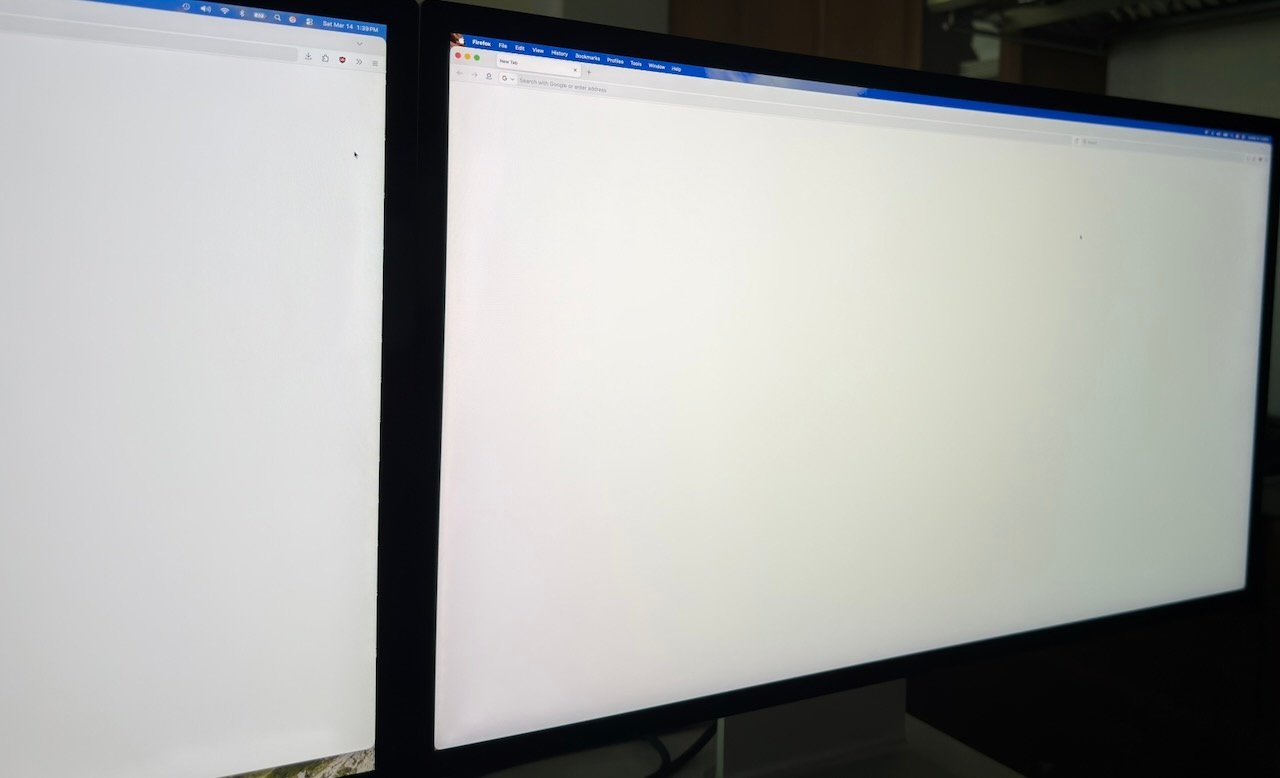
XDR that was returned
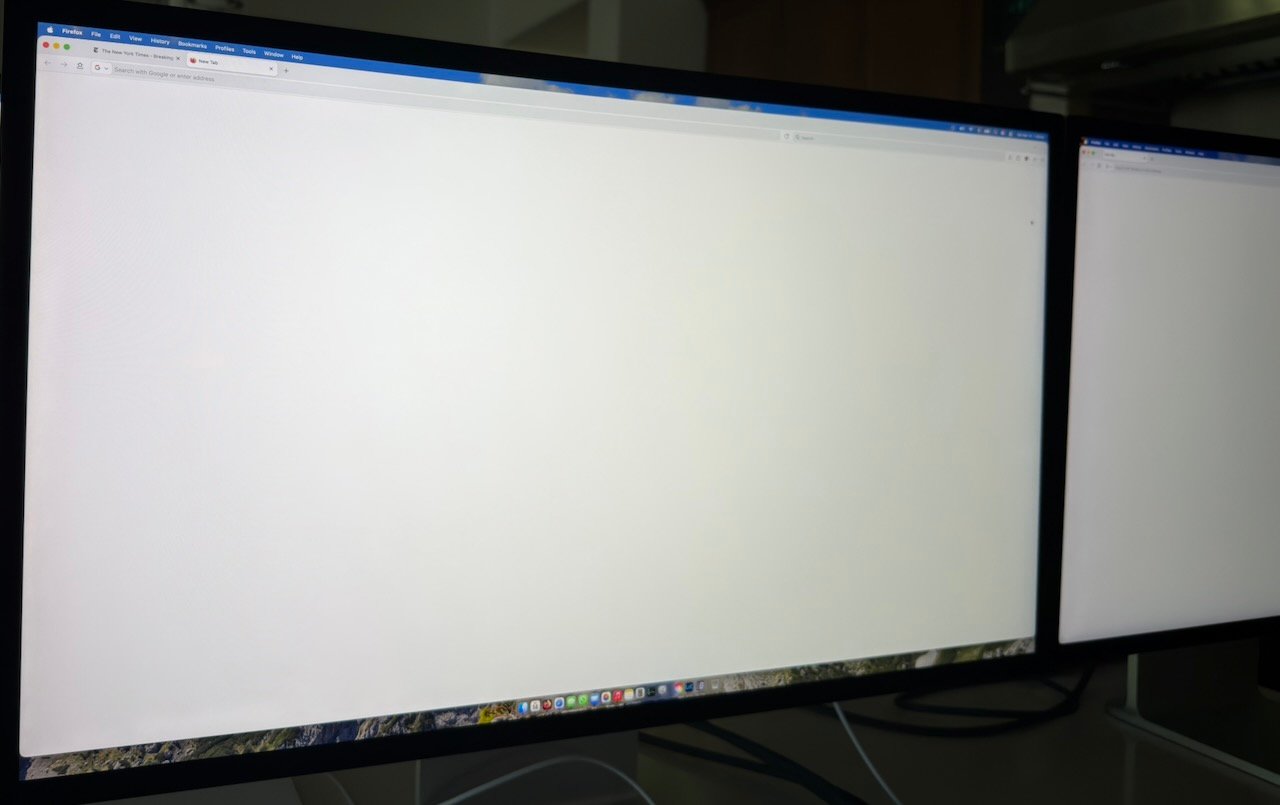
Replacement that has green shift but not as severe and at more of an angle.
LG has green shift issues on their OLED TVs and iPhone OLED screens. But for IPS, unclear to my eyes if the ASD and ASD XDR use the same LG panel but different backlights, or different panels and backlights completely.
I think I read LG panels in Kuycon 32" also has green tint on the right side when viewed straight on.
XDR that was returned
Replacement that has green shift but not as severe and at more of an angle.
Last edited:
appleinsiderbro
macrumors newbie
Thank you. Would be one 10GbE, an OWC 8TB SSD and some small USB stuff like Loupedeck and Wacom.
Boy this was easier with a Studio instead of a MBP
its trying to protect you from doom scrollingWhile I haven't experienced the weird glitch or kernel panic issues that others have mentioned here and on YouTube, I’ve noticed that YouTube video playback (even in 60Hz mode) crashes Chrome whenever I scroll down to read the comments. It happens every time. The browser window starts to flash or refresh, and then everything becomes incredibly laggy.
I initially thought it was just a Chrome bug, but when I tested it with my old 4K 120Hz LG monitor, the issue didn't occur. The same thing happens after long scrolls on X (Twitter) or Instagram. I’m running an M3 Ultra Mac Studio using the cable that came with the display, and I have no other peripherals connected.
Most notably, Activity Monitor shows WindowServer constantly idling around 40% CPU usage. This XDR is clearly in dire need of an "SOS" firmware update. If nothing is released this week, it’s going straight back to Apple.
You may want to buy this cable and see if it works; that's how people get their ADS connected to PC via DP > TB.Some wall of text impressions of the XDR vs OLED:
I'm a programmer that's very picky about displays. I have near sightedness and an astigmatism corrected with contact lenses.
I've been using an LG 32GS95UE 32" OLED for the past 6 months. I LOVE the deep blacks and high refresh rate, and it has a very stunning picture. The problem is every single night after working on my OLED I would end the day with super fatigued and bloodshot eyes and I had a hard time even focusing on things, to the point that I wouldn't even be able to read subtitles on the TV or read a book. I tried everything to fix it including making it dimmer, disabling dithering, reducing refresh rate, reduced contrast, different office lighting, taking endless breaks, and nothing helped. Also the constant bother of doing things to avoid burn-in as a programmer is very inconvenient.
I have never had the same eye issues with my MacBook Pro 2023 screen, so I've been waiting for Apple to release something that was basically the MacBook Pro screen but larger. Refresh rate and black level are both very important to me so the regular Studio Display was out. I jumped on the XDR even though it is quite pricey for me. I know LG/MSI are releasing ones with possibly the same panel but at this point I straight don't trust them to make something great with it.
The XDR absolutely blows the OLED away in most ways for me. It's FAR crisper for text even when using scaling due to the higher PPI, glossy finish, and RGB pixel arrangement. The colors are better, the HDR is much more noticeable, and it's more pleasing in general to look at for hours. The viewing angles are great, and I see basically 0 IPS glow (I owned a few 4K IPS displays before the OLED and they were terrible for glow). The viewing angle color shift is a little worse on the vertical than the horizontal if that bothers you. The screen uniformity is basically perfect on mine, certainly compared to OLED. There is some slight vignetting, but nothing like the old iMac displays though.
I have also been streaming Resident Evil Requiem from my gaming PC to it and it's been great in that too. I will say it's a little silly that my gaming PC is right there and I can't find a good way yet to really connect it to the XDR when I want to play games, so I'm just using Moonlight streaming to play it through my Mac ha. Moonlight supports the 5K/120hz/HDR perfectly though and the motion is more than good enough for the games I play. I'm guessing hardcore multiplayer FPS gamers would be happier with the 240hz OLED though. To my eyes the motion looks far better than my MacBook Pro 2023 screen.
If blooming isn't an issue to you on the MacBook screen it won't be here, I would say it's very minimal. However I don't use my monitors with super bright settings, usually in the 45-55 range, so maybe it's worse if you'd running super bright video. I tested a bunch of HDR videos on YouTube and personally the minimal blooming is a fine compromise for all the benefits over OLED.
Best of all thus far my eyes aren't killing me after using it for hours, they would already be in massive pain on the OLED monitor.
The stand is awesome, I've never been a big fan of monitor arms. Note that it doesn't have rotation though, which is a big downside for me.
Also for anyone that can't get to an Apple Store to compare: I would say the nanotexture looked very sparkly/grainy on white content, and the blacks looked a little raised. It may just be the bright lighting in the Apple Store, but I don't think I'd go for that option unless you REALLY need it. It definitely makes the picture worse even though it's really good at reducing reflections. I decided to just get some black out curtains myself.
As an Amazon Associate, MacRumors earns a commission from qualifying purchases made through links in this post.

btrach144
macrumors 68040
Just ran into this bug tonight. Tried switching from HDR video preset back to the default Studio Display XDR preset and it went black like it normally does except this time it stayed black.I shipped mine back to Apple today. Mine would go black every time I changed video presets. The only way to get it to respond was to disconnect/reconnect to AC power. This would occur again after the computer went through a sleep/wake cycle. I tried 3 different TB cables and contacted Apple support. They were not particularly helpful and indicated they had no reports of this issue. I really liked the display, but I don’t want the return window to expire while hoping for a software/firmware fix.
I filed a report with feedback assistant. Hoping Apple will iron bugs out on these pricey displays.
Yeah, I only used it in 2:1 "1920x1080" 100% of the time, it was fairly blurry in anything but that. I just meant that the XDR is significantly clearer than 2:1 on the LG even when using fractional scales... I wasn't saying I primarily use any of them, only that they are actually viable on the XDR while they really weren't on the LG.[ 4K panel ]
Everything included going to straight 2:1 'Retina' scaling? In part, because ...
Scaling seems to be a target usage.
Strange, I'm running a MacBook M3 Max 64GB and have tried to reproduce this out of curiosity, and I don't have that issue. I haven't run into any of the crashes either, and I've been compiling and using Blender and Unity all day (Some people thought it might be when the CPU/GPU are being pushed). I am really wondering what is causing all these glitches on seemingly random machines.While I haven't experienced the weird glitch or kernel panic issues that others have mentioned here and on YouTube, I’ve noticed that YouTube video playback (even in 60Hz mode) crashes Chrome whenever I scroll down to read the comments. It happens every time. The browser window starts to flash or refresh, and then everything becomes incredibly laggy.
I initially thought it was just a Chrome bug, but when I tested it with my old 4K 120Hz LG monitor, the issue didn't occur. The same thing happens after long scrolls on X (Twitter) or Instagram. I’m running an M3 Ultra Mac Studio using the cable that came with the display, and I have no other peripherals connected.
Most notably, Activity Monitor shows WindowServer constantly idling around 40% CPU usage. This XDR is clearly in dire need of an "SOS" firmware update. If nothing is released this week, it’s going straight back to Apple.

kostya_sheng
macrumors newbie
Also encountered this problem on my M4 Mac mini and M5 MacBook Pro (both not with the Pro or Max chip, thus TB 4 ports). The workaround I discovered for now is to fix the refresh rate to 60 or 120 Hz and avoid using the Adaptive Sync, meanwhile I submitted the panic information to Apple.View attachment 2612803
Third time since yesterday 🔥😂🤯
I also let Gemini and Claude look at the key panic file lines and they tell me that the problem may be related to how Macs used to treat Pro Display XDR like two separate displays (because Pro Display XDR does not support DSC, hence to drive such a display Mac needs to push two synchronized signals to the screen which will combine them into one 6K HDR signal). However, according to Apple Studio Display XDR does support DSC, which is able to compress the signal of 5K 10-bit HDR @120Hz well under the maximum bandwidth of TB4. So... I have to think the problem lies within macOS or Display firmware.

conmee
macrumors 65816
I'm going to continue to roll with my 2022 ASD for a little while longer. Want to sell it and get the ASD XDR but only after some of the gremlins have been worked out. Don't want to deal with any green shift (other than the green shifting from my wallet to Apple when I buy the ASD XDR lol).
I am *fairly* certain the 32" 6k XDR had to use DSC on TB3 Macs, so that alone probably is not new to the system to the point of inducing panics. Also judging by some posters in this thread reporting issues that only show up on one half of the new 27" XDR, I am venturing to guess a similar trick of halving the panel into combining 2 streams for certain lower bandwidth scenario is still present.Also encountered this problem on my M4 Mac mini and M5 MacBook Pro (both not with the Pro or Max chip, thus TB 4 ports). The workaround I discovered for now is to fix the refresh rate to 60 or 120 Hz and avoid using the Adaptive Sync, meanwhile I submitted the panic information to Apple.
I also let Gemini and Claude look at the key panic file lines and they tell me that the problem may be related to how Macs used to treat Pro Display XDR like two separate displays (because Pro Display XDR does not support DSC, hence to drive such a display Mac needs to push two synchronized signals to the screen which will combine them into one 6K HDR signal). However, according to Apple Studio Display XDR does support DSC, which is able to compress the signal of 5K 10-bit HDR @120Hz well under the maximum bandwidth of TB4. So... I have to think the problem lies within macOS or Display firmware.
Yeah it is a bit convoluted, I already had the TS4 laying around and I didn’t have a way to convert the thunderbolt output to DisplayPort and USB.
I’ll bet the Sabrent works. I was looking for one and they were out of stock everywhere. Let me know if you get one and what your experience is.
This TB5 KVM has been announced, no idea on price or launch date though:
TBT5 KVM Dock, Thunderbolt™5, 8k@60Hz
TBT5 KVM Dock (SI-452TB5), 2 to 2 KVM dock, Thunderbolt™5 speed up to 80Gbps, 8K@60Hz output through Thunderbolt connection.
 www.ssi.com.tw
Sabrent are also ment to be working on a TB5 KVM too.
SRQrws
macrumors 6502
I hope they will fix it soon. I wonder how widespread this issue is, because I suspect quite a few people have set up the XDR but not tried switching presets yet. And it only happens after a sleep cycle of more than a few minutes. I also wonder if it's tied to a specific computer (mine is a Studio M4 Max), or Tahoe, or is a firmware problem with the display?? In any case, I just didn't want to deal with the problem on such a costly piece of gear.Just ran into this bug tonight. Tried switching from HDR video preset back to the default Studio Display XDR preset and it went black like it normally does except this time it stayed black.
I filed a report with feedback assistant. Hoping Apple will iron bugs out on these pricey displays.
I had a similar problem but after restarting my computer this seams to be working fine, even after it wakes up.
Apple always seems to have these firmware glitches on new hardware, especially ones that don’t get refreshes often in the first few months. They will get it fixed.I hope they will fix it soon. I wonder how widespread this issue is, because I suspect quite a few people have set up the XDR but not tried switching presets yet. And it only happens after a sleep cycle of more than a few minutes. I also wonder if it's tied to a specific computer (mine is a Studio M4 Max), or Tahoe, or is a firmware problem with the display?? In any case, I just didn't want to deal with the problem on such a costly piece of gear.
btrach144
macrumors 68040
They’ll for sure get it fixed. I remember when the 2022 ASD came out and it had firmware updates for the first year almost every month it seemed. Really calmed down laterI hope they will fix it soon. I wonder how widespread this issue is, because I suspect quite a few people have set up the XDR but not tried switching presets yet. And it only happens after a sleep cycle of more than a few minutes. I also wonder if it's tied to a specific computer (mine is a Studio M4 Max), or Tahoe, or is a firmware problem with the display?? In any case, I just didn't want to deal with the problem on such a costly piece of gear.
I’m using a M4 Pro mini with the latest 26.3.1 so doesn’t seem machine specific. Likely an issue with the displays firmware. But that’s fixable via updates!

technopaul
macrumors member
I have a 16-inch M1 Max MBP and have loved the display so far. My only hiccup was when I went to change the reference mode preset to something other than the "Apple XDR Display (P3-2000 nits)" the display would go dark until I reverted. A quick restart of the MacBook seems to have fixed the problem for now.
I hope they will fix it soon. I wonder how widespread this issue is, because I suspect quite a few people have set up the XDR but not tried switching presets yet. And it only happens after a sleep cycle of more than a few minutes. I also wonder if it's tied to a specific computer (mine is a Studio M4 Max), or Tahoe, or is a firmware problem with the display?? In any case, I just didn't want to deal with the problem on such a costly piece of gear.
I had to turn off adaptive sync to be able to switch presets
at fixed 120/60 I can switch