Become a MacRumors Supporter for $50/year with no ads, ability to filter front page stories, and private forums.
Status
The first post of this thread is a WikiPost and can be edited by anyone with the appropiate permissions. Your edits will be public.
A bit of speculation.

I've been following the evolution of Apple's monitor lineup for a while, and I've come to the conclusion that the next professional display could look exactly like this.

Apple is bound by several strict limitations when it comes to its monitors, and these limitations shape the potential appearance of any new product.

One: macOS Scaling. macOS uses integer scaling: @1x = 110 PPI, @2x = 220 PPI. This is the gold standard for Retina density. A display with a density of 330 PPI (@3x) is currently unfeasible, not only due to manufacturing complexity but also because of the lack of graphical processing power required to handle such resolutions comfortably for a wide range of tasks.

Two: The Retina and Diagonal Size Equation. This leads to a simple piece of arithmetic: A density of ~220 PPI at 5K resolution gives you a 27-inch diagonal (Studio Display). The same density at 6K gives you 32 inches (Pro Display XDR). Finally, at 8K, we arrive at a 40-inch diagonal. However, there's a crucial detail: a 40-inch display with a 16:9 aspect ratio would be massive and unwieldy. This is where the 21:9 (UltraWide) aspect ratio makes perfect sense. Why? The height of a 32-inch 16:9 display is approximately 40cm. The height of a 40-inch ultra-wide 21:9 display is also approximately 40cm.
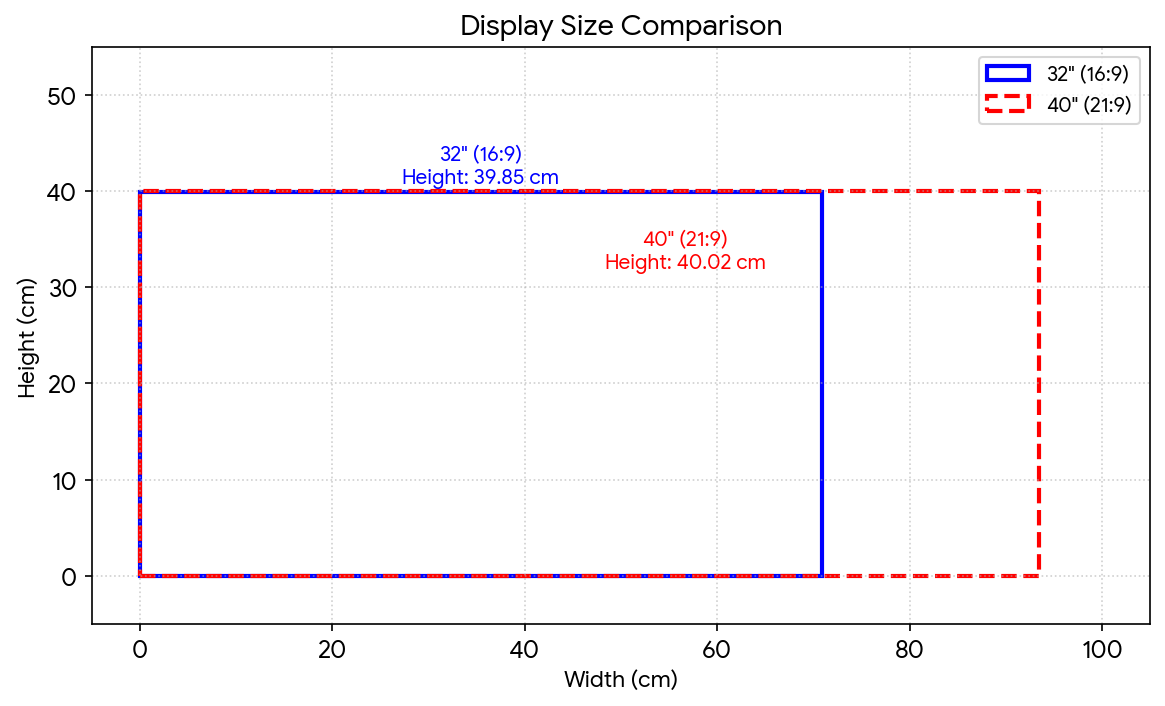
Unknown.png


This means the user gains more than a 30% increase in usable screen area (horizontally) without altering the physical height of the monitor or their eye line.

Three: Thunderbolt Bandwidth. Back in 2019, when the Pro Display XDR (6K, 60Hz, 10-bit) was introduced, it utilised almost the entire bandwidth of Thunderbolt 3 (40 Gbit/s), with a data stream of around 38 Gbit/s. Today, we have Thunderbolt 5 with a Bandwidth Boost mode of up to 120 Gbit/s. If we take an 8K resolution, 220 PPI, 10-bit colour, and a 120Hz (ProMotion) refresh rate, the required data stream would be approximately 112 Gbit/s. This fits perfectly within the capabilities of the new interface. It's a logical step for Apple, much like the one they took in 2019.

Four: Display Technology. MicroLED: Apple recently scaled back its project to develop proprietary MicroLED screens for the Apple Watch due to complexity and cost. We are unlikely to see this technology in monitors anytime soon. OLED: Currently, there are no mass-produced OLED panels with the specifications of 40", 218 PPI, and 8K UltraWide. Furthermore, the risk of burn-in for the static interfaces professionals use remains a significant concern. Tandem OLED: The technology used in the iPad Pro is excellent for compact devices, but its brightness and longevity are not yet sufficient for a large professional monitor. This leaves Mini-LED: Apple's evolutionary path is to refine and perfect proven technologies. An IPS panel with a Mini-LED backlight and thousands of local dimming zones is the most realistic candidate.

Based on all of the above, here is a monitor I would buy without hesitation. Here are its specifications:

Diagonal: 40 inches
Panel Type: IPS with Mini-LED technology
Aspect Ratio: 21:9 (UltraWide)
Resolution: 8192 × 3510 (8K horizontally)
Pixel Density: 218 PPI (perfect Retina 2x for macOS)
Backlighting: ~4600 local dimming zones for deep HDR (UltraXDR?)
Brightness: 2000 nits (typical), 3000 nits (peak HDR)
Refresh Rate: 120Hz
Colour Depth: 10-bit (1.07 billion colours), full P3 gamut
Interface: Thunderbolt 5 (single cable for video, data, and laptop charging up to 140W+)
Data Stream: ~112 Gbit/s — fits perfectly within the 120 Gbit/s limit
Form Factor: Flat (curves distort geometry, which is critical for designers and architects)
Chassis: Aluminium for efficient cooling of the dense Mini-LED array
Purpose: To replace multi-monitor setups for video editing (an 8K timeline across the full width), coding, working with massive spreadsheets, and financial dashboards.

Price
In its base configuration (without a stand?), such a monitor would carry a frighteningly realistic price tag of $6999.

Apple Pro Display Ultra 40-inch like this to replace two Studio Displays.
 
Last edited:
A bit of speculation.

I've been following the evolution of Apple's monitor lineup for a while, and I've come to the conclusion that the next professional display could look exactly like this.

Apple is bound by several strict limitations when it comes to its monitors, and these limitations shape the potential appearance of any new product.

One: macOS Scaling. macOS uses integer scaling: @1x = 110 PPI, @2x = 220 PPI. This is the gold standard for Retina density. A display with a density of 330 PPI (@3x) is currently unfeasible, not only due to manufacturing complexity but also because of the lack of graphical processing power required to handle such resolutions comfortably for a wide range of tasks.

Two: The Retina and Diagonal Size Equation. This leads to a simple piece of arithmetic: A density of ~220 PPI at 5K resolution gives you a 27-inch diagonal (Studio Display). The same density at 6K gives you 32 inches (Pro Display XDR). Finally, at 8K, we arrive at a 40-inch diagonal. However, there's a crucial detail: a 40-inch display with a 16:9 aspect ratio would be massive and unwieldy. This is where the 21:9 (UltraWide) aspect ratio makes perfect sense. Why? The height of a 32-inch 16:9 display is approximately 40cm. The height of a 40-inch ultra-wide 21:9 display is also approximately 40cm.

View attachment 2613501

This means the user gains more than a 30% increase in usable screen area (horizontally) without altering the physical height of the monitor or their eye line.

Three: Thunderbolt Bandwidth. Back in 2019, when the Pro Display XDR (6K, 60Hz, 10-bit) was introduced, it utilised almost the entire bandwidth of Thunderbolt 3 (40 Gbit/s), with a data stream of around 38 Gbit/s. Today, we have Thunderbolt 5 with a Bandwidth Boost mode of up to 120 Gbit/s. If we take an 8K resolution, 220 PPI, 10-bit colour, and a 120Hz (ProMotion) refresh rate, the required data stream would be approximately 112 Gbit/s. This fits perfectly within the capabilities of the new interface. It's a logical step for Apple, much like the one they took in 2019.

Four: Display Technology. MicroLED: Apple recently scaled back its project to develop proprietary MicroLED screens for the Apple Watch due to complexity and cost. We are unlikely to see this technology in monitors anytime soon. OLED: Currently, there are no mass-produced OLED panels with the specifications of 40", 218 PPI, and 8K UltraWide. Furthermore, the risk of burn-in for the static interfaces professionals use remains a significant concern. Tandem OLED: The technology used in the iPad Pro is excellent for compact devices, but its brightness and longevity are not yet sufficient for a large professional monitor. This leaves Mini-LED: Apple's evolutionary path is to refine and perfect proven technologies. An IPS panel with a Mini-LED backlight and thousands of local dimming zones is the most realistic candidate.

Based on all of the above, here is a monitor I would buy without hesitation. Here are its specifications:

Diagonal: 40 inches
Panel Type: IPS with Mini-LED technology
Aspect Ratio: 21:9 (UltraWide)
Resolution: 8192 × 3510 (8K horizontally)
Pixel Density: 218 PPI (perfect Retina 2x for macOS)
Backlighting: ~4600 local dimming zones for deep HDR (UltraXDR?)
Brightness: 2000 nits (typical), 3000 nits (peak HDR)
Refresh Rate: 120Hz
Colour Depth: 10-bit (1.07 billion colours), full P3 gamut
Interface: Thunderbolt 5 (single cable for video, data, and laptop charging up to 140W+)
Data Stream: ~112 Gbit/s — fits perfectly within the 120 Gbit/s limit
Form Factor: Flat (curves distort geometry, which is critical for designers and architects)
Chassis: Aluminium for efficient cooling of the dense Mini-LED array
Purpose: To replace multi-monitor setups for video editing (an 8K timeline across the full width), coding, working with massive spreadsheets, and financial dashboards.

Price
In its base configuration (without a stand?), such a monitor would carry a frighteningly realistic price tag of $6999.

Apple Pro Display Ultra 40-inch like this to replace two Studio Displays.
I would be absolutely ecstatic if Apple released such a display! While I’m not thrilled by the price I also would not be shocked. I did not buy the Pro XDR because the blooming sucked and was very visible to me. Not paying those dollars for something that isn’t nigh perfect.

This would indeed replace two monitors for me, thus helping to justify the cost more. C’mon Apple!
 
I would be absolutely ecstatic if Apple released such a display! While I’m not thrilled by the price I also would not be shocked. I did not buy the Pro XDR because the blooming sucked and was very visible to me. Not paying those dollars for something that isn’t nigh perfect.

This would indeed replace two monitors for me, thus helping to justify the cost more. C’mon Apple!
Then start setting aside $120 a week, and hopefully in a year you'll have enough for such an Apple monitor.
 
  • Haha
Reactions: leifp
Another thought just hit me.

An ultra-wide monitor isn't just about replacing two Studio Displays. It could actually be the perfect tool for making content for the Apple Vision Pro.

Look, we all know the Vision Pro isn't flying off the shelves like iPhones. Sales are slow. But Apple isn't going to kill it. This is a long-term play. They'll keep improving it over time, just like they did with the iPad or the Apple Watch. But here's the thing: for the platform to grow, you need content. And to make great content, you need great tools.

And honestly, I think Apple has a pretty clear roadmap here.

Step one: Regular widescreen monitors (16:9). That's where we are now. Most pros work on 27-inch Studio Displays. It's fine for everyday stuff, but it's getting cramped if you're working on new formats.

Step two: Ultra-wides (and beyond?). This is where that 40-inch Pro Display UltraWide we talked about comes in. It trains your brain for immersion. Human vision is naturally wide. Working on an ultra-wide monitor all day gets your eyes and brain used to that wide, peripheral feel. It's like practice before you put the headset on.

It's built for spatial video editing. If you're cutting video for the Vision Pro, you're dealing with panoramic, 3D stuff. Try doing that on a standard 16:9 screen – it's a pain. An 8K ultra-wide gives you space to stretch out your Final Cut Pro timeline and actually see your whole spatial scene without hiding all your tools.

Step three: Full immersion. That's the endgame. You create and tweak your content on that big, beautiful ultra-wide monitor. Then you pop it into the headset for the final check and for people to actually experience it.

So yeah, that 40-inch UltraWide isn't just a "give me more pixels" screen. It's basically a pro-level gateway into this new reality Apple is building.

Apple wants a smooth ecosystem: you at your desk with a this monitor, then you seamlessly move into a virtual workspace with the Vision Pro. The more of these monitors devs and creators have on their desks, the faster we'll get quality content for the headset. And that's how the Vision Pro stops being an "expensive toy" and turns into a real tool.
 
  • Like
Reactions: leifp
Another thought just hit me.

An ultra-wide monitor isn't just about replacing two Studio Displays. It could actually be the perfect tool for making content for the Apple Vision Pro.

Look, we all know the Vision Pro isn't flying off the shelves like iPhones. Sales are slow. But Apple isn't going to kill it. This is a long-term play. They'll keep improving it over time, just like they did with the iPad or the Apple Watch. But here's the thing: for the platform to grow, you need content. And to make great content, you need great tools.

And honestly, I think Apple has a pretty clear roadmap here.

Step one: Regular widescreen monitors (16:9). That's where we are now. Most pros work on 27-inch Studio Displays. It's fine for everyday stuff, but it's getting cramped if you're working on new formats.

Step two: Ultra-wides (and beyond?). This is where that 40-inch Pro Display UltraWide we talked about comes in. It trains your brain for immersion. Human vision is naturally wide. Working on an ultra-wide monitor all day gets your eyes and brain used to that wide, peripheral feel. It's like practice before you put the headset on.

It's built for spatial video editing. If you're cutting video for the Vision Pro, you're dealing with panoramic, 3D stuff. Try doing that on a standard 16:9 screen – it's a pain. An 8K ultra-wide gives you space to stretch out your Final Cut Pro timeline and actually see your whole spatial scene without hiding all your tools.

Step three: Full immersion. That's the endgame. You create and tweak your content on that big, beautiful ultra-wide monitor. Then you pop it into the headset for the final check and for people to actually experience it.

So yeah, that 40-inch UltraWide isn't just a "give me more pixels" screen. It's basically a pro-level gateway into this new reality Apple is building.

Apple wants a smooth ecosystem: you at your desk with a this monitor, then you seamlessly move into a virtual workspace with the Vision Pro. The more of these monitors devs and creators have on their desks, the faster we'll get quality content for the headset. And that's how the Vision Pro stops being an "expensive toy" and turns into a real tool.
A bit optimistic but it wouldn’t be the first time Apple pulled such a thing. It also wouldn’t be the first time they doubled down on something (“retina”) and then abandoned people to the vagaries of a market with only Apple buyers… a niche of a niche…
 
  • Like
Reactions: jsts
Four: Display Technology. MicroLED: Apple recently scaled back its project to develop proprietary MicroLED screens for the Apple Watch due to complexity and cost. We are unlikely to see this technology in monitors anytime soon. OLED: Currently, there are no mass-produced OLED panels with the specifications of 40", 218 PPI, and 8K UltraWide. Furthermore, the risk of burn-in for the static interfaces professionals use remains a significant concern. Tandem OLED: The technology used in the iPad Pro is excellent for compact devices, but its brightness and longevity are not yet sufficient for a large professional monitor. This leaves Mini-LED: Apple's evolutionary path is to refine and perfect proven technologies. An IPS panel with a Mini-LED backlight and thousands of local dimming zones is the most realistic candidate.
You’re missing one recent development: “RGB MiniLED” backlights. The one 32" monitor that was shown at CES this year has a VA-type (not IPS-type) panel (HKC M10 Ultra), but that's not a requirement. LG also featured the technology in televisions at CES, as Micro RGB (not to be confused with MicroLED).

I could see Apple designing a reference monitor with this. Their experience with respect to timing controllers would be useful.
 
Last edited:
  • Like
Reactions: the future
You’re missing one recent development: “RGB MiniLED” backlights. The one 32" monitor that was shown at CES this year has a VA-type (not IPS-type) panel (HKC M10 Ultra), but that's not a requirement. LG also featured the technology in televisions at CES, as Micro RGB (not to be confused with MicroLED).

I could see Apple designing a reference monitor with this. Their experience with respect to timing controllers would be useful.
I have yet to see a VA panel that didn’t cause my eyeballs to implode. They’re fine for my old gaming LCDs (fast!) but my goodness I wouldn’t want them for colour correction! At least they’re not TN… *shudder*
 
You’re missing one recent development: “RGB MiniLED” backlights.

Yes, this is a very interesting technology, but I haven't paid close attention to it for several reasons. The technology is new, only about two years old. The cost of devices with RGB-Mini LED panels is very high. The only announced monitor, the HKC, is a 32-inch, 4K panel with a pixel density of 140 PPI. The release date and price of the monitor are unknown; one cannot expect a modest price tag for such a cutting-edge solution. The main problem is how to control the image on the panel. With Mini-LED, it's white light that is converted into red, blue, and green using filters, but here, the volume of data that needs to be processed grows exponentially. Since Apple does not outsource the software for its monitors, it would take them at least two years to implement control over the backlighting for an ultra-premium level monitor. Moreover, Apple usually collaborates with LG, not Samsung. And LG only introduced its RGB-Mini LED technology about a year ago. Too little time, too expensive, too many "buts." For this reason, in my humble opinion, a conventional Mini-LED with a large number of backlight zones is more realistic for a Pro-level monitor from Apple, at least in the 2026–2028 period, especially since the company already has considerable experience bringing monitors with this well-established technology to market.

Certainly, I would be extremely surprised if Apple introduced an RGB-Mini LED monitor in the very near future with a pixel density of 220 PPI and a price of less than $9,000. I would applaud Tim Cook standing up and would immediately buy such a work of art.
 
  • Like
Reactions: tenthousandthings
A bit of speculation.

Diagonal: 40 inches
Panel Type: IPS with Mini-LED technology
Aspect Ratio: 21:9 (UltraWide)
Resolution: 8192 × 3510 (8K horizontally)

I would be absolutely ecstatic if Apple released such a display!

Yeah, me too. Ultrawide is ideal for productivity (for me), so I keep hanging on to the 34“ LG 5K2K, which is now over 7 years old and still the ultrawide with the highest PPI (163) ever released. A full-on retina ultrawide from Apple would be an absolute dream come true.
 
Yeah, me too. Ultrawide is ideal for productivity (for me), so I keep hanging on to the 34“ LG 5K2K, which is now over 7 years old and still the ultrawide with the highest PPI (163) ever released. A full-on retina ultrawide from Apple would be an absolute dream come true.
That was on my list but so long delayed in arriving (with glitchiness on Macs) that I ended up just getting their regular 32” 4K. Even ended up getting a second one years ago but in frustration at the lack of “retina” ditched it for a Studio Display where I hate the size…
 
That was on my list but so long delayed in arriving (with glitchiness on Macs) that I ended up just getting their regular 32” 4K. Even ended up getting a second one years ago but in frustration at the lack of “retina” ditched it for a Studio Display where I hate the size…

There was a new 34“ 5K2K on LGs roadmap lately, with an OLED panel. I might take a good look at that if no real retina ultrawide materializes.
 
  • Like
Reactions: leifp
An update on this... So the monitor is indeed based on the LG LM315QU1. I was given the spec sheet for the panel dated by LG from 2019. They also offered the control board drawings and specifications: BH-8K01 interestingly having 2 DP and 4 HDMI2.0 ports. It specifies that to achieve the 8K full resolution @ 60Hz, it needs to use both DP ports (Dual DP mode). It is not an "IPS black" panel as you all know as it is normally black.

The frame can be custom made. The initial one offered is a black plastic but one can get it in a aluminum alloy casing. I am trying to get pictures of it and getting it quoted. I was initially told it can be made glossy with a glass panel but the LG has a 2H anti reflective coating in the spec sheets. The initial price seems quite reasonable... $1600
 
  • Like
Reactions: tenthousandthings
An update on this... So the monitor is indeed based on the LG LM315QU1. I was given the spec sheet for the panel dated by LG from 2019. They also offered the control board drawings and specifications: BH-8K01 interestingly having 2 DP and 4 HDMI2.0 ports. It specifies that to achieve the 8K full resolution @ 60Hz, it needs to use both DP ports (Dual DP mode). It is not an "IPS black" panel as you all know as it is normally black.

The frame can be custom made. The initial one offered is a black plastic but one can get it in a aluminum alloy casing. I am trying to get pictures of it and getting it quoted. I was initially told it can be made glossy with a glass panel but the LG has a 2H anti reflective coating in the spec sheets. The initial price seems quite reasonable... $1600
You probably want a different driver board like the R1815 V2.

It's annoying that the monitor takes up two USB-C ports.
 
An update on this... So the monitor is indeed based on the LG LM315QU1. I was given the spec sheet for the panel dated by LG from 2019. They also offered the control board drawings and specifications: BH-8K01 interestingly having 2 DP and 4 HDMI2.0 ports. It specifies that to achieve the 8K full resolution @ 60Hz, it needs to use both DP ports (Dual DP mode). It is not an "IPS black" panel as you all know as it is normally black.

The frame can be custom made. The initial one offered is a black plastic but one can get it in a aluminum alloy casing. I am trying to get pictures of it and getting it quoted. I was initially told it can be made glossy with a glass panel but the LG has a 2H anti reflective coating in the spec sheets. The initial price seems quite reasonable... $1600
Any updates from this seller? If you could send me the seller name I would appreciate it, as I am also looking at this.

Can they design it to facilitate heat transfer on the very hot bottom left and right corners which affected the tab bonds of many UP3218K's? thermal interface material on these bonds connected to the aluminum frame might work.

Did you get any details on the 2H anti-reflective coating? Many of the new 6k monitors have this aggressive coating that produces a grainy or blurry effect. I like the type of mild 2H anti-reflective coating on my old Dell UP3216Q.
 
Yes, I continued the conversation a little but then gradually lost interest.
1. The casing they are offering are mostly off the shelf and would likely be VESA 100x100 and therefore no stand. Not a deal breaker.
2. They have many options on casing but the aluminum ones are quite thick. They can do better but then we get into full customization and they started asking for volume to get better pricing.
3. They can absolutely use the R1815 V2 combined with the LG LM315QU1 panel.

The coating comes from LG and is on the panel when they buy it. So it will be a 2H coating period. No other choices.
I think if many people are interested, we may be able to get a group buy going and I can negotiate pricing. I am multilingual and can converse fluently in mandarin with them... My own interest is only medium at this point as I would need to see what the casing really looks like before deciding.
 
Yes, I continued the conversation a little but then gradually lost interest.
1. The casing they are offering are mostly off the shelf and would likely be VESA 100x100 and therefore no stand. Not a deal breaker.
2. They have many options on casing but the aluminum ones are quite thick. They can do better but then we get into full customization and they started asking for volume to get better pricing.
3. They can absolutely use the R1815 V2 combined with the LG LM315QU1 panel.

The coating comes from LG and is on the panel when they buy it. So it will be a 2H coating period. No other choices.
I think if many people are interested, we may be able to get a group buy going and I can negotiate pricing. I am multilingual and can converse fluently in mandarin with them... My own interest is only medium at this point as I would need to see what the casing really looks like before deciding.
I tried to just buy a panel as a replacement for my Dell UP3218K and they wanted nearly $2000 😂
 
Aspect Ratio: 21:9 (UltraWide)
Resolution: 8192 × 3510 (8K horizontally)

Apple Pro Display Ultra 40-inch like this to replace two Studio Displays.
So this has a few things off. First off, MacOS limits the framebuffer to 7680x4320 (8K). Whichever dimension hits that limit is how far you can scale. So your 8192x3510 resolution is out already. 7680x3240 would be possible.

The real problem with this is that your max scaled resolution would be "looks like 3840x1620" = 7680x3240 render res. Which just happens to be the same max HiDPI res you get with 5120x2160 displays. So the only advantage to those would be the integer scaled resolution.

Until Apple removes this limit, 8K ultrawides are problematic.

Finally, that does not replace two displays. My 7680x2160 32:9 superultrawide is a proper two display replacement. But running one side as a 5120x2160 @ 3840x1620 HiDPI is absolutely not. It's just a single display with more desktop space.
 
A bit of speculation.

I've been following the evolution of Apple's monitor lineup for a while, and I've come to the conclusion that the next professional display could look exactly like this.

Apple is bound by several strict limitations when it comes to its monitors, and these limitations shape the potential appearance of any new product.

One: macOS Scaling. macOS uses integer scaling: @1x = 110 PPI, @2x = 220 PPI. This is the gold standard for Retina density. A display with a density of 330 PPI (@3x) is currently unfeasible, not only due to manufacturing complexity but also because of the lack of graphical processing power required to handle such resolutions comfortably for a wide range of tasks.

Two: The Retina and Diagonal Size Equation. This leads to a simple piece of arithmetic: A density of ~220 PPI at 5K resolution gives you a 27-inch diagonal (Studio Display). The same density at 6K gives you 32 inches (Pro Display XDR). Finally, at 8K, we arrive at a 40-inch diagonal. However, there's a crucial detail: a 40-inch display with a 16:9 aspect ratio would be massive and unwieldy. This is where the 21:9 (UltraWide) aspect ratio makes perfect sense. Why? The height of a 32-inch 16:9 display is approximately 40cm. The height of a 40-inch ultra-wide 21:9 display is also approximately 40cm.

View attachment 2613501

This means the user gains more than a 30% increase in usable screen area (horizontally) without altering the physical height of the monitor or their eye line.

Three: Thunderbolt Bandwidth. Back in 2019, when the Pro Display XDR (6K, 60Hz, 10-bit) was introduced, it utilised almost the entire bandwidth of Thunderbolt 3 (40 Gbit/s), with a data stream of around 38 Gbit/s. Today, we have Thunderbolt 5 with a Bandwidth Boost mode of up to 120 Gbit/s. If we take an 8K resolution, 220 PPI, 10-bit colour, and a 120Hz (ProMotion) refresh rate, the required data stream would be approximately 112 Gbit/s. This fits perfectly within the capabilities of the new interface. It's a logical step for Apple, much like the one they took in 2019.

Four: Display Technology. MicroLED: Apple recently scaled back its project to develop proprietary MicroLED screens for the Apple Watch due to complexity and cost. We are unlikely to see this technology in monitors anytime soon. OLED: Currently, there are no mass-produced OLED panels with the specifications of 40", 218 PPI, and 8K UltraWide. Furthermore, the risk of burn-in for the static interfaces professionals use remains a significant concern. Tandem OLED: The technology used in the iPad Pro is excellent for compact devices, but its brightness and longevity are not yet sufficient for a large professional monitor. This leaves Mini-LED: Apple's evolutionary path is to refine and perfect proven technologies. An IPS panel with a Mini-LED backlight and thousands of local dimming zones is the most realistic candidate.

Based on all of the above, here is a monitor I would buy without hesitation. Here are its specifications:

Diagonal: 40 inches
Panel Type: IPS with Mini-LED technology
Aspect Ratio: 21:9 (UltraWide)
Resolution: 8192 × 3510 (8K horizontally)
Pixel Density: 218 PPI (perfect Retina 2x for macOS)
Backlighting: ~4600 local dimming zones for deep HDR (UltraXDR?)
Brightness: 2000 nits (typical), 3000 nits (peak HDR)
Refresh Rate: 120Hz
Colour Depth: 10-bit (1.07 billion colours), full P3 gamut
Interface: Thunderbolt 5 (single cable for video, data, and laptop charging up to 140W+)
Data Stream: ~112 Gbit/s — fits perfectly within the 120 Gbit/s limit
Form Factor: Flat (curves distort geometry, which is critical for designers and architects)
Chassis: Aluminium for efficient cooling of the dense Mini-LED array
Purpose: To replace multi-monitor setups for video editing (an 8K timeline across the full width), coding, working with massive spreadsheets, and financial dashboards.

Price
In its base configuration (without a stand?), such a monitor would carry a frighteningly realistic price tag of $6999.

Apple Pro Display Ultra 40-inch like this to replace two Studio Displays.


So @jsts longtime lurker here - just registered solely to make this my first post.

Seems like this development supports your hypothesis:


Reeeeeaaaaaalllly hoping this winds up true.

Love my 6K Pro Display XDR, but want a new generation large-format display from Apple with built in speakers, good regional zones, and a modern camera front & center - hoping this might be a sign.

I do think ultrawides are getting more and more adoption so it feels like Apple might perceive an opportunity here.
 
  • Like
Reactions: leifp
So @jsts longtime lurker here - just registered solely to make this my first post.

Seems like this development supports your hypothesis:


Reeeeeaaaaaalllly hoping this winds up true.

Love my 6K Pro Display XDR, but want a new generation large-format display from Apple with built in speakers, good regional zones, and a modern camera front & center - hoping this might be a sign.

I do think ultrawides are getting more and more adoption so it feels like Apple might perceive an opportunity here.
The only problem to his hypothesis is he thinks Apple need to stay at 220 PPI. It just needs to be around 200 PPI or higher.

Current 8K displays are 279 PPI at 32-inches. I just wish Apple would allow 3x integer scaling like their phones do. That would allow 4K HiDPI (2x) and 1440p HiDPI (3x) on that 8K display.

I don't understand why people prefer ultra wides and miss out on all that vertical resolution 🤷🏼‍♂️
 
Last edited:
So @jsts longtime lurker here - just registered solely to make this my first post.

Seems like this development supports your hypothesis:


Reeeeeaaaaaalllly hoping this winds up true.

Love my 6K Pro Display XDR, but want a new generation large-format display from Apple with built in speakers, good regional zones, and a modern camera front & center - hoping this might be a sign.

I do think ultrawides are getting more and more adoption so it feels like Apple might perceive an opportunity here.
Reeeeeeaaaaallllly hope that it’s just a dumb display without speakers, mic, and camera. Otherwise we share a hope! And if it’s “your” version that comes true that’s better than no ultrawide display at all… but I’ll still grumble.
 
I don't understand why people prefer ultra wides and miss out on all that vertical resolution 🤷🏼‍♂️
Because they are the only way to get the effective additional horizontal resolution we need for our productivity workflows.

I’m still rocking a $400 34” Samsung ultrawide and suffering with 109 dpi and 350 nits of brightness because the 32” 6K displays, despite their better specs in every other regard, chop off crucial horizontal space.
 
  • Like
Reactions: leifp and rafale77
Because they are the only way to get the effective additional horizontal resolution we need for our productivity workflows.

I’m still rocking a $400 34” Samsung ultrawide and suffering with 109 dpi and 350 nits of brightness because the 32” 6K displays, despite their better specs in every other regard, chop off crucial horizontal space.
Ultrawides are a good alternative to having two screens. Different use cases especially for productivity work require a lot of horizontal space while other give more value to vertical ones. Best of both worlds?
 
Because they are the only way to get the effective additional horizontal resolution we need for our productivity workflows.

I’m still rocking a $400 34” Samsung ultrawide and suffering with 109 dpi and 350 nits of brightness because the 32” 6K displays, despite their better specs in every other regard, chop off crucial horizontal space.
What resolution is that running?
 
Register on MacRumors! This sidebar will go away, and you'll see fewer ads.