

Hi everyone,
Quick Look came from Leopard (10.5), so Tiger does not have it. On 10.4, the near things are MacGizmo (it is paid, and it use modifier key click, not only spacebar) and context menu tools like FinderPop. But I wanted the same feeling as Leopard: choose a file in Finder, press Space, and preview shows. And I want it free, native, and light enough to keep running on my 1.2GHz G4. So I tried to make a small one.
What it does:
- It runs as a background agent. No Dock icon. Only a small "QL" on the right side of the menu bar, to quit.
- Finder is front + one file is selected + press Space -> a preview window (you can resize it). Press Space again, or Esc, to close. If another app is front, Space works normally.
- Supported format is only four, by purpose: JPG, PNG, PDF, TXT. For other files, nothing happens.
- Also there is a one-shot mode, no setup needed: open -a TigerQuickLook.app /path/to/file
One setup step (only for agent mode):
To catch the plain Space key, it needs CGEventTap. On Tiger this needs the checkbox "Enable access for assistive devices" to be ON, in System Preferences > Universal Access. Only one time. If it is OFF, the app shows a message and quits. The one-shot mode does not need this.
About keeping it light:
Images are decoded already small from the start (CGImageSourceCreateThumbnailAtIndex), never full size. PDF draws only page 1. CGPDFDocumentCreateWithURL reads pages lazily, so a 250 pages PDF opens as fast as a 1 page PDF - only page 1 complexity matters. TXT reads only the first 64KB. No prefetch, no cache, the window is throwaway.
Known limits (this is still v0.1):
- If you rename a file in Finder (inline edit) and press Space, you get a preview instead of a space character. An outside process cannot know Finder is in edit mode. Please press Esc to go back.
- Just after you switch to Finder, for about 0.3 second, Space maybe does not work yet (it checks the front app by polling; 10.4 has no notification for this). But selecting a file takes enough time, so usually it is ok.
I tested on iBook G4, Mac OS X 10.4.11. I did not try G3 or G5, or Leopard (Leopard already has the real Quick Look). "It works / it does not work on my machine" reports are very welcome.
This is my personal, non-commercial project. Free, MIT license. Source is on GitHub:

 github.com
The zip below has the app and a short readme. Also there is a disk image on my site:
 oldmac.policy-log.jp
It is v0.1 and I still add more. I know MacGizmo already exists and it supports more formats - my one is just free, open source, uses the plain spacebar, and tries to stay light on slow machines. Sorry, English is not my first language, so some sentences maybe strange. Any feedback or bug report is welcome. Thank you.
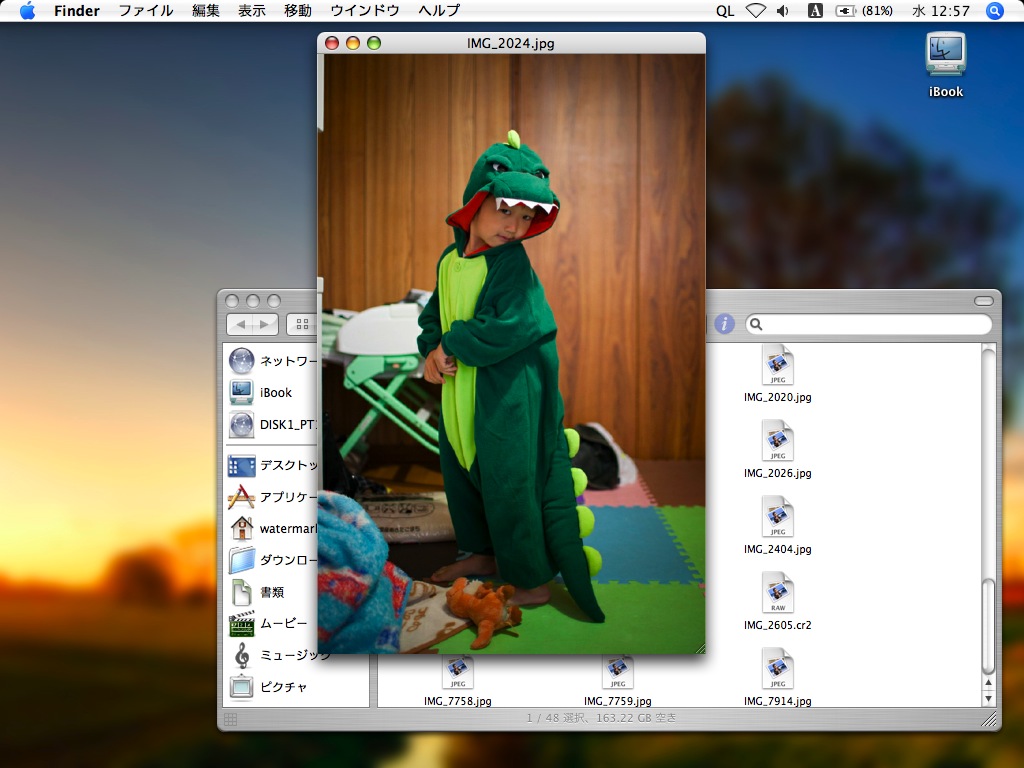
Quick Look came from Leopard (10.5), so Tiger does not have it. On 10.4, the near things are MacGizmo (it is paid, and it use modifier key click, not only spacebar) and context menu tools like FinderPop. But I wanted the same feeling as Leopard: choose a file in Finder, press Space, and preview shows. And I want it free, native, and light enough to keep running on my 1.2GHz G4. So I tried to make a small one.
What it does:
- It runs as a background agent. No Dock icon. Only a small "QL" on the right side of the menu bar, to quit.
- Finder is front + one file is selected + press Space -> a preview window (you can resize it). Press Space again, or Esc, to close. If another app is front, Space works normally.
- Supported format is only four, by purpose: JPG, PNG, PDF, TXT. For other files, nothing happens.
- Also there is a one-shot mode, no setup needed: open -a TigerQuickLook.app /path/to/file
One setup step (only for agent mode):
To catch the plain Space key, it needs CGEventTap. On Tiger this needs the checkbox "Enable access for assistive devices" to be ON, in System Preferences > Universal Access. Only one time. If it is OFF, the app shows a message and quits. The one-shot mode does not need this.
About keeping it light:
Images are decoded already small from the start (CGImageSourceCreateThumbnailAtIndex), never full size. PDF draws only page 1. CGPDFDocumentCreateWithURL reads pages lazily, so a 250 pages PDF opens as fast as a 1 page PDF - only page 1 complexity matters. TXT reads only the first 64KB. No prefetch, no cache, the window is throwaway.
Known limits (this is still v0.1):
- If you rename a file in Finder (inline edit) and press Space, you get a preview instead of a space character. An outside process cannot know Finder is in edit mode. Please press Esc to go back.
- Just after you switch to Finder, for about 0.3 second, Space maybe does not work yet (it checks the front app by polling; 10.4 has no notification for this). But selecting a file takes enough time, so usually it is ok.
I tested on iBook G4, Mac OS X 10.4.11. I did not try G3 or G5, or Leopard (Leopard already has the real Quick Look). "It works / it does not work on my machine" reports are very welcome.
This is my personal, non-commercial project. Free, MIT license. Source is on GitHub:
GitHub - watermark-hd/tiger-quicklook: Mac OS X 10.4 Tiger 用の軽量 Quick Look 代替(JPG/PNG/PDF/TXT)。Finder で選択して Space キー。
Mac OS X 10.4 Tiger 用の軽量 Quick Look 代替(JPG/PNG/PDF/TXT)。Finder で選択して Space キー。 - watermark-hd/tiger-quicklook
github.com
The zip below has the app and a short readme. Also there is a disk image on my site:
Tiger QuickLook
Mac OS X 10.4 Tiger 実機向けの軽量Quick Look代替。Finderでファイルを選んでSpaceキーでプレビュー(JPG/PNG/PDF/TXT)
oldmac.policy-log.jp
It is v0.1 and I still add more. I know MacGizmo already exists and it supports more formats - my one is just free, open source, uses the plain spacebar, and tries to stay light on slow machines. Sorry, English is not my first language, so some sentences maybe strange. Any feedback or bug report is welcome. Thank you.
Attachments
Last edited:
