
Become a MacRumors Supporter for $50/year with no ads, ability to filter front page stories, and private forums.
I think I figured it out… @gilles_polysoft is actually an Inter-Dimensional Being with no real conception of how our boring ol' linear time operates.

I think this hypothesis explains why every possible time estimate he mentions is hilariously off-base, as if he's just kinda winging it based on a date/time framework he doesn't actually understand 🤔

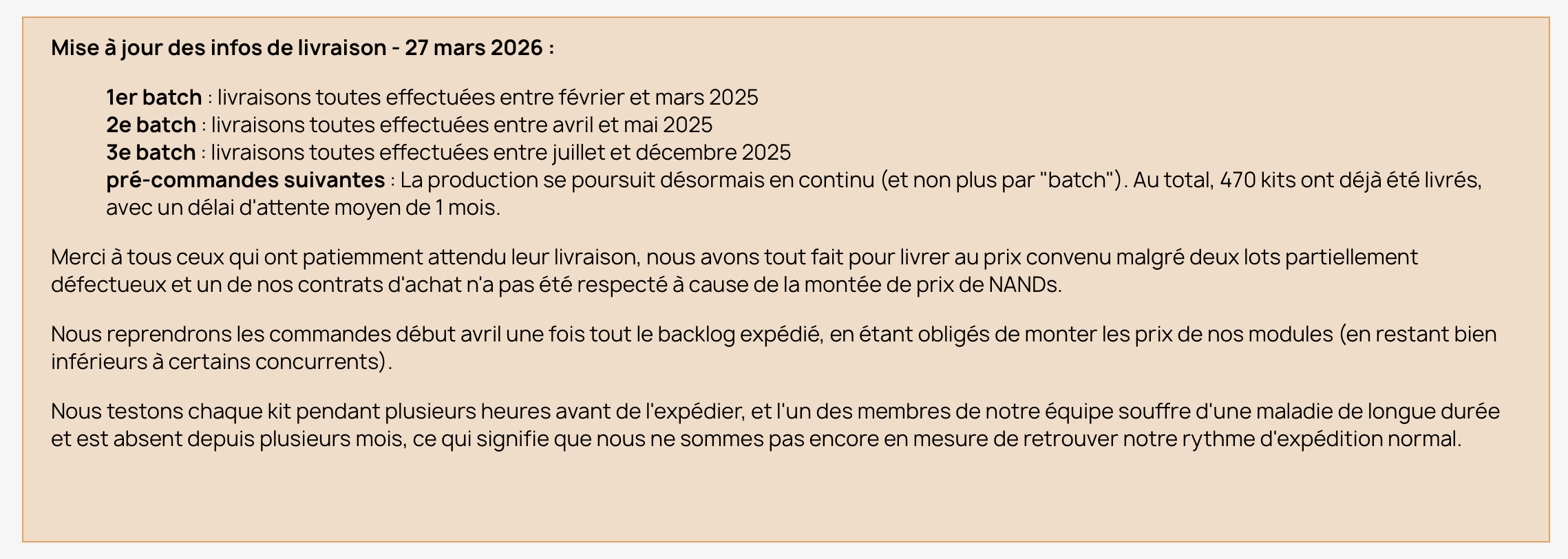
Relatedly: I just noticed that the French Polysoft homepage actually got an update on March 27 (just before Gilles posted his last lengthy-but-info-free treatise on March 31):
1779822123710.png

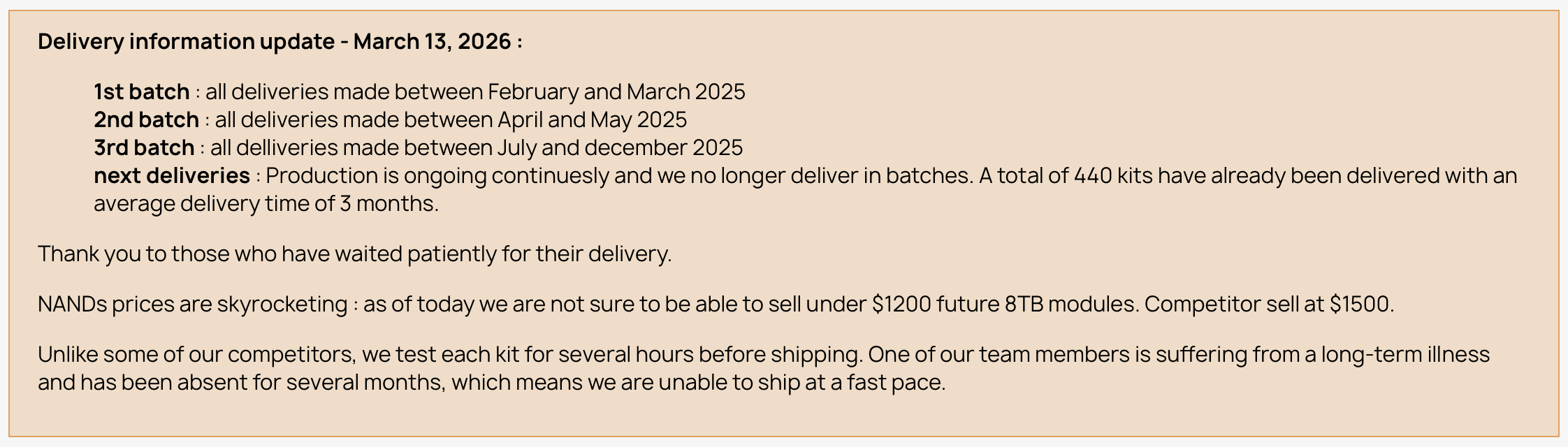
…whereas the English page last saw a March 13 update:
1779822496505.png


Based on the Inter-Dimensional Theory we can see that a whole 30 more kits were apparently shipped between those two updates, working out to ~3 kits per business day. However, the average delivery time/délai d'attente also dropped from 3 months to only 1 month! 🤯 Magic!

Oh, and also: "Nous reprendrons les commandes début avril une fois tout le backlog expédié" ("We will resume orders in early April once all the backlog has been shipped") —but of course it's now late May, the backlog obviously hasn't been cleared, and no further updates have appeared.

Perhaps when @gilles_polysoft emerges from whatever wormhole is currently shuttling him between quantum planes he will grace us with a few more glimpses into the majesty that is non-linear spacetime.
 
Posting some notes from my Fangyuan kit experience just in case anyone else trips over it.

I installed Apple Configurator on my M1 MBP to do the DFU update after installing the NAND module and reassembling. No matter what I did, I was getting errors trying to do the DFU update - I tried about six different USB-C/Thunderbolt cables (including a proper Apple brand cable as well as an OWC TB4 cable).

I took the system back apart and put the original NAND module back in - and confirmed I could do the DFU update with the original module - and reached out to Fangyuan via Aliexpress messages. They suggested manually downloading the ipsw file and doing a drag n drop onto Apple Configurator, rather than letting Configurator download (whatever firmware version it deems appropriate). So, after disassembling/reassembling again, I tried the drag n drop method, first with 26.5 and then with 26.4. 26.5 did not work but 26.4 did, for some reason.

So, if you have a M1 Mac Studio and have trouble doing the DFU restore, try manually downloading the ipsw and try an older version.
 
Posting some notes from my Fangyuan kit experience just in case anyone else trips over it.

I installed Apple Configurator on my M1 MBP to do the DFU update after installing the NAND module and reassembling. No matter what I did, I was getting errors trying to do the DFU update - I tried about six different USB-C/Thunderbolt cables (including a proper Apple brand cable as well as an OWC TB4 cable).

I took the system back apart and put the original NAND module back in - and confirmed I could do the DFU update with the original module - and reached out to Fangyuan via Aliexpress messages. They suggested manually downloading the ipsw file and doing a drag n drop onto Apple Configurator, rather than letting Configurator download (whatever firmware version it deems appropriate). So, after disassembling/reassembling again, I tried the drag n drop method, first with 26.5 and then with 26.4. 26.5 did not work but 26.4 did, for some reason.

So, if you have a M1 Mac Studio and have trouble doing the DFU restore, try manually downloading the ipsw and try an older version.
When I installed my kit I did the IPSW method first, albeit directly from the Finder, and not via Apple Configurator. I also had to give the restore a couple of tries before it worked correctly, but there were no issues once I got the DFU restore process to take hold. I attribute this to the fault of bugs in the software, or in the connectivity between the software and the DFU target machine, and not a fault of the SSD hardware.

Either the OS thinks the drive hardware is present or it's not, essentially. Since Apple does all the SSD controller abstraction in their own silicon now, as long as the NAND chips are communicating with the controller and the SMD parts are functional, there's not much else that can misbehave!
 
I'm in the UK and looking at the Fangyuan route for 8TB in my M3 Ultra. Does the seller usually declare full value so it's subject to import of 20%?

I see Polysoft are best avoided. Does anyone have a reputable 16TB route?

Thanks
 
I'm in the UK and looking at the Fangyuan route for 8TB in my M3 Ultra. Does the seller usually declare full value so it's subject to import of 20%?

I see Polysoft are best avoided. Does anyone have a reputable 16TB route?

Thanks
661-50224, 16 TB (Mac Studio (2025) with M3 Ultra), through the Apple Self Service Repair 😅
 
I have no much external SSD storage that I have no desire to upgrade my internal 1TB drive TBH. I've barely used 200GB of it as it is!
 
  • Like
Reactions: TheStork
i sent a complaint via official french fraud police - he refused to answer them. 10 days ago he posted a refund has been done but my creditcard company says no. im so tired of this sht. TJRNCLUBH from oct 2025
 
Im sorry to read about people having issues with polysoft. Just to mention iBoff have stuck to their 2 week lead time and shipped the item. Might be useful for anyone else looking to order.
 
Looking into to upgrading the M4 studio now since it seems like it's going to be the long long term machine.

What 3rd party ssd's have had the best reliability and comparable speeds?
 
Register on MacRumors! This sidebar will go away, and you'll see fewer ads.