
We've just released version 2.11 which includes
With this version you can install macOS 27 Golden Gate as a Virtual Machine in a host running macOS 26. Before installing the macOS 27 please download and install DeviceSupport_macOS_27_beta.dmg from Apple devleoper downloads. At present there is an issue https://github.com/utmapp/UTM/issues/7746 going on with macOS 27 and macOS 26 Guest installation when DeveloperSupport_macos_27_beta.dmg or Xcode 27 is installed. If you are facing the issue please enable "Use DFU Restore" in the Restore Image Section when creating the virtualmachine
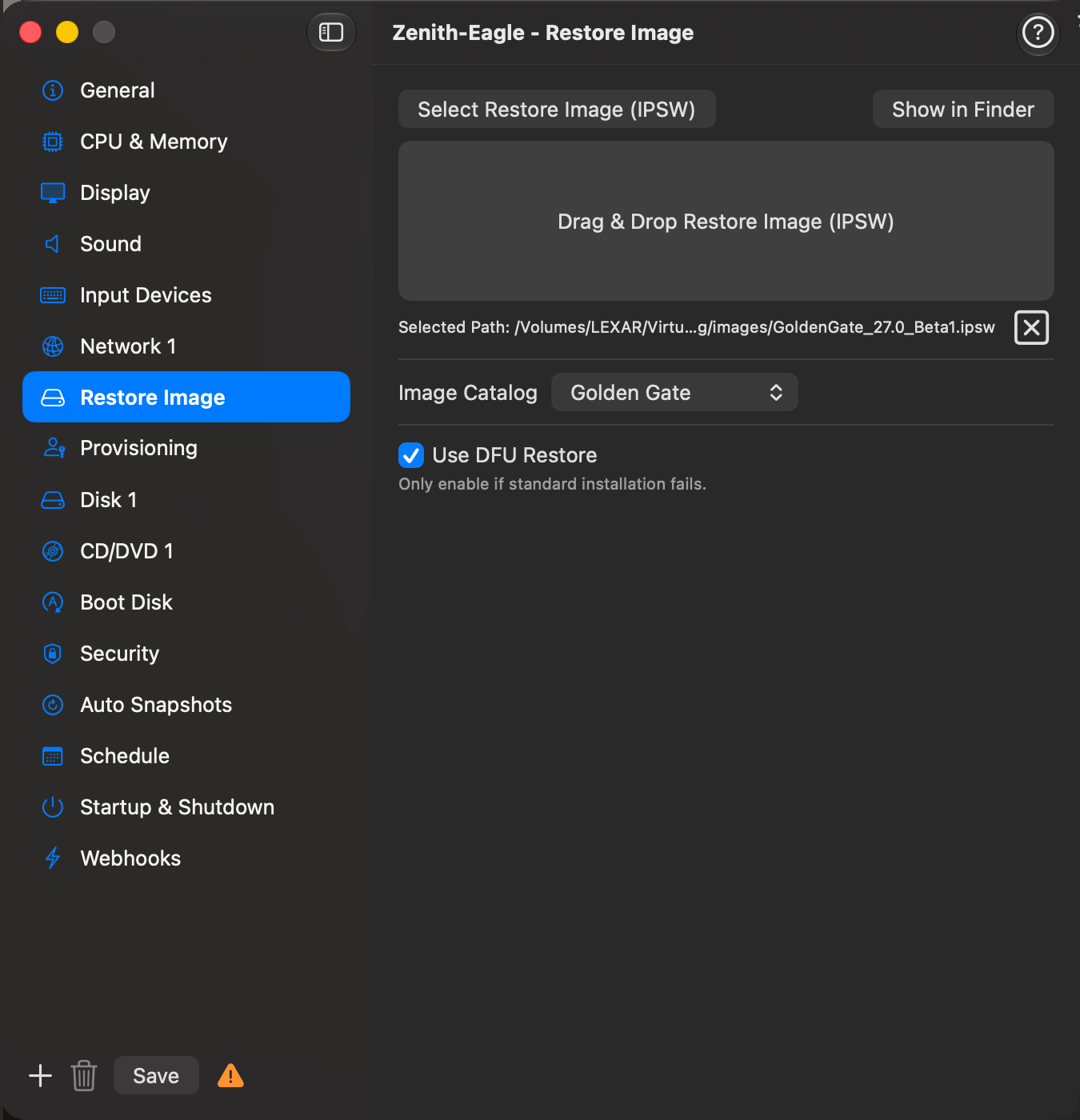
and continue the installation and you can successfully install VMS with macoOS 27 and macOS 26 on the host running macOS 26 witih xcode 27 beta installed or latest device support installed. You would not face the problem of installation failing at 78%. Hope this helps you in trying macOS 27 Golden Gate on hosts running macOS 26.
Spoiler Video
- DFU Restore installation mode (Mac, Web) When installing a macOS guest the standard installer can stall or fail partway through. Enable Use DFU Restore in the IPSW configuration tab to switch to an alternative installation path that uses Apple's DFU Restore — the same mechanism used to restore real Apple hardware. Only enable this option when the standard installation fails.
- Golden Gate added to Image Catalog (Mac, Web, CLI) macOS 27 Golden Gate is now listed in the Image Catalog. You can download the restore image directly from the catalog or select it in the Distro / Version dropdown when creating a new macOS VM.
With this version you can install macOS 27 Golden Gate as a Virtual Machine in a host running macOS 26. Before installing the macOS 27 please download and install DeviceSupport_macOS_27_beta.dmg from Apple devleoper downloads. At present there is an issue https://github.com/utmapp/UTM/issues/7746 going on with macOS 27 and macOS 26 Guest installation when DeveloperSupport_macos_27_beta.dmg or Xcode 27 is installed. If you are facing the issue please enable "Use DFU Restore" in the Restore Image Section when creating the virtualmachine
and continue the installation and you can successfully install VMS with macoOS 27 and macOS 26 on the host running macOS 26 witih xcode 27 beta installed or latest device support installed. You would not face the problem of installation failing at 78%. Hope this helps you in trying macOS 27 Golden Gate on hosts running macOS 26.
Spoiler Video
Last edited:

