Become a MacRumors Supporter for $50/year with no ads, ability to filter front page stories, and private forums.
For those of you old enough to remember the 1990 Apple Extended Keyboard is considered the best Apple ever made. It is also the last mechanical keyboard Apple ever made.

People like it because its durable, responsive, and distinct “click-clack” typing experience, the mechanical key switches made by Alps Electric remain unmatched by modern membrane designs. It featured physical springs under each keycap and a heavy chassis.

More here: Today in Apple history: Apple’s last mechanical keyboard is a winner

You can find them on eBay and with a ADB to USB dongle you can run it today.


View attachment 2655891

Yep. I came across some old Apple keyboards from the 80's a few weeks ago doing a garage clean out.
They were in rough physical shape, but the key action was still perfect, as were the keys themselves.

I couldn't help but spend some time typing on them just for the fun and feel.

It felt SO good. The tactile response just brings typing totally "alive".
 
  • Like
Reactions: bandits1
Wouldn’t that have a pretty big impact on battery life? Genuinely asking. The battery life on these is... ok but not fantastic, so I’d assume backlighting would shorten that or they’d have to make it thicker or larger.
third party ones do it. personally I dont see any reason for the keyboard to be wireless. I wouldn't even notice a wire going through my desk setup. maybe make it light up when plugged in
 
third party ones do it. personally I dont see any reason for the keyboard to be wireless. I wouldn't even notice a wire going through my desk setup. maybe make it light up when plugged in
Sure, I guess. Personally it just doesn’t matter to me much on a keyboard I’m using at a desk where I can control the lighting. ¯\_(ツ)_/¯
 
I started with a USB PC keyboard and just found it frustrating to use with the Mac and didn't feel like figuring out what was wrong, so I went with the Apple keyboard because of the integration with MacOS including TouchID, which benefits from the Secure Enclave. While I have my Apple Watch to unlock the Mac, it is far easier to tap the Touch ID than to double-press the watch button when prompted by other apps. Best of both.

I use the Apple keyboard for my personal machine and agree that it is not anywhere as good as the feel of my IBM long-throw work keyboard. For all day typing, the ancient IBM keyboard design wins. Yes, the Magic Mouse is terrible too (not to mention the insane charge port on the bottom). It's a tradeoff for sure.
Yeah I have my Apple Watch set as a backup but I couldn't imagine using it as my primary. It's a poor substitute for Touch ID and doesn't always prompt me right away either (although recent updates it's become more consistent).
 
Wouldn’t that have a pretty big impact on battery life? Genuinely asking. The battery life on these is... ok but not fantastic, so I’d assume backlighting would shorten that or they’d have to make it thicker or larger.
MacBook keyboards are backlit, so I don't think battery life is a big concern. I've been using this Satechi keyboard...

ASSET_MP_150873642.jpg


...because it's close to Apple's design, AND it's backlit. I use my computer everyday, and only have to charge it every 2 - 3 weeks (only using the backlight at night and at brightness level 4 of 10). Meanwhile I have to recharge my iPad mini 2 - 3 times a day.

Overall I'm happy with this keyboard, but Touch ID would actually be a huge upgrade. Not having to retype my password 5 - 6 times a day (conservatively) would be great, but I absolutely need the backlight.
 
  • Like
Reactions: delsoul
Its comical at this point that Apple doesn't include backlighting in their keyboards. They are great to type on but a hard no without the backlighting (for me at least).
They’d probably have to make them a lot heavier and thicker to fit the lights and a larger battery then. Same reason why the key travel is so bad - it’s worse than on MacBooks.

I think the main selling points of the Apple keyboard are touchID, the design and the lightness/ thinness. And they probably don’t want to compromise much on those. If you prioritize a good typing experience then there are, in my opinion, better third party options.

I personally have the Logitech MX Keys Mini and love it. I work on a MacBook Pro with an external display so I still have access to touchID when I need it. If I was working on a desktop Mac I might consider the Magic Keyboard to have access to touchID, but I really don’t like how they feel to type on..
 
Last edited:
They’d probably have to make them a lot heavier and thicker to fit the lights and a larger battery then. Same reason why the key travel is so bad - it’s worse than on MacBooks.

I think the main selling points of the Apple keyboard are touchID, the design and the lightness/ thinness. And they probably don’t want to compromise much on those. If you prioritize a good typing experience then there are, in my opinion, better third party options.

I personally have the Logitech MX Keys Mini and love it. I work on a MacBook Pro with an external display so I still have access to touchID when I need it. If I was working on a desktop Mac I might consider the Magic Keyboard to have access to touchID, but I really don’t like how they feel to type on..
That Logitech is so superior in every possible way (except touchID) it is not funny. Do not be fooled, at that price the "Magically Bad" keyboard with no backlight is simply an insult to our intelligence.
 
  • Love
Reactions: turbineseaplane


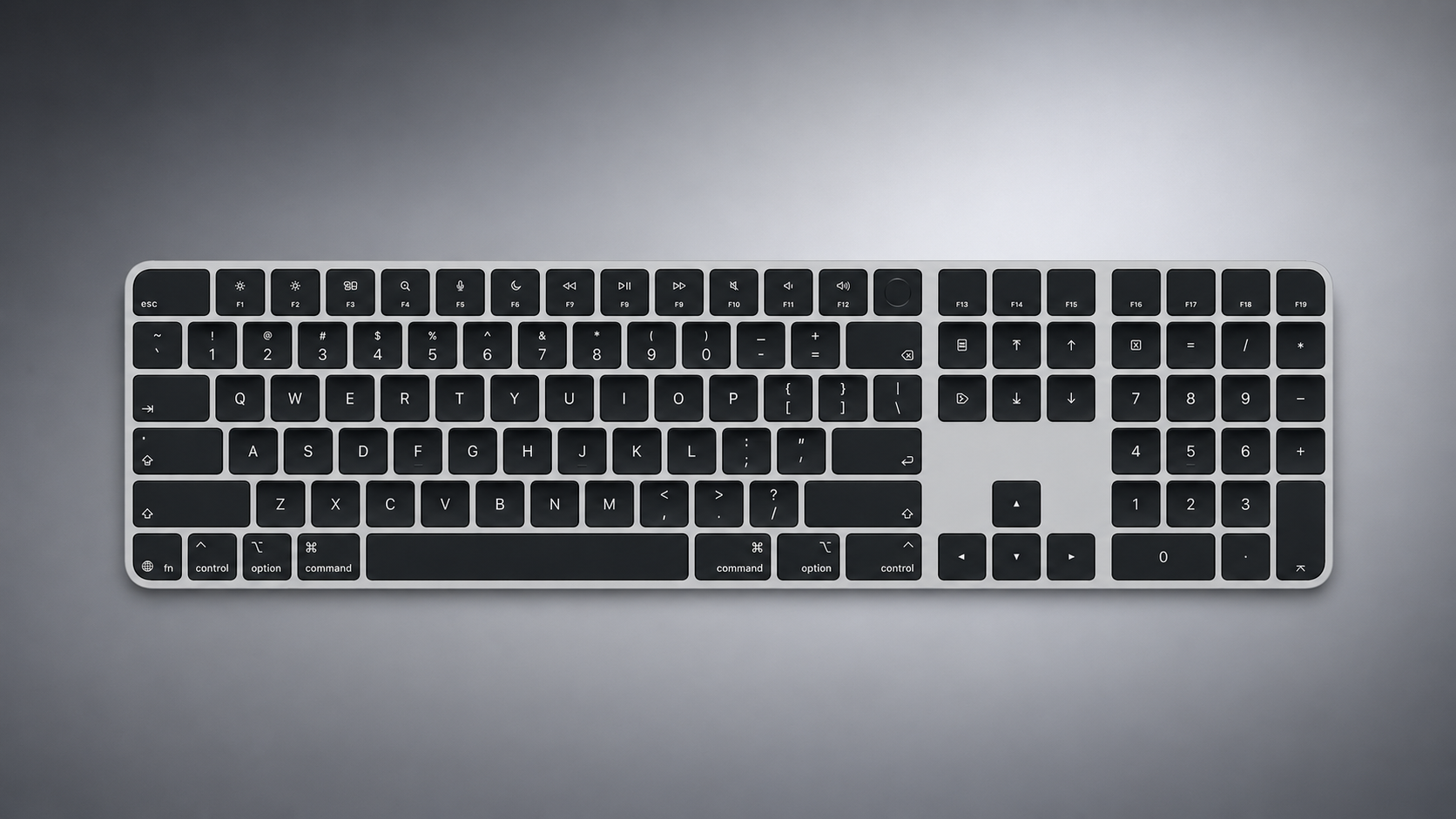
Apple today quietly introduced updated Magic Keyboard models with revised U.S. English key labeling.

apple-magic-keyboard-with-glyphs-2026-refresh.png

On the new keyboards, the tab, caps lock, shift, return, and delete keycaps are labeled with glyphs rather than edge text. On the full-size models with a numeric keypad, the change goes further, with the home, page up, page down, end, clear, and enter keys also swapping their text labels for symbols.

Four models have been updated: the Magic Keyboard, the Magic Keyboard with Touch ID, and the Magic Keyboard with Touch ID and Numeric Keypad in both white keys and black keys.

The one U.S. English model Apple has not refreshed is the Magic Keyboard with Numeric Keypad, which lacks Touch ID and continues to use text labels on the same keys.

The change mirrors the one Apple made to its laptops earlier this year, when the new MacBook Air, MacBook Pro, and MacBook Neo adopted glyphs on the same set of keys.

Since the U.S. English layout is the default option in Canada, Australia, New Zealand, and Singapore, among other countries, the new labeling effectively extends well beyond the United States. Apple has used glyphs on its British English and other European layouts for some time, so the symbols will already be familiar to customers there.

Article Link: Apple Quietly Refreshes Magic Keyboards
Approximately 1% of apple's audience will know what the symbol for the tab key means.
 
That Logitech is so superior in every possible way (except touchID) it is not funny. Do not be fooled, at that price the "Magically Bad" keyboard with no backlight is simply an insult to our intelligence.

Except that the battery in the MX Keys lasts almost half as long as the one in the Apple keyboard.

I'm used to touch typing, so backlit keyboard is of no use for me really. And for those who want it - Logitech is much cheaper, have all the features you need... I see no problem, just get it.
 
  • Love
Reactions: Cape Dave
Apple can’t hear. The keyboards need both backlighting and Touch ID in both a no numeric keypad and with numeric keypad version. The lack of backlighting is a fatal flaw.
 
  • Love
Reactions: Cape Dave
They’d probably have to make them a lot heavier and thicker to fit the lights and a larger battery then. Same reason why the key travel is so bad - it’s worse than on MacBooks.

I think the main selling points of the Apple keyboard are touchID, the design and the lightness/ thinness. And they probably don’t want to compromise much on those. If you prioritize a good typing experience then there are, in my opinion, better third party options.
This is not true. The Satechi keyboard I have (shown above in my previous post) is only a couple millimeters thicker than my trackpad. And with a full aluminum body still only a little heavier than a standard Magic Keyboard. But that shouldn't matter anyway for a desktop keyboard.
 
  • Like
Reactions: Cape Dave
Except that the battery in the MX Keys lasts almost half as long as the one in the Apple keyboard.

I'm used to touch typing, so backlit keyboard is of no use for me really. And for those who want it - Logitech is much cheaper, have all the features you need... I see no problem, just get it.
Yes, the battery is iffy, but I just plug it in 🙂
 
Apple can’t hear. The keyboards need both backlighting and Touch ID in both a no numeric keypad and with numeric keypad version. The lack of backlighting is a fatal flaw.
You are so 100% correct! It is truly an abomination that a FIVE TRILLION DOLLAR COMPANY cannot provide a backlit keyboard. Sad.
 
I had another thought... I have to manually turn on the backlight and set the level each time on my Satechi. Apple could also make the Backlit Magic Keyboard with TouchID even more innovative by having the backlight automatically come on at a user set time, or according to the time of day, and at a preset level.

You can have that idea gratis Apple. I promise I won't sue... 😏
 
I owned one of these years ago and they are quite difficult to type with. All sizzle, no steak. Very surprised Apple doesn’t make a keyboard that is comfortable to use. Logitech runs circles around this keyboard.
 
  • Love
Reactions: Cape Dave
I owned one of these years ago and they are quite difficult to type with. All sizzle, no steak. Very surprised Apple doesn’t make a keyboard that is comfortable to use. Logitech runs circles around this keyboard.
💯 💯 💯 💯 💯 💯 💯 💯 💯 💯
 
Register on MacRumors! This sidebar will go away, and you'll see fewer ads.