
Got a tip for us?
Let us know
Become a MacRumors Supporter for $50/year with no ads, ability to filter front page stories, and private forums.
Apple Quietly Refreshes Magic Keyboards
- Thread starter MacRumors
- Start date
- Sort by reaction score
You are using an out of date browser. It may not display this or other websites correctly.
You should upgrade or use an alternative browser.
You should upgrade or use an alternative browser.

If you find the Touch ID feature compelling, then it makes sense to stick with the Apple keyboard, especially if you are happy with the typing experience.Your Logi keyboard doesn't have Touch ID, which is the main reason many of us buy Apple keyboards for our Macs. I use a cheap little $10 wired mouse from Five Below that my partner got me after I got tired of having more expensive gaming mice break and having to charge them all the time (and the mouse is actually very good, I wouldn't hesitate to buy another, I've had no issues with it whatsoever and it's been almost a year, which is longer than my last two gaming mice lasted, it's the Titan GA-0536) but I will happily buy another Apple keyboard to keep the Touch ID as it's just so much more convenient to tap my finger than type my password and I do a lot of things on my Mac that would require a lot of password typing without it.
For my wife and I, we are happy to not use the Touch ID feature and get, for us, a far superior typing experience with the mechanical keyboards we use (incidentally, we choose key switch types that are quieter so you do not get a noisy clacking noise, but they are still noisier than the Magic Keyboards with their scissor switches).
For me, the Apple Watch does the job and, for my wife, Touch ID does not work at all and is completely useless. As an aside she can set it up and it work for a couple of uses and then it stop working. This has been the case since Touch ID was introduced on the iPhone. Why, we have no idea. Face ID works fine for us, but, of course, this is not available on a Mac.

DMG35
Contributor
IMO, not even great to type on without the ability to incline for a better typing angle.
Very true. It's been so long since I've used one I forgot how flat they sit.
coolfactor
macrumors G3
This sure seems like a step in the wrong direction to me. Users should not be expected to know what these symbols mean. I like the bottom row that has word and symbol.
That's my feedback, too. I always felt Apple offered the "friendliest" keyboards compared to PC keyboards. Do they think the icons are better? Is this about making Macs more geek-corporate friendly?
Not a fan.
coolfactor
macrumors G3
I suspect this is about respecting more languages, and not pushing English as hard. Fewer internationalized keys need to be printed because icons are universal.

Spacewiz
macrumors member
Just placed an order on Amazon for the current version with intelligible labels, as opposed to something I have to decode every time I move towards a key. What a joyless waste of an update...like others, a backlight would've been nice. The only thing that keeps me coming back, at least for now is that typing still feels great.

Mrkevinfinnerty
macrumors 68040

hybrid_x
macrumors 6502a
I'm still baffled by Apple not including multi-device pairing. Every $40 Bluetooth keyboard from Amazon can do it.
I have a work MacBook Pro, a personal Air, and my spouse has a MacBook Air as well. We both have iPads. We need separate Apple keyboard/mouse combos for each of them, or re-pair every time we switch devices. This is absolute nonsense in 2026.
I have a work MacBook Pro, a personal Air, and my spouse has a MacBook Air as well. We both have iPads. We need separate Apple keyboard/mouse combos for each of them, or re-pair every time we switch devices. This is absolute nonsense in 2026.
switcher3365
macrumors regular
I just bought the Magic Keyboard with Touch ID and the Magic Trackpad at the beginning of the month....I couldn't find any indication that they were updating it. Oh well...

nybear31
macrumors member
And with backlighting and no issues with battery life.I didn't even know Apple had a keyboard. Logitech keyboard is years better than this.
I started with a USB PC keyboard and just found it frustrating to use with the Mac and didn't feel like figuring out what was wrong, so I went with the Apple keyboard because of the integration with MacOS including TouchID, which benefits from the Secure Enclave. While I have my Apple Watch to unlock the Mac, it is far easier to tap the Touch ID than to double-press the watch button when prompted by other apps. Best of both.Your Logi keyboard doesn't have Touch ID, which is the main reason many of us buy Apple keyboards for our Macs. I use a cheap little $10 wired mouse from Five Below that my partner got me after I got tired of having more expensive gaming mice break and having to charge them all the time (and the mouse is actually very good, I wouldn't hesitate to buy another, I've had no issues with it whatsoever and it's been almost a year, which is longer than my last two gaming mice lasted, it's the Titan GA-0536) but I will happily buy another Apple keyboard to keep the Touch ID as it's just so much more convenient to tap my finger than type my password and I do a lot of things on my Mac that would require a lot of password typing without it.
I use the Apple keyboard for my personal machine and agree that it is not anywhere as good as the feel of my IBM long-throw work keyboard. For all day typing, the ancient IBM keyboard design wins. Yes, the Magic Mouse is terrible too (not to mention the insane charge port on the bottom). It's a tradeoff for sure.These are very expensive keyboards for their functionality and feel. You can buy excellent mechanical and standard keyboards from other manufacturers which far exceed their capabilities, ergonomics and typing speed for 50 to 80% of their price, albeit without Touch ID which is not needed if you have an Apple Watch. I use mechanical keyboards from Keychron and Das Keyboard which are better and, in the case of Keychron, far cheaper.
Form over function like their so called Magic Mouse which is an ergonomic disaster.
I was so disappointed by the keyboard relabeling that I immediately purchased an existing full size keyboard with numeric keypad from Amazon just to have a spare. No thanks, Apple. There was absolutely no need to make this change. Why not remove the Esc, Control, Option, and Command labels for the next iteration and leave just the symbols everywhere? Totally ridiculous.
And Fn key is now next to a tiny Control key on the left side just so I can press it more often by mistake. Control, Option and Command keys to the left of the space bar are now smaller than the corresponding keys on the right side. Who on earth thought this made any sense at all? IMO, this was a profoundly stupid design decision by Apple.
I value TouchID functionality so much that I have no choice but to use an Apple keyboard. But I'm not getting this one ever.
And Fn key is now next to a tiny Control key on the left side just so I can press it more often by mistake. Control, Option and Command keys to the left of the space bar are now smaller than the corresponding keys on the right side. Who on earth thought this made any sense at all? IMO, this was a profoundly stupid design decision by Apple.
I value TouchID functionality so much that I have no choice but to use an Apple keyboard. But I'm not getting this one ever.

TurboDrooler
macrumors member

Phaseangle
macrumors member
ignatius345
macrumors G3
Wouldn’t that have a pretty big impact on battery life? Genuinely asking. The battery life on these is... ok but not fantastic, so I’d assume backlighting would shorten that or they’d have to make it thicker or larger.they couldn't give them backlighting still? lame
DavidSchaub
macrumors 6502a
Matias offers a wireless aluminum keyboard with backlight for $139. Battery lasts one year on a single charge. It looks just like an Apple keyboard but without Touch ID.Wouldn’t that have a pretty big impact on battery life? Genuinely asking. The battery life on these is... ok but not fantastic, so I’d assume backlighting would shorten that or they’d have to make it thicker or larger.
Matias Wireless Aluminum Keyboard with Backlight
Wireless aluminum keyboard with backlight
matias.ca
Really wish they would have included backlit keys in this update. I own the current Magic Keyboard with Touch ID, and since its sits on my keyboard tray thats halfway under my desk, I can’t see the keys at the top half of the keyboard, and I always hit the stupid focus button when I’m going for the dictation key next to it. For $200 keyboard, I would think Backlit keys would be a no-brainer. Frustrates the heck out of me.
Can’t give us backlighting, but hey…can give us weird looking runes and glyphs! Pure apple!

RUQRU
macrumors 6502
For those of you old enough to remember the 1990 Apple Extended Keyboard is considered the best Apple ever made. It is also the last mechanical keyboard Apple ever made.
People like it because its durable, responsive, and distinct “click-clack” typing experience, the mechanical key switches made by Alps Electric remain unmatched by modern membrane designs. It featured physical springs under each keycap and a heavy chassis.
More here: Today in Apple history: Apple’s last mechanical keyboard is a winner
You can find them on eBay and with a ADB to USB dongle you can run it today.
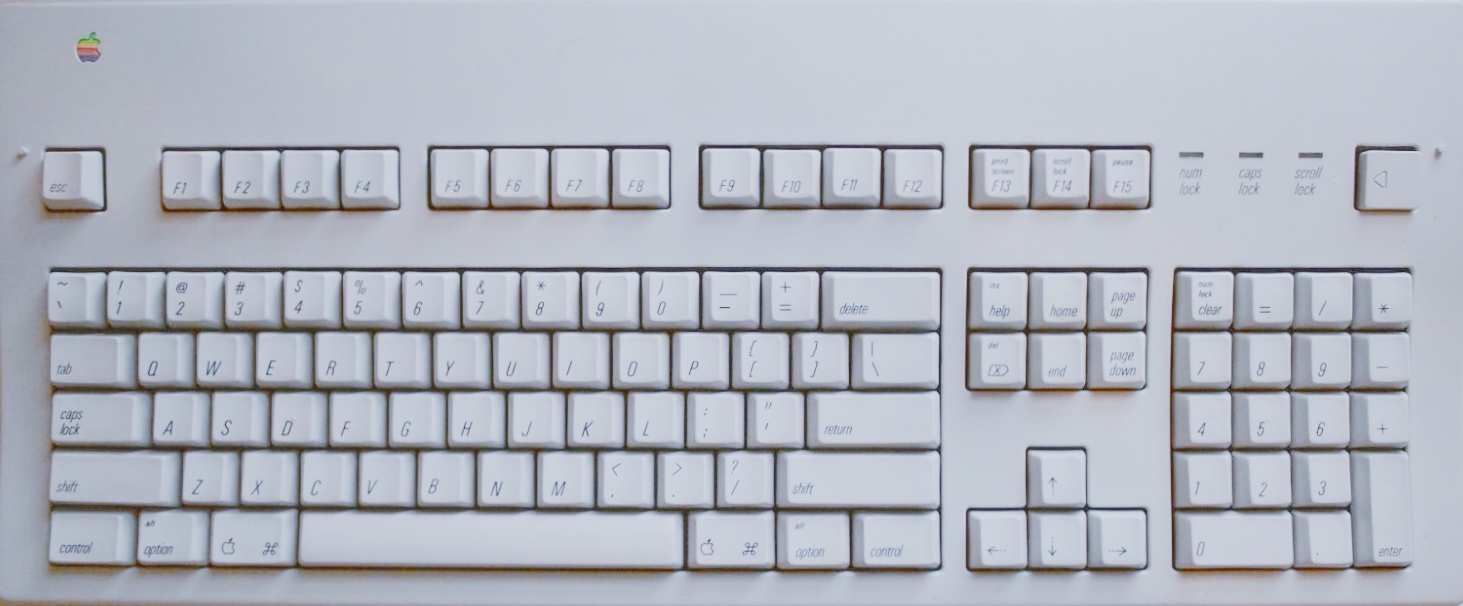
People like it because its durable, responsive, and distinct “click-clack” typing experience, the mechanical key switches made by Alps Electric remain unmatched by modern membrane designs. It featured physical springs under each keycap and a heavy chassis.
More here: Today in Apple history: Apple’s last mechanical keyboard is a winner
You can find them on eBay and with a ADB to USB dongle you can run it today.
Last edited:
TechRemarker
macrumors 6502a
At least now we know what the new MacBook Ultra keyboard will look like. Just hope they can move the touchID eventually under the trackpad, or of course ideal get faceid on the Mac, where it would be so much more helpful than on iPhone where I'd kill for touchid back (other than when using thick gloves but even then lots offer touch capacitive elements.
polyphenol
macrumors 68030
Is there no symbol/glyph/whatever you want to call it, for esc? On my UK English keyboard, I have no symbols on F5 and F6, nor fn. The symbol on F4 is very different.
I've been switching between keyboards of so many variations, for so long, I scarcely notice whether it has words or something else, or both. Certainly not consciously. I'm somewhat surprised at the strength of feeling in some replies.
Adding:
There is a Unicode APL symbol for esc: 238B BROKEN CIRCLE WITH NORTHWEST ARROW = escape
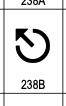
I've been switching between keyboards of so many variations, for so long, I scarcely notice whether it has words or something else, or both. Certainly not consciously. I'm somewhat surprised at the strength of feeling in some replies.
Adding:
There is a Unicode APL symbol for esc: 238B BROKEN CIRCLE WITH NORTHWEST ARROW = escape
Last edited:

MacBH928
macrumors G3
why you need an extra up and arrow keys?
and what are the 2 buttons under F13
I was hoping they'd bring back the lightning connector 😭
why?
ignatius345
macrumors G3
Interesting! Hard to tell from the photos, but it looks like there's a bit of a "pedestal" along the bottom that's a bit thicker to accomodate that battery (or, batteries since it smartly has a separate one for the backlight). Anyway, it's a nice keyboard.Matias offers a wireless aluminum keyboard with backlight for $139. Battery lasts one year on a single charge. It looks just like an Apple keyboard but without Touch ID.
Matias Wireless Aluminum Keyboard with Backlight
Wireless aluminum keyboard with backlightmatias.ca
My hunch is that the Apple Magic Keyboard is so thin that it won't accomodate a battery big enough for backlighting. And I think the reason it's that thin is to keep it as low as possible, which is better for ergonomics. The more your wrists are bent back, the more strain is put on them. When a keyboard is super low it's easier physically to keep your wrists up. I think this is why Apple has gone to such design extremes to keep it thin. That's my take anyway.