
Got a tip for us?
Let us know
Become a MacRumors Supporter for $50/year with no ads, ability to filter front page stories, and private forums.
Apple Quietly Refreshes Magic Keyboards
- Thread starter MacRumors
- Start date
- Sort by reaction score
You are using an out of date browser. It may not display this or other websites correctly.
You should upgrade or use an alternative browser.
You should upgrade or use an alternative browser.

knappeduivel
macrumors 6502
My logi keyboard and mouse are cheaper and much better than what Apple offers. Also more durable.
I used the original keyboard and mouse of my 2020 iMac only for first setup, never again. Apple has imho never made a proper mouse.
I used the original keyboard and mouse of my 2020 iMac only for first setup, never again. Apple has imho never made a proper mouse.


GuilleA
macrumors 6502
Your Logi keyboard doesn't have Touch ID, which is the main reason many of us buy Apple keyboards for our Macs. I use a cheap little $10 wired mouse from Five Below that my partner got me after I got tired of having more expensive gaming mice break and having to charge them all the time (and the mouse is actually very good, I wouldn't hesitate to buy another, I've had no issues with it whatsoever and it's been almost a year, which is longer than my last two gaming mice lasted, it's the Titan GA-0536) but I will happily buy another Apple keyboard to keep the Touch ID as it's just so much more convenient to tap my finger than type my password and I do a lot of things on my Mac that would require a lot of password typing without it.My logi keyboard and mouse are cheaper and much better than what Apple offers. Also more durable.
I used the original keyboard and mouse of my 2020 iMac only for first setup, never again. Apple has imho never made a proper mouse.
These are very expensive keyboards for their functionality and feel. You can buy excellent mechanical and standard keyboards from other manufacturers which far exceed their capabilities, ergonomics and typing speed for 50 to 80% of their price, albeit without Touch ID which is not needed if you have an Apple Watch. I use mechanical keyboards from Keychron and Das Keyboard which are better and, in the case of Keychron, far cheaper.
Form over function like their so called Magic Mouse which is an ergonomic disaster.
Form over function like their so called Magic Mouse which is an ergonomic disaster.


LanaDelDeathRay
macrumors newbie
Stated without a single glyph in sight...We have progressed so much as a society that we no longer rely on words for things. We're back to heiroglyphs to represent everything.
Ugh. And now trying to explain the keyboard to someone gets insane. Press the shift key. Yeah, the one with the arrow pointing up. No, not the arrow pointing up with the key that has a light on ot. No, not the one with an arrow pointing up that's by the one with an arrow pointing down.
And then, the page up, page down, home and end keys are there. The words with the icons make far more sense. Why eliminate them??
Let's hope this is the last Tim failure and things improve starting next month!!!

needsomecoffee
macrumors 6502a
We have progressed so much as a society that we no longer rely on words for things. We're back to heiroglyphs to represent everything.
Ugh. And now trying to explain the keyboard to someone gets insane. Press the shift key. Yeah, the one with the arrow pointing up. No, not the arrow pointing up with the key that has a light on ot. No, not the one with an arrow pointing up that's by the one with an arrow pointing down.
And then, the page up, page down, home and end keys are there. The words with the icons make far more sense. Why eliminate them??
Let's hope this is the last Tim failure and things improve starting next month!!!
Recently had to use the "function" modifier key on my Mac Keyboard. Fortunately it is labeled "fn" cause I do not use it much. Looked at this keyboard, and am a complete loss as the the glyph representing the "function" key. May the spirits be helpful when you have to explain to someone that they need to hold down the function key + F9 (etc.) on their Mac to enact F9 rather than "Next" should Apple Music be playing. Good Luck. NSC

tomtad
macrumors 68040

Honestly I was a bit worried about the keyboard typing quality when I bought it but I have been pleasantly surprised and it is still way quieter than most mechanical keyboards which is great because I have a partner who gets driven up the wall by loud keyboards. The hardest thing for me has been and still is the change to the button layout on the numpad coming from a PC. Whenever I go back to my PC I have to re-train myself or just use the number row up top instead of the numpad and I hate it.Typing on membrane keys is anything but magical on a non laptop keyboard. Scissor switches? Blah... The only thing they have over a 30 dollar mechanical keyboard is Touch ID.

Tyler O'Bannon
macrumors 65816
they couldn't give them backlighting still? lame
Yesss. Since the design has been around so long and hasn’t had R&D expenses, you would think they could add this so easily and remain extremely profitable on a $200 keyboard

unkl bob
macrumors regular
I've got a 2010 Mac Mini that is definitely NOT Apple silicon. It has a magic keyboard of its own, and while it does NOT come with biometrics, it does have an eject key...Why are these only supported on Apple Silicon macs? how hard is it for these to just be supported as USB keyboards for any Mac

carrrrrlos
macrumors 65816
reinisbaab
macrumors newbie
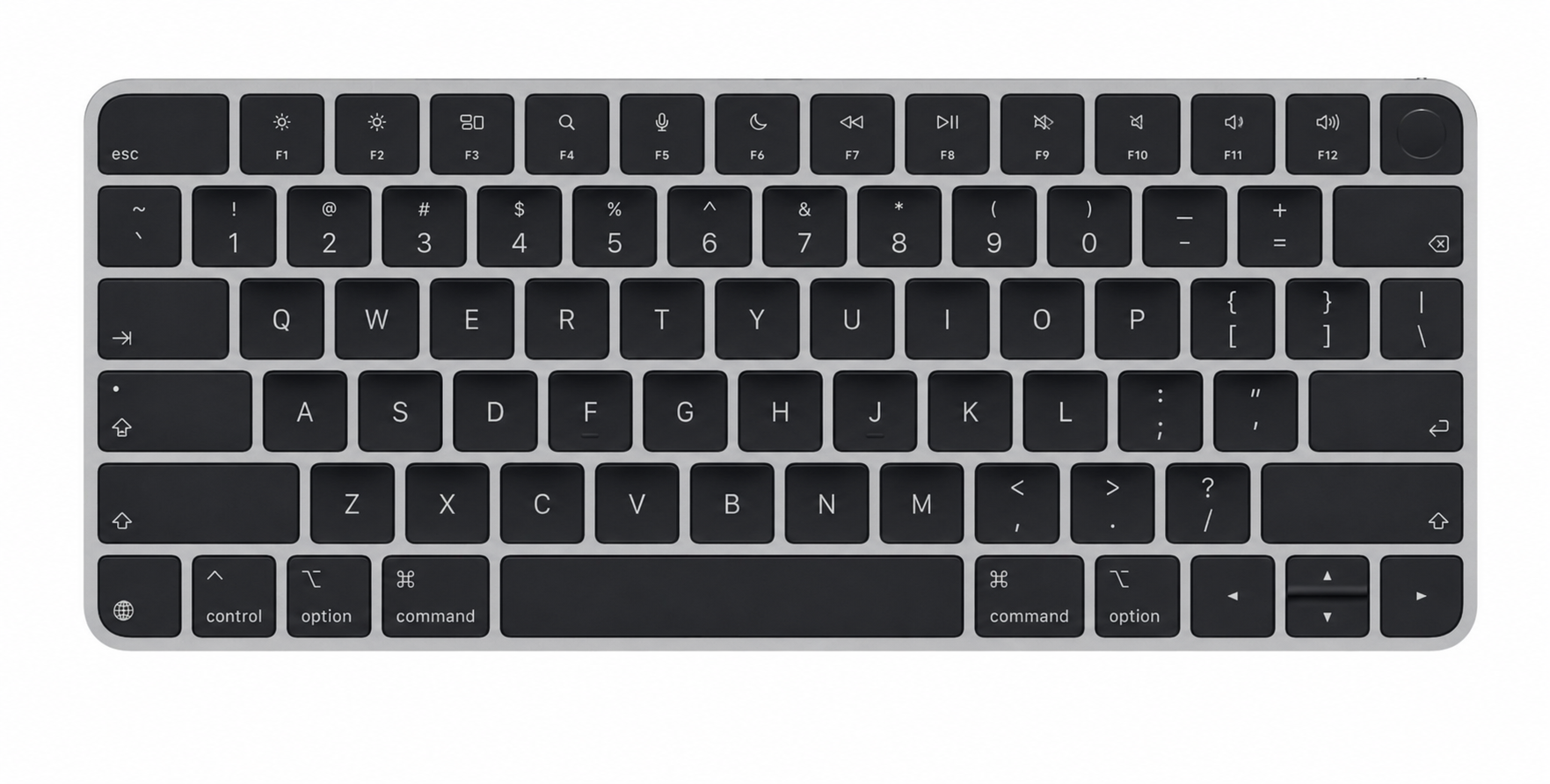
For years I’ve been waiting on the compact layout with black keys. And it’s still not available. I don’t need the numpad. Apple, please!

iDento
macrumors 65816
Not “Pro” enough for a black paint.I do not understand why Apple doesn't make a compact (non-numeric keypad) keyboard model with black keys.

bandits1
macrumors member
Even tenkeyless is a bit too wide for me and my uses. Release a 75% with backlighting, touch ID and an option for white or black keycaps and I'd buy one.
still no inverted T arrow keys on the compact one is ridiculous at this point. Every other Apple keyboard has corrected this, but this last vestige of the butterfly keyboard persists here and only here
bandits1
macrumors member
Yeah, white keycaps on a silver keyboard with gray fonts looks a little too sterile to me. At least make the fonts black.Why no Black Keys on the smaller version? WTF
unkl bob
macrumors regular
The keyboard that fits with my M2PRO Mac Mini Does in fact HAVE a biometric key, and it's bluetooth too.That would be awesome. For folks with desktop work set up, that would be great. I still have the old keyboard prior to the Touch ID and never felt it was justifiable to get a new keyboard for that.

klasma
macrumors G4
It’s a misguided cost-cutting measure, just like in the UI, because symbols mean they have to do less localization across markets.This sure seems like a step in the wrong direction to me. Users should not be expected to know what these symbols mean. I like the bottom row that has word and symbol.

anthorumor
macrumors 65816
Why do Americans struggle with symbols? The car dashboard has words instead, makes no sense.
Apple today quietly introduced updated Magic Keyboard models with revised U.S. English key labeling.
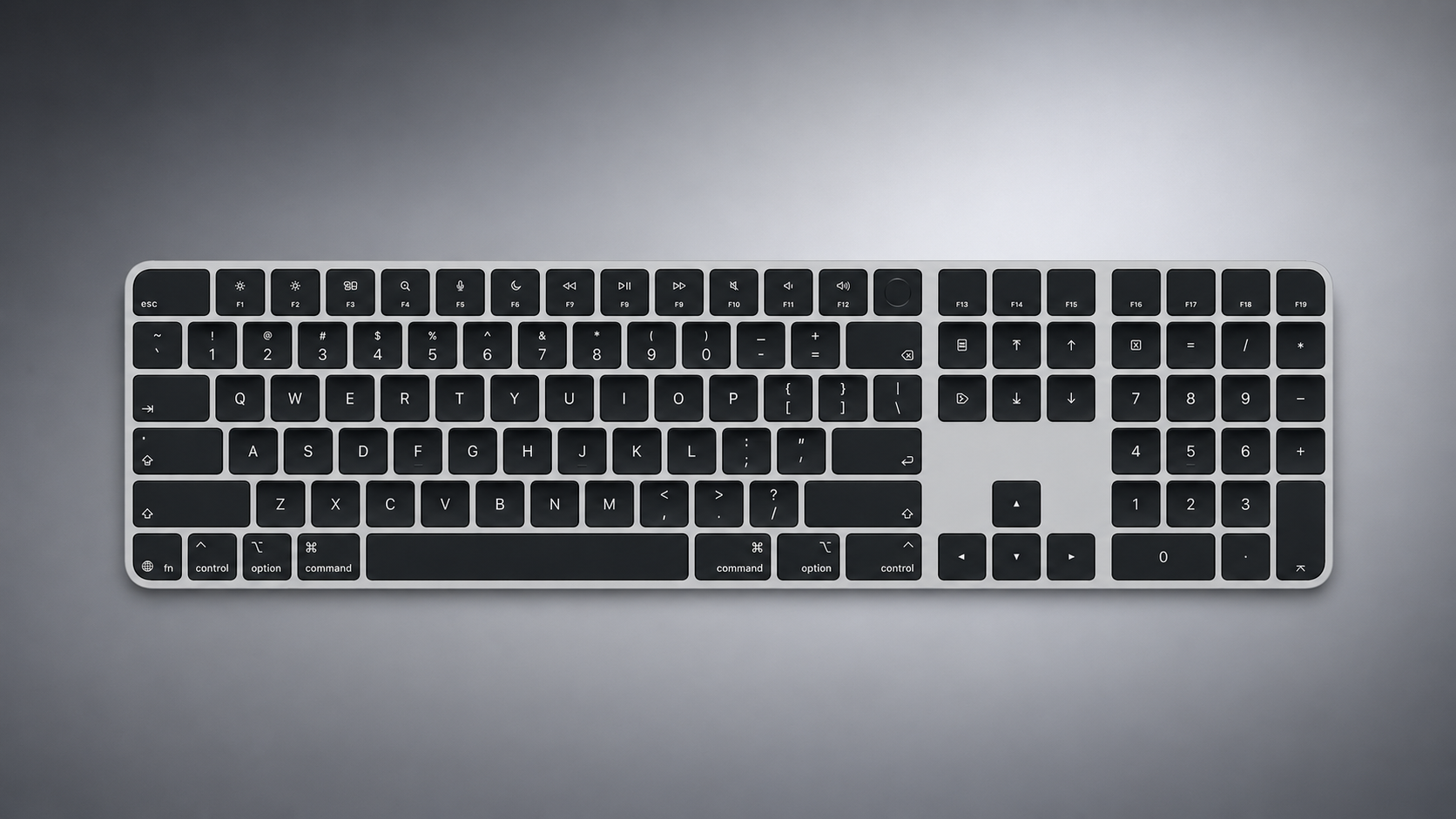
On the new keyboards, the tab, caps lock, shift, return, and delete keycaps are labeled with glyphs rather than edge text. On the full-size models with a numeric keypad, the change goes further, with the home, page up, page down, end, clear, and enter keys also swapping their text labels for symbols.
Four models have been updated: the Magic Keyboard, the Magic Keyboard with Touch ID, and the Magic Keyboard with Touch ID and Numeric Keypad in both white keys and black keys.
The one U.S. English model Apple has not refreshed is the Magic Keyboard with Numeric Keypad, which lacks Touch ID and continues to use text labels on the same keys.
The change mirrors the one Apple made to its laptops earlier this year, when the new MacBook Air, MacBook Pro, and MacBook Neo adopted glyphs on the same set of keys.
Since the U.S. English layout is the default option in Canada, Australia, New Zealand, and Singapore, among other countries, the new labeling effectively extends well beyond the United States. Apple has used glyphs on its British English and other European layouts for some time, so the symbols will already be familiar to customers there.
Article Link: Apple Quietly Refreshes Magic Keyboards

Never mind. Now I see it! 🙂