Become a MacRumors Supporter for $50/year with no ads, ability to filter front page stories, and private forums.
new digital audio !!

I did not see any reference to this but I understood the old Airport Express only had Apple's analog audio out.

Then new specs read:
* 3.5mm audio minijack for analog or optical digital sound

This suggests Airport Express will now allow audiophiles to pump digital signals to a fancy DAC which would be a HUGE thing for this admittedly tiny market, competing with products like Sonos and Squeezebox.
 
I did not see any reference to this but I understood the old Airport Express only had Apple's analog audio out.

Then new specs read:
* 3.5mm audio minijack for analog or optical digital sound

This suggests Airport Express will now allow audiophiles to pump digital signals to a fancy DAC which would be a HUGE thing for this admittedly tiny market, competing with products like Sonos and Squeezebox.

The old express has optical out.
 
Did I just sleep through an entire day, or did they really release a product on Monday? :D

no, everyone else however is on drugs.

There's no new product. A obvious update to the A/X. That's all.

Good news, but no big deal whatsoever.
 
Glad to see MacWorld agrees with me.

http://www.macworld.com/article/132566/2008/03/airportexpress.html

Some may be disappointed by the Express’ Ethernet specs—10/100Base-T rather than Gigabit Ethernet. Dry your tears: few people would see a benefit from Gigabit Ethernet on this device. Although we found that gigabit Ethernet did provide improved wireless-to-Ethernet transfer rates with the latest AirPort Extreme Base Station, the Express’ single Ethernet port means such benefits would be realized only if the Express was extending an 802.11n-only (5GHz) network and the Express was acting as a wireless-to-Ethernet bridge for a computer with Gigabit Ethernet.
 
I ran out and got one of these things today at the Eaton Centre Apple Store in Toronto. Actually, they exchanged my previous Express for a new Wireless-n one under their 14-day policy, since i got my last Express less than 14 days ago... and they issued me a refund for $26 for the price difference. All of which is nice.

But I use WDS to extend the range, and bridge my Xbox 360 onto my wireless network, and here are my observations: in WDS mode, the Express (nor the Extreme) will function in 5Ghz Wireless-N. In fact, they will only function in 2.4GHz, n/b/g backwards-compatibility mode.

This is a particularly upsetting limitation, since the 2.4GHz band in my condo in downtown Toronto is heavily saturated with cordless phones and other Wi-Fi hotspots. I was really, really, hoping the Express would let me move to 5Ghz... but nope.
That's even worse than no gigabit.
 
How can you tell by looking at the "About This Mac" which network protocol is supported? In addition to my new MBP, -- I know this is n -- we have a white MB 1.83Ghz -- about a year old. Is it n or g and how would I be able to tell when connected which protocol is in use by the connection? Also if I turn off a g device and all other remaining devices are g, will the n/w switch to n automatically?
 
Answer: What's the current network protocol ?

How can you tell by looking at the "About This Mac" which network protocol is supported? In addition to my new MBP, -- I know this is n -- we have a white MB 1.83Ghz -- about a year old. Is it n or g and how would I be able to tell when connected which protocol is in use by the connection? Also if I turn off a g device and all other remaining devices are g, will the n/w switch to n automatically?

Check Network Utility > Info. It would list the 802.11x protocols enabled on your machine. My link speeds shows 270 Mbit/s which is 802.11n. The base station would use the highest possible protocol/speed when communicating with devices. If a one-to-one protocol. The whole network might not switch up or down based on the slowest device. Instead it would talk to devices in .11a or .11b or .11g or .11n based on whatever is the max supported protocol/speed of the device its talking to. Same is the case when 2 laptops form an adhoc connection. If one has only .11a and you want to communicate, you got to scale down to .11a from .11g/n.
I don't think a network slows down for 1 slow device. Else introducing a slow-moe would kill the network throughput for faster devices. Makes sense ?
Hope this helps !
 

Attachments

  • snap.jpg
    snap.jpg
    66.5 KB · Views: 112
Check Network Utility > Info. It would list the 802.11x protocols enabled on your machine. My link speeds shows 270 Mbit/s which is 802.11n.!

What determines this number? is it depend on the account u have with your internet provider? mine says 130Mbit/s and model is Wireless network adapter (802.11a/b/g/n)

I just got the new AE today. :D:D:D
 
What determines this number? is it depend on the account u have with your internet provider? mine says 130Mbit/s and model is Wireless network adapter (802.11a/b/g/n)

I just got the new AE today. :D:D:D

You are probably running in b/g/n compatibility mode (2.4GHz). To get 270 or 300mbps you need to be in 5GHz n only mode (but then older b/g devices won't see your network).
 
What determines this number? is it depend on the account u have with your internet provider? mine says 130Mbit/s and model is Wireless network adapter (802.11a/b/g/n)
I just got the new AE today. :D:D:D

Yep, same for me. My APExpress is just 2 hrs old :D
Ok, for your question - No, it has nothing to do with the ISP. It's a function of the signal strength, distance between the APExpress and your laptop, electromagnetic pollution and other noise related factors in your wifi network. It shows 270 mbits/sec since the APExpress is about 15 feet from my laptop and almost in a LOS (Line of Sight) link.

You are probably running in b/g/n compatibility mode (2.4GHz). To get 270 or 300mbps you need to be in 5GHz n only mode (but then older b/g devices won't see your network).

I don't think so. That would be trying to force the APEX and laptop to work in 270/300 but it's not guaranteed. As I said earlier, wi-fi bitrate varies on all aforementioned factors and steps between bit-rates to acquire the highest achievable rate based on current network radio conditions.
In other words, APEX <--> laptop link would use the best protocol+ max speed on that protocol possible within current network conditions.
 
how do i do that?

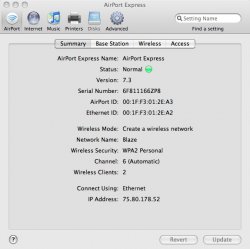
Airport utility > Double click on ApExpress on the left side pane. That would open this window (see attachment) > Radio mode

To add to my previous post about link speeds on .11n you can check: Airport Utility > Summary tab > Click on Wireless Clients > Opens the Wireless clients and depicts their link state in a graphical form. (Check Screen Shots). You would see that currently I have 130 mbits/sec on the MBP and 117 mbps on the MB. I believe both these link speeds are pertinent to .11n ack nd are the lower bit-rates because of non-ideal channel conditions. So a while back (when my MB was off) I was on 270 mbits/sec, now I have 130 mbps.
 

Attachments

  • snap1.jpg
    snap1.jpg
    81.8 KB · Views: 117
  • 1.jpg
    1.jpg
    71 KB · Views: 104
  • 2.jpg
    2.jpg
    68.7 KB · Views: 100
Airport utility > Double click on ApExpress on the left side pane. That would open this window (see attachment) > Radio mode


thank you for the fast replies guys. I actually found it then i checked the forum and boom.. the answer is here.

I'm loving this thing so far. it appears faster. No more disconnection like the old belkin. Sharing speakers is awesome. Sharing printer is even more awesome. Love It. :D
 
i just got one of these. i replaced my extreme and previous AE with this new one. I would have gotten a time capsule but there is no airtunes on that. either way i'm not liking this at all. It drops the signal all the bloody time.
 
thank you for the fast replies guys. I actually found it then i checked the forum and boom.. the answer is here.

I'm loving this thing so far. it appears faster. No more disconnection like the old belkin. Sharing speakers is awesome. Sharing printer is even more awesome. Love It. :D

Nothing's better than sharing knowledge ;)
I am a bit dissatisfied though. I replaced my crappy Trendnet .11g router with the APExpress. My DSL modem is on one wall while my Z-5500 is on the other side. If I want to use the APExpress as the primary base Station, I would not be able to connect it to my Z-5500 control pod (one of the reasons which makes the APExpress a cool gadget to me). I wanted to stream music and use the toslink optical input from the ApExpress. For the time being I am unable to do so. Damn it !! (But I do have a bluetooth based wireless music system(transmitter-receiver) in place :p). I have a question in mind which would need the geeks on these forums to put their thoughts into place. Would post it in a separate thread :)
 
reliability?

Any chance the new version will be more reliable than the prior one?

Mine was great until it suddenly died after less than two years of use. And I was not alone---there are reports all over about systematic failures of the airport express. $99 isn't a ton of money, but I don't want another one if it's not going to last.
 
How could anyone know ? They just came out ....


Any chance the new version will be more reliable than the prior one?

Mine was great until it suddenly died after less than two years of use. And I was not alone---there are reports all over about systematic failures of the airport express. $99 isn't a ton of money, but I don't want another one if it's not going to last.
 
How could anyone know ? They just came out ....

Teardowns of the prior version indicate they were made with substandard parts, so if someone has info on the construction of the new model, that could be an indicator. Just asking...
 
um.. i just noticed this.. but airport express doesnt work with movies??? nor anything else?? When they say airtunes.. they really mean music from itunes??? please tell me im wrong. Please tell me that I can use my speakers wirelessly through AE to watch videos/movies/etc...
 
um.. i just noticed this.. but airport express doesnt work with movies??? nor anything else?? When they say airtunes.. they really mean music from itunes??? please tell me im wrong. Please tell me that I can use my speakers wirelessly through AE to watch videos/movies/etc...

Airfoil.
 
The fine print in the Tech Specs seems to say that you can't use WPA2 when using the Express to join an existing network. I mainly use the Express for Airtunes and hooking up a remote printing so I wonder if this is true even if not extending a network.

Am I misunderstanding something? Is this something that a software upgrade could fix?
 
um.. i just noticed this.. but airport express doesnt work with movies??? nor anything else?? When they say airtunes.. they really mean music from itunes??? please tell me im wrong. Please tell me that I can use my speakers wirelessly through AE to watch videos/movies/etc...

No you can't. Airtunes only supports playback of music through the Airport Express. There is a program called Airfoil that enables play back of other sound events but I'm not sure if it allows you to shift the audio so that it matches the video. It can get out of sync if you're sending it wirelessly.
 
The fine print in the Tech Specs seems to say that you can't use WPA2 when using the Express to join an existing network. I mainly use the Express for Airtunes and hooking up a remote printing so I wonder if this is true even if not extending a network.

Am I misunderstanding something? Is this something that a software upgrade could fix?

It says in the tech sheet that you can use WPA2 during joining provided the network computers are Mac with airPort extreme cards and Mac OS X v10.3 or later.

Unless I interpret it wrongly?
 
Check Network Utility > Info. It would list the 802.11x protocols enabled on your machine. My link speeds shows 270 Mbit/s which is 802.11n. The base station would use the highest possible protocol/speed when communicating with devices. If a one-to-one protocol. The whole network might not switch up or down based on the slowest device. Instead it would talk to devices in .11a or .11b or .11g or .11n based on whatever is the max supported protocol/speed of the device its talking to. Same is the case when 2 laptops form an adhoc connection. If one has only .11a and you want to communicate, you got to scale down to .11a from .11g/n.
I don't think a network slows down for 1 slow device. Else introducing a slow-moe would kill the network throughput for faster devices. Makes sense ?
Hope this helps !

Yes it does. Thanks.
 
External USB HD

Tried my portable WD 160 on the new AE into the USB port and it does not work because the HD needs to have its own power source. Just posting so people know.
 
Register on MacRumors! This sidebar will go away, and you'll see fewer ads.