Hi everyone,
I’m trying to build a multiboot setup on an Early 2009 iMac with XP, Vista, 7, one extra FAT partition and several macOS partitions afterwards. I’m not using Boot Camp Assistant because I want this custom multiboot layout with multiple Windows partitions. I previously had XP + multiple macOS partitions working fine on a 2009 MacBook, so I know XP itself can work on these late Intel Macs.
The machine uses GPT + hybrid MBR. I tried both with and without rEFIt GPT/MBR sync.
XP finishes text mode setup successfully, but after the first reboot I either get HAL.DLL missing/corrupt or later UNMOUNTABLE_BOOT_VOLUME.
XP setup automatically writes partition(2) into boot.ini, but that results in the infamous hal.dll error. The only value that partially works is partition(1). With partition 1, XP reaches the XP logo and starts loading, but then crashes with UNMOUNTABLE_BOOT_VOLUME.
I already tried:
- fixmbr
- fixboot
- bootcfg /rebuild (always writes partition 2 to boot.ini)
- manually editing boot.ini
- chkdsk /r
- rEFIt MBR sync
- direct rEFIt booting
- Installing Vista first and installing XP first
- An unhealthy amount of reformatting the whole drive
I also created a custom XP SP3 ISO with nLite and integrated the NVIDIA textmode SATA drivers from the Snow Leopard Boot Camp DVD, but it changed nothing.
The interesting part is that I completely wiped the disk and tested XP installation through Boot Camp Assistant instead of my manual layout, and XP installed and booted perfectly immediately. So it seems the SATA drivers are not actually the issue and the problem is specifically related to the manually created hybrid MBR / partition mapping.
In Hiren’s BootCD, the XP partition appears active, as drive C:, and as the first partition after EFI, so from XP’s perspective it should look correct right?.
My current layout is:
(Formatted as GUID)
0 EFI
1 XP
2 Vista
3 7
4 FAT Partition for Experiments
5+ macOS partitions
I suspect Boot Camp creates a very specific Apple compatible hybrid MBR / BIOS mapping that XP depends on, while manually synchronized GPT/MBR layouts are technically valid but not fully compatible with XP on this hardware.
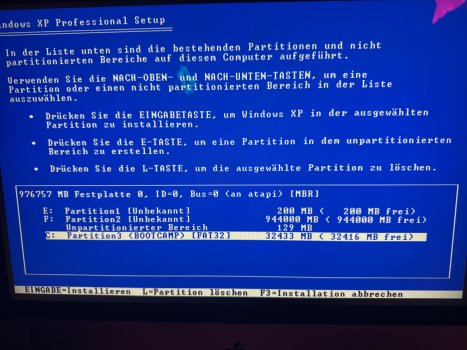
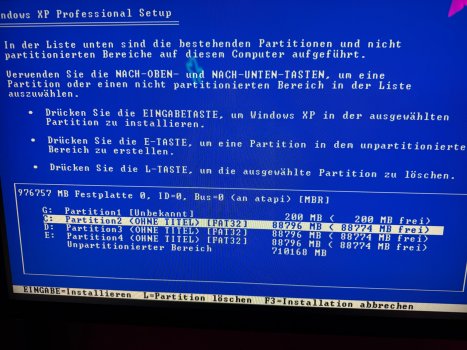
I’ll attach two photos of the partition layout during XP setup. The first is the Boot Camp layout and the second is my custom partition layout.
Any help would be greatly appreciated 😄
Thanks in advance!
I’m trying to build a multiboot setup on an Early 2009 iMac with XP, Vista, 7, one extra FAT partition and several macOS partitions afterwards. I’m not using Boot Camp Assistant because I want this custom multiboot layout with multiple Windows partitions. I previously had XP + multiple macOS partitions working fine on a 2009 MacBook, so I know XP itself can work on these late Intel Macs.
The machine uses GPT + hybrid MBR. I tried both with and without rEFIt GPT/MBR sync.
XP finishes text mode setup successfully, but after the first reboot I either get HAL.DLL missing/corrupt or later UNMOUNTABLE_BOOT_VOLUME.
XP setup automatically writes partition(2) into boot.ini, but that results in the infamous hal.dll error. The only value that partially works is partition(1). With partition 1, XP reaches the XP logo and starts loading, but then crashes with UNMOUNTABLE_BOOT_VOLUME.
I already tried:
- fixmbr
- fixboot
- bootcfg /rebuild (always writes partition 2 to boot.ini)
- manually editing boot.ini
- chkdsk /r
- rEFIt MBR sync
- direct rEFIt booting
- Installing Vista first and installing XP first
- An unhealthy amount of reformatting the whole drive
I also created a custom XP SP3 ISO with nLite and integrated the NVIDIA textmode SATA drivers from the Snow Leopard Boot Camp DVD, but it changed nothing.
The interesting part is that I completely wiped the disk and tested XP installation through Boot Camp Assistant instead of my manual layout, and XP installed and booted perfectly immediately. So it seems the SATA drivers are not actually the issue and the problem is specifically related to the manually created hybrid MBR / partition mapping.
In Hiren’s BootCD, the XP partition appears active, as drive C:, and as the first partition after EFI, so from XP’s perspective it should look correct right?.
My current layout is:
(Formatted as GUID)
0 EFI
1 XP
2 Vista
3 7
4 FAT Partition for Experiments
5+ macOS partitions
I suspect Boot Camp creates a very specific Apple compatible hybrid MBR / BIOS mapping that XP depends on, while manually synchronized GPT/MBR layouts are technically valid but not fully compatible with XP on this hardware.
I’ll attach two photos of the partition layout during XP setup. The first is the Boot Camp layout and the second is my custom partition layout.
Any help would be greatly appreciated 😄
Thanks in advance!