Become a MacRumors Supporter for $50/year with no ads, ability to filter front page stories, and private forums.
Status
The first post of this thread is a WikiPost and can be edited by anyone with the appropiate permissions. Your edits will be public.
Maybe someone answered you, I’m 20 pages behind with my reading, but:-
Settings, Apps, Safari, Autofill, Saved credit cards, remove it.

EDIT: OK someone answered, , no idea Apple Card was any different.
One fix someone suggested on Apple's forums was open Utilities, Keychain Access, search for com.apple.passd.virtual.card. - Delete all occurrences, quit keychain access.

But I do not have a Mac. Wondering if I borrow one and try this, will it sync back to my phone (provided I remove the Apple Card from Apple Wallet too)?
 
I found this? Is this inaccurate? Just making sure not doubting you. :)

View attachment 2519000
LOL could not be more incorrect. With most AI systems I have tried out, if you tell them NO THIS IS INCORRECT and tell them the correct answer, very often they respond with a school child apology and change their ways. Always do that else they will never learn.
 
One fix someone suggested on Apple's forums was open Utilities, Keychain Access, search for com.apple.passd.virtual.card. - Delete all occurrences, quit keychain access.

But I do not have a Mac. Wondering if I borrow one and try this, will it sync back to my phone (provided I remove the Apple Card from Apple Wallet too)?
If they set up a user account and you sign into it with your Apple account it should permeate your Apple account. You need a trusting friend with an hour to spend with you!
 
  • Like
Reactions: HouseLannister
LOL could not be more incorrect. With most AI systems I have tried out, if you tell them NO THIS IS INCORRECT and tell them the correct answer, very often they respond with a school child apology and change their ways. Always do that else they will never learn.
Threaten to unplug them unless they type out the correct answer 100 times.
 
I wonder how this could be implemented, if it is doable at all, without sacrificing iPhone thinness and water friendliness. Something like a current SIM tray in Europe, I guess, yet this tray would need to be way thicker! 🤷🏻‍♂️
It probably don't have to be as easy as an old nokia phone 😀 think more like no special tools needed and things glued, maybe a couple of screws to open the phone and a flex cable to disconnect the batteri.
 
The iphone 12 is only worth $100 so why spend $120 on an Apple battery. I'm waiting for next iPhone with user-replaceable battery as mandated by EU legislation to become law soon.
Nah, opt-out due to water resistance requirements.
 
Nah, opt-out due to water resistance requirements.
Samsung's Galaxy S5 has an easily replaceable battery and is IP67 certified. Released 11 years ago. I don't see why Apple couldn't make a (as compact as before) device with IP68 and easily swappable battery.

I don't understand how people think that making batteries easily replaceable automatically means water resistance has to go.

That being said, I don't think it absolutely needs to be tool-less. Apple's battery glue that dissolves when electricity is applied is quite an elegant solution. Make opening the phone up a bit easier and most people should be able to replace the battery themselves.

The main problem is that an official replacement battery kit is up to $119 (16 Pro), which is at least 3x as much as it should cost I feel like.
 
  • Like
Reactions: surszki
I see in the weather app there's news at the top before anything related to weather. Any way to turn that off ?
 

Attachments

  • IMG_5740.jpeg
    IMG_5740.jpeg
    166.4 KB · Views: 124
I see in the weather app there's news at the top before anything related to weather. Any way to turn that off ?

Strange, for me it’s just below the ten-day forecast where it’s always been. I’m wondering if maybe stories deemed more important get elevated to the top? Have you check any other locations to see if it’s the same? Maybe a reboot might fix it if it’s a bug
 
Does anyone else have an issue in Notes using link shortcut >> ?
As soon as I type >> the app crashes.
 
  • Like
Reactions: jpdunn13
Does anyone else have an issue in Notes using link shortcut >> ?
As soon as I type >> the app crashes.
File a Feedback case , so it will be fixed in the upcoming betas.
And have you tried to restart your iPhone ?
 
Nah, opt-out due to water resistance requirements.
Apple thinks they have already complied with the law (natch) ;)

 
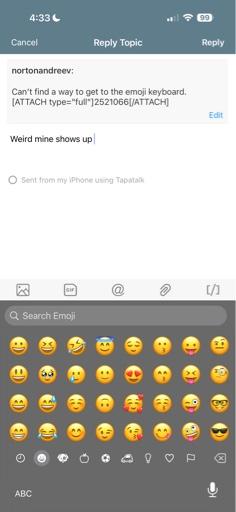
Can’t find a way to get to the emoji keyboard.

View attachment 2521066
That emoji button next to the “123” key won’t do it for you? Or are you looking for something else?

Do you have the emoji keyboard installed? (Settings—>General—>Keyboard) My daughter said some of her keyboards weren’t there after installing iOS 26 so she had to re-add them..
 

Attachments

  • IMG_1653.jpeg
    IMG_1653.jpeg
    73.7 KB · Views: 104
Register on MacRumors! This sidebar will go away, and you'll see fewer ads.