Become a MacRumors Supporter for $50/year with no ads, ability to filter front page stories, and private forums.
Status
The first post of this thread is a WikiPost and can be edited by anyone with the appropiate permissions. Your edits will be public.
So I'm approaching the iPad as someone who's typically been a Mac-first, Mac-only guy. Originally my use case was having a desktop/desktop-replacement laptop at home, and a laptop as my mobile computing and work device.

But now that my lifestyle has changed to be more nomadic, I've found myself wanting something even lighter and more mobile that my MacBook Air (which has evolved into my "home base" desktop replacement) - hence, an iPad, specifically an M4 Air with 256 GB storage.

Part of me feels a little perlexed by the social media (specifically YouTuber) criticism of the iPad Air. Much of it seems to centre around anger around it not being the iPad Pro. But the price delta between the Air and Pro is just way too much for me in CAD, and I simply don't care about it not having a 120 Hz ProMotion display, or Face ID. Face ID on my iPhone doesn't work for me anyway when I wear my N95 ("mask support" notwithstanding).

I see and use my iPad Air as something like an AlphaSmart on Steroids (which I find funny, since the AlphaSmart was invented by Apple engineers and Apple passed on developing and producing it). For my ADHD, it's actually worked really well for me as a system that focuses me solely on writing, especially when using an app like IA Writer, 1Writer or iWriter Pro.

My current setup is my iPad Air in a folio case, which I have propped up on a metal folding tablet stand to elevate for ergonomics, alongside my ProtoArc XK04 (one of the best portable bluetooth keyboards I've ever used), which it shares with my MacBook Air. Maybe it's because I'm still in my Apple honeymoon phase, or maybe it's because I'm reminded of my lost love, the 11" MacBook Air, but I absolutely love working on my iPad.

I'd love to find something like the MOFT Dynamic Folio, which would allow me to save weight and bulk by not needing my tablet stand, but it doesn't offer full side protection, and from what I've seen in the reviews, it's actually not very structurally stable.

Awesome, I’m glad to hear it’s working out well for you! 👍🏻. The iPad Air’s are very underrated in my opinion, they’re a very solid bang for buck. 👍🏻. I chose to go with the Pro since it’s my primary computer and my workflow benefits from the OLED and some of the other stuff, but I think the iPad Air really is the best option for most people. I will keep an eye out for cases that might suit your needs. 🙂👍🏻
 
  • Like
Reactions: Ludatyk
My current setup is my iPad Air in a folio case, which I have propped up on a metal folding tablet stand to elevate for ergonomics, alongside my ProtoArc XK04 (one of the best portable bluetooth keyboards I've ever used), which it shares with my MacBook Air. Maybe it's because I'm still in my Apple honeymoon phase, or maybe it's because I'm reminded of my lost love, the 11" MacBook Air, but I absolutely love working on my iPad.
You mind sharing a photo of this current setup? And I'm looking to add to my Galaxy Fold setup... unrelated to the iPad (don't really need to add any accessories to it), but it's still mobile nevertheless. Debating whether to get the Mind XPlay or Clevertura Keyboard... I'm really having a tough time deciding.
 
  • Like
Reactions: Kal Madda
Awesome, I’m glad to hear it’s working out well for you! 👍🏻. The iPad Air’s are very underrated in my opinion, they’re a very solid bang for buck. 👍🏻. I chose to go with the Pro since it’s my primary computer and my workflow benefits from the OLED and some of the other stuff, but I think the iPad Air really is the best option for most people. I will keep an eye out for cases that might suit your needs. 🙂👍🏻

Once in a while, I'll come across another iPad Air M4 vs. iPad Pro M5 video on YouTube and think, "Hmm, maybe I should have just gone with the iPad Pro," and then I'll look at the price difference between the Air and Pro and be reminded why I didn't get a Pro in the first place.

I've always gravitated towards the low-end of Apple's lineups, but have been drawn to the mid-range because I know my needs well enough to recognize that I'll likely regret not spending a little more up front for extra storage, memory, or processor performance when I had the chance.

That all being said, I've always felt like Apple's mid-range offerings like the iPad Air are basically there to be part of Apple's pricing ladder to get you to spend more for their Pro-level offerings. 😀
 
So I'm approaching the iPad as someone who's typically been a Mac-first, Mac-only guy. Originally my use case was having a desktop/desktop-replacement laptop at home, and a laptop as my mobile computing and work device.

But now that my lifestyle has changed to be more nomadic, I've found myself wanting something even lighter and more mobile that my MacBook Air (which has evolved into my "home base" desktop replacement) - hence, an iPad, specifically an M4 Air with 256 GB storage.

Part of me feels a little perlexed by the social media (specifically YouTuber) criticism of the iPad Air. Much of it seems to centre around anger around it not being the iPad Pro. But the price delta between the Air and Pro is just way too much for me in CAD, and I simply don't care about it not having a 120 Hz ProMotion display, or Face ID. Face ID on my iPhone doesn't work for me anyway when I wear my N95 ("mask support" notwithstanding).

I see and use my iPad Air as something like an AlphaSmart on Steroids (which I find funny, since the AlphaSmart was invented by Apple engineers and Apple passed on developing and producing it). For my ADHD, it's actually worked really well for me as a system that focuses me solely on writing, especially when using an app like IA Writer, 1Writer or iWriter Pro.

My current setup is my iPad Air in a folio case, which I have propped up on a metal folding tablet stand to elevate for ergonomics, alongside my ProtoArc XK04 (one of the best portable bluetooth keyboards I've ever used), which it shares with my MacBook Air. Maybe it's because I'm still in my Apple honeymoon phase, or maybe it's because I'm reminded of my lost love, the 11" MacBook Air, but I absolutely love working on my iPad.

I'd love to find something like the MOFT Dynamic Folio, which would allow me to save weight and bulk by not needing my tablet stand, but it doesn't offer full side protection, and from what I've seen in the reviews, it's actually not very structurally stable.
Check this out.

 
  • Like
Reactions: Kal Madda
You mind sharing a photo of this current setup? And I'm looking to add to my Galaxy Fold setup... unrelated to the iPad (don't really need to add any accessories to it), but it's still mobile nevertheless. Debating whether to get the Mind XPlay or Clevertura Keyboard... I'm really having a tough time deciding.

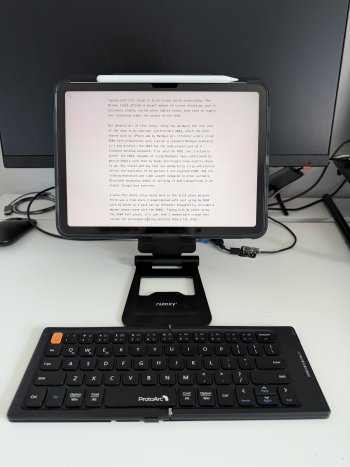
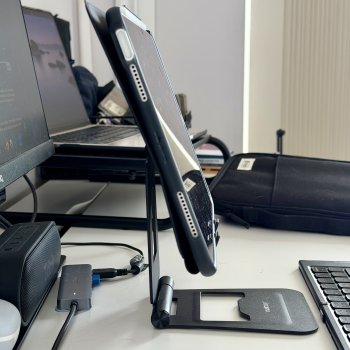
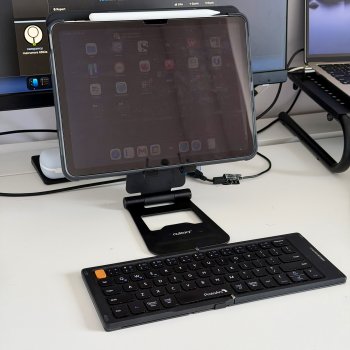
Gentlemen, behold!

IMG_7995.jpegIMG_7994.jpegIMG_7993.jpeg

Typing with this setup is surprisingly quite pleasurable (I typed this entirely on my setup pictured here). The Nulaxy stand affords a decent amount of screen elevation, and is extremely stable, unlike other tablet stands that tend to topple over backwards under the weight of the iPad. The hinges are extremely beefy, but the trade-off is that it's somewhat heavy (but in the same range, if not lighter than other similar stands).

But despite all of this fancy, shiny new hardware the real star of the show is my two-year old ProtoArc XK04, which the iPad shares with my iPhone and my MacBook Air. ProtoArc wisely sized the XK04 with measurements very similar to my M2 MacBook Air's keyboard; its big brother, the XK01 has similar measurements as a standard desktop keyboard. I've used the XK01, but I actually prefer the XK04; decades of using MacBooks have conditioned my muscle memory such that my hands and fingers know exactly where to go. Key travel and key feel are wonderfully crisp and precise versus the mushiness of my partner's Logitech K380. And its folding mechanism and light weight compared to other portable Bluetooth keyboards makes carrying and packing/unpacking it an almost thoughtless exercise.

I knew this whole setup would work in the first place because there was a time where I experimented with just using my XK04 with my iPhone 11 Pro as a productivity set up (ProtoArc thoughtfully included a decent phone stand with the XK04). Typing with my phone using the XK04 felt great; it's just that I needed more screen real estate for prolonged writing sessions (hence the iPad).

I suppose looking at this, one could just say, "Why didn't you get the Magic Keyboard or ESR's cheaper equivalent?" to which I'd say (a) I have a great portable keyboard already, why would I need to pay for another? (b) both solutions add a lot of extra weight to the iPad, and (c) I want the flexibility to use my iPad as a tablet with an all-around protective folio case (for eReading, web browsing, note taking, etc., without the keyboard.
 
Last edited:
I'd love to find something like the MOFT Dynamic Folio, which would allow me to save weight and bulk by not needing my tablet stand, but it doesn't offer full side protection, and from what I've seen in the reviews, it's actually not very structurally stable.

My wife uses the MOFT and has the same complaints - it’s great and the origami thing they have going on is tactile and fun, but it could be just a little more sturdy and protective.
 
Had a good experience this weekend and found that iPadOS has at some point fixed one of my last annoyances with it. You can now plug a Magic trackpad that has been paired to another device into the iPad, and after doing this you can pair it with the iPad. The way it used to work, in my experience, was that you needed to pair it to a Mac and then “forget this device” and only THEN could you pair it to an iPad. So you needed a Mac as an interim step to move a Magic trackpad from one device to a new iPad.

I realize this is a super niche thing but it’s nice that Apple changed it.

Now we just need smart photo albums and the ability to import music.
 
Register on MacRumors! This sidebar will go away, and you'll see fewer ads.