
Got a tip for us?
Let us know
Become a MacRumors Supporter for $50/year with no ads, ability to filter front page stories, and private forums.
macOS 10.14 Mojave on Unsupported Macs Thread
- Thread starter dosdude1
- WikiPost WikiPost
- Start date
- Sort by reaction score
You are using an out of date browser. It may not display this or other websites correctly.
You should upgrade or use an alternative browser.
You should upgrade or use an alternative browser.
- Status
- The first post of this thread is a WikiPost and can be edited by anyone with the appropiate permissions. Your edits will be public.


jackluke
macrumors 68040
It is made with a electron app I found it on softpedia 125 mb download about 450 mb expanded
Very interesting, electron app uses JavaScript, HTML, CSS and Node.js , in your previous example used also for the Windows virtualization in a web browser. Never figured that web browsers today can do almost everything like a little OS, especially with extensions (chrome, safari and so on) that act as real browser apps.
[doublepost=1535193903][/doublepost]
Oh not focusing on Finder per se. It's just a good use case, right? A core app (from many) to test...
Per our previous discussions, yes it is systemic and OS wide (so obviously a framework as we suspect). Here's another tid bit, you'll find interesting:
I disabled metal on my metal-supported card (pro 3.1 + GTX 680) and got Dark mode to glitch - the same way it does in Light mode. So it's definitely at the display framework +OpenGL framework. I think I eliminated for good the possibility of this being an AppKit or app bug. Good news. So back to OpenGL calls. I think NSVisualEffectView (as we were positing) is a red herring. It's at even a lower level.
By the way, to display metal processing on a metal supported card:
1. sudo defaults write /Library/Preferences/com.apple.CoreDisplay useMetal -boolean no
2. sudo defaults write /Library/Preferences/com.apple.CoreDisplay useIOP -boolean no
3. restart
Good job! Hope only that in "reporting bug" they will not rid these residual OpenGL calls for dark mode too, anyway since I'm not on DP8, take a stock backup of those two framework you indicated (and for safety take also the Skylight DP8 backup) to save at least a dark mode with working transparencies in case things will not go as they should.


pkouame
macrumors 65816
On electron....yes, web browser javascript frameworks like node.js are very powerful. Just take a look at what Microsoft did with Visual Code: the cross platform version of Visual Studio. It is not only leaner and meaner but better and much faster. I do cross platform web app development completely on my Mac now. Very very sweet. I hardly need my Windows VM any more...Very interesting, electron app uses JavaScript, HTML, CSS and Node.js , in your previous example used also for the Windows virtualization in a web browser. Never figured that web browsers today can do almost everything like a little OS, especially with extensions (chrome, safari and so on) that act as real browser apps.
[doublepost=1535193903][/doublepost]
Good job! Hope only that in "reporting bug" they will not rid these residual OpenGL calls for dark mode too, anyway since I'm not on DP8, take a stock backup of those two framework you indicated (and for safety take also the Skylight DP8 backup) to save at least a dark mode with working transparencies in case things will not go as they should.
Back to Light Mode... @TimothyR734 asked whether NVIDIA drivers could be a player here. Quite possibly yes, when running my Cinebench opengl tests on Mojave betas I noticed that the (internal) Nvidia driver version number is bumping up. So they may not have an official beta, but it seems to be a work in progress too.

thewebgal
macrumors member
Its the hot geek news for August 24th!Windows 95 runs on Mojave
https://www.cultofmac.com/572081/run-windows-95-app-mac/
Download it here - 129Meg
https://github.com/felixrieseberg/windows95/releases

KernkraftX360
macrumors member
Anyone with MacBook Pro mid 2010, core2duo, 7,1, with a working wifi after update to Mojave?

MoHaya
macrumors newbie
CoreDisplay and/or OpenGL. May even be kext'able. Reproducing a problem at will means one is close to a solution. Need a nap. Later guys.
[doublepost=1535173175][/doublepost]
Ouch! I remember that. Is upgrading to a 680 an option for you?
Yes I'm afraid I'll have to get either a 680 or 760 4gb

Macschrauber
macrumors 68040
I don't have Mac with AMD/ATI GPUs, but for ex. HD5000 if looking at the Extensions folder the main kexts needed for QE/CI should be:
AMD5000Controller.kext
AMDRadeonX5000GLDriver.bundle
AMDRadeonX5000.kext
AMDLegacySupport.kext
IOGraphicsFamily.kext
IOAccelerator2D.plugin
IOAcceleratorFamily2.kext
and few other
Probably the patched AMDRadeonX3000.kext is a bridge to bring Mojave legacy OpenGL Acceleration on HD5000/6000.
But that kext contains also the AMD Framebuffers, so for sure you are using w/o QE/CI just the standard AMD GPU kext identifying its properties in system profiler.
yes, @jackluke you're perfectly right that AMDRadeonX3000.kext loading is normal. I checked with another Mac Pro 3.1 with HD5870 running El Capitan
those extensions were loaded (El Capitan, fully supported on Mac Pro 3.1 and HD5870)
AMDRadeonX3000
AMD5000Controller
AMDFramebuffer
AMDSupport
AppleGraphicsDeviceControl

vince22
macrumors 6502a
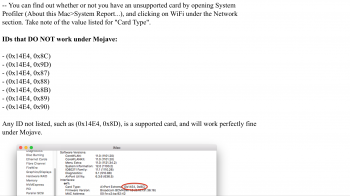
It’s working for me, WiFi patch not needed but make sure check your WiFi values at OP ( first page).Anyone with MacBook Pro mid 2010, core2duo, 7,1, with a working wifi after update to Mojave?
Attachments
Last edited:

webg3
macrumors 6502a
Yes workingAnyone with MacBook Pro mid 2010, core2duo, 7,1, with a working wifi after update to Mojave?
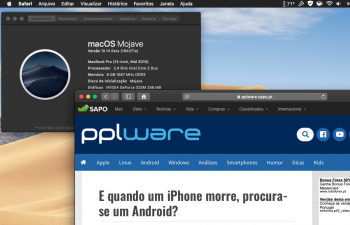
[doublepost=1535216307][/doublepost]I was here thinking about the artifacts of the dark mode and the light way, did you notice that the reduce transparency does not appear edges (dots) in windows like Spotlight? Is it some instruction behind the window sketch? Could you bring it back or forth and solve this problem?
Attachments
KernkraftX360
macrumors member
It’s working for me, WiFi patch not needed but make sure check your WiFi values at OP ( first page).
Can explain to me about wifi patch? I have a mid 2010, 7,1 MBP that has working wifi on 10.13.4 but now it stopped working as soon as I update to 10.13.6. It says WiFi: Hardware not installed. Let me try to see if it works under 10.14.
[doublepost=1535218636][/doublepost]
Yes working
[doublepost=1535216307][/doublepost]I was here thinking about the artifacts of the dark mode and the light way, did you notice that the reduce transparency does not appear edges (dots) in windows like Spotlight? Is it some instruction behind the window sketch? Could you bring it back or forth and solve this problem?
How do I check if I have the same wifi card as you? Or is it that my wifi card has deteriorated for its age and due to be changed?

thatsmeonlyme
macrumors regular
Forst of all: Thanks to dosdude for the mojave patcher. macmini mid 2011 working without problems. Same for Macbook pro 13" mid2011 and my imac 27" mid 2011. The only one as in High Sierra is the slow boot. Is there anyone who has got this away??

ASentientBot
macrumors 6502a
Hello, I was on the verge of installing this patcher on my MacBook 7,1 Core2Duo (A1342). Will it work or not?
You don't need the APFS Boot ROM patch, but Mojave will work perfectly on that machine.
?
HM,...
No one uses a Magic Mouse (1) and has issues with scrolling and right click?
HM,...
No one uses a Magic Mouse (1) and has issues with scrolling and right click?
Macschrauber
macrumors 68040
Check with the patch updater if the wifi patch was applied. Last time with dp8 the legacy wifi patch didnt worked and I implemented the patch manually.
coolio2004
macrumors 6502
You don't need the APFS Boot ROM patch, but Mojave will work perfectly on that machine.
MacMini 5.2 mid 2011 with AMD doesn't work with acceleration - makes no sense for me.Forst of all: Thanks to dosdude for the mojave patcher. macmini mid 2011 working without problems. Same for Macbook pro 13" mid2011 and my imac 27" mid 2011. The only one as in High Sierra is the slow boot. Is there anyone who has got this away??

tn-xyz
macrumors regular
Hello, I was on the verge of installing this patcher on my MacBook 7,1 Core2Duo (A1342). Will it work or not?
yes, it will work.

Macschrauber
macrumors 68040
?
HM,...
No one uses a Magic Mouse (1) and has issues with scrolling and right click?
I do sometimes have this issue when Bluetooth is not recognized. I have onBoard Bluetooth plus a USB Dongle for 4.0 - BT in the menu bar is greyed out, MM1 is working, with missing touch funcionality. Let BT display its icon in the menu bar and check again.
Bluetooth Explorer from the developer tools helps providing more details.
vince22
macrumors 6502a
Can explain to me about wifi patch? I have a mid 2010, 7,1 MBP that has working wifi on 10.13.4 but now it stopped working as soon as I update to 10.13.6. It says WiFi: Hardware not installed. Let me try to see if it works under 10.14.
[doublepost=1535218636][/doublepost]
How do I check if I have the same wifi card as you? Or is it that my wifi card has deteriorated for its age and due to be changed?
Can explain to me about wifi patch? I have a mid 2010, 7,1 MBP that has working wifi on 10.13.4 but now it stopped working as soon as I update to 10.13.6. It says WiFi: Hardware not installed. Let me try to see if it works under 10.14.
[doublepost=1535218636][/doublepost]
How do I check if I have the same wifi card as you? Or is it that my wifi card has deteriorated for its age and due to be changed?
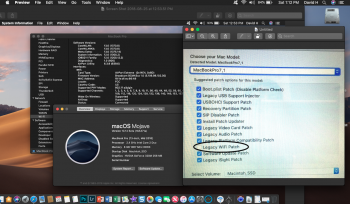
here's my mid 2010 MBP 7,1 wifi card values and you can try this wifi patch even though I didn't use it with mine.
Attachments
Last edited:
I do sometimes have this issue when Bluetooth is not recognized. I have onBoard Bluetooth plus a USB Dongle for 4.0 - BT in the menu bar is greyed out, MM1 is working, with missing touch funcionality. Let BT display its icon in the menu bar and check again.
Bluetooth Explorer from the developer tools helps providing more details.
I´m not sure we are talking about the same thing...
Cause Magic Mouse only has touch for scrolling in any directions, there is no wheel...
and this don´t work.
cursor and left click is working.
everything else not.
so, no bluetooth problem here.
where can i find developer tools and bluetooth explorer?

OGNerd
macrumors regular
Since the MBA 13" mid-2011 supports HS, presumably it gets the genuine Apple APFS boot ROM when installing HS and therefore does not need the dosdude1 APFS boot ROM patch for Mojave. Or is this faulty logic?
Your logic is sound, no ROM modification is required for the 2001 MBP to boot APFS volumes.

ivofonseca
macrumors newbie
Hello. I decided to try to apply the ROM patch on my Macbook Pro 2009. Faced with the options given by the patch software, I opened the computer and found the chip reference, but I still have doubts about the correct option. Attached I send the options the patcher gave me and a photo of the chip itself. Can anyone tell me the right option? I bet on the second one, but my computer wants me to be sure 🙂 Thank you all, Ivo.


Last edited:

sapphade
macrumors member
I would agree with you it does appear to be the second one . I know that the two I patched were . I hold no responsibility if its not tho 🙂

DaniloGeekDude
macrumors 6502
Tenth seed of iOS 12 /PB8 is out I wonder if another developers beta of Mojave will follow 🙂
If I have to guess, it will be this coming Monday, which seems to be the norm at this time.