
Got a tip for us?
Let us know
Become a MacRumors Supporter for $50/year with no ads, ability to filter front page stories, and private forums.
macOS 10.14 Mojave on Unsupported Macs Thread
- Thread starter dosdude1
- WikiPost WikiPost
- Start date
- Sort by reaction score
You are using an out of date browser. It may not display this or other websites correctly.
You should upgrade or use an alternative browser.
You should upgrade or use an alternative browser.
- Status
- The first post of this thread is a WikiPost and can be edited by anyone with the appropiate permissions. Your edits will be public.


Starplayr
Cancelled
my last words on this, because it's a completely different topic and doesn't belong here.
just because something runs doesn't mean it runs as intended or well (see this topic).
same goes for any other OS, mobile or desktop, independent from the company.
and as you implied regarding iOS: they take precautions. because i know very well, how apple literally destroyed the iPhone 4S and iPad Mini 1 with iOS 9. the performance is a mess and there's no going back.
my MBP6,2 runs on mojave too. does it run well? no.
is it because of the beta phase (which it was excluded from intentionally)?
i don't know yet and we will see.
the (business) premise apple has set is modern technology and with mojave, it's the GPU.
Apple has never sold a Mac with a decent GPU. So requiring Metal is kinda crazy. Even games that use metal run like crap compared to the same hardware running in bootcamp running the same game. Prime example is Fortnite which runs on Mac and PC. Mac uses Metal. PC uses DirectX.
Apple really needs to make metal work well in order to make it a requirement.
Metal on Mac in my opinion has to mature and on the Mac it hasn't yet. So to make this an absolute is really dumb. Apple should have made Mojave a transitional OS (metal or OpenCL/OpenGL). Then give people a road map of where Apple is taking the hardware and software and when users should upgrade or keep what they have.
I never liked MicroSoft, but what they did with Windows 10 is impressive especially with it running on Macs. You don’t even have to install bootcamp anymore to make it work great. And because of this you do not see a lot of wasted time patching and testing it like we are with unsupported macs and home brewed computers. It installs most of its drivers automatically and even if its an older driver or missing audio it takes like a few minutes to get it to 100%.
Apple has overall done a great job on iOS. And for some time now Macs have become an after thought for the company. They say no that is not the case but look at the Mac Pro. 2013 in 2018 world? IMac Pro already a year old, overpriced, builtin everything and to play games you still need bootcamp. Mac mini 2014? Mac hardware is getting long in the tooth. Buying new isn’t that great anymore. And when you do, you get a crappy integrated and/or discrete GPU. For Apple to change that they silll need to put top of the line GPUs in and stop glueing the boxes and soldering everything to the mobo. And they need to do this without gauging the customer. Mac video cards for made for Macs need to be the same prices at their PC counter parts. Most PCIe cards are the same except for a couple pins and Mac firmware. And the RAM. 16GB machines as the max in most units and is often non-upgradable because it is soldered to the motherboard? New machines need more capacity. If I bought a new Mac Book Pro today, I would probably sell it in less than 1 year for many reasons. 1 glue. 2. more glue (battery is glued). 3. remove the battery and you have to replace the trackpad or cable because well it's glued! Macs are not iPhones. Stop designing them like an iPhone and start designing like a computer. More RAM options, user upgradable in a simple slot, do the same for the SSD slot and you might actually get more people buying your stuff again.
Last edited:

Thank you all for the comments and a big thanks for @dosdude1 for his big work! This is something awesome to get the new update on an old MacBook .
I just got an 2011 mid Air and it works fine, with no problem on it, no problem with sound, internet, or nothing else.
For those who get the "no logo" error when booting up:
After you install and patch, there is an very important thing, to edit the: :"/Volumes/Mojave/Library/Preferences/SystemConfiguration/com.apple.Boot.plist" "Kernel Flags" to "-v -no_compat_check keepsyms=1".
This probably will fix the no logo booting error, and your Mac will boot with the new software.
I got a question: Can we just update to the next beta when it comes out thru the AppStore, or we have to make a new USB installer with the next beta on it?
I just got an 2011 mid Air and it works fine, with no problem on it, no problem with sound, internet, or nothing else.
For those who get the "no logo" error when booting up:
After you install and patch, there is an very important thing, to edit the: :"/Volumes/Mojave/Library/Preferences/SystemConfiguration/com.apple.Boot.plist" "Kernel Flags" to "-v -no_compat_check keepsyms=1".
This probably will fix the no logo booting error, and your Mac will boot with the new software.
I got a question: Can we just update to the next beta when it comes out thru the AppStore, or we have to make a new USB installer with the next beta on it?

Joep1000
macrumors newbie
Hello, I'm wondering something about the supported macs section. With the MacBook Pro's from 2010 to 2011, do you mean that all MacBooks from mid 2010 to late 2011 are supported, or only the mid 2010 and late 2011 MacBook Pro's? I would love to try this as my second partition. Thanks in advance.

tn-xyz
macrumors regular
Hello, I'm wondering something about the supported macs section. With the MacBook Pro's from 2010 to 2011, do you mean that all MacBooks from mid 2010 to late 2011 are supported, or only the mid 2010 and late 2011 MacBook Pro's? I would love to try this as my second partition. Thanks in advance.
it means that only core i's are supported at this point.
core 2 duo suffers from kernel panic right now.

nekton1
macrumors 65816
Thanks for this. It worked on my iMac 11,2 (mid 2010) which is sort of working without graphics acceleration on a HD5670, although a lot of stuff is messed up, including Maps.
You don't actually need to put it inside the kext. Just install it with kext utility. That way updates won't mess with it either

BookEmDanno
macrumors 6502
Nice!
When you created a new partition on your internal drive, did you create by "new partition or new volume". I can only do the latter for my formatted APFS drive.
Thanks.
[.
I created using volume. Advantage is that both volumes within the same SSD can share entire disk space although 2 separate boots (HS and Mojave).
Mahalo.
Starplayr
Cancelled
Thank you all for the comments and a big thanks for @dosdude1 for his big work! This is something awesome to get the new update on an old MacBook .
I just got an 2011 mid Air and it works fine, with no problem on it, no problem with sound, internet, or nothing else.
For those who get the "no logo" error when booting up:
After you install and patch, there is an very important thing, to edit the: :"/Volumes/Mojave/Library/Preferences/SystemConfiguration/com.apple.Boot.plist" "Kernel Flags" to "-v -no_compat_check keepsyms=1".
This probably will fix the no logo booting error, and your Mac will boot with the new software.
I got a question: Can we just update to the next beta when it comes out thru the AppStore, or we have to make a new USB installer with the next beta on it?
what does keepsyms=1 do? Curious.
[doublepost=1530322496][/doublepost]
Farthest I got is boot to a black screen on the second stage. Similar CPU, Mac Pro 3,1.has anyone figured c2d at all?
[doublepost=1530323525][/doublepost]
Supporting new technology doesn't have to come at the cost of dropping support for older technology. Mojave is actually a good example of this; although Apple claims the OS requires Metal, it actually still contains the necessary code and frameworks for OpenGL and OpenCL support, even updated from the versions found in High Sierra.
There's a financial incentive for Apple to force users of older hardware to upgrade, and excuses like 32-bit EFI, Metal, or even just a 7 year cutoff work well. In reality, supporting these things would not cripple Apple's ability to also allow MacOS to fully take advantage of newer hardware and technology.
I haven't tried Mojave on a 2010 MacBook Pro 6,2, but my 2011 MacBook Pro 8,3 does run Mojave well, or at least as well as you can expect for a beta.
They could easily support both. I am all for moving forward. But how hard would it to be cover every machine that supports High Sierra, Sierra and El Cap for that matter. It would not ruin their company.
I am an Apple fan boy and have used Macs since the Mid 1980s and bought my first Mac in a parking lot of a hotel in 1992. It was a Mac SE. Used. I upgraded it myself with a faster CPU via a daughter card and cranked it up to a whopping 4MB of RAM. Black and White 9 inch screen.
My first new Mac was a Quadra 600. Later a used LC 575. Then a new SuperMac S900 Clone (8500 equiv) Next new Mac was a Mac Pro QuickSilver G3 (cost a bundle over 3K). And later an Intel Mac mini, some Mac Laptops used and new, but lately Mac mini's 2012s and Mac Pros 2008s. Finally in 4K land on the desktop and it was cheap. Best display ever, 28" gaming ASUS and it only cost $250 off eBay. I also was in the Hackintosh Realm around the Pentium 4 and Dell Mini 9 days.
That said... I am never gonna buy another new Mac. Not at today's prices. Not when I can practically build one from scratch with a Mac Pro 2008 - 2012. Yes, no i7, ram is not the fastest, but it does not take a rocket scientist to take it from running like total garbage to a zippy mean machine.
Apple makes its money today form selling phones and selling warez at the App Store that they don't even write. I doubt Mac sales which account for less than 10% of all PCs sold makes a difference to them. I doubt they care if I buy used for the rest of my life. They need to stop making a new version of their OS every year, and just have software updates every year. Give everyone in the last decade the goods. Apple has the money and resources to make it happen. Apple is a consumer company and that's how they got back on top, but when will they give back to the community that made them great. When will they set out to do what they original intended to do, to change the world.
Apple could donate old supported hardware to third world countries and really make a difference. Apple says they want to change the world. I actually work a progressive startup company ranked #14 in Charlotte that also says this and does do it. But if Apple really wants to change the entire world. Support machines back to 2008 and take any old stock hardware and donate it to third world countries, schools, governments, and non-profit organizations. Support the OS and software. Give em free AppleCare and stamp your logo where it isn't. It's time for Apple to give back and in a big way. And if they did this, they might even gain market share. It'll give them great free PR and it is better news than the bad press they received in the past year about a root access bug, cruddy keyboards that short out keys due to dust and slowing down old iPhones with old batteries. Their design is great. Why not make the Company really great?
Last edited:

ASentientBot
macrumors 6502a
what does keepsyms=1 do? Curious.
keepsyms=1 saves the names of functions ("symbols") in kernel panic stack traces. I suggested it on a previous post, for troubleshooting purposes only. (The person who mentioned using -v -no_compat_check keepsyms=1, does not need it. It's the -no_compat_check that actually bypasses the (\) icon, as I'm sure you know.)
If you compare the panic log I posted a few pages back, with a panic log without this flag, you'll see that the backtrace is more informative.
Source: StackOverflow post (more interesting debug info here too)
Starplayr
Cancelled
keepsyms=1 saves the names of functions ("symbols") in kernel panic stack traces. I suggested it on a previous post, for troubleshooting purposes only. (The person who mentioned using -v -no_compat_check keepsyms=1, does not need it. It's the -no_compat_check that actually bypasses the (\) icon, as I'm sure you know.)
If you compare the panic log I posted a few pages back, with a panic log without this flag, you'll see that the backtrace is more informative.
Source: StackOverflow post (more interesting debug info here too)
Ahh that's good to know.
Macbookprodude
Suspended
it means that only core i's are supported at this point.
core 2 duo suffers from kernel panic right now.
Hello, I have a 2011 MacBook Pro 15 inch - will Mojave work on this, or is there not a work around ?

redheeler
macrumors G3
I completely agree. It's not that they can't support hardware all the way back to 2008, but rather that they won't.They could easily support both. I am all for moving forward. But how hard would it to be cover every machine that supports High Sierra, Sierra and El Cap for that matter. It would not ruin their company.
Yet there are still plenty of people who justify Apple's decisions to drop older hardware, either because they erroneously think that it does something good for their newer hardware (the space saved from removing the older kexts is tiny, I doubt it would even total 200 MB), or because they badly want to see a good reason for Apple dropping their older hardware.
2011 is Core i-series. It can run Mojave, however on the 15" / 17" the dedicated AMD GPU must be disabled, meaning you won't be able to connect external displays. There is still a possibility we will find a way to make it work properly, but since the GPU is very prone to failure you might be better off disabling it anyway.Hello, I have a 2011 MacBook Pro 15 inch - will Mojave work on this, or is there not a work around ?
Macbookprodude
Suspended
are you able to disclose the CatalogURL for the 10.14 download? If you are able to can you share it?
Do you think 2011 MacBook Pro will work with Mojave ? I really don't want to move to the 2012, maybe the non-retina version - anything after 2012 is not upgradable anymore.
Well, I have the 15 inch mid 2012 Retina MacBook Pro and was able to upgrade the SSD.Do you think 2011 MacBook Pro will work with Mojave ? I really don't want to move to the 2012, maybe the non-retina version - anything after 2012 is not upgradable anymore.

thewebgal
macrumors member
i bought a Late 2011 15" a few days ago, and i just learned it's about to lose support.. so i completely agree.
[doublepost=1530275304][/doublepost]
i don't want to throw it away. i just bought it a few days ago... thanks apple.
Don't blame Apple - Its not their fault you just bought a 7 year old machine .... be real.
I have an older mac Pro - I read the thread, and maybe once Mojave is beyond early beta versions,
I'll try it on mine - but not just yet!
Macbookprodude
Suspended
I found a solution for 2011 MacBook Pro owners!!!
1. replace the logic board wth a 2012 MacBook Pro logic board
2. install Mac OS 10.14
Benefits include:
1. cheap to upgrade around $200 - $300
2. metal support
3. USB 3 upgrade from usb 2
4. your Mac will be supported for at least 2-3 more years
5. support for faster cpu and ram
6. no need to hack SIP and night mode every time you update
Hi, is it true that the NON-RETINA 15 inch 2012 MacBook pro logic board will fit and also will it power the 2011 screen ?
If so, it may be worth the 2-300 dollars for the logic board.

visberry
macrumors regular
We can whine about Apple not supporting all we want. We need to kick them and show them that they're wrong and the developer community can show them that we're smart. So let's do that instead of whining.I completely agree. It's not that they can't support hardware all the way back to 2008, but rather that they won't.
Yet there are still plenty of people who justify Apple's decisions to drop older hardware, either because they erroneously think that it does something good for their newer hardware (the space saved from removing the older kexts is tiny, I doubt it would even total 200 MB), or because they badly want to see a good reason for Apple dropping their older hardware.
2011 is Core i-series. It can run Mojave, however on the 15" / 17" the dedicated AMD GPU must be disabled, meaning you won't be able to connect external displays. There is still a possibility we will find a way to make it work properly, but since the GPU is very prone to failure you might be better off disabling it anyway.
redheeler
macrumors G3
I would say what we've accomplished in this thread already qualifies as more than whining. But I am sure that Apple is not paying attention or caring, and didn't with MacOS Sierra or Mountain Lion happily running on unsupported Macs either. 😉We can whine about Apple not supporting all we want. We need to kick them and show them that they're wrong and the developer community can show them that we're smart. So let's do that instead of whining.
Unfortunately, for 2010 / 2011 iMac owners full acceleration on the AMD GPU is still an issue, as there is no integrated GPU to fall back on. I haven't been able to get that working yet. But Mojave does run with partial acceleration.
visberry
macrumors regular
I’m not annoyed , it’s just Apple is Apple and Apple will do whatever Apple likes. Pretty typical for themI would say what we've accomplished in this thread already qualifies as more than whining. But I am sure that Apple is not paying attention or caring, and didn't with MacOS Sierra or Mountain Lion happily running on unsupported Macs either. 😉
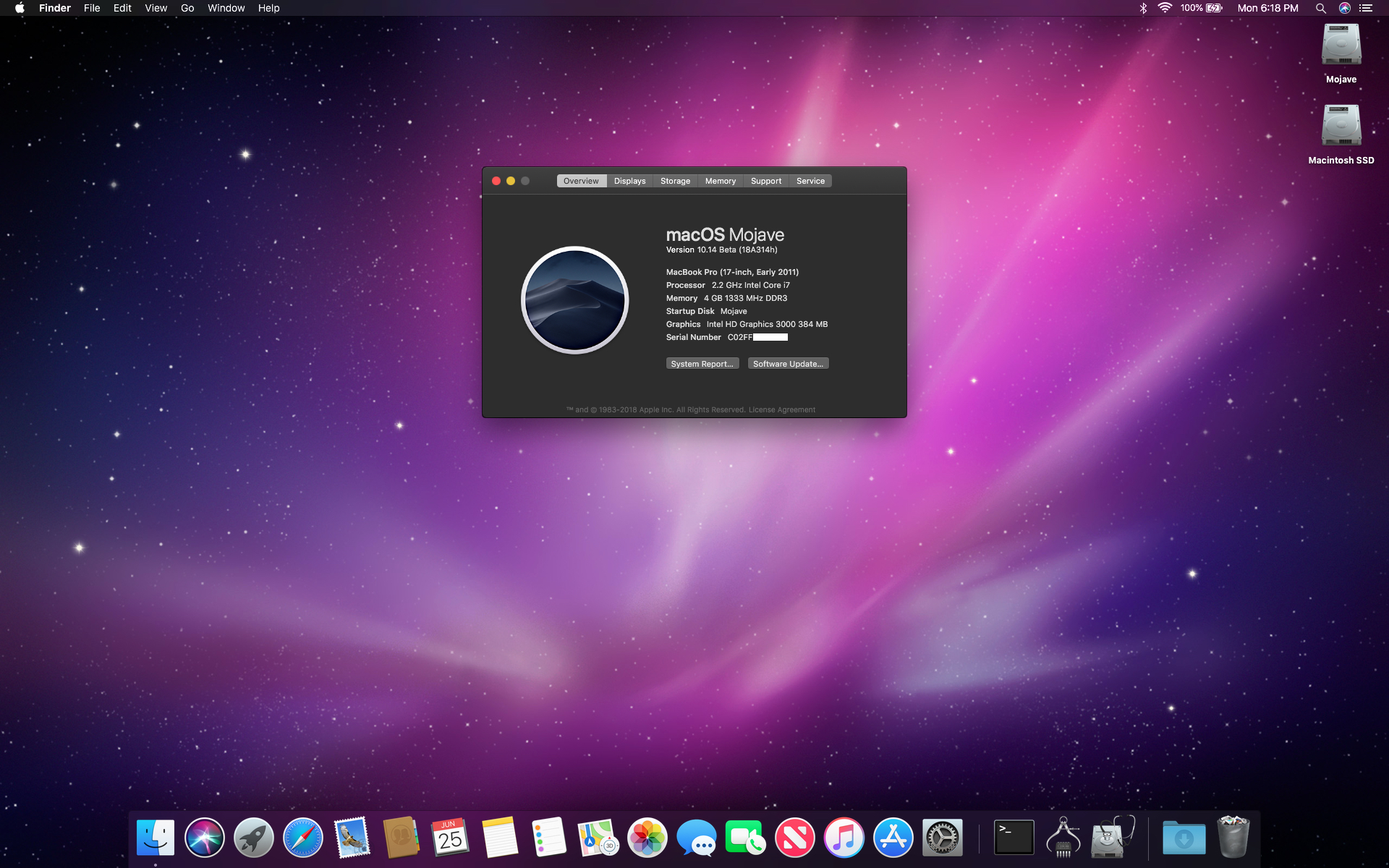
Unfortunately, for 2010 / 2011 iMac owners full acceleration on the AMD GPU is still an issue, as there is no integrated GPU to fall back on. I haven't been able to get that working yet. But Mojave does run with partial acceleration.
Macbookprodude
Suspended
Hi, I have never had issues with the AMD GPU. I even do strong video work and run video benchmark tests and the chip just keeps going. Once the solution is found for the AMD GPU, will that solve the Mojave situation in terms of acceleration and reliability ?
Will the AMD GPU chip for Mojave ever be solved ? Another question I have.. if i can get a 2012 MacBook Pro logic board for a good price, is it possible to remove the 2011 and put in the 2012 - non-retina ?
[doublepost=1530340512][/doublepost]
Hi, do you think with more research and as we get closer to Fall, you and Dosdude will have a solution to this? I do want to put this on my 2011 MacBook pro, however I am concerned that if a patch comes out 2nd beta or 3rd beta it will brick it. Will you or Dosdude put out a final patcher to then allow all of us 2011 MacBook pro owners to install this OS ? I don't understand Apple's logic in not allowing these machines to run Mojave, but I guess I won't go there either. Also, I have never had issues with my AMD CPU and I use it almost all the time. I feel for those, that have this issue.
[doublepost=1530339615][/doublepost]Dosdude: Can you outline the steps for getting Mojave to work on the 2011 MacBook Pro 15 inch. Though many have had issues with their AMD GPUS, mine is still working very well.. never an issue and I hope there won't be any issue with it. Possibly, my system may be just lucky, I don't know. But, at this point what works for on the 2011 when running Mojave and what does not work ?I completely agree. It's not that they can't support hardware all the way back to 2008, but rather that they won't.
Yet there are still plenty of people who justify Apple's decisions to drop older hardware, either because they erroneously think that it does something good for their newer hardware (the space saved from removing the older kexts is tiny, I doubt it would even total 200 MB), or because they badly want to see a good reason for Apple dropping their older hardware.
2011 is Core i-series. It can run Mojave, however on the 15" / 17" the dedicated AMD GPU must be disabled, meaning you won't be able to connect external displays. There is still a possibility we will find a way to make it work properly, but since the GPU is very prone to failure you might be better off disabling it anyway.[/QUOTE
Will the AMD GPU chip for Mojave ever be solved ? Another question I have.. if i can get a 2012 MacBook Pro logic board for a good price, is it possible to remove the 2011 and put in the 2012 - non-retina ?
[doublepost=1530340512][/doublepost]
I would say what we've accomplished in this thread already qualifies as more than whining. But I am sure that Apple is not paying attention or caring, and didn't with MacOS Sierra or Mountain Lion happily running on unsupported Macs either. 😉
Unfortunately, for 2010 / 2011 iMac owners full acceleration on the AMD GPU is still an issue, as there is no integrated GPU to fall back on. I haven't been able to get that working yet. But Mojave does run with partial acceleration.
Hi, do you think with more research and as we get closer to Fall, you and Dosdude will have a solution to this? I do want to put this on my 2011 MacBook pro, however I am concerned that if a patch comes out 2nd beta or 3rd beta it will brick it. Will you or Dosdude put out a final patcher to then allow all of us 2011 MacBook pro owners to install this OS ? I don't understand Apple's logic in not allowing these machines to run Mojave, but I guess I won't go there either. Also, I have never had issues with my AMD CPU and I use it almost all the time. I feel for those, that have this issue.
Christos0210197
macrumors newbie
Thanks to @dosdude1's patcher app, I was able to install Mojave Public Beta without big problems!! Thanks

First of all Hello All.
Thanks for the tremendous work you do here.
I have a 27" iMac (late 2009) running High Sierra 10.13.6 Beta (17G54a). Until yesterday I was an happy beta tester. Happy until I understood that all is done for my mac lol. I downloaded the Mac OS Mojave patcher, the OS beta, made bootable usb external and began the installation. After a few hours, computer restarted and I got a prohibitory icon. So I restored from fresh Time machine backup I made just before installing. Is there any hope here for my mac to run Mojave?
It remembers me the time when Apple suddenly discarded SCSI and a lot of my users had to trash their Umax Powerlook scanners, not speaking of scientific instruments continuing to work on obsolete systems....
Anyway, a big thanks to all of you here.
Thanks for the tremendous work you do here.
I have a 27" iMac (late 2009) running High Sierra 10.13.6 Beta (17G54a). Until yesterday I was an happy beta tester. Happy until I understood that all is done for my mac lol. I downloaded the Mac OS Mojave patcher, the OS beta, made bootable usb external and began the installation. After a few hours, computer restarted and I got a prohibitory icon. So I restored from fresh Time machine backup I made just before installing. Is there any hope here for my mac to run Mojave?
It remembers me the time when Apple suddenly discarded SCSI and a lot of my users had to trash their Umax Powerlook scanners, not speaking of scientific instruments continuing to work on obsolete systems....
Anyway, a big thanks to all of you here.
Last edited:
Telmon Lima
macrumors newbie
Thanks to @dosdude1's patcher app, I was able to install Mojave Public Beta without big problems!! ThanksView attachment 768397
Hi! Please explain what problems you have encountered so far. Thanks!

Larsvonhier
macrumors 68000
Well, wait and see if the C2D issue(s) can be found and fixed. Currently completely unclear, but folks are at it!First of all Hello All.
Thanks for the tremendous work you do here.
I have a 27" iMac (late 2009) running High Sierra 10.13.6 Beta (17G54a). Until yesterday I was an happy beta tester. Happy until I understood that all is done for my mac lol. I downloaded the Mac OS Mojave patcher, the OS beta, made bootable usb external and began the installation. After a few hours, computer restarted and I got a prohibitory icon. So I restored from fresh Time machine backup I made just before installing. Is there any hope here for my mac to run Mojave?
It remembers me the time when Apple suddenly discarded SCSI and a lot of my users had to trash their Umax Powerlook scanners, not speaking of scientific instruments continuing to work on obsolete systems....
Anyway, a big thanks to all of you here.
I personally still have hope running Mojave on all our old gear.