Become a MacRumors Supporter for $50/year with no ads, ability to filter front page stories, and private forums.
Status
The first post of this thread is a WikiPost and can be edited by anyone with the appropiate permissions. Your edits will be public.
I ripped the 2TB drive out of my Windows desktop that I forgot was inside it. I shoulda done this before I bought the 1TB but I forgot I had that 2TB in that machine. I was dual booting Linux for fun.Took the 1TB out of this 2012MPB that I had OCLP/14.8.2 on it, put the 2TB in it, booted off OCLP-2.4.1 stick, reinstalled 14.8.2. Set it up with admin account and did Migration Assistant using my 2015 MBP TM backup and restored it to the 2012. Almost all back together. Have to re-download all my movies(54). I think I'll stay on 14.8.2 for a while yet. I thought I saw people were saying Safari has issues in 14.8.3
 
  • Like
Reactions: OKonnel
Okay I need advice here please, thanks.

I reclaimed a second 5,1 from my child that isn't using the computer.

Initially had an SSD with Mt. Lion on it, but I do remember a couple of years ago I updated the firmware to 144.

Anyhow, I ended up sticking the Nvidia Quadro 4,000, with Mt. Lion. since couldn't go past Mojave.

Well, I stuck in a SSD with Sonoma on it, and boots right up. Everything seems to be working when I open apps.

I must of had OCLP on that drive, because it said an update 2.4.1, so I updated OCLP. I disable SIP and restart, but tells me I have Available patches for Nvidia Web drivers, cannot patch due to SIP is enabled, but I disabled SIP in recovery mode, and still says due to SIP enabled, even when I disabled in recovery mode?

Any suggestions please, thanks
1766208238698.png
 
Derping with SIP shouldn’t be necessary. OCLP will handle it. Re-enable SIP and try again.
Thank you for chiming in.

Re-enabled, and it still did not let me post install.

I also lost WiFi when I updated Sonoma to 14.8.4?
 
Last edited:
What would actually be the problem? Here the only drawback is that I need to keep logging in to YouTube constantly.
Truthfully, I really don't know.. I use Firefox for most things on my OCLP machines cuz streaming doesn't work in Safari on them. I just know I've seen people having issues with Safari 26.x, but in Sonoma with Safari 17.6, I don't have any issues really except for the streaming not working, and like I said, I use Firefox for that.
 
For Kepler GPUs (2009+ with GPU upgrades to 2013), I've found Sonoma to be the best OCLP option for most people and novice.
  • Sequoia System Preferences menu subsystem is quite slow.
  • Monterey has the wifi connection bug require manually enter SSID and password (easy UI of clicking on SSID list and entering password don't work)
  • Haven't tried Ventura
Sonoma Safari 26.2 Software Update Problem with Kepler

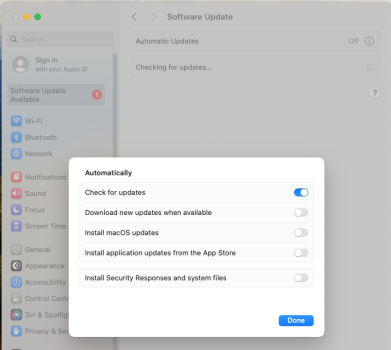
With Kepler GPU, Sonoma 14.8.3 (latest on 1/13/26) does have a problem with the Software Update

NOTE : Automatic macOS update should be turned off of course with Apple aggressively pushing Tahoe update staging. Can leave Install Security Reponses and system files on if willing to do the lengthy OCLP macOS security update process (I turn this off and remove OCLP app from the Mac on systems I do for the novices so they don't hang themselves. And I tell them to follow this if make another account which will have auto macOS update turned on by default)
Screenshot 2026-01-14 at 10.46.18 AM.png

Safari 17.6 is installed by default and doesn't work on some websites requiring update to 26.2. Below is a lengthy buggy process to do this update. A lot easier just manually update via dmg from Mr. Macintosh's Safari 26.2 repository ( link ) Make sure to select Sonoma version.

Lengthy Buggy Process to System Update Safari 26.2

1. It takes several minutes for Software update to find the Safari update

Screenshot 2026-01-14 at 10.55.57 AM.png

2. After clicking on More info and Update Now, takes several more minutes to get another Update Now button

Screenshot 2026-01-14 at 10.56.11 AM.pngScreenshot 2026-01-14 at 10.59.37 AM.png

3. Click on this then can takes like another 10+ minutes and jump back to step 1 (not sure if it would have just worked by waiting longer). I then repeat 1-3 and wait 1/2+ hour to actually update and never show update progress bar making progress or completing. Eventually the only way to know is launch Safari and check its the updated 26.2 version

Screenshot 2026-01-14 at 11.18.55 AM.pngScreenshot 2026-01-14 at 11.21.50 AM.png

Finally, after all this in 10-15min, Software Update erroneously kicks off macOS Tahoe download despite telling it not to in menu choice above. X out this download and reboot the system.

Screenshot 2026-01-14 at 11.31.19 AM.png

Be patient and just let Sonoma do these steps slowly. If impatient and keep on clicking on these buttons, gets kind of queued up and makes a mess requiring a reboot to restart.

According to OCLP legacy metal support notes. Software Update on Sequoia with Kepler has this problem. Maybe whatever Apple did for macOS 26.2 and the back patch Sonoma 14.8.3 inherited this problem. OCLP note suggest command line update is the workaround ( link )
 
Last edited:
  • Like
Reactions: OKonnel
Hi
Could you describe step-by-step the process of installing NVME SSD and installing OS Sonoma there on MBP 11,3 15” 2014?

Now I have the original SSD with Big Sur inside my MBP and BootRom 478.0.0.0.
Also I have external enclosure Acasis MAC3W compatible both with Apple and generic SSD,
Sintech short adapter.
USB Flash with Sonoma installer
And NVME SSD of course.

The question is:
To format and install Sonoma OS to new drive in external enclosure and then swap drives?
Or To swap drives first and install Sonoma to new drive inside the MBP?
 
Last edited:
The question is:
To format and install Sonoma OS to new drive in external enclosure and then swap drives?
Or To swap drives first and install Sonoma to new drive inside the MBP?
Is your goal to dual-boot supported and unsupported macOS? Which would be used daily?
 
Dual-boot sounds well - especially for the first time.
Hopefully I won’t have any problems with Sonoma and it will be used as the main system.
But if something goes wrong, I would like to be able to return at any time to the old OS.
This MBP is a working tool and I can’t risk
 
Dual-boot sounds well - especially for the first time.
Hopefully I won’t have any problems with Sonoma and it will be used as the main system.
But if something goes wrong, I would like to be able to return at any time to the old OS.
This MBP is a working tool and I can’t risk
First, make sure you have installed latest Big Sur on original internal storage to get latest firmware. Second, make sure you have a good backup of original internal storage. Third, on Big Sur internal storage, install latest OCLP and create Sonoma USB external install media.

At this point, I would remove original internal storage and replace with new SSD. Boot from OCLP Sonoma USB install media, format newly installed SSD APFS, and install OCLP Sonoma. If you plan to migrate data from original internal storage, put in external enclosure, and use Migration Assistant. Might be possible to boot from external enclosure with original storage by reducing Sonoma security configuration.
 
  • Like
Reactions: Meddvedd
I hope somebody can help me.

I have a couple of cMP3,1, both with an unflashed Sapphire RX 580 8GB, one running Catalina, the other Monterey. I want to upgrade to Sonoma at least.

I started with the one running Catalina. In spite of following all the tutorials on Dortania I wasn't able to get a boot screen with the RX 580 using OCLP 2.4.1. So I used an old GT120 to be able to install Sonoma on a SSD. The problem is now that Sonoma doesn't start when I put back in the RX 580 but it does just fine with the GT 120. I hear the chime, no boot screen obviously, then 10-15 seconds later a click and it reboots.

Important to say is that the full potential of the GPU is the reason why I decided to upgrade macOS. The only app I use mainly on these machines has very specific requirements regarding the version of macOS.

Any advice would be greatly appreciated.
 
So I used an old GT120 to be able to install Sonoma on a SSD. The problem is now that Sonoma doesn't start when I put back in the RX 580 but it does just fine with the GT 120. I hear the chime, no boot screen obviously, then 10-15 seconds later a click and it reboots.
Did you build an OCLP install w/drivers supporting GT120, not RX580? You need to rebuild the OC EFI using OCLP application, but choose the appropriate settings for RX580 GPU, and then reinstall root patches. Post screenshot of your OCLP application Settings > Advanced tab so we can see your Graphics settings.
 
Did you build an OCLP install w/drivers supporting GT120, not RX580? You need to rebuild the OC EFI using OCLP application, but choose the appropriate settings for RX580 GPU, and then reinstall root patches. Post screenshot of your OCLP application Settings > Advanced tab so we can see your Graphics settings.
The OCLP was built with the RX 580 under Catalina.

Question: when am I suppose to apply the root patches? Before switching the card or after? Because obviously I can not apply the patches after the switch since it doesn't boot.
 
Did you build an OCLP install w/drivers supporting GT120, not RX580? You need to rebuild the OC EFI using OCLP application, but choose the appropriate settings for RX580 GPU, and then reinstall root patches. Post screenshot of your OCLP application Settings > Advanced tab so we can see your Graphics settings.
I just looked under the Advanced section (didn't read anything about that, my bad) and it looks like previously I didn't check the AMD GPU injection and Nvidia GPU Injection when I built the OCLP. I will try that now.
 
Register on MacRumors! This sidebar will go away, and you'll see fewer ads.