Become a MacRumors Supporter for $50/year with no ads, ability to filter front page stories, and private forums.
Status
The first post of this thread is a WikiPost and can be edited by anyone with the appropiate permissions. Your edits will be public.
macOS 14.8.4 installed atop 14.8.3 OTA, OCLP 2.4.1, does NOT run as expected. 🙄
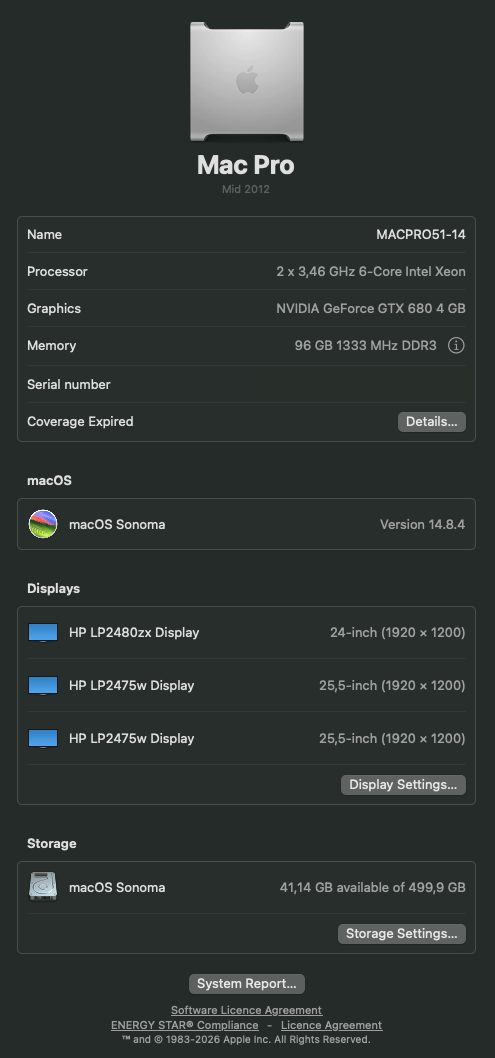
MP51-macOS_Sonoma_14.8.4.png


This update is beach balling all over the place like a madman. Never had such a bad experience after a successful update, patching this update with OCLP 2.4.1 after booted in Safe Mode. This is needed due to the severe WindowServer issues while rebooting after the update sequence all along from the first macOS Sonoma 14.8
installation.

BlackSOD macOS Sonoma 14.8.4

:

Code:
panic(cpu 12 caller 0xffffff80070b589b): userspace watchdog timeout: no successful checkins from WindowServer (2 induced crashes) in 120 seconds

service returned not alive with context : is_alive_func returned unhealthy : WindowServer initialization not complete (post IOKitWaitQuiet)

service: logd, total successful checkins in 10827 seconds: 1078, last successful checkin: 0 seconds ago

service: WindowServer (2 induced crashes), total successful checkins in 10740 seconds: 1062, last successful checkin: 120 seconds ago

service: opendirectoryd, total successful checkins in 10827 seconds: 1077, last successful checkin: 0 seconds ago

service: configd, total successful checkins in 10827 seconds: 1078, last successful checkin: 0 seconds ago


Panicked task 0xffffff99ffea9dd8: 4 threads: pid 120: watchdogd

Backtrace (CPU 12), panicked thread: 0xffffff9535b71598, Frame : Return Address

0xffffffd75a7f3570 : 0xffffff80044215a1 mach_kernel : _handle_debugger_trap + 0x4b1

0xffffffd75a7f35c0 : 0xffffff8004587aa0 mach_kernel : _kdp_i386_trap + 0x110

0xffffffd75a7f3600 : 0xffffff800457705c mach_kernel : _kernel_trap + 0x55c

0xffffffd75a7f3680 : 0xffffff80043bb971 mach_kernel : _return_from_trap + 0xc1

0xffffffd75a7f36a0 : 0xffffff800442188d mach_kernel : _DebuggerTrapWithState + 0x5d

0xffffffd75a7f3790 : 0xffffff8004420f33 mach_kernel : _panic_trap_to_debugger + 0x1e3

0xffffffd75a7f37f0 : 0xffffff8004bda41e mach_kernel : _panic_with_options + 0x89

0xffffffd75a7f38e0 : 0xffffff80070b589b com.apple.driver.watchdog : __ZN10IOWatchdog14userspacePanicEP8OSObjectPvP25IOExternalMethodArguments.cold.1 + 0x27

0xffffffd75a7f38f0 : 0xffffff80070b5356 com.apple.driver.watchdog : __ZN10IOWatchdog14userspacePanicEP8OSObjectPvP25IOExternalMethodArguments + 0x2e

0xffffffd75a7f3910 : 0xffffff80070b441d com.apple.driver.watchdog : __ZN20IOWatchdogUserClient14externalMethodEjP25IOExternalMethodArgumentsP24IOExternalMethodDispatchP8OSObjectPv + 0x83

0xffffffd75a7f3a40 : 0xffffff8004b4f346 mach_kernel : __ZN12IOUserClient18callExternalMethodEjP25IOExternalMethodArguments + 0x86

0xffffffd75a7f3a70 : 0xffffff8004b4f6bd mach_kernel : _is_io_connect_method + 0x31d

0xffffffd75a7f3be0 : 0xffffff800452f8af mach_kernel : _iokit_server_routine + 0x3aff

0xffffffd75a7f3d00 : 0xffffff80043fe405 mach_kernel : _ipc_kmsg_send + 0x6f5

0xffffffd75a7f3da0 : 0xffffff8004412305 mach_kernel : _mach_msg_overwrite_trap + 0x5a5

0xffffffd75a7f3df0 : 0xffffff80044129f4 mach_kernel : _mach_msg2_trap + 0x444

0xffffffd75a7f3ee0 : 0xffffff800455beab mach_kernel : _mach_call_munger64 + 0x22b

0xffffffd75a7f3fa0 : 0xffffff80043bbdd6 mach_kernel : _hndl_mach_scall64 + 0x16

      Kernel Extensions in backtrace:

         com.apple.driver.watchdog(1.0)[2D007C64-EF78-3276-A014-C76E314452E2]@0xffffff80070b3000->0xffffff80070b5fff


Process name corresponding to current thread (0xffffff9535b71598): watchdogd

Boot args: keepsyms=1 debug=0x100 -lilubetaall -btlfxallowanyaddr ipc_control_port_options=0 -nokcmismatchpanic


Mac OS version:

23J319


Kernel version:

Darwin Kernel Version 23.6.0: Mon Jan 19 22:02:22 PST 2026; root:xnu-10063.141.1.710.3~1/RELEASE_X86_64

Kernel UUID: 282B6BF5-245F-3883-AD78-A7AC54581EFC

roots installed: 0

KernelCache slide: 0x0000000004000000

KernelCache base:  0xffffff8004200000

Kernel slide:      0x00000000040e4000

Kernel text base:  0xffffff80042e4000

__HIB  text base: 0xffffff8004100000

System model name: MacPro5,1 (Mac-F221BEC8)

System shutdown begun: NO

Panic diags file available: YES (0x0)

Hibernation exit count: 0


System uptime in nanoseconds: 10827621960017

Last Sleep:           absolute           base_tsc          base_nano

  Uptime  : 0x000009d9008f9677

  Sleep   : 0x0000000000000000 0x0000000000000000 0x0000000000000000

  Wake    : 0x0000000000000000 0x0000002246aeb6e4 0x0000000000000000

Compressor Info: 0% of compressed pages limit (OK) and 0% of segments limit (OK) with 0 swapfiles and OK swap space

Zone info:

  Zone map: 0xffffff806536b000 - 0xffffffa06536b000

  . PGZ   : 0xffffff806536b000 - 0xffffff807136c000

  . VM    : 0xffffff807136c000 - 0xffffff853c36b000

  . RO    : 0xffffff853c36b000 - 0xffffff86d536b000

  . GEN0  : 0xffffff86d536b000 - 0xffffff8ba036b000

  . GEN1  : 0xffffff8ba036b000 - 0xffffff906b36b000

  . GEN2  : 0xffffff906b36b000 - 0xffffff953636b000

  . GEN3  : 0xffffff953636b000 - 0xffffff9a0136b000

  . DATA  : 0xffffff9a0136b000 - 0xffffffa06536b000

  Metadata: 0xffffffd0df2ac000 - 0xffffffd0ff2ac000

  Bitmaps : 0xffffffd0ff2ac000 - 0xffffffd10f2ac000

  Extra   : 0 - 0

Would appreciate reviews of this log and receive some directions to troubleshoot this issue?

Thanks in advance,
Cheers
 
I am hopeful that the OCLP crew is able to figure out how to patch the T2 chip to be able to install either sequoia or Tahoe on my 2018 MacBook Air. Already know it is able to run either sequoia or Tahoe, has 16gb ram and a 512 ssd.
 
Is Firewire Audio out of the question? The FA-101 shows in system report but not in audio devices or daws.
Mbp8,2 early 2011, oclp 2.4.1, Sonoma 14.7.5
 
Using this update for quite some time now, I've been having serious issues with syncing the Apple Photos van Voice Memos via iCloud between MP 5.1 macOS 14.8.4 and iPhone 17 iOS 26.3.1.

I have no idea what could be the root cause of this syncing issue.
 
Last edited:
Decided to try Sonoma on a 13" mid-2014 Pro and it's very laggy in that it takes much more time to change screens after clicking on an option such as VPN in settings. I'm comparing Sonoma to Ventura and wanted to try Sonoma since Ventura is EoL.
 
Decided to try Sonoma on a 13" mid-2014 Pro and it's very laggy in that it takes much more time to change screens after clicking on an option such as VPN in settings. I'm comparing Sonoma to Ventura and wanted to try Sonoma since Ventura is EoL.
Have you given system time to settle down background housekeeping processes after install?
 
I have. I had Sonoma running for about a week with at least 4 hours of use each day.

Maybe I need to use it for a longer period of time?
How much RAM and storage type/size?. I have it running on my 2012 15" with 16gb RAM and 2tb SATA SSD and it works pretty well. It's now the house machine. I also have it on my 2015 MBA and it works decent. Only 8gb RAM of course which I believe is the most impacting factor, and 2TB NVMe SSD. 8gb RAM it is slow changing screens in settings and things, but very usable for watching movies, web browsing, email, iMessage, Calendar, photos.. all the usual things.
 
How much RAM and storage type/size?. I have it running on my 2012 15" with 16gb RAM and 2tb SATA SSD and it works pretty well. It's now the house machine. I also have it on my 2015 MBA and it works decent. Only 8gb RAM of course which I believe is the most impacting factor, and 2TB NVMe SSD. 8gb RAM it is slow changing screens in settings and things, but very usable for watching movies, web browsing, email, iMessage, Calendar, photos.. all the usual things.
It has 16 GB of ram and 256 GB SSUBX Samsung OEM drive.
 

Attachments

  • Screenshot 2026-03-17 at 7.17.40 PM.png
    Screenshot 2026-03-17 at 7.17.40 PM.png
    73.1 KB · Views: 42
Using this update for quite some time now, I've been having serious issues with syncing the Apple Photos van Voice Recorder via iCloud between MP 5.1 macOS 14.8.4 and iPhone 17 iOS 26.3.1.

I have no idea what could be the root cause of this syncing issue.

The sync-issues with Voice Memos has gladly resorted itself in iCloud. Now I still have to tackle the sync issues with Apple Photos.

Screenshot 2026-03-20 at 23.13.09.png
 
It has 16 GB of ram and 256 GB SSUBX Samsung OEM drive.
hmm.. how much free space on the drive?. Perhaps it's getting full or maybe there's a hardware issue of some sort going on? Maybe SSD issues?. Hard to say. I believe a certain amount of delay does happen as I believe with OCLP the system is patched in RAM, but like I said, this 2012MBP works pretty well with Sonoma. Sequoia?.. not so much.
 
hmm.. how much free space on the drive?. Perhaps it's getting full or maybe there's a hardware issue of some sort going on? Maybe SSD issues?. Hard to say. I believe a certain amount of delay does happen as I believe with OCLP the system is patched in RAM, but like I said, this 2012MBP works pretty well with Sonoma. Sequoia?.. not so much.
Running Apple diagnostics revealed no issues.

Tried Sonoma with nothing installed other than a safari update.

Tested with a 128 Gb and 256 Gb SSD with no change.

I'm saving my pennies to get a refurbished m4 or m3 Air since I'm now retired.
 
I'm unable to reclaim the space after definitive empty bin action. Reading that it may take up to one day, before the space is again available for use, not sure if my macOS is indeed holding the line. This is the first macOS release where I'm experiencing this issue.

Anybody having directions to resolve this via terminal CLI commands? Thanks in advance!
 
Decided to try Sonoma on a 13" mid-2014 Pro and it's very laggy in that it takes much more time to change screens after clicking on an option such as VPN in settings. I'm comparing Sonoma to Ventura and wanted to try Sonoma since Ventura is EoL.
I went on the same path, was on Ventura and decided to give Sonoma a try due to EOL, and I'm very happy with the results, Sonoma feels much faster, specially on the Photos app that I use a lot. Systems setting app though take about 1 to 2 seconds to change pages, but thats Ok. And I immediatelly changed the wallpaper to static image, the moving thing was too laggy.

I decided to do I clean install on different volume, maybe that made a difference. Now running beta 14.8.5 RC4 (23J423), very stable.

Are you dual booting between MacOS? That can slows things down if you don't isolate the OSes.

MacBook 15 mid 2012, 16GB, Fusion drive with 2TB SSD + 2TB HDD.
I had resort to Fusion since my Photos library has passed the 2TB mark, no money to buy a larger SSD.
 
hmm.. how much free space on the drive?. Perhaps it's getting full or maybe there's a hardware issue of some sort going on? Maybe SSD issues?. Hard to say. I believe a certain amount of delay does happen as I believe with OCLP the system is patched in RAM, but like I said, this 2012MBP works pretty well with Sonoma. Sequoia?.. not so much.
My MacBook 15 mid 2012 runs great on Sonoma. Now on Sequoia the video was very glitch, full of artifacts, unusable, only happens when I boot with the Thunderbolt Display connected. I'll report on the Sequoia thread.

I think with current OCLP devolpment state Sequoia will not get fixed for Kepler machines. But that's fine, Sonoma is smooth, very happy that managed to use this machine for 14 years! Thank you for all OCLP developers!

MacBook 15 mid 2012, 16GB, Fusion drive with 2TB SSD + 2TB HDD.
I had resort to Fusion since my Photos library has passed the 2TB mark, no money to buy a larger SSD.
 
I'm unable to reclaim the space after definitive empty bin action. Reading that it may take up to one day, before the space is again available for use, not sure if my macOS is indeed holding the line. This is the first macOS release where I'm experiencing this issue.

Anybody having directions to resolve this via terminal CLI commands? Thanks in advance!
Are you using Time Machine? It does local snapshots and this take space if you changed a lot of files. This space is released automatically if needed. This is listed as purgeable space on the drive info.

Try this to list snapshots: tmutil listlocalsnapshots /
 
  • Like
Reactions: m4v3r1ck
I went on the same path, was on Ventura and decided to give Sonoma a try due to EOL, and I'm very happy with the results, Sonoma feels much faster, specially on the Photos app that I use a lot. Systems setting app though take about 1 to 2 seconds to change pages, but thats Ok. And I immediatelly changed the wallpaper to static image, the moving thing was too laggy.

I decided to do I clean install on different volume, maybe that made a difference. Now running beta 14.8.5 RC4 (23J423), very stable.

Are you dual booting between MacOS? That can slows things down if you don't isolate the OSes.

MacBook 15 mid 2012, 16GB, Fusion drive with 2TB SSD + 2TB HDD.
I had resort to Fusion since my Photos library has passed the 2TB mark, no money to buy a larger SSD.
I am back on Ventura for now and will remain on it until I can get a deal on an m3 or m4 13" Air. Not in a rush since I use my iPad more than my Macbook these days. I am mainly using Chrome and Mail on the MacBook and these seem to work better on Ventura vs Sonoma.

I installed Sonoma from a USB installer after using Disk Utility to wipe the entire SSD. After the first few uses, Mail and Chrome on Sonoma became laggy. Didn't experience this with Ventura.
 
Are you using Time Machine? It does local snapshots and this take space if you changed a lot of files. This space is released automatically if needed. This is listed as purgeable space on the drive info.

Try this to list snapshots: tmutil listlocalsnapshots /

Thanks for your reply, appreciated!

It seems that indeed, after doing a definitive empty bin action, the space is reclaimed by the volume, but it took 2 days to resolve itself. In the future I'll have to take that into account and be sure to do the housekeeping before the SSD reaches it point to have only 20GB of available free space.

Screenshot 2026-03-24 at 04.05.53.png

I followed your directions to discover snapshots using your cli command and it has the following output:

Code:
Snapshots for volume group containing disk /:

com.apple.TimeMachine.2026-03-23-104754.local

com.apple.bless.redacted

com.apple.os.update-redacted

com.bombich.ccc.transient.redacted.2026-03-24-040240

com.synology.activebackup.redacted

com.synology.activebackup.reducted

Never deleted snapshots before, so I have to be wary about the impact on my macOS instance.

Greetings and have a nice week ahead. Cheers
 
Thanks for your reply, appreciated!

It seems that indeed, after doing a definitive empty bin action, the space is reclaimed by the volume, but it took 2 days to resolve itself. In the future I'll have to take that into account and be sure to do the housekeeping before the SSD reaches it point to have only 20GB of available free space.

View attachment 2616193
I followed your directions to discover snapshots using your cli command and it has the following output:

Code:
Snapshots for volume group containing disk /:

com.apple.TimeMachine.2026-03-23-104754.local

com.apple.bless.redacted

com.apple.os.update-redacted

com.bombich.ccc.transient.redacted.2026-03-24-040240

com.synology.activebackup.redacted

com.synology.activebackup.reducted

Never deleted snapshots before, so I have to be wary about the impact on my macOS instance.

Greetings and have a nice week ahead. Cheers
Snapshots are the past, they are not being used, is just a way to get back to how the volume was at that time. It can be safely deleted. The Apple ones are managed automatically. The other ones are backups from the programs that created them, check with the program to manage them, or if no longer used justs delete them.

You can also check Snapshots from inside Disk Utility, View, Show Snapshots. The private size is the space they actually use.
 
  • Like
Reactions: m4v3r1ck
I am back on Ventura for now and will remain on it until I can get a deal on an m3 or m4 13" Air. Not in a rush since I use my iPad more than my Macbook these days. I am mainly using Chrome and Mail on the MacBook and these seem to work better on Ventura vs Sonoma.

I installed Sonoma from a USB installer after using Disk Utility to wipe the entire SSD. After the first few uses, Mail and Chrome on Sonoma became laggy. Didn't experience this with Ventura.

When buiding Open Core check to see if Kernel options are all unselected, a bug on OCLP enables them sometimes but your machine doesn't need it.

Also, how is your battery health? When the Mac battery dies the system heavly throttles the CPU making everything slow. You can check the option to Disable Firmware Throttling on OCLP to see if improves anything, or just get a new battery.
 

Attachments

  • Screenshot 2026-03-24 at 07.57.55.png
    Screenshot 2026-03-24 at 07.57.55.png
    25.1 KB · Views: 45
When buiding Open Core check to see if Kernel options are all unselected, a bug on OCLP enables them sometimes but your machine doesn't need it.

Also, how is your battery health? When the Mac battery dies the system heavly throttles the CPU making everything slow. You can check the option to Disable Firmware Throttling on OCLP to see if improves anything, or just get a new battery.
Checked OCLP and didn't see an option regarding kernel options.

Battery health looks fine.
 

Attachments

  • Screenshot 2026-03-24 at 11.58.13 AM.png
    Screenshot 2026-03-24 at 11.58.13 AM.png
    79.9 KB · Views: 40
Register on MacRumors! This sidebar will go away, and you'll see fewer ads.