Become a MacRumors Supporter for $50/year with no ads, ability to filter front page stories, and private forums.
Status
The first post of this thread is a WikiPost and can be edited by anyone with the appropiate permissions. Your edits will be public.
So 15.7.3 (now non-rc for us who don't do betas ATM ;) ) is out and 24G419 is still the build, as last RC.
Also the usual slew of 26.2 for all Apple gadgets.
Updated MBA 3,2 and 6,2 without issues so far, using OCLP 2.4.1.
Try to download it but it only max out at 100kbps. Looks like network congestion at Apple server.
 
Hi all,

Updated 15.7.1 to 15.7.3 this morning (OCLP 2.4.1).
Always work fine.
Finder seems a little faster and more responsive.

Capture d’écran 2025-12-13 à 08.59.44.png


Has anyone noticed consistent crashes of Facebook pages on Safari 26.2? Any solutions, other than downgrading to 26.1?

I can confirm that Safari 26.2 crashes with the Facebook website.

Capture d’écran 2025-12-13 à 17.08.36.png
 
  • Like
Reactions: MacMorrison
Updated 2015 15-inch MacBook Pro (MacBookPro11,5) to macOS Sequoia 15.7.3 with OCLP 2.4.1 on an external SSD.

The download was slow, estimating at 2 days, but it speeded up at the end (about 2 hours total) and updated without problems. Re-applied root patches without issues.
 
Last edited:
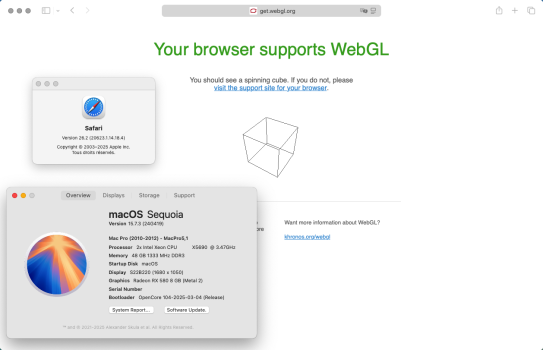
For me on Safari 26.2 the google maps bugs and canvas bugs are gone but the WebGL spinning cube not appearing is still a problem, and it has been since Safari 18.
 
  • Like
Reactions: piwikiwi
How would you downgrade to 26.1?
Safari 26.1 has been removed from Apple’s cdn servers and is therefore no longer available for official download.
As a precaution, as soon as a new version is released, I download it from Apple’s cdn servers in order to be able to downgrade if necessary, which was the case under Ventura, version 18.1.1 worked very well but starting with version 18.2 Safari crashed and no web page was displayed.

EDIT:
Safari 26.1 is still available on apple servers here: (I don’t know how long the link will still work)
https://swcdn.apple.com/content/dow...cpszpwofuanw13l46zy/Safari26.1SequoiaAuto.pkg

MD5: 6EDAC70A53727853D5D2A2045659AE4E
SHA1: 712113FF863A521567329DDFF5F689341ED57655
SHA256: FE036446BC351D04ED52BE6CA9A2083994C1C29D4EC4956E1211261DC2F4B302
 
Last edited:
Updated 2 iMacs 2011 27", i7-2600, K2100m to 15.7.3 flawlessly. Creating the USB stick with OCLP took very long (the last bits & bytes before verification, app. 1h), which was unusual. Started the installer out of existing 15.7.2 & 2.4.1 installations.

I have a problem with the external display (screen flickering) on both machines, which makes the external display unusable at the moment. But since this issue already started before the update, I think it is rather related to the K2100m custom ROM and I will post it in the other thread. Just mentioning it here, just in case anyone else is experiencing issues in this regard.
 
Last edited:
Updated 2 iMacs 2011 27", i7-2600, K2100m to 15.7.3 flawlessly. Creating the USB stick with OCLP took very long (the last bits & bytes before verification, app. 1h), which was unusual. Started the installer out of existing 15.7.2 & 2.4.1 installations.

I have a problem with the external display (screen flickering) on both machines, which makes the external display unusable at the moment. But since this issue already started before the update, I think it is rather related to the K2100m custom ROM and I will post it in the other thread. Just mentioning it here, just in case anyone else is experiencing issues in this regard.
Updated another iMac 2011, this time 21,5" with i7-2600s/K2100m and a MBP 2015 – no problems. Started off the same USB installer stick from within existing running installations.
 
Sequoia 15.7.4 beta 1 just showed up. Installing OTA on a supported MM 8,1 2018 at present.
Just a quick question if you have a sec? Do you generally always install betas, regardless of OCLP or not?
Does it typically fix something for you ? Something else? Just curious..

My strategy entails that I don't install any OS updates until I can make a USB installer for repairs and reinstalls as point betas, alfas or RC:s tend to not be possible to download as installers, so too risky for me, as a beta install tends to be harder to repair and may require a wipe and vanilla reinstall.
 
  • Like
Reactions: rehkram and hvds
Just a quick question if you have a sec? Do you generally always install betas, regardless of OCLP or not?
Does it typically fix something for you ? Something else? Just curious..

My strategy entails that I don't install any OS updates until I can make a USB installer for repairs and reinstalls as point betas, alfas or RC:s tend to not be possible to download as installers, so too risky for me, as a beta install tends to be harder to repair and may require a wipe and vanilla reinstall.
Currently I have two different policies, one for supported- & the other for unsupported.

On the supported Mac I tend to install the higher point betas. My rationale at present is that Sequoia is now at 15.7.* and relatively stable so the risk of problems is lower.

On the unsupported Mac I install only RCs & final public releases. This is to allow time for me to get familiar with it through the betas on the other m/c, and for the OCLP patches to get developed. In the interest of risk avoidance I do not set up multiple boot volumes, having had a bad experience (corruption) with that in the past.

I should also say that I can very quickly drop back to an earlier version. I've set things up so all my local stuff, including user files and non-apple installers go automatically to the cloud.
 
Last edited:
  • Like
Reactions: houser
updated 15.7.3 ON macpro 2014 oclp 2.4.1 and cannot make screenshot , screencapture.app not opening oclp laggy moving to linux mint thx btw even if it never was smooth as monterey
 
Thanks, that really wasn't the type I was thinking of though. I was thinking more of the analytics settings. However, I'm pretty happy with the changes I've made in terms of boosting performance.

You know the term, de-googling android?, I wish there was a way to de-Apple macOS, so it was more of regular unix OS, that just happened to have the mac desktop.
Hi @MacinMan
I think this might interest you, in order to block all Apple’s Telemetry, by simply adding a list of addresses to the host file that blocks native Apple trackers that track our activities.
Quick and easy to set up and remove if necessary.
 
Register on MacRumors! This sidebar will go away, and you'll see fewer ads.