Become a MacRumors Supporter for $50/year with no ads, ability to filter front page stories, and private forums.
Status
The first post of this thread is a WikiPost and can be edited by anyone with the appropiate permissions. Your edits will be public.
Unsupported rMBP10,1 2012 updated OTA from 15.7.3 to 15.7.4 RC
OCLP 2.4.1 prompted to reapply patches as expected.
OTA found an update for Safari, Version 26.3 (20623.2.2.11.1), AOK
SilentKnight found an update to XProtectPlistConfigData_10_15-5325, have to run terminal command after downloading: xprotect update AOK

No issues found with the update workflow, random smoke testing looking good.
 
Last edited:
After several false starts and much troubleshooting with the help of an AI, 15.7.3 is now running on a late 2012 iMac 13,2 via OCLP 2.4.1 (see signature). The iMac has a hybrid drive, so rather than replace the internals I installed on a spare external SSD, beginning with Ventura (stable, easier to install) and then upgrading to Sequoia via a disk image. No notable problems after sorting out the inevitable installation and migration glitches. The external SSD may be faster than the hybrid internal.
 
  • Like
Reactions: ronton3 and rehkram
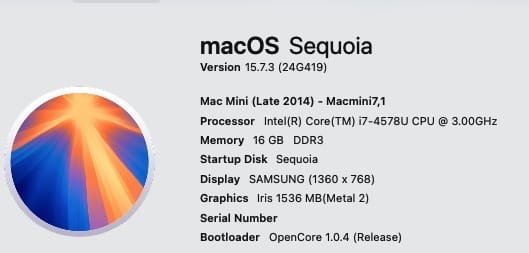
macOS 15.7.3 installed atop 15.7.2 OTA, OCLP 2.4.1 on 2014 Mac Mini. Runs as expected. :apple:👏 1573.jpg
 
Last edited:
Its not spinning for me
I believe that is to be expected if your cpu doesn't have the newer AVX2 instruction set which I believe was introduced in 2013 models and newer IIRC. I have the same issue on my 2012 MBP. Most of the 3rd party browsers don't require it though so on the few sites I need it I can use Brave or Firefox.
 
Mine is a Broadwell. It does support AVX2.
What mac and graphics card? When I ran Sequoia on my late 2015, 27" iMac, and had updated to the latest Safari, the WebGL test page worked fine. I haven't tried 15.7.3 as I went back to Monterey and put Sonoma in a VM as my needs for a newer OS at this point are very minimal. Not worth using OCLP at this point. With that said, the spinning cube doesn't work in a VM either, but Safari typically works on the sites I use. I use Firefox as my main browser though, Chrome as secondary, and Safari as 3rd.
 
  • Like
Reactions: ronton3
After reading this thread I checked my setup (see signature for details) with latest OTA Sequoia and Safari26.2 -> does not display WebGL animations. Firefox on the same setup does. I am not computer savvy.
 
Last edited:
You could've looked at the image where I showed that the spinning cube isn't appearing - there was an About this Mac window in it- but it's a 2017 MacBook Air with an Intel HD Graphics 6000.
Sorry I missed the image. I saw the Safari window, but didn't realize the about window was there too until I clicked it.
Anyway, I'm not the right person to give Safari advice. I never used it as my main browser because of early problems with site compatibility, and preferring cross platform solutions, so I've always stuck to third party browsers. However, I will use Safari to create accounts because I like the password generator. That's the main use of Safari for me, and for local Plex server management. Beyond that, it's usually Firefox, or Chrome.
 
Unsupported rMBP10,1 2012 updated OTA from 15.7.3 to 15.7.4 RC
OCLP 2.4.1 prompted to reapply patches as expected.
OTA found an update for Safari, Version 26.3 (20623.2.2.11.1), AOK
SilentKnight found an update to XProtectPlistConfigData_10_15-5325, have to run terminal command after downloading: xprotect update AOK

No issues found with the update workflow, random smoke testing looking good.
Same here on Mac Pro 4,1/5,1:
15.7.4RC (build 24G503) running fine, patches done with OCLP 2.4.0 (due to USB camera bug in 2.4.1).
Interestingly, a KDK that I installed "officially" via developer download for 15.7.3 is ignored and OCLP falls back to much older one for build 24G90. Works nonetheless for Kepler GPU in the cMP.
 
Hello all,

Help me understand this. Gets a little involved.

I have a second 5,1 I let my kid use. Never used it, so I thought I would tinker with it.

I did the same process with my current 5,1, and running Sequoia just fine, along with other MacOS's.

I remember back then I did update the firmware, and pretty much that was it, nothing done past Mojave.

Anyhow I installed the NVIDIA Quadro 4000, and running 2.4.1 and it won't load the Nvidia driver, and said I needed to disable
Same here on Mac Pro 4,1/5,1:
15.7.4RC (build 24G503) running fine, patches done with OCLP 2.4.0 (due to USB camera bug in 2.4.1).
Interestingly, a KDK that I installed "officially" via developer download for 15.7.3 is ignored and OCLP falls back to much older one for build 24G90. Works nonetheless for Kepler GPU in the cMP.
You think it's possible it will work for the Quadro 4000 mac edition>?
 
Hello all,

Help me understand this. Gets a little involved.

I have a second 5,1 I let my kid use. Never used it, so I thought I would tinker with it.

I did the same process with my current 5,1, and running Sequoia just fine, along with other MacOS's.

I remember back then I did update the firmware, and pretty much that was it, nothing done past Mojave.

Anyhow I installed the NVIDIA Quadro 4000, and running 2.4.1 and it won't load the Nvidia driver, and said I needed to disable

You think it's possible it will work for the Quadro 4000 mac edition>?
Strange, it should support her
 
  • Like
Reactions: MacRumors3590
That's the first I've heard of that happening on newer machines. Do you know what OS version it started happening on?
It's not an OS issue, it's a WebKit issue. WebGL worked perfectly well up to Safari 17.6 for me on my MacBook Air, which it officially supported. After that, when I used OCLP to get to Sequoia, I got Safari 18, which apparently introduced a new WebGL pipeline. Apparently there was no code that allowed my GPU to run this new WebKit WebGL for complex sites like 3D games, leading to a context loss. On non-WebKit browsers they didn't change the way WebGL works so it runs almost the same as it ran in Safari 17.6. Google Maps and 2D games still work fine on Safari, because the 2017 MacBook Air only supported basic Metal 2 features in its GPU. Other than that, the GPU was a Metal 1.2 GPU.

I actually hate this dual-browser lifestyle I have, with Safari and Vivaldi. If none of the things above happened, not only would I be using Safari only, the MacBook would also be fully functional.
 
I used an older tech preview version of safari for a while to work around that problem. It's not a perfect solution, but it did allow me to get back to using just Safari for the vast majority of my web browsing.
 
I updated from 15.7.2 to macOS 15.7.3 with OCLP 2.4.1 via OTA.
After the update, my login screen was suddenly in English and the keyboard was set to "ABC," when both should have been in German. Secure Boot etc. wasn't working at all.

Thanks to AI support, I found the error in Preboot and fixed it via Terminal. Thanks, AI.
 
  • Like
Reactions: ronton3
Strange, it should support her
So this is what I found on Github.

Legacy Non-Metal GPUs and macOS Big Sur - Sequoia #108​

It appears they do have hardware acceleration on this ATI 5870 / TeraScale+2
Not for the Quadro 4000 Mac edition, oh well.
 
Last edited:
A powered Pluggable USB 3 hub seems not to get along with OCLP on a 2012 iMac 13,2. After booting it failed to connect a wired keyboard and powered spinning hard disk attached to its ports. Is this a common problem?
 
Register on MacRumors! This sidebar will go away, and you'll see fewer ads.