Become a MacRumors Supporter for $50/year with no ads, ability to filter front page stories, and private forums.
My main concern about the new Finder is how ugly those huge rounded window corners are.
When Mac OS X came out, it was the first system with decent anti-aliasing that could afford slightly rounded corners to make windows feel more friendly.
Other developers started to imitate it, misunderstanding the whole intention of that solution and using comically large rounded corners. I remember how dumb Real Player felt, as an application that was supposed to show rectangles and put it inside a very rounded interface.

So how did we get here now?
Apple needed a different interface for iOS to differentiate it from Android with some useless graphic effects than could never be imitated on cheap Android phones.
Those glassy effects need rounded corners to look decent, and that's ok on phones where the interface already has the device's rounded corners on the screen and you click with your rounded fingertips.
macOS needed to feel consistent with iOS and just used the same solution that makes no sense on a computer.

Sorry for the off-topic rant.

Edit: thought my grumpy-old-man and off-topic rant would have been ignored but apparently many other people hate this too 😁
 
Last edited:
Once upon an Apple, they polished every last pixel. It’s very strange to witness the lack of care they have now.
That is what happens when the CEO is nothing but a cost cutter and ships software development out the to lowest cost options without regard to quality, which he does not understand.

That age old triangle still stands, you cannot reduce cost without at least one of longer delivery time or reduced quality. Probably both.
 
There are plenty of issues with xOS 26 across the board. The two annoying me the most are:
1. widgets on iPhone disappear every time the app updates (iPhone 15 pro max)
2. Action button to start an activity on watch (Watch Ultra 1) will crash and the overlaying orange screen stays there for ages while you can see the other watchOS screens still moving around and interacting underneath.

How haveApple come to this? Quality in any software they release these days has a very low bar.
 
I remember how dumb Real Player felt, as an application that was supposed to show rectangles and put it inside a very rounded interface.
lol, I had completely repressed that memory

real.png
 
It's even worse in the Music app. The scrollbar in this instance doesn't even do anything as there are no further columns to scroll to.

Screenshot 2026-02-13 at 15.22.14.png

The only workaround (apart from restoring back to an OS version prior to Tahoe) is to turn off the "always show" for scrollbars and change it to "When scrolling". However, I like that on so I can see at a glance how far down my playlist I am (or Finder list - whatever - all Apple apps are the same mess nowadays).

Screenshot 2026-02-13 at 15.24.46.png
 
Err, I can turn a blind eye to UI defects as long as they are purely cosmectic and don't hinder functionality (assuming these get resolved eventually), there are severe ones Apple should have addressed already and, inexplicably, has not.

But the issues with Tahoe a lot bigger than only Liquid Glass-tied inconsistencies.

Performance, for one, is one major issue that does not get mentioned enough.
 
I use column views all the time, and I’ve never noticed this. I don’t have in front of me right now, but I thought it was in the center.
 
Tim Cook has been great for Apple as far as growth and making money, but has completely stunk for Apple when it comes to what made Apple’s products great, easy to use and approachable software that worked better than its competitors. When Apple finally adopted/copied a feature from someone else, they did it better. Now it feels as if Apple can’t keep any of its products working right. Siri, which has never delivered on its promised capabilities could at least respond with the first “Siri”, this is no longer the case. Additionally, Siri would skip forward, play, pause, etc every time you asked, now not so much. When I’m listening to a Podcast using the Overcast App and pause the Podcast using Siri, Siri will choose to open Apple Music sometimes when I say “Siri play”. 😤 My AirPods Pro 3 also have problems actually playing audio even though they’re connected to my iPhone 17 Pro Max. I’ve also found that across the board, Apple is getting away from giving you multiple ways to handle a specific task and is copying Microsoft Windows by only giving you one, out of the way and often hidden means of accomplishing things. Hopefully these things get corrected soon. 🙂
 
It's mentioned like 5 times in the text?
No, it is mentioned that there are resize handles and when "show scrollbars" is set to "always", the scrollbar overlaps the handles. That the handles only appear when the setting is "always" was not clear to me (being no native speaker).


"At the bottom of each Finder column are handy little resize handles allowing you to expand or reduce each column as you see fit. But in macOS 26 and macOS 26.2, when scroll bars are set to "always show," the horizontal scroll bar at the bottom overlaps and covers those handles"
 
Apples software "polish" has never been the same since 2020. I think the whole "work from home" has had some unintended consequences, and quality of software has definitely been one that has affected Apple. There is just better collaboration in person, I see it in my own job as well as much as I enjoy getting to work at home. Zoom is NOT a perfect substitute for in-person collaboration.


Apple released macOS Tahoe last September, but despite two point updates since then, it is still struggling to resolve an embarrassing interface issue in Finder that appears to have been introduced with its Liquid Glass redesign.

macOS-Tahoe-Finder-Bug-Underscores-Apples-Slipping-UI-Polish-Feature.jpg

If you updated your Mac to macOS Tahoe and you prefer to work in Finder's column view, there's a good chance you've been frustrated by the glitch, which developer Jeff Johnson has been admirably tracking over on his blog.

macos-tahoe-finder-column-view-bug3.jpg

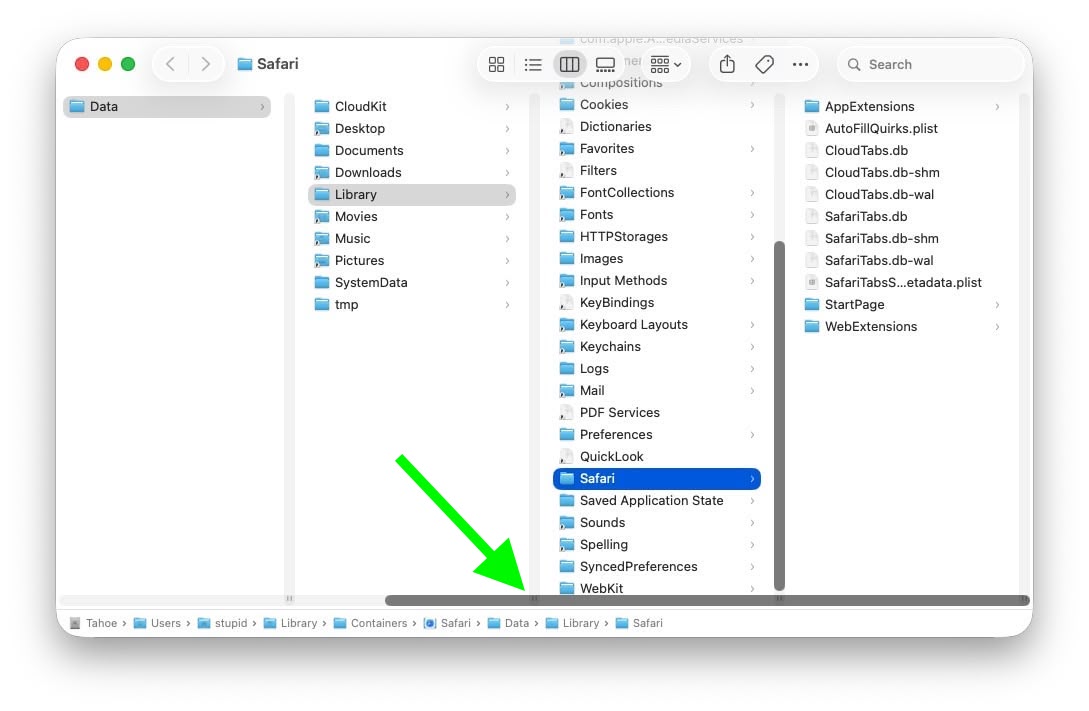
Scroll bar blocking column resize handles (Original image: Jeff Johnson)

At the bottom of each Finder column are handy little resize handles allowing you to expand or reduce each column as you see fit. But in macOS 26 and macOS 26.2, when scroll bars are set to "always show," the horizontal scroll bar at the bottom overlaps and covers those handles, so you can't click them to adjust column widths the way you could in earlier macOS versions like Sequoia.

macos-tahoe-finder-column-view-bug2.jpg

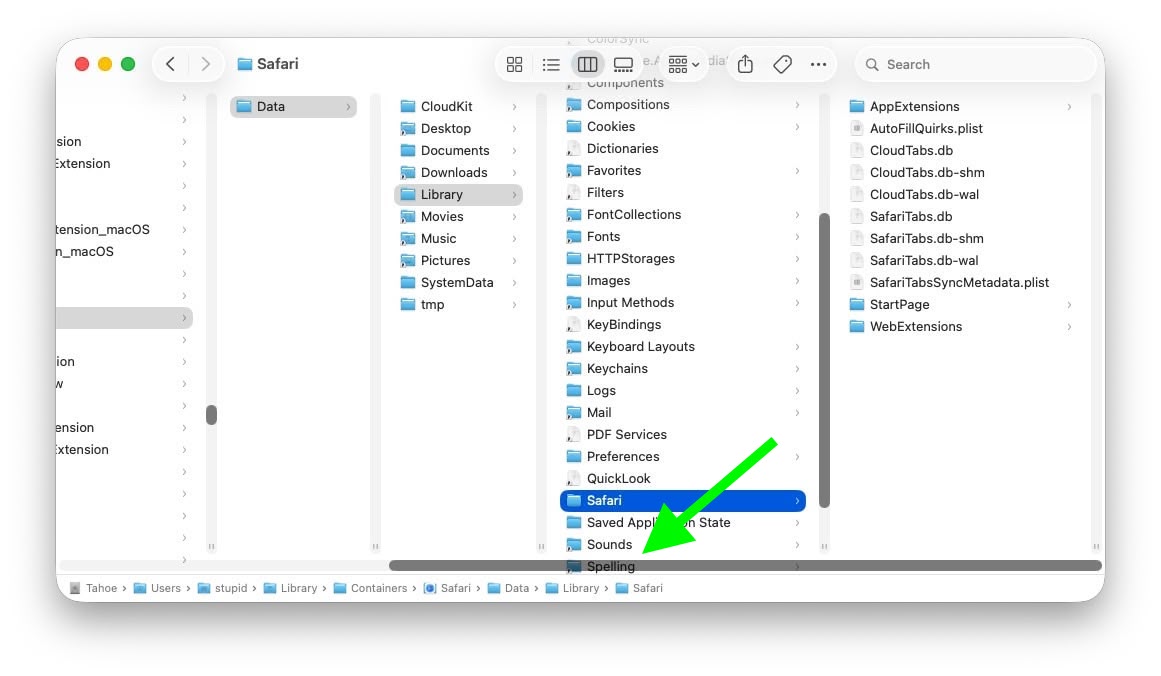
Scroll bar occluding column content (Original image: Jeff Johnson)

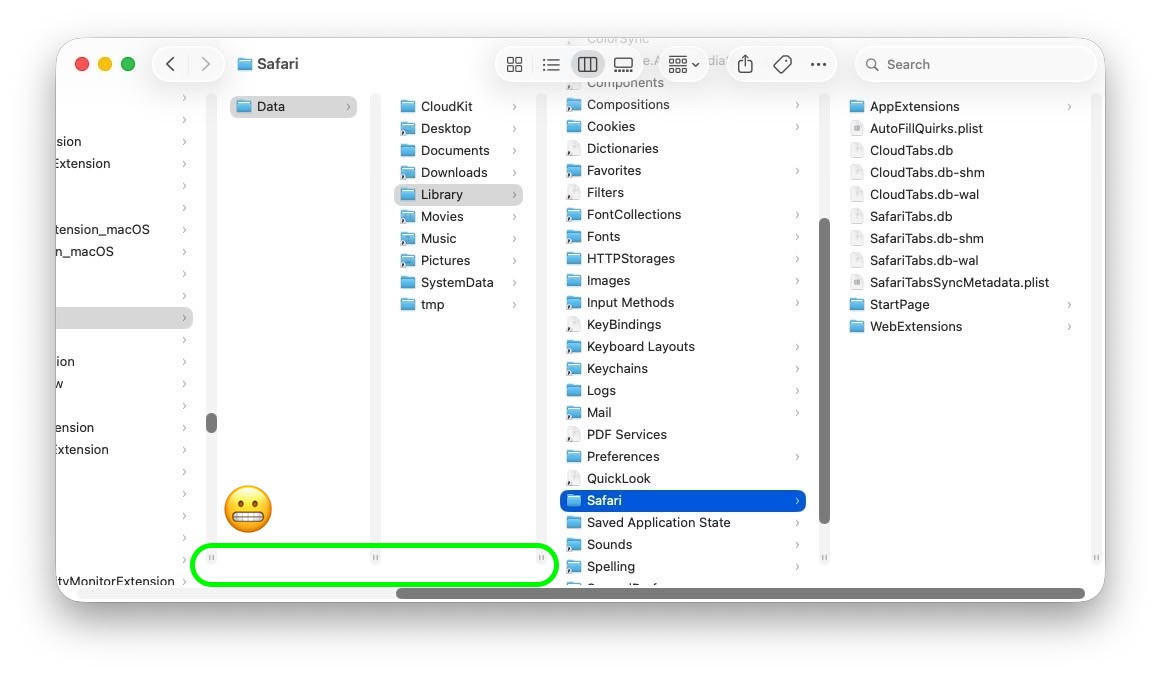
With the recent release of macOS 26.3, Apple attempted a fix. The vertical scrollers were shortened so the resizing widgets now sit above the horizontal bar and are technically clickable again. Unfortunately though, as Johnson points out, the horizontal scroll bar still overlaps file names in the view, causing it to regularly obscure content. Moreover, if you hide the path bar and status bar, the layout leaves a weird amount of empty space below the scrollers, making the whole thing look unfinished (see image below).

macos-tahoe-finder-column-view-bug1.jpg

Column resize handles suspended in mid-air (Original image: Jeff Johnson)

Johnson's take is basically that while the most disruptive bug is less bad now, the overall column view layout still feels half-baked – especially for anyone who keeps scroll bars always visible.

As Daring Fireball's John Gruber points out, it's an embarrassing fudge for a company that used to pride itself on pixel-perfect settings across its Mac operating system.

At this point, it's unclear when Apple will manage to iron out the UI irregularities introduced by Liquid Glass. macOS Tahoe‌ 26.4 is likely to be released in March or April, and could introduce some new Siri features, though at least some of the capabilities that we were expecting may have been delayed, depending on who you believe. The update is also expected to introduce new emoji characters.

Article Link: macOS Tahoe Finder Bug Underscores Apple's Slipping UI Polish
I'd never think of using the handles to resize the columns. I just drag the columns sides.
 
At this point, the only thing keeping me using Apple hardware is a) Apple Silicon, and b) Unified memory for my research in AI.

I've already switched my PC over to Nobara Linux from Windows and can see it end up being my daily driver if Apple doesn't improve their poorly vetted OS and UI.
 
meh, bit of myth that Apple at some point delivered flawless design. people have always been complaining.
I would say that the difference now is sloppiness.

Back in the day ie the second coming of Steve jobs - it was highly opinionated.

For example, I remember the ‘brushed metal years’.

It was very well implemented in tiger, but it made no sense - ie why do some apps have brushed metal and why do others not?

iTunes and QuickTime Player are media apps and brushed metal is obviously meant to mimic a high end hifi system from the time.

Ok I get it.

But then why did finder and safari have brushed metal too?

The answer was obviously ‘because Jobs said so’.

Anyway. The point is that the Apple of the 00s could be frustrating but not sloppy in the way it is now.
 
Finder has always been an abomination, with or without bugs. I honestly don't understand how anyone could actually like this garbage.
 
  • Like
Reactions: goodcow
Folks, it’s really not that complex. After the HomePod 1 debacle, Apple learned that you can’t add everything all at once, because it prevents a clear upgrade path. This is a great example of Apple putting what they learned into practice. Now Apple has a clear upgrade path for window scrolling! That is how you generate ever-increasing profits!
 
I have been adapting to another bug. You can no longer drag a clipping or file onto a folder icon in list view. I have to drag to the folder's name for it to copy or move.

View attachment 2604443
I have a similar issue where if you have a long list view and delete, move or add extra items. The items just get dumped wherever you release the mouse and you get what you see here where the bottom 8851.jpg just sits on top of everything. OR when you delete a slew of items you just end up with a giant blank space and the remaining items don't reposition to fill the gap.
 
  • Wow
Reactions: maxoakland
Register on MacRumors! This sidebar will go away, and you'll see fewer ads.