Become a MacRumors Supporter for $50/year with no ads, ability to filter front page stories, and private forums.
Good question. What speeds do you get that way? If you have it in a thunderbolt port it likely is running at pretty good speeds
Apologies, I did not use the same benchmark for all of these tests.

This is the speed of the Kingston Fury Renegade 1TB SSD installed into the Mac Pro 6,1 internal NVMe slot:
DiskSpeedTest - Kingston Fury Renegade - Mac Pro Internal NVMe.png


I have a couple different enclosures now. I got this MAIWO dual bay enclosure which has a USB 3.2 Gen 2x2 interface because it had a separate power supply and 20 Gbps speed. I tried this with the Apple TB3 (USB-C) to TB2 adapter fantasizing that I would get both PCIe lanes of the Gen 2x2 interface to connect to the two PCIe lanes of the TB2 interface. Even though I can power the device separately, the Apple adapter will not allow the drive to connect to the TB2 host port on the Mac Pro 6,1 at all. So, I have to use a USB 3.0 port on the Mac Pro 6,1 for this enclosure.

The speed of the Samsung 980 PRO in the MAIWO enclosure connected to USB 3.0 on a Mac Pro 6,1:
Samsung 980 PRO : MAIWO - JMicron PCIe0586 : Intel Xeon E5-1650 v2.png


For comparison, the speed of the Samsung 980 PRO in the MAIWO enclosure on an M2 Max which enumerates the drive as USB 3.2 Gen 2 with a speed of 10 Gbps:
JMicron PCIe0586 : Apple M2 Max.png


I am also trying out this INDMEM TB4/USB4 enclosure. For me this one was about 33% less expensive than the ACASIS and about 1/2 the price of an ORICO TB4 enclosure. Speed of the Samsung 980 PRO in the INDMEM enclosure connected to a USB 3.0 port of the Mac Pro 6,1 is:
Samsung SSD 980 PRO : Intel Xeon E5-1650 v2 - INDMEM enclosure.png


For comparison, speed of the Samsung 980 PRO in the INDMEM enclosure connected to a TB4 port of the MBP M2 Max is:
Samsung SSD 980 PRO 1TB : Apple M2 Max.png
 
As an Amazon Associate, MacRumors earns a commission from qualifying purchases made through links in this post.
Connect the TB4 adapter to the TB2 port with the apple adapter, VERY interested to see how fast that would be. Might get to around 2kMBps with overhead!
 
Connect the TB4 adapter to the TB2 port with the apple adapter, VERY interested to see how fast that would be. Might get to around 2kMBps with overhead!
Unfortunately, that does not work. The INDMEM enclosure does not have a separate power supply so there is no way to power the device when using the Apple adapter since that adapter does not support power delivery to the drive. The only way to connect the INDMEM to the TB2 host port on the Mac Pro 6,1 would be through a TB4 or TB3 dock. I have been trying to avoid going the dock route since they are quite expensive. Beyond connecting the SSD I do not really have much need for a dock. Though, I've been reading about some guys using an LG 48" C2 OLED TV as a monitor ...
 
Unfortunately, that does not work. The INDMEM enclosure does not have a separate power supply so there is no way to power the device when using the Apple adapter since that adapter does not support power delivery to the drive. The only way to connect the INDMEM to the TB2 host port on the Mac Pro 6,1 would be through a TB4 or TB3 dock. I have been trying to avoid going the dock route since they are quite expensive. Beyond connecting the SSD I do not really have much need for a dock. Though, I've been reading about some guys using an LG 48" C2 OLED TV as a monitor ...
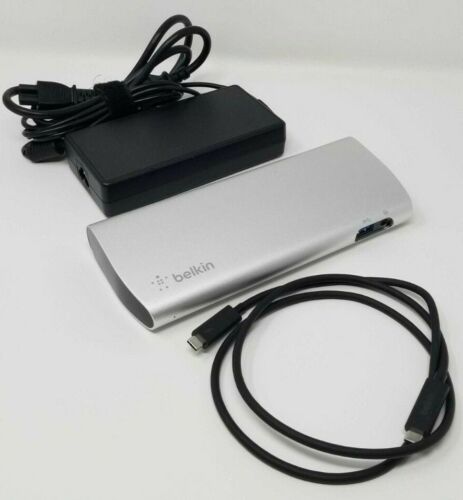
Tb3 docks are cheap! Targus Dock 220, Belkin thunderbolt 3 Express and others are usually on eBay for under $40. Just make sure you get one with a power supply and TWO tb3 ports (one upstream for the apple adapter, one downstream for the drive adapter)
 
  • Like
Reactions: steve123
This is the speed of the Kingston Fury Renegade 1TB SSD installed into the Mac Pro 6,1 internal NVMe slot

Out of curiosity, was this speed test done with macOS installed on and booted from the Fury Renegade? If yes, which version of macOS?
 
Out of curiosity, was this speed test done with macOS installed on and booted from the Fury Renegade? If yes, which version of macOS?
Yes. That particular screenshot was taken when I was running Big Sur 11.7.4 on a Mac Pro 6,1. I ran the tests on my Mac Pro 6,1 with macOS booting and running from the SSD with macOS versions Big Sur 11.7.5, Monterey 12.6.4 and Ventura 13.2.1 and 13.3. The results were all similar to this. I also ran several tests with the SSD installed in a Thunderbolt 4 enclosure and a USB 3.2 Gen 2x2 enclosure.
 
  • Like
Reactions: zzzippp
I just bought a thunderbolt 3 dock for $40, will update you if it'll work with a Dell power brick because if so you can get a dock and brick for like $25
Which dock did you get? Let me know how it works out. When I looked around on Ebay, I found a number of docks for sale but they did not include the power brick. The items I found that included the power brick were more expensive and when the shipping was added they were getting close to the price of one of the less expensive hubs. There was a no-name dock for sale on Ebay for $29 back in Feb but those quickly sold out and the seller does not anticipate selling more of them.

The Ebay sleuthing got me thinking, why don't we have a hub/dock with Dual Role Power on the upstream port? If DRP was supported it would be possible to power the hub/dock from the host. DRP would be a handy feature to have when go mobile. Ideally, a hub/dock would also have a pass-through USB-PD port that would allow use of any USB-PD power supply instead of a single use brick.
 
Which dock did you get? Let me know how it works out. When I looked around on Ebay, I found a number of docks for sale but they did not include the power brick. The items I found that included the power brick were more expensive and when the shipping was added they were getting close to the price of one of the less expensive hubs. There was a no-name dock for sale on Ebay for $29 back in Feb but those quickly sold out and the seller does not anticipate selling more of them.

The Ebay sleuthing got me thinking, why don't we have a hub/dock with Dual Role Power on the upstream port? If DRP was supported it would be possible to power the hub/dock from the host. DRP would be a handy feature to have when go mobile. Ideally, a hub/dock would also have a pass-through USB-PD port that would allow use of any USB-PD power supply instead of a single use brick.
That would be rad! I grabbed a Belkin TB3 Express, F4U095

If you have tb3 cables AND a beefy Dell laptop adapter then you can just get a bare dock (just a 20v 8.5a adapter comes with them, standard barrel jack)

Here's one with both for fifty bucks
 
Last edited:
  • Like
Reactions: steve123
Here's one with both for fifty bucks
Thanks for the heads up. Have you tried this one out on the MP 6,1? Does it enumerate in System Information? The OWC TB4 hub I have does not enumerate. The only way to mount my SSD requires a reboot and if you eject a disk, you have to reboot to remount it.
 
Thanks for the heads up. Have you tried this one out on the MP 6,1? Does it enumerate in System Information? The OWC TB4 hub I have does not enumerate. The only way to mount my SSD requires a reboot and if you eject a disk, you have to reboot to remount it.
I haven't, it definitely works with my wife's MacBook pro, but that's a tb3 Mac. I have some TB2 Macs but don't have a TB2 cable anymore to test with, just sold it lol
 
Came across this external dock today. Sonnet confirmed it will work with the TB 2 adapter and achieve a transfer rate about 1350 MBps which is similar to the speed of the internal SSD. It is a dual NVMe dock and has one downstream TB3 port and 4 USB 3 Gen 2 ports. The two NVMe disks can be configured as RAID0 and when connected to a TB3 or TB4 host, can achieve speeds of 2700 MB/s.

The physical unit is large but includes a built in fan for cooling the SSD's. It is expensive though ... if it was priced at $149.00 it would be a no-brainer.

 
Came across this external dock today. Sonnet confirmed it will work with the TB 2 adapter and achieve a transfer rate about 1350 MBps which is similar to the speed of the internal SSD. It is a dual NVMe dock and has one downstream TB3 port and 4 USB 3 Gen 2 ports. The two NVMe disks can be configured as RAID0 and when connected to a TB3 or TB4 host, can achieve speeds of 2700 MB/s.

The physical unit is large but includes a built in fan for cooling the SSD's. It is expensive though ... if it was priced at $149.00 it would be a no-brainer.

If you can do 2700 in raid 0 then one fast SSD should be able to hit that over tb2... Confusing
 
If you can do 2700 in raid 0 then one fast SSD should be able to hit that over tb2... Confusing
There are only two PCIe lanes per NVMe slot. It is a Gen 3 PCIe TB3 controller, so each slot gets 8 x 2 = 16 Gbps. That is why you max out at about 1350 MBps per SSD. Two slots provide 8 x 4 = 32 Gbps of bandwidth which is about 2700 MBps. When connected to the TB2 port, the data rate will be limited by the speed of the TB2 port.
 
  • Like
Reactions: tabormeister
I know this thread has been quiet, but I have news that's directly relevant to what @CodeJingle was trying to accomplish years ago — and it turns out Apple already solved it internally.
I've been trying to bypass the Thunderbolt 2 bottleneck on my Mac Pro 6,1 for an eGPU setup and stumbled across something incredible. A Reddit user (u/dogtooth97 on r/macpro) just posted photos of three Mac Pro 2013 trash cans with their GPUs removed and replaced by custom PCIe breakout/daughter cards that expose multiple M.2 NVMe slots in place of the FirePro GPU board.
1775882156178.png
1775882170086.png

Here's what we know so far:


  • The board replaces one of the two GPU boards (plugs into the same FCI Meg-Array flex cable connector that the D300/D500/D700 uses)
  • It breaks out the PCIe x16 lanes into what appears to be six M.2 slots
  • The connectors appear to be from Apple or Amphenol factory
  • According to the owner, these are Apple internal development daughter cards used to clone macOS onto prototype hardware with codenames J138 (iMac Pro 2017) and J139 (Mac Pro 2019)
  • They were used as HDD/SSD duplicator/imaging stations inside Apple
  • These were never sold commercially — they leaked out through Apple's asset disposal/e-waste chain

This is the exact board that CodeJingle spent 100+ hours trying to reverse-engineer by mapping the ~300-pin flex cable traces before abandoning the project. Apple had already designed and manufactured the solution internally — they just never released it.


The original Reddit post:
 
Wow, this is such a cool discovery. Its interesting to me that they would use just a ton of PCIe X4 connectors instead of regular M.2 or their own 12+16 pin connector, maybe for easy adapting to other standards?

They must be using some kind of PCIe switch chip for the slots, judging by the fact that the 6,1 does not support bifurcation in any way, and the big thermal pad on the heatsink. There sure is a lot of logic on those boards though if its just PCIe slots and a switch. I see some fat inductors, physical buttons, and a programming header for maybe a microcontroller. Wish u/dogtooth97 would post a picture of the rear.

I got a 6,1 a couple weeks ago with the goal of designing an X16 breakout / dev board and possibly a new much faster GPU board to replace the dual GPUs. The first issue is obviously the part number and pinout on that damn 300-pin connector.

Can anyone comment if there will be any issues with GPU EFI firmware like there is with the 4,1/5,1?
Luckily were dealing with UEFI now like with the 2019, so fingers crossed its actually "Unified".
 
  • Wow
Reactions: underthere
The bios for both GPUs is also stored in the bootrom and unfortunately, it uses UGA instead of GOP. But i'm not 100% sure, because i found both definitions in the bootrom (GOP and UGA).
 
There are only two PCIe lanes per NVMe slot. It is a Gen 3 PCIe TB3 controller, so each slot gets 8 x 2 = 16 Gbps. That is why you max out at about 1350 MBps per SSD. Two slots provide 8 x 4 = 32 Gbps of bandwidth which is about 2700 MBps. When connected to the TB2 port, the data rate will be limited by the speed of the TB2 port.
No, look a the diagram, it is PCIe 2.0 x4
 
Wow! It would be great to produce a module for a modern or just supported GPU to use it with OpenCore and make the Mac Pro stable and efficient with macOS Sequoia.
 
Wow! It would be great to produce a module for a modern or just supported GPU to use it with OpenCore and make the Mac Pro stable and efficient with macOS Sequoia.

This won't be possible with a CPU that doesn't have AVX2 supportand and all current GPU drivers and some subsystems requiring it.
 
This won't be possible with a CPU that doesn't have AVX2 supportand and all current GPU drivers and some subsystems requiring it.Oh ok. But Dx00 drivers after macOS 13 are super bugged, maybe there are more modern GPU from iMac 2015-2019 which at least can run ok with OpenCore.
 
Register on MacRumors! This sidebar will go away, and you'll see fewer ads.