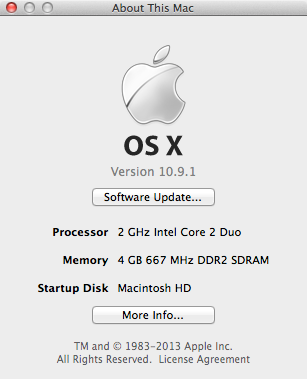
my original theory didn't work however installing macos extractor was what got me somewhere interesting...First off the original instructions for MacOS extractor are extremely outdated or plain wrong and can cause it to completely fail each time so I'd like to create a small better guide for the latest version.
1. Download the MacOS OFFLINE PACKAGE (unless you have good and reliable internet on your mac I'd recommend the offline version Link
http://redirect.viglink.com/?format=go&jsonp=vglnk_153538701484116&key=da7846f9c7bf9c1a01a023cce0263f39&libId=jlchruhy0101ctzq000DAb8x76wql&loc=http://osxhackers.net/macos-extractor.html&v=1&out=https://mega.nz/#!B3ZAHYQB!_mg1ojdOoG030jgF4I26I1PJALAQUjB__fFagnef-_Y&ref=https://www.google.com/&title=OS X Hackers - macOS Extractor&txt=Download from Provider (Mega)
2. Insure you either have sierra?, el captain, yosemite, mavericks, or mountain lion's installer app in your applications folder and startup the installer.
3. Keep clicking on continue until you reach the last screen before you install, then select customize and in the next screen select the version that corresponds to your version, then hit continue and install, when it prompts you to input your password do that and wait for it to complete.
4. go to applications/OS X Hackers Patch Files/ and run AutoPatch.mpkg, IMPORTANT! right before you install your package go into disk utility and format either a partition on your hard drive or format a flash drive to prepare for the installation to Mac OS Extended (Journaled) select options and choose GUID partition table.
5. Now go back into the installer after you've successfully partitioned your hard drive/flash drive and select the install location and select that partition/drive and hit install and run the installer. Your going to wait a while so go do something in the mean time.
6. After the installer succeeds back up the "OS X Hackers Patch Files" to a separate drive in case you decide to wipe your main drive for the new os. Now restart your computer and when the iconic boot chime starts up, hold alt option key on your keyboard and select the "OS X Base System" wait for the installer to complete.
7. Reboot and you should be in your newly installed system. if it doesn't work refer to the first post on what to do. congratulations you've successfully installed an unsupported system on your mac. Enjoy
😀!
EDIT: I'm going to test Sierra soon, I don't have it and I've mainly been torrenting the installers (would be nice if someone can link me to a better versions, Preferably torrent versions as it's the only secure way I can download things without them corrupting due to poor internet.) so I'm going to torrent the installer tonight and post results tomorrow
😀
EDIT:Mavericks Confirmed Working however the gma 950 kext installer seems to be a redirect to a download that 404s which is required for my macbook, does anyone have a reliable mirror?