
Got a tip for us?
Let us know
Become a MacRumors Supporter for $50/year with no ads, ability to filter front page stories, and private forums.
The Samsung 840/840 Pro SSD thread
- Thread starter Hexley
- Start date
- Sort by reaction score
You are using an out of date browser. It may not display this or other websites correctly.
You should upgrade or use an alternative browser.
You should upgrade or use an alternative browser.

kcrossley
macrumors regular
That is actually a very good question. When Samsung comes out with the new update, I will try this approach, since it takes 5 minutes, and report back.
Did you try this to see if it works?

T'hain Esh Kelch
macrumors 604
No, I do not run Windows.Did you try this to see if it works?
kcrossley
macrumors regular
No, I do not run Windows.
Me neither. Plus, I'm using in a Data Doubler so I no longer have an internal drive. So how did you update your firmware?
T'hain Esh Kelch
macrumors 604
I just wrote no to your question? 😕So how did you update your firmware?
T'hain Esh Kelch
macrumors 604
You'd most likely get way better answers in a thread dedicated to the application used. This thread really has nothing to do with your question.I cloned my new 840 EVO last night. I noticed it transferred about 10GB's less than what's on my HDD? It was late so I haven't installed it yet, just cloned it. Any way to tell what didn't transfer over?

I cloned my new 840 EVO last night. I noticed it transferred about 10GB's less than what's on my HDD? It was late so I haven't installed it yet, just cloned it. Any way to tell what didn't transfer over?
Most clone apps don't clone over the swap files and that would account for the difference.
Extremely slow Samsung SSD 740 PRO
I've upgraded my MacBook Pro early 2011 with a Samsung 740 PRO SSD of 256 Gb a while back now. When I first ran a Blackmagic speedtest it was telling me almost 420 MB/s write speed and read of over 450 MB/s.
Lets see what it is now;
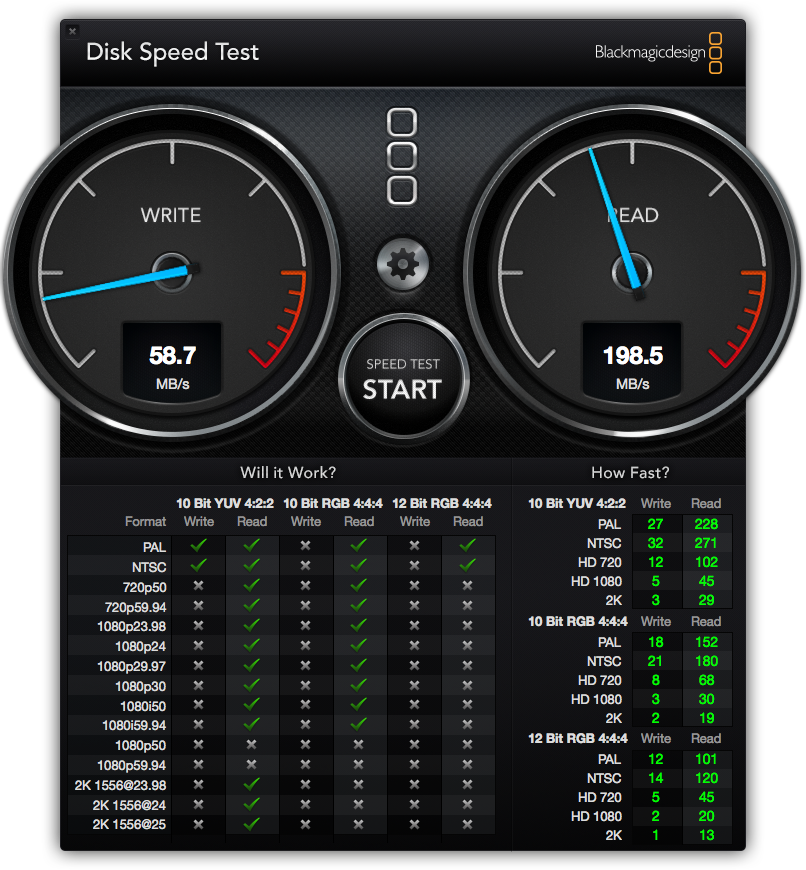
How is this happening? I've enabled trim support with chameleon SSD optimizer. I also repaired all disk permissions. I checked the SATA speeds (they're 6gbit/sec). I don't know what to do now so if anybody has an idea please let me know...
I've upgraded my MacBook Pro early 2011 with a Samsung 740 PRO SSD of 256 Gb a while back now. When I first ran a Blackmagic speedtest it was telling me almost 420 MB/s write speed and read of over 450 MB/s.
Lets see what it is now;
How is this happening? I've enabled trim support with chameleon SSD optimizer. I also repaired all disk permissions. I checked the SATA speeds (they're 6gbit/sec). I don't know what to do now so if anybody has an idea please let me know...
T'hain Esh Kelch
macrumors 604
I've upgraded my MacBook Pro early 2011 with a Samsung 740 PRO SSD of 256 Gb a while back now. When I first ran a Blackmagic speedtest it was telling me almost 420 MB/s write speed and read of over 450 MB/s.
Lets see what it is now;
Image
How is this happening? I've enabled trim support with chameleon SSD optimizer. I also repaired all disk permissions. I checked the SATA speeds (they're 6gbit/sec). I don't know what to do now so if anybody has an idea please let me know...
Give this a try...
First make sure TRIM is enabled. Then boot to single user mode by holding command-s at boot. Then enter "fsck -fy" (without the quotes) on the command line. It should check the disk and display a message that all unused blocks were trimmed.
Now type reboot and test again to see if that helped.
Thanks!!
Thanks man!! It worked like a charm. Is this something I should do every while? Why does this work and the trimming of the chameleon app doesn't... Here are the new specs;
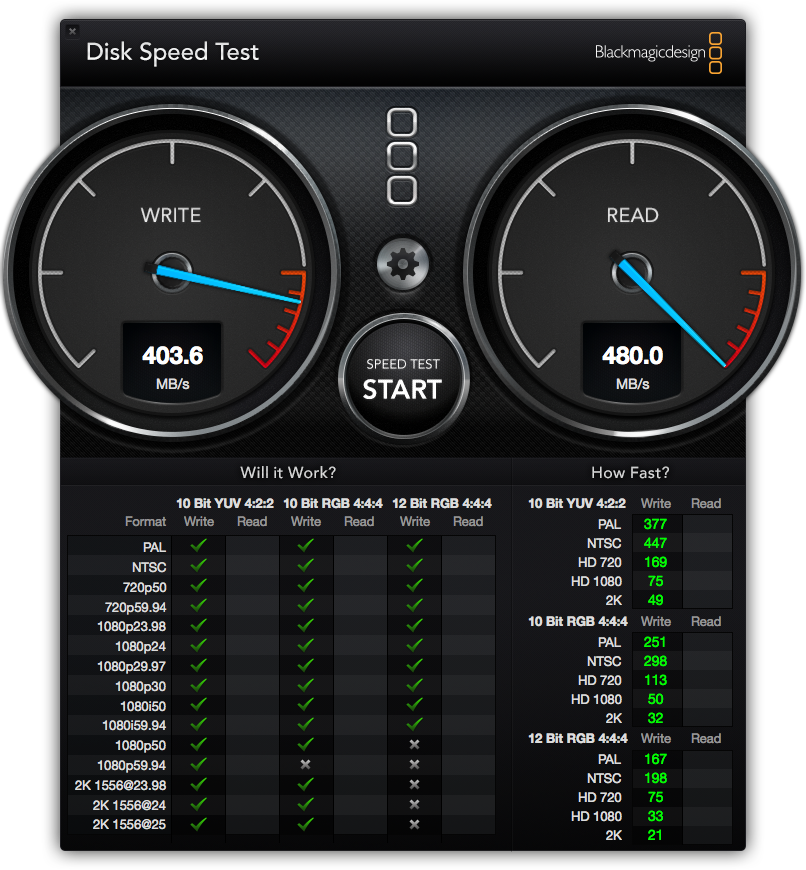
Like when it was brand new!
.....
This was just a minute ago. I wanted to do a test again, because the read specs weren't on the picture.. Now everything dropped again.. I getting these speeds now, and it's fluctuating like hell...
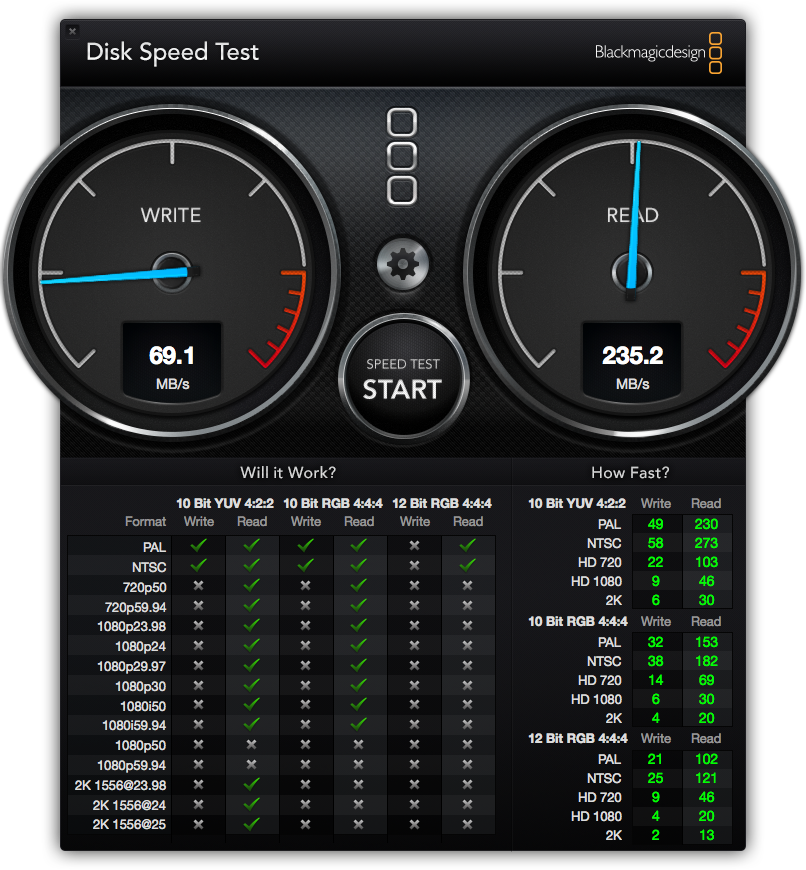
Why can't I get a steady read-out?
I have 37gb of free disk space.
Give this a try...
First make sure TRIM is enabled. Then boot to single user mode by holding command-s at boot. Then enter "fsck -fy" (without the quotes) on the command line. It should check the disk and display a message that all unused blocks were trimmed.
Now type reboot and test again to see if that helped.
Thanks man!! It worked like a charm. Is this something I should do every while? Why does this work and the trimming of the chameleon app doesn't... Here are the new specs;
Like when it was brand new!
.....
This was just a minute ago. I wanted to do a test again, because the read specs weren't on the picture.. Now everything dropped again.. I getting these speeds now, and it's fluctuating like hell...
Why can't I get a steady read-out?
I have 37gb of free disk space.
T'hain Esh Kelch
macrumors 604
Thanks man!! It worked like a charm. Is this something I should do every while? Why does this work and the trimming of the chameleon app doesn't... Here are the new specs;
Like when it was brand new!
.....
This was just a minute ago. I wanted to do a test again, because the read specs weren't on the picture.. Now everything dropped again.. I getting these speeds now, and it's fluctuating like hell...
Why can't I get a steady read-out?
I have 37gb of free disk space.
TRIM just works with the space being used for read/write and does not do much with the unused space, so running that command to TRIM unused space can help. Ideally, you would never need to run it... bit for some reason it seems to help to do it once in a while.
Just an idea... but try running the command again, then disable TRIM for a day and see if the speeds stay up. Maybe something up with the way Chameleon is enabling TRIM?
You have enough free space that that should not be an issue.

hfg
macrumors 68040
I've upgraded my MacBook Pro early 2011 with a Samsung 740 PRO SSD of 256 Gb a while back now. When I first ran a Blackmagic speedtest it was telling me almost 420 MB/s write speed and read of over 450 MB/s.
Lets see what it is now;
Image
How is this happening? I've enabled trim support with chameleon SSD optimizer. I also repaired all disk permissions. I checked the SATA speeds (they're 6gbit/sec). I don't know what to do now so if anybody has an idea please let me know...
Is your SSD mounted where the original hard disk was located ... or did you install it in a optibay in place of the optical drive?
Is your SSD mounted where the original hard disk was located ... or did you install it in a optibay in place of the optical drive?
It's located in the original place where my HDD used to be.. I did so to ensure the best/quickest connection by taking advantage of the 6gbit/sec SATA connection..

johnnnw
macrumors 65816
Massive problems since updating my firmware.
The drive is not working on and off. It won't let me do any clones with getting write errors and OS X installs are constantly failing.
I thought it was the drive and Samsung just replaced it but the new one is doing the same thing.
I don't know what to do now. Can I go back to the old firmware? Does anyone know what the firmware version was before the current one?
DriveDx is showing a CRC count error and everything is just acting weird. The factory HDD doesn't show any issues so it must be the drive I'm thinking.
Help
I tried installing via internet recovery and also tried installing OS X using a usb drive multiple times and it always gives random different errors that it couldn't copy a file etc. It installed fine using the same USB drive on my old hdd so something is up with the ssd. This is two in a row so I know it's not broken, something is just really messed up and I suspect it's the firmware because it was fine until I updated it.
The drive is not working on and off. It won't let me do any clones with getting write errors and OS X installs are constantly failing.
I thought it was the drive and Samsung just replaced it but the new one is doing the same thing.
I don't know what to do now. Can I go back to the old firmware? Does anyone know what the firmware version was before the current one?
DriveDx is showing a CRC count error and everything is just acting weird. The factory HDD doesn't show any issues so it must be the drive I'm thinking.
Help
I tried installing via internet recovery and also tried installing OS X using a usb drive multiple times and it always gives random different errors that it couldn't copy a file etc. It installed fine using the same USB drive on my old hdd so something is up with the ssd. This is two in a row so I know it's not broken, something is just really messed up and I suspect it's the firmware because it was fine until I updated it.

macenied
macrumors 6502a
Massive problems since updating my firmware.
The drive is not working on and off. It won't let me do any clones with getting write errors and OS X installs are constantly failing.
I thought it was the drive and Samsung just replaced it but the new one is doing the same thing.
I don't know what to do now. Can I go back to the old firmware? Does anyone know what the firmware version was before the current one?
DriveDx is showing a CRC count error and everything is just acting weird. The factory HDD doesn't show any issues so it must be the drive I'm thinking.
Help
I tried installing via internet recovery and also tried installing OS X using a usb drive multiple times and it always gives random different errors that it couldn't copy a file etc. It installed fine using the same USB drive on my old hdd so something is up with the ssd. This is two in a row so I know it's not broken, something is just really messed up and I suspect it's the firmware because it was fine until I updated it.
SOME SAY it's a cable issue and this sounds feasible. This also has been the reason why Apple throttleld the speed for their own SSD's ( I am not sure if they still do ). 6GB SATA speed is very fast and can require a good cable and shielding. Check if Apple has an upgrade cable.
I use a Corsair GT 480 ( a SATA III SSD ) in my MBP at 3GB SATA Speed, cable not upgraded and I never had issues ( knock on wood ), my MBP only has a SATA II interface.
Last edited:
SkimMilk168
macrumors regular
I upgraded my wifes 13" MBP (late 2011) with an 840 EVO and man it's crazy fast! I also maxed out her RAM w/ 8GB from crucial. She says it has new life. She uses it heavily with office programs, two browsers for school (one website doesn't support and vise versa). mail app, iTunes all work perfect.
I'll keep an eye on the firmware update.
Would it be beneficial for me to get the same model on my Mid 2009 15" MBP? I chose the 840 EVO because it was on sale at bestbuy for $129. Not sure how long it will be that price?
I'd suggest looking at the Crucial MX100. Cheap and good performance too. 🙂

yanki01
macrumors 68040
I'd suggest looking at the Crucial MX100. Cheap and good performance too. 🙂
too late, bought and installed an 840 EVO.
johnnnw
macrumors 65816
SOME SAY it's a cable issue and this sounds feasible. This also has been the reason why Apple throttleld the speed for their own SSD's ( I am not sure if they still do ). 6GB SATA speed is very fast and can require a good cable and shielding. Check if Apple has an upgrade cable.
I use a Corsair GT 480 ( a SATA III SSD ) in my MBP at 3GB SATA Speed, cable not upgraded and I never had issues ( knock on wood ), my MBP only has a SATA II interface.
I thought maybe that was it too but it's happening when the drive is in my external enclosure too.
BluemanSegundo
macrumors newbie
Many thanks to all the contributors to this thread!
I combed through the 48 pages and decided to buy and upgrade a late 2012 Mac Mini with the 2.3ghz processor(MD388LL/A).
I decided to add a second drive and 16gb ram. The drive choice was the Samsung 840 Pro. The ram was the Crucial 16gb kit(
(8GBx2) DDR3 PC3-12800 Unbuffered NON-ECC 1.35V 1024Meg x 64
part #:CT3650349)
I upgraded the software to IOS 10.10 then
ran the BlackMagic software to test the read/write speeds. This was critical because I also needed to re-run the test once I switched the drive and replaced the SATA cable. I needed to have a benchmark.
I also own a 2010 Mac Mini Server with dual drives. One drive died so I was able to take the SATA cable, screws, and rubber grommets from it to update the 2012. First I consulted iFitIts instructions for adding the second hard drive to the 2010 mini. After taking it apart I grabbed the cable, grommet and screws and and began the process with the new 2012 mini. Since my new 840 Pro had not arrived on time I decided that I could start with moving the 1TB drive in the 2012 to the upper position.
This also involves taking everything apart. I placed the drive in the open upper position with all the needed grommets/screws and re-assembled the 2012 mini. Next I ran the BlackMagic test to make sure everything was working as new. Success!(see the first attached image)
The next day my 840 Pro arrived along with 16gb of Crucial ram(Yay)
The first thing I noticed was that the 840 Pro was a lot thinner and lighter than the OEM 1TB drive. I figured that I could slide it into its new home without completely taking apart the 2012 Mini and I was correct!
I removed the two screws holding the fan and carefully(slowly) puled the fan up without unplugging it, slowly flipped it over and carefully laid it on its back. Next I removed the screws from the wi-fi antenna and slowly flipped it over and carefully laid it on its back.
Lastly I removed the one screw holding for the cowling and removed it.
Now I attached the SATA cable/ taped it down, screwed the mounting studs and carefully slid it into its new home. Simple as that. I pressed the SATA cable to the logic board and I reversed the install on the antenna/cowling/fan. Then I removed/replaced the 4gb OEM ram with the new 16gb ram. Put the base back on and plugged it in, started it up and ran the BlackMagic software. Remember, I have not initialized the new 840 SSD, Im just starting it from the 1TB with IOS 10.10. Since I got the message that the new drive needed to be initialized I opened up Disk Utility and formatted the new 840 Pro drive. Then I ran the BlackMagic to check the read/write on the 1TB with the new 16GB ram. Success! The new ram speeded up the BlackMagic results(see second attached image)
Next I ran the test on the new SDD and I smiled 🙂 (see the third attached image)
Next I went to the App Store and downloaded 10.10 and installed it onto the 840 Pro drive. I also decided to download the Trim Enabler software from Cindori.org. (see the fourth image attached). I liked the software interface and all that it claims to do
Rebooted a couple times after following the Trim Enabler software install and re-ran the Black Magic software. Success! (see fifth attached image)
Again, Thanks to all the contributors!
I combed through the 48 pages and decided to buy and upgrade a late 2012 Mac Mini with the 2.3ghz processor(MD388LL/A).
I decided to add a second drive and 16gb ram. The drive choice was the Samsung 840 Pro. The ram was the Crucial 16gb kit(
(8GBx2) DDR3 PC3-12800 Unbuffered NON-ECC 1.35V 1024Meg x 64
part #:CT3650349)
I upgraded the software to IOS 10.10 then
ran the BlackMagic software to test the read/write speeds. This was critical because I also needed to re-run the test once I switched the drive and replaced the SATA cable. I needed to have a benchmark.
I also own a 2010 Mac Mini Server with dual drives. One drive died so I was able to take the SATA cable, screws, and rubber grommets from it to update the 2012. First I consulted iFitIts instructions for adding the second hard drive to the 2010 mini. After taking it apart I grabbed the cable, grommet and screws and and began the process with the new 2012 mini. Since my new 840 Pro had not arrived on time I decided that I could start with moving the 1TB drive in the 2012 to the upper position.
This also involves taking everything apart. I placed the drive in the open upper position with all the needed grommets/screws and re-assembled the 2012 mini. Next I ran the BlackMagic test to make sure everything was working as new. Success!(see the first attached image)
The next day my 840 Pro arrived along with 16gb of Crucial ram(Yay)
The first thing I noticed was that the 840 Pro was a lot thinner and lighter than the OEM 1TB drive. I figured that I could slide it into its new home without completely taking apart the 2012 Mini and I was correct!
I removed the two screws holding the fan and carefully(slowly) puled the fan up without unplugging it, slowly flipped it over and carefully laid it on its back. Next I removed the screws from the wi-fi antenna and slowly flipped it over and carefully laid it on its back.
Lastly I removed the one screw holding for the cowling and removed it.
Now I attached the SATA cable/ taped it down, screwed the mounting studs and carefully slid it into its new home. Simple as that. I pressed the SATA cable to the logic board and I reversed the install on the antenna/cowling/fan. Then I removed/replaced the 4gb OEM ram with the new 16gb ram. Put the base back on and plugged it in, started it up and ran the BlackMagic software. Remember, I have not initialized the new 840 SSD, Im just starting it from the 1TB with IOS 10.10. Since I got the message that the new drive needed to be initialized I opened up Disk Utility and formatted the new 840 Pro drive. Then I ran the BlackMagic to check the read/write on the 1TB with the new 16GB ram. Success! The new ram speeded up the BlackMagic results(see second attached image)
Next I ran the test on the new SDD and I smiled 🙂 (see the third attached image)
Next I went to the App Store and downloaded 10.10 and installed it onto the 840 Pro drive. I also decided to download the Trim Enabler software from Cindori.org. (see the fourth image attached). I liked the software interface and all that it claims to do
Rebooted a couple times after following the Trim Enabler software install and re-ran the Black Magic software. Success! (see fifth attached image)
Again, Thanks to all the contributors!
Attachments


OooH-Boy2014
macrumors newbie
Same problem
Hi I got the same problem did u fix it.??
I thought maybe that was it too but it's happening when the drive is in my external enclosure too.
Hi I got the same problem did u fix it.??
johnnnw
macrumors 65816
Hi I got the same problem did u fix it.??
Nope, still having the problem that it works fine in the external but won't boot in the internal bay
Think I'm going to have Apple replace the sata cable it's the only thing I can think of