Become a MacRumors Supporter for $50/year with no ads, ability to filter front page stories, and private forums.

akidokraja

macrumors 6502
Original poster
I have brand new MacBook Air M5 15 inch, 32 GB, 1TB. running Tahoe, 26.4.1
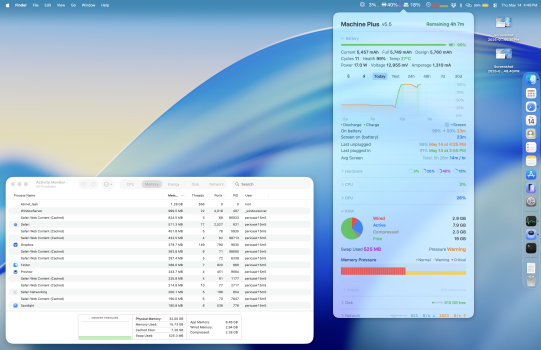
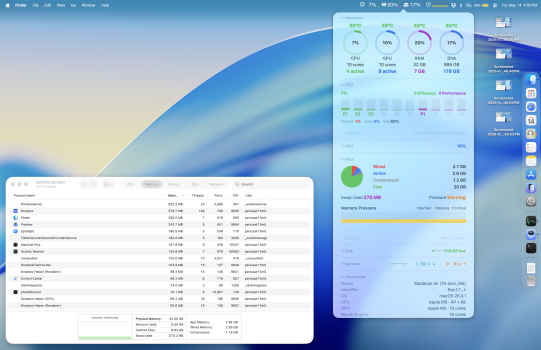
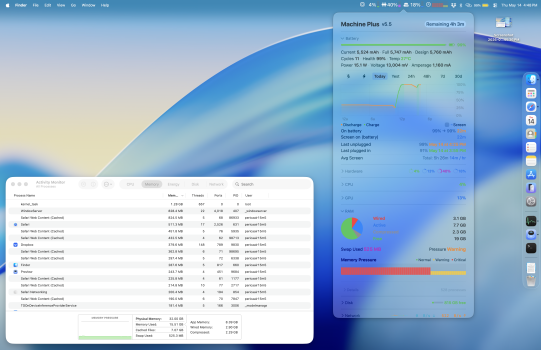
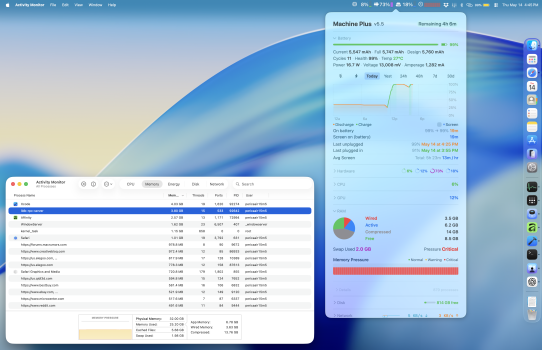
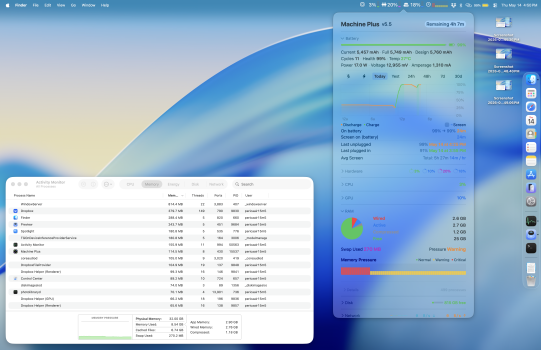
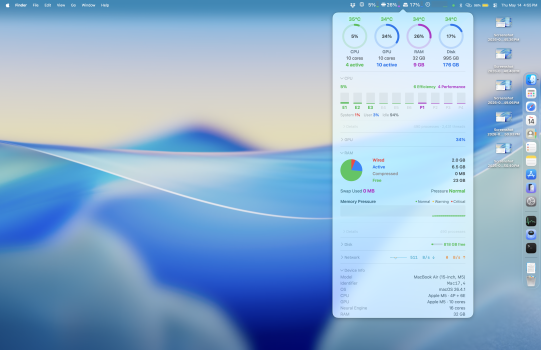
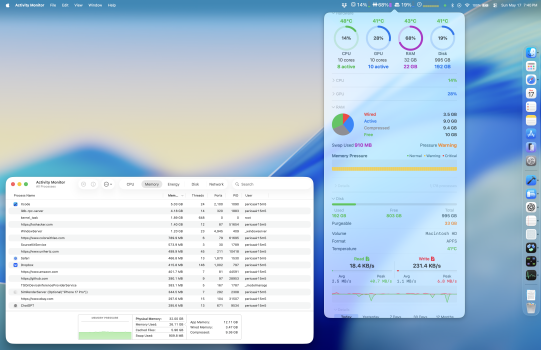
Everyone says: "Oh don't worry, just let the system manage memory - it is very efficient..blah blah blah". It is obviously not that great, or to say pretty horrible. Look at my screenshot of my app I am working on - and no it is not mistake in the app as Activity monitor shows same swap. Shouldn't Compressed memory be immediately released before Swap is used? Once I restart and open all the same apps and windows no more SWAP. Just look at screenshots.
Can anyone explain this without just saying: it is fine just let system handle it?
What I have running:
my monitoring app (less than 100 MB RAM). 3 Xcode windows - different projects. One simulator. maybe 3 Safari windows with around 4-5 tabs open). ChatGPT app. Dropbox, Text Edit, preview with one pdf of 10 pages open.
 

Attachments

  • Screenshot 2026-05-14 at 4.49.06 PM.png
    Screenshot 2026-05-14 at 4.49.06 PM.png
    5.9 MB · Views: 128
  • Screenshot 2026-05-14 at 4.50.40 PM.png
    Screenshot 2026-05-14 at 4.50.40 PM.png
    5.9 MB · Views: 128
  • Screenshot 2026-05-14 at 4.48.40 PM.png
    Screenshot 2026-05-14 at 4.48.40 PM.png
    6.1 MB · Views: 72
  • Screenshot 2026-05-14 at 4.45.36 PM.png
    Screenshot 2026-05-14 at 4.45.36 PM.png
    5.9 MB · Views: 120
  • Screenshot 2026-05-14 at 4.50.03 PM.png
    Screenshot 2026-05-14 at 4.50.03 PM.png
    6.1 MB · Views: 114
  • Screenshot 2026-05-14 at 4.55.34 PM.png
    Screenshot 2026-05-14 at 4.55.34 PM.png
    7.4 MB · Views: 117
  • Screenshot 2026-05-17 at 7.40.09 PM.png
    Screenshot 2026-05-17 at 7.40.09 PM.png
    5.5 MB · Views: 111
  • Like
  • Haha
Reactions: Nik and allaboutp
Can anyone explain this without just saying: it is fine just let system handle it?
How deep an explanation do you want? macOS will move low priority background system tasks to dynamic swap to leave room in physical memory for higher priority application memory needs. You can turn off swapping memory to disk if you don’t want to “let the system handle it”. I’m sure you will hear from swap haters on how to do this shortly ;-)
 
Last edited:
Shouldn't Compressed memory be immediately released before Swap is used?
The Compressor handles shortage of memory by first compressing memory and if that is not sufficient swapping to disk. My understanding is that the algorithms make decisions on what to compress and what to swap based on how likely that memory will be required in the future. But also that there is no requirement to release compressed memory at the same time as moving memory to swap. The parameters controlling those algorithms vary between Macs and are forever tweaked with macOS updates.

The Activity Monitor output in your screenshots look perfectly normal.

Restarting releases all memory, so you must expect zero swap and very little compressed after a reboot. Here is the recent memory usage of my iMac. The reboot on 12th May cleared all swap and initially there was no compressed RAM.

1779067248345.png


Apple does not document any of this though much of the macOS kernel is open source and can be explored. Also "*OS Internals" also known as "macOS and iOS Internals" by Jonathan Levin (3 volumes) is a useful if slightly dated reference. Volume 2 covers the kernel. There is also an older single volume "Mac OS X and iOS Internals" which I find more readable but which is now dated.

As aside, things I don't like in your app: You are classifying Cache memory as Free memory. Also memory pressure is more critical than Activity Monitor.

 
Last edited:
The Compressor handles shortage of memory by first compressing memory and if that is not sufficient swapping to disk. My understanding is that the algorithms make decisions on what to compress and what to swap based on how likely that memory will be required in the future. But also that there is no requirement to release compressed memory at the same time as moving memory to swap. The parameters controlling those algorithms vary between Macs and are forever tweaked with macOS updates.

The Activity Monitor output in your screenshots look perfectly normal.

Restarting releases all memory, so you must expect zero swap and very little compressed after a reboot. Here is the recent memory usage of my iMac. The reboot on 12th May cleared all swap and initially there was no compressed RAM.

View attachment 2630652

Apple does not document any of this though much of the macOS kernel is open source and can be explored. Also "*OS Internals" also known as "macOS and iOS Internals" by Jonathan Levin (3 volumes) is a useful if slightly dated reference. Volume 2 covers the kernel. There is also an older single volume "Mac OS X and iOS Internals" which I find more readable but which is now dated.

As aside, things I don't like in your app: You are classifying Cache memory as Free memory. Also memory pressure is more critical than Activity Monitor.

Thanks for the detailed explanation. I think we should not be needing to restart computer to free cached memory - yes system will decide but obviously it’s wrong. The other day I left Lightroom open for a week or two when I don’t use my MacBook Pro and came back to 100gb of usage and all kind of panics. Yes? I know Adobe is at fault but shouldn’t the system say: hold on something is wrong I need to shut down this app. It did nothing. I am tweaking the app and wanted to clarify the cached memory as free as the idea is that user would think it will be released anytime but that’s not the case. Thanks again.
 
I think we should not be needing to restart computer to free cached memory - yes system will decide but obviously it’s wrong.
sudo purge will clear the cache - but only use it when you know it is necessary (usually never).

There are also apps around which will aggressively grab memory (forcing other apps to swap) and then exit leaving lots of free memory. Not that I think that is a good idea. Better just to quit the apps you are not using.
 
Last edited:
Because macOS is build that way? Even Windows since version XP does this.

And what the hell are you complaining about? My M4 Air did swap about 4 gigs of RAM and the last white Intel based MacBook did swap about 9 gigs. Works as intended!
 
Last edited:
Translation from a famous German Mac Forums:

To put it another way: Operating systems like macOS are intentionally not optimized to avoid using swap space and to postpone its use for as long as possible.

They are optimized to make swapping and retrieval as efficient as possible when swap space is needed (which is considered the norm). Inactive memory plays a crucial role in this, acting as a kind of probability-optimized cache. This allows a swapped-out page that is being accessed to be reactivated without swapping it back in, i.e., without any time loss. Therefore, it's an intermediate state between free and used. It contains memory pages that are likely to be released and reused with a certain probability without any time loss.

Anyone observing a macOS system with normal memory usage over extended periods will notice that inactive and free memory are consistently kept at about one-third of the available RAM.

Update:
No longer than by using 10.9 and above. 15.99 of 16 gigs of RAM used after startup from my M4 Air.
 
Register on MacRumors! This sidebar will go away, and you'll see fewer ads.