Become a MacRumors Supporter for $50/year with no ads, ability to filter front page stories, and private forums.
Status
The first post of this thread is a WikiPost and can be edited by anyone with the appropiate permissions. Your edits will be public.
No, you're officially the only one trying that out for all of us. I was genuinely tempted to install a VM with Windows on my Mac just to try out Apple Devices, but then I changed my mind 😂
Has anyone successfully installed this IPSW with Apple Devices?


I honestly was going to try updating my Daughter's iPhone 16e from my Mac mini's Windows Bootcamp login, but between all of the CarPlay issues we've been having in our house, I ended up just updating OTA in my car..
 
I’m trying to understand how you did this. So you ran Windows in a VM?
You can install BootCamp on Intel Mac minis. I've got the most current version of Windows 10 installed on mine. Although I find that the only time I boot into Windows anymore is to run Windows updates lol

I'll try and remember to update next time through the Apple Devices app in Windows, although I'm not on Windows 11. May be a similar workflow, but remember it IS pretty niche. Most folks that don't/can't use a Mac end up just doing OTA. No one really wants to jump through all these hoops on a Windows computer.
 
I have a couple friends, too, who see the entire year of the "Current" OS as still being in beta testing. One friend will flat out refuse to update for even longer than a year.. Like, he'll stay on the prior version (still updating THAT version) and even wait a few .point updates into the next OS before updating.

I think it must just be me, I have no idea how you deciphered that post. But thanks for the clarification
 
Sorry my misunderstanding.

I used Mac Mini and finder to update.

I did not use windows.
I see, thank you for the update. I am specifically asking about Apple Devices which only exists on Windows. But there was one other (unconfirmed) poster who claimed to use Apple Devices so that is at least a good sign it has been fixed.
 
You can install BootCamp on Intel Mac minis. I've got the most current version of Windows 10 installed on mine. Although I find that the only time I boot into Windows anymore is to run Windows updates lol

I'll try and remember to update next time through the Apple Devices app in Windows, although I'm not on Windows 11. May be a similar workflow, but remember it IS pretty niche. Most folks that don't/can't use a Mac end up just doing OTA. No one really wants to jump through all these hoops on a Windows computer.
There once was a time all this wasn’t so niche at all, it was just standard operating procedure. I have to imagine all these people are paying for iCloud or are just content walking around without having a backup? They all forgot what it was like so quickly?
 
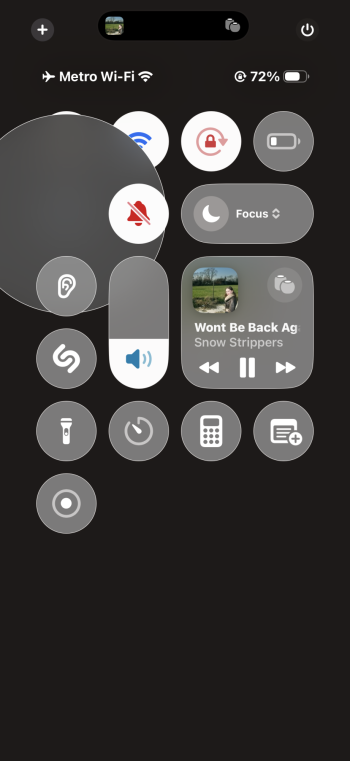
Long-press/ellipsis button visual artifact bug (reproducible by enabling Prefer Cross-Fade Transitions under Settings > Accessibility > Motion > Reduce Motion) still front-and-center :)

For illustrative purposes, attached is a screenshot of my Control Center after long-pressing the Bluetooth connectivity control
 

Attachments

  • IMG_0234.png
    IMG_0234.png
    299.2 KB · Views: 1
Right? Not being able to just press a button to answer a call on my car stereo display is a huge safety concern.

If this is impacting a bunch of other people, too, unfortunately, that means that people will have to pick up their phone to answer a phone call now while they’re driving as opposed to just pressing the answer button.
Or don't answer shrug. People got along just fine before cell phones
 
This really feels like the Windows Vista of iOS updates. I do understand the underlying changes happening, along with all of the bugs that whole concept brings with it. Usually by a “point 2” update, though, we’re seeing more stability. For it to be this far in the game and there to be so many glaring issues, I’m at a loss. I feel like throwing in the towel and just admitting that it’s time to wait for iOS 27.
Have you tried to reset network settings on your phone. It will be a bit annoying but I have found it has fixed tehse kind of issues for me in the past
 
  • Like
Reactions: dustin.haley
@gank41, Hey, I just thought of something after @DblHelix mentioned Network Reset. Long shot: Have you tried playing around with the Wired Accessories security settings in Settings->Privacy&Security->Security->Wired Accessories? Try changing the settings, even if it's already set to Always Allow. Sometimes these settings get corrupted and needs a kick.
 
  • Like
Reactions: NBKindaGirl
Register on MacRumors! This sidebar will go away, and you'll see fewer ads.