My 17PM's battery is taking a toll after the update. The phone apparently uses 15% more battery for almost identical usage and similar screentime.

Got a tip for us?
Let us know
Become a MacRumors Supporter for $50/year with no ads, ability to filter front page stories, and private forums.
iOS 26.5 ― Bug Fixes, Changes, and Improvements
- Thread starter Banglazed
- WikiPost WikiPost
- Start date
- Sort by reaction score
You are using an out of date browser. It may not display this or other websites correctly.
You should upgrade or use an alternative browser.
You should upgrade or use an alternative browser.
- Status
- The first post of this thread is a WikiPost and can be edited by anyone with the appropiate permissions. Your edits will be public.

17 PM here and this update was a HUGE improvement on battery life! Just like when I got the phone in Sept.
I keep using the charge cycle of 40-85%. And I charge it at the same time in the office, and noticed more drain than usual, though the apps usage in the battery app doesn't reflect anything weird. The only thing different I did was turn on the wallpaper with AOD. Now I have turned it back off and gave my phone a restart.17 PM here and this update was a HUGE improvement on battery life! Just like when I got the phone in Sept.
WildstarBR2020
macrumors 6502
Folks, I’m seeing notifications saying that “data access for your app XYZ has now been turned off.” Is anyone else experiencing this issue?

thadoggfather
macrumors P6
26.5 seems zippier than 26.3.1 (a) on 17 pro. Doesnt seem like just safari lol, and doesn't seem like placebo.
Fingers crossed this is a more performant release.
Fingers crossed this is a more performant release.

mcvaughan
macrumors 65816
Not able to repro this behavior. The time wheel comes up fine for me. M4 iPP 11”.Bug on iPadOS 26.5. Adding an event on calendar.app, rather than using the time wheel I like to type in the time. The number keypad doesn’t appear properly, just the top slither of it (created a test event to screenshot and show what I mean):
View attachment 2629899
no0nefamous
macrumors 6502
26.5 is the first time using my 17 Pro has felt close to how I think an $1100 flagship should feel. I've been very vocal about how bad the experience with the 17 Pro has been so far. This is a big improvement, but it's unfortunate that it took this long. It's still not fully there, but it's better.
The time wheel comes up fine, it’s when I click onto the number 20 in the example screen recording below, to start actually typing in the time, when just a slither of the number keypad appears.Not able to repro this behavior. The time wheel comes up fine for me. M4 iPP 11”.
thadoggfather
macrumors P6
26.5 is the first time using my 17 Pro has felt close to how I think an $1100 flagship should feel. I've been very vocal about how bad the experience with the 17 Pro has been so far. This is a big improvement, but it's unfortunate that it took this long. It's still not fully there, but it's better.
It is fatiguing how often this is the case.
Apple software QC is really really bad in my opinion. We viciously restart this cycle every year and by the time it’s refined enough for the average MR user, we are all intriguing by shiny new thing next month which is iOS 27 Beta.
Not that I’ll try it on my main iPhone or even necessarily at all but the new features on beta are a good window of what’s to come Fall onward.

gwang73
macrumors 68030
I see the same issue on my iPad. Doesn't matter if the Cal app is in fullscreen or windowed, landscape or portrait. It does work fine on my iPhone.The time wheel comes up fine, it’s when I click onto the number 20 in the example screen recording below, to start actually typing in the time, when just a slither of the number keypad appears.

Knowlege Bomb
macrumors G4
That’s the cycle of iOS. The best version is always right before the next one drops (for obvious reasons). Everything before is for all intents and purposes beta testing for Apple.26.5 is the first time using my 17 Pro has felt close to how I think an $1100 flagship should feel. I've been very vocal about how bad the experience with the 17 Pro has been so far. This is a big improvement, but it's unfortunate that it took this long. It's still not fully there, but it's better.
I’m right there with ya though. My 17 Pro feels spectacular.
Great minds.It is fatiguing how often this is the case.
Apple software QC is really really bad in my opinion. We viciously restart this cycle every year and by the time it’s refined enough for the average MR user, we are all intriguing by shiny new thing next month which is iOS 27 Beta.
Not that I’ll try it on my main iPhone or even necessarily at all but the new features on beta are a good window of what’s to come Fall onward.

-BigMac-
macrumors 68030
You seem hella defensive yourself. People just have different opinions to yours thats allI don't understand why people are getting defensive about this.
All I said was that it was not necessary to manually restart unless you're actually having issues like battery drain or stuttering. I leave it plugged in for half hour after the update so it can finish with any background processing, and rarely do I experience any issue.
If you believe that's helping your experience, then by all means. But it's not necessary as a reboot is part of the update process itself.
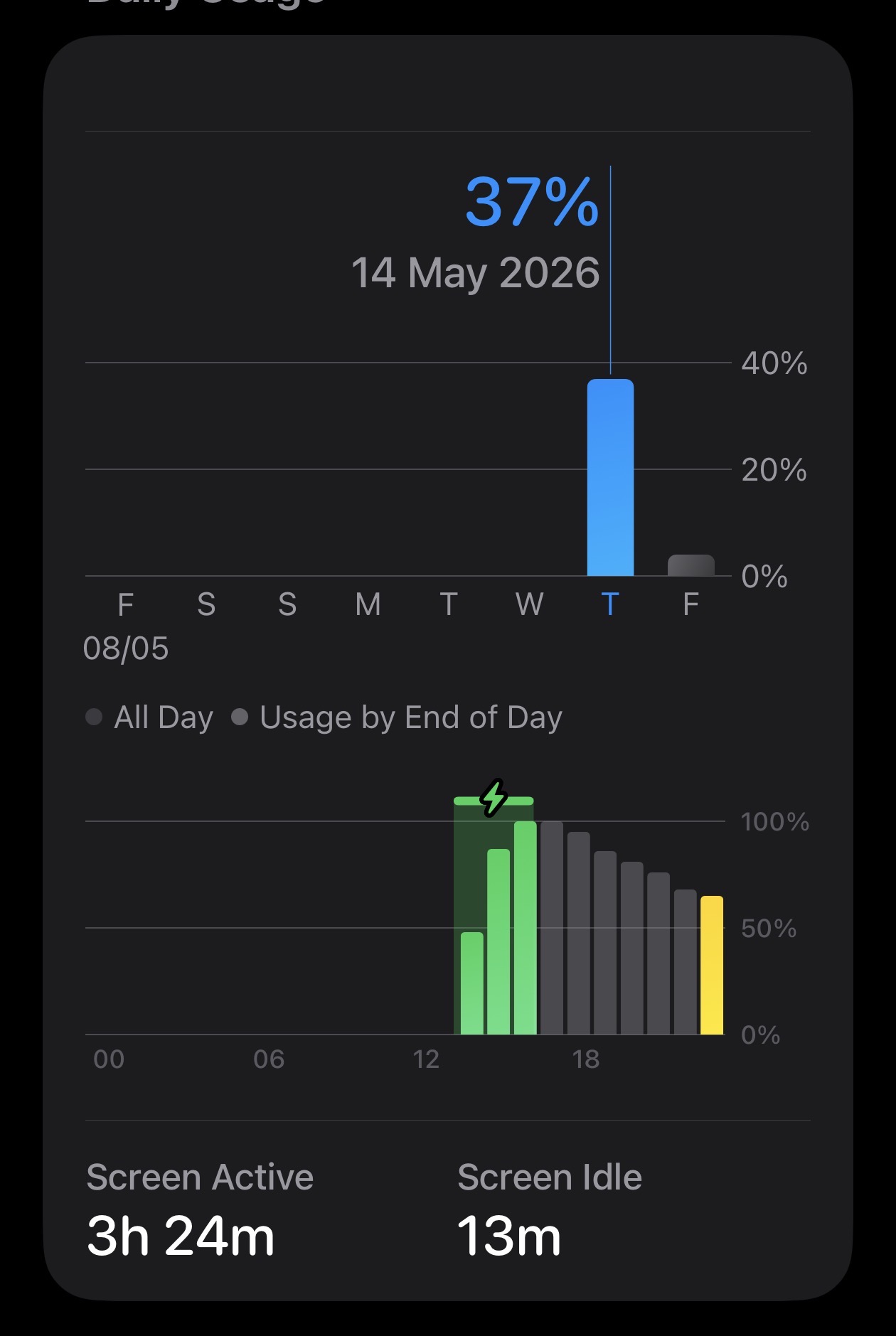
Why do I am having different experience than other people on this forum? My battery on 17 Pro Max seems to be on the downside, like yesterday I used 62% with 3h11m screen on time. Home & lock screen used 6% alone. Is the pride wallpaper using more power? I changed it today to see if this makes any difference.
Phone is no longer snappier. Like when I unlock the phone, sometimes the animation seems like doing what a 60 Hz phone would do.
I was having such a beautiful battery timing on my previous 26.3.3 (or was it 26.4.3, i forgot) before update.
Phone is no longer snappier. Like when I unlock the phone, sometimes the animation seems like doing what a 60 Hz phone would do.
I was having such a beautiful battery timing on my previous 26.3.3 (or was it 26.4.3, i forgot) before update.
mine is set at 85%.To those who say battery life took a hit do you have it set to charge to 100% or 80% under battery management and my battery has not worsen or improved but 26.5 is snappier all the way around.

James6s
macrumors 68020
Set up a new iPhone Air yesterday including an update to 26.5 out of the box, so a lot going on in the background. 2% drain overnight whilst sitting idle with low power mode on.
Performance is excellent with speed and smoothness.
Performance is excellent with speed and smoothness.
It's not just you.Why do I am having different experience than other people on this forum? My battery on 17 Pro Max seems to be on the downside, like yesterday I used 62% with 3h11m screen on time. Home & lock screen used 6% alone. Is the pride wallpaper using more power? I changed it today to see if this makes any difference.
Phone is no longer snappier. Like when I unlock the phone, sometimes the animation seems like doing what a 60 Hz phone would do.
I was having such a beautiful battery timing on my previous 26.3.3 (or was it 26.4.3, i forgot) before update.
26.4 and 26.5 are definitely worse on my 17 Pro than 26.3
I had amazing battery life on 26.3 to the point I used to get 9h SOT from using 65% of battery (I posted screenshots in battery life thread).
Today, on 26.5, 1,5h SOT already used 31% battery, which is bad.
Im glad people are satisfied with this update but I would never call ANY iOS 26 version that "feels spectacular" (yet? hopefully).
Not a single visual bug has been fixed since 26.3, there's still jitters and stutters all over the OS, in 1st and 3rd party apps that I'm not seeing on my iPhone 13 Pro Max on iOS 17.
I've been an Apple user since 2015, this year I got myself cheap android OnePlus tablet with 2 or 3 generation old SOC and the difference in smoothness between Android 16 and iOS 26 is just embarrassing. It's really jarring coming from smooth scrolling and animations on Android to stuttery iOS.
Apple really needs to step up it's game with iOS 27.

dk001
macrumors demi-god
Did a trip and used my Air for Car Play (Sync4).
In areas with low cell signal, it burned through battery fast. Tried using my in car wireless charger and the phone got real hot. Wired charging was better.
Still had the issue using YouTube Music - the Air just flat out refused to show my play lists. Take it off Car Play, and all worked fine.
In areas with low cell signal, it burned through battery fast. Tried using my in car wireless charger and the phone got real hot. Wired charging was better.
Still had the issue using YouTube Music - the Air just flat out refused to show my play lists. Take it off Car Play, and all worked fine.
I did a 500-mile road trip yesterday and my Air battery was honestly unbelievable. I had to remember to keep it off my wireless charger because I couldn’t seem to keep it below 80%.Did a trip and used my Air for Car Play (Sync4).
In areas with low cell signal, it burned through battery fast. Tried using my in car wireless charger and the phone got real hot. Wired charging was better.
Still had the issue using YouTube Music - the Air just flat out refused to show my play lists. Take it off Car Play, and all worked fine.
I did a fresh install of the RC IPSW from recovery, though.

Dust-by-Monday
macrumors 6502a
I haven’t noticed any stutters on my iPhone 15 pro and I am very sensitive to frame drops (gamer)It's not just you.
26.4 and 26.5 are definitely worse on my 17 Pro than 26.3
I had amazing battery life on 26.3 to the point I used to get 9h SOT from using 65% of battery (I posted screenshots in battery life thread).
Today, on 26.5, 1,5h SOT already used 31% battery, which is bad.
Im glad people are satisfied with this update but I would never call ANY iOS 26 version that "feels spectacular" (yet? hopefully).
Not a single visual bug has been fixed since 26.3, there's still jitters and stutters all over the OS, in 1st and 3rd party apps that I'm not seeing on my iPhone 13 Pro Max on iOS 17.
I've been an Apple user since 2015, this year I got myself cheap android OnePlus tablet with 2 or 3 generation old SOC and the difference in smoothness between Android 16 and iOS 26 is just embarrassing. It's really jarring coming from smooth scrolling and animations on Android to stuttery iOS.
Apple really needs to step up it's game with iOS 27.
LegendaryTechnician
macrumors member

spartan1967
macrumors 6502a
Observed a friend with her iPhone 14 Plus skating though her apps like a content creator does when discussing a new iOS update. Asked her if she was thinking of updating to iOS 26 & she showed me she was already on iOS 26.4.1.
With this and the plethora of security fixes, I finally decided to update my 13 Mini to iOS 26.5. This version should have been the first public release in September 2025. Now before all the Apple fan peeps start criticizing this assessment, ask yourself how a trillion dollar company cannot hire interns, or even use AI (🤮) to test a new annual iOS software release before it is publicly available in September to get it to the point iOS 26.5 is at right now.
Hopefully the new CEO will look at Apple customers more with this perspective & not just the Apple stock holders when dealing with this annual cycle. As I've already said, most of Apple's hardware is thoroughly QC'd before it is unveiled to the public & the software needs the same type of due diligence. Apple does get some undue credit this time by updating iOS 18 longer this year than prior releases, but this is only because they were forced to due to some nasty security breaches.
With this and the plethora of security fixes, I finally decided to update my 13 Mini to iOS 26.5. This version should have been the first public release in September 2025. Now before all the Apple fan peeps start criticizing this assessment, ask yourself how a trillion dollar company cannot hire interns, or even use AI (🤮) to test a new annual iOS software release before it is publicly available in September to get it to the point iOS 26.5 is at right now.
Hopefully the new CEO will look at Apple customers more with this perspective & not just the Apple stock holders when dealing with this annual cycle. As I've already said, most of Apple's hardware is thoroughly QC'd before it is unveiled to the public & the software needs the same type of due diligence. Apple does get some undue credit this time by updating iOS 18 longer this year than prior releases, but this is only because they were forced to due to some nasty security breaches.
