
Got a tip for us?
Let us know
Become a MacRumors Supporter for $50/year with no ads, ability to filter front page stories, and private forums.
macOS 10.14 Mojave on Unsupported Macs Thread
- Thread starter dosdude1
- WikiPost WikiPost
- Start date
- Sort by reaction score
You are using an out of date browser. It may not display this or other websites correctly.
You should upgrade or use an alternative browser.
You should upgrade or use an alternative browser.
- Status
- The first post of this thread is a WikiPost and can be edited by anyone with the appropiate permissions. Your edits will be public.


arqueox
macrumors regular
I'm not sure if you mean dude's Mojave patcher or the Apple Mojave Installer itself.
Both? What do you think it is the best to even think about it ..

TimothyR734
macrumors 68030
I think 9/10 last beta and 9/12 GM 🙂x
It could very possibly happen but its best to think the light mode we have is the best we are going to have 🙂Both? What do you think it is the best to even think about it ..

pkouame
macrumors 65816
Well, let's take dude's patcher for example (running in Mojave) Even in Dark mode it is lightly colored and translucency is not implemented. So dude's patcher simply does not implement the new Appearance and Theming "protocol' required to use system wide theming functionality. This not his fault (nor should he care at this point). Dark Light Mode in Mojave is an "opt-in" sort of technology: an application can choose to ignore and even style its own UI elements independently. This is according to Apple's own published guidelines. See below. I can write an app that will appear light, even in Dark Mode whether on supported or unsupported machines etc.Both? What do you think it is the best to even think about it ..
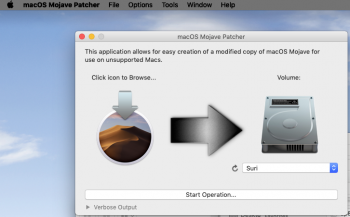
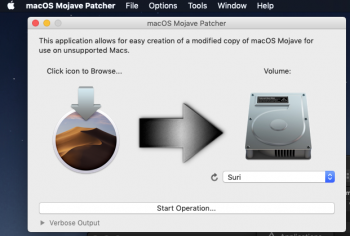
All questions are welcome. This issue is actually a little complicated. We're all trying to find a quick-fix that will suffice...Given that beta9 doesn't fix this, Apple clearly doesn't care about supporting our unsupported machines. Simple as that.
TimothyR734
macrumors 68030
Eventually we will all succumb to the dark side 🙂I think 9/10 last beta and 9/12 GM 🙂x
It could very possibly happen but its best to think the light mode we have is the best we are going to have 🙂

nekton1
macrumors 65816
If you want to boot from M.2 NMVe storage using a PCIe—NVMe adapter on one of the MP 3,1, 4,1 or 5,1 models, you need the separate NVMe boot ROM patch too.
Somebody here posted that running the APFS boot ROM patch first followed by the NVMe boot ROM patch is the best sequence to use.
Somebody here posted that running the APFS boot ROM patch first followed by the NVMe boot ROM patch is the best sequence to use.
I'm the last that can give advise on APFS EEPROM patching, since I bricked, and after reprogramming correctly too hot air has damaged some 3-4 SMC resistors atom size, anyway you should be safe cause it seems your MacPro3,1 is largely APFS Patched tested, moreover you should have this not bad firmware recovery CD: https://support.apple.com/kb/DL94?locale=en_US
However I give you an advise, don't APFS patch for now, and stay HFS+ on Mojave, since it is still supported through dosdude1's Mojave Patcher USB Installer.
I use both HFS+ and APFS on different SSDs and I can say that in my personal opinion there are no remarkable performance and reliability differences from HFS+.
I would have a little reserve only using APFS strictly on PCIe NVMe SSDs.
As an aside on the APFS and updates question.
I've been having to apply the Betas 8 on my Parallels Mojave VM with an HFS boot drive with the full package as the Software Update always failed.
I upgraded to Parallels 14 recently and then applied the full Beta 8 package and to my surprise my boot drive in the VM was converted to APFS.
This evening I successfully applied the Beta 9 via Software Update for the first time.
All a bit circumstantial, I know, but APFS does seem to be be required for Software Update.
I've been having to apply the Betas 8 on my Parallels Mojave VM with an HFS boot drive with the full package as the Software Update always failed.
I upgraded to Parallels 14 recently and then applied the full Beta 8 package and to my surprise my boot drive in the VM was converted to APFS.
This evening I successfully applied the Beta 9 via Software Update for the first time.
All a bit circumstantial, I know, but APFS does seem to be be required for Software Update.

Rami Ashqar
macrumors newbie


OGNerd
macrumors regular
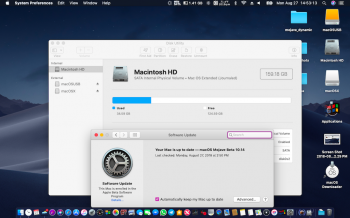
Do you still need an internal storage volume formatted as Apple File System (APFS) to receive over-the-air (OTA) Updates in System Preferences -> Software Update?
No, the APFS formatted volume does not need to be internal to receive OTA updates.

TimothyR734
macrumors 68030

BookEmDanno
macrumors 6502
First glitch discovered ~ keyboard brightness control not working ~ despite running Patch Updater after upgrade.
My bad. It's not a glitch after all. My guess is that due to Night Shift enabled, when my MBAir is plugged-in to my power source, and it's day time, then the keyboard lights is not relevant. Sorry for the false alarm. Mahalo.
nekton1
macrumors 65816
Deleted.
It was a bad 14.0.2 installer download—and very slow too.
It was a bad 14.0.2 installer download—and very slow too.
Last edited:

ctaylora1231
macrumors member

Luckygreek
macrumors regular
There are a couple of options with Mozilla, there is a Developer and a Nightly version that work equally well with Netflix. Silverlight which has some known security vulnerabilities, (as do some other Microsoft products) leaves it a no-brainer, at least for me not to install it especially when there are other options to do the job equally well.Hi, Luckygreek, sorry, I tried safari, then Chrome but it doesn't work, then Mozilla but that is a pesky one because every single site is reported as unsafe even their site.
I did what you recommend with chrome, but the browser works a few minutes then freezes up.
I will wait for next beta release.
Some of the issues I encountered with Chrome is with extensions not playing well with Mojave, initially I couldn't get Chrome to work with extensions I had loaded from HS, once I un-installed Chrome & downloaded newest version it works well, (no extensions loaded @ this point) personally with Mojave I use Safari Technology as go to browser, if I want to watch Netflix, HS works best with unsupported iMac without graphics acceleration. Just my 2¢.

Macschrauber
macrumors 68040
I just built (twice) a USB full installer for the downloaded (with Tools) 14.0.20 installer using the 1.1.2 Mojave patcher and it fails to even boot the MP 3,1 and displays the gray no entry sign.
Maybe dosdude1 needs to teak the 1.1.2 patch?
I do exactly same on MP3.1 and it does boot and installs (DP9 with DosDudes 1.1.2)
got boot-args right ?
sudo nvram boot-args="-no_compat_check"
As the earliest adopter of APFS ROM PATCHER v2 on macpro 3.1, I can address some of your questions:
0) Have the same Boot ROM version - the patcher did not change that
1) In my experience, all ROM flashing was completed in one cycle. I then rebooted into HFS+ with no issues. Then rebooted using the patcher to reformat my boot disk as APFS before installing the new patched OS.
2) Haven't checked. Good question.
3) Didn't benchmark, but it seems a little zipper. Can't tell for sure if it's just new car smell...😉
Of course, @dosdude1 is the ultimate authority on all things APFS boot rom related. So make sure and double check with him. This is just my real-world experience. YMMV.
Good luck.
[doublepost=1535317625][/doublepost]
I know...just being a little lazy on a Sunday afternoon...Trying to avoid any unnecessary lifting 😉.
Patching CoreDisplay and/or OpenGL so we can avoid application specific workarounds is tricky enough...
And of course, tomorrow is patch Monday! Some new surprises for sure...
What OS did you run the APFS Patch installer under? Was it under the patched High Sierra? Also were you running from a hard drive or SSD? I see some messages claiming that the faster io of the SSDs are fouling the EEPROM programming.
OGNerd
macrumors regular
Here is proof you need APFS to install the DP/PB update
Yes sir! I have cloned Mojave DP8 installations on externally connected SSD drives, one is on an APFS formatted volume, and the other on a HPFS+ volume. When I booted my MBP 8,2 from the APFS volume, it almost immediately began to download DP9 for installation.When I boot the machine from the HPFS+ formatted volume, Software Update reported that the machine was up to date on DP8.
pkouame
macrumors 65816
I flashed the eeprom from a Mojave beta 4 running HFS+What OS did you run the APFS Patch installer under? Was it under the patched High Sierra? Also were you running from a hard drive or SSD? I see some messages claiming that the faster io of the SSDs are fouling the EEPROM programming.
Running from SSD - none of my boot drives spin
Luckygreek
macrumors regular
Another painless upgrade to 18A377a thru Software Update. Didn't patch Legacy Video (2010 iMac) and happily no trails. Getting pretty routine doing updates. System appears to labor less as updates progress. Even without graphics acceleration I can use this iMac as a daily system (not that I do) and it's pretty zippy with apps I've tried at this point. Had to re-apply audio patch, aside from that everything else works.
Macschrauber
macrumors 68040

jdogg89
macrumors newbie
I'm rocking a MBA 4.2 (2011) and I'm on build 18a366e - The issue I'm having is I am not receiving OTA updates. Recently bricked the machine trying to update by enrolling it in the developer beta program and receiving updates. I was able to reinstall from an external HDD I had with this build - what are people doing to get OTA updates to work? Are they not a thing on these unsupported Macs? I have "automatically keep my Mac up to date" checked in system preferences.

TeckFire
macrumors newbie
For me, I install the update normally, then boot to the patched USB drive and redo the "post install" and then let it reboot. Once it's done, it will be updated.I'm rocking a MBA 4.2 (2011) and I'm on build 18a366e - The issue I'm having is I am not receiving OTA updates. Recently bricked the machine trying to update by enrolling it in the developer beta program and receiving updates. I was able to reinstall from an external HDD I had with this build - what are people doing to get OTA updates to work? Are they not a thing on these unsupported Macs? I have "automatically keep my Mac up to date" checked in system preferences.

ASentientBot
macrumors 6502a
Hi, Luckygreek, sorry, I tried safari, then Chrome but it doesn't work, then Mozilla but that is a pesky one because every single site is reported as unsafe even their site.
I did what you recommend with chrome, but the browser works a few minutes then freezes up.
I will wait for next beta release.
A bit late to the browser discussion. But if Firefox is reporting every site as unsafe, you need to check your system clock! It doesn't normally do that.
[doublepost=1535416684][/doublepost]
You can't use the High Sierra APFS dynamic EFI script patcher for Mojave.
I don't actually see why a modified version of this cannot be made... We can copy the apfs.efi from Mojave and use it with the same patcher, no? Don't have a non-APFS machine to test this on but it seems like it should be doable. For those who don't want to risk a Boot ROM patch (I sure wouldn't).
[doublepost=1535416770][/doublepost]
@pkouame Did you notice these changes (reduced transparency)?
Maybe the correction is simpler than we imagine.
You need to find where the change is made to the framework for transparency reduction, which is enabled or disabled.
Both @pkouame and I have already traced this in AppKit. This isn't the root of the problem (although a work-around could possibly involve modifying it to disable transparency in only some cases, perhaps).