Anybody using Adguard on Beta 4? It was crashing quite often for me on earlier betas so I had to downgrade back to macOS 26.5.2

Got a tip for us?
Let us know
Become a MacRumors Supporter for $50/year with no ads, ability to filter front page stories, and private forums.
macOS Golden Gate 27.0 Beta 4 - What's New?
- Thread starter WilliApple
- WikiPost WikiPost
- Start date
- Sort by reaction score
You are using an out of date browser. It may not display this or other websites correctly.
You should upgrade or use an alternative browser.
You should upgrade or use an alternative browser.
- Status
- The first post of this thread is a WikiPost and can be edited by anyone with the appropiate permissions. Your edits will be public.


ErikGrim
macrumors 604
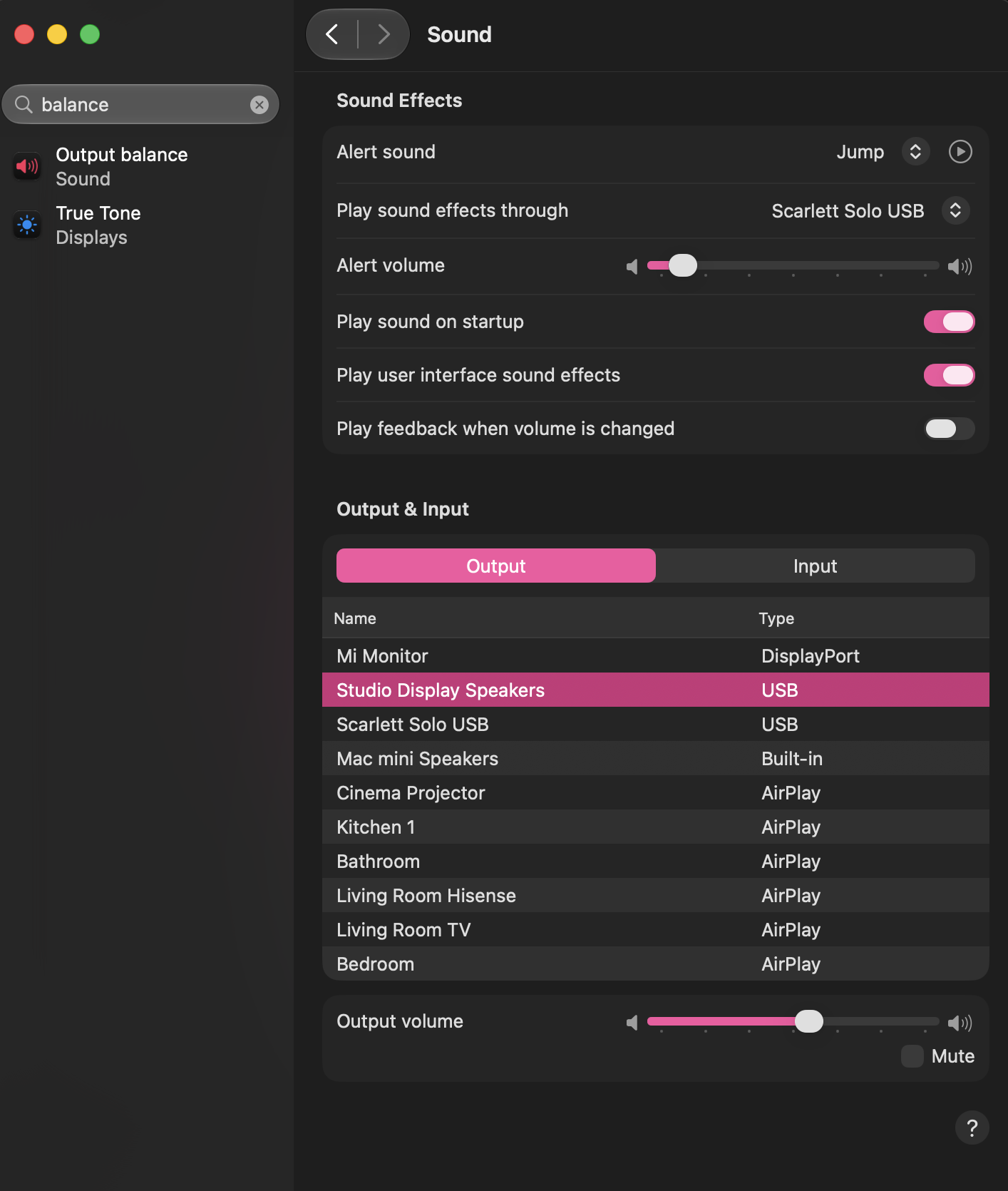
Did audio balance disappear from the latest beta? I am sitting closer to my right speaker each side of my dual side monitor (with an UW monitor as my secondary display), and noticed that I suddenly hear all sounds from the right. I had adjusted the balance to compensate up until now, and when I went looking for it in preferences, it's just not there? (Nor in Audio MIDI Setup).

nortonandreev
macrumors 68040
nortonandreev
macrumors 68040
1) Can't dismiss this dialog in Settings -> Accounts

2) Still 3rd party items come before the system ones, this for me is the worst regression in version 27.

3) The language switched HUD doesn't auto-dismiss in many apps – still. This has been an issue for maybe 2 years now, if not more...

2) Still 3rd party items come before the system ones, this for me is the worst regression in version 27.
3) The language switched HUD doesn't auto-dismiss in many apps – still. This has been an issue for maybe 2 years now, if not more...

nnauq
macrumors newbie
Can't you cmd+drag them around, like in previous releases?2) Still 3rd party items come before the system ones, this for me is the worst regression in version 27.

kharys415
macrumors member
Has anything changed about the option to turn off AI yet? I switched to VM for beta so I can't verify. Can't really afford running it like usual since it effectively doubles the OS size.

pdfu
macrumors regular
Apple Mail in macOS 27 has a new Formatting Bar design with Write with Siri.

 forums.macrumors.com

Apple working on redesigned Formatting Bar for Apple Mail in macOS 27, here's how to enable it
macOS Golden Gate includes a new Formatting Bar for Apple Mail with Write with Siri front and center. The classic formatting options are collapsed to the right edge of the composer and disappear when you start typing a prompt to Siri. Similar to the Siri AI Lightweight UI, when selecting text...
forums.macrumors.com
nortonandreev
macrumors 68040
You can. But still... why was this change made?Can't you cmd+drag them around, like in previous releases?

maxoakland
macrumors 68000
That’s freaking insane. Especially with their obscene pricing on anything above 256. Can you delete AI again?Storage for macOS & System Data has increased slightly here.
macOS reports 30.08GB but somehow says Apple Intelligence is at 31.3GB (was 29GB)
System Data is currently at 33.43GB (was 30GB)
So about 65GB just for the OS and it's files. Sure glad I opted for the 512.
Hope these values will decrease by the time the final comes out, but I'm skeptical.
nortonandreev
macrumors 68040
What for. It's useless...says Apple Intelligence is at 31.3GB (was 29GB)

ProTruckDriver
Contributor
It doesn't look like you can delete AI in the beta. Hoping we can turn off / delete AI in the release but I'm not holding my breath on that.That’s freaking insane. Especially with their obscene pricing on anything above 256. Can you delete AI again?

fisherking
macrumors G5
there's no pan slider when you're using most usb interfaces (ie the scarlett, or, apparently, the Mi Monitor. if you switch to the mac mini speakers, it will show up. check that first, or check the app you're listening to. or is there an option in the monitor? something is causing that...Did audio balance disappear from the latest beta? I am sitting closer to my right speaker each side of my dual side monitor (with an UW monitor as my secondary display), and noticed that I suddenly hear all sounds from the right. I had adjusted the balance to compensate up until now, and when I went looking for it in preferences, it's just not there? (Nor in Audio MIDI Setup).
View attachment 2647361

fhamadeh
macrumors regular
This seems to be happening to a lot of folks, myself included. Make sure to report it using the Feedback app.I can't change the default font / text size in Apple Mail, keeps reverting back, anyone else?

flowrider
macrumors 604
Nope - Not for me:Did audio balance disappear from the latest beta? I am sitting closer to my right speaker each side of my dual side monitor (with an UW monitor as my secondary display), and noticed that I suddenly hear all sounds from the right. I had adjusted the balance to compensate up until now, and when I went looking for it in preferences, it's just not there? (Nor in Audio MIDI Setup).
View attachment 2647361
I play my sound through the headphones jack to a Fosi amplifier:

Lou
pdfu
macrumors regular
Yes, they're upgrading the Formatting Bar, see:I can't change the default font / text size in Apple Mail, keeps reverting back, anyone else?
MAC MAIL "Message font" size setting is incorrect until cursor is moved
When composing a new message in Mail, the message body doesn't use the font size I set in Mail → Settings → Fonts & Colors → Message font. Instead, the first line of every new message opens at a smaller default size (appears to be 13pt) regardless of what is set in preferences. Steps to...
forums.macrumors.com
Apple working on redesigned Formatting Bar for Apple Mail in macOS 27, here's how to enable it
macOS Golden Gate includes a new Formatting Bar for Apple Mail with Write with Siri front and center. The classic formatting options are collapsed to the right edge of the composer and disappear when you start typing a prompt to Siri. Similar to the Siri AI Lightweight UI, when selecting text...
forums.macrumors.com
maxoakland
macrumors 68000
It’s a release candidate so it’s not a planned feature. Maybe if we’re loud about it they’ll change somethingIt doesn't look like you can delete AI in the beta. Hoping we can turn off / delete AI in the release but I'm not holding my breath on that.
But my Mac mini is constantly running out of storage space already on Sequoia. I’m really mad that I’m going to have to skip another version of MacOS. I was looking forward to Tahoe
working fine hereAnybody using Adguard on Beta 4? It was crashing quite often for me on earlier betas so I had to downgrade back to macOS 26.5.2
Maybe try SFX output device from the Scarlet Solo to Studio Display, and switch the output device to something else and back again. Looks fine on my system.Did audio balance disappear from the latest beta? I am sitting closer to my right speaker each side of my dual side monitor (with an UW monitor as my secondary display), and noticed that I suddenly hear all sounds from the right. I had adjusted the balance to compensate up until now, and when I went looking for it in preferences, it's just not there? (Nor in Audio MIDI Setup).
View attachment 2647361
Attachments

fisherking
macrumors G5
you missed my post! many usb-audio interfaces remove the pan option from system settings sound options (and 'lock' the volume, so you control it solely from the interface)...Nope - Not for me:
I play my sound through the headphones jack to a Fosi amplifier:
View attachment 2647503
Lou

inspt
macrumors newbie
Now I can Customise Control Strip... from Keyboard/Touch Bar Settings...
for Touch Bar of my Pro M1. =D
for Touch Bar of my Pro M1. =D
Works for me.Anybody using Adguard on Beta 4? It was crashing quite often for me on earlier betas so I had to downgrade back to macOS 26.5.2

SketchyClown
macrumors 6502
Apple Mail in macOS 27 has a new Formatting Bar design with Write with Siri.
Apple working on redesigned Formatting Bar for Apple Mail in macOS 27, here's how to enable it
macOS Golden Gate includes a new Formatting Bar for Apple Mail with Write with Siri front and center. The classic formatting options are collapsed to the right edge of the composer and disappear when you start typing a prompt to Siri. Similar to the Siri AI Lightweight UI, when selecting text...
View attachment 2647423
macOS 27 Beta Reworks Mail's Compose Window Around Siri AI
Got your 15 seconds of fame.
Hi everyone,
I'm currently running the latest macOS 27 beta. With each new beta release, I've noticed that app compatibility and overall stability have improved, which is great.
However, I still have the feeling that the operating system itself has gradually become slower. Right now, it feels noticeably sluggish at times, even though I'm using a MacBook Air M3 with 24 GB of RAM.
Once the final version of macOS 27 is released, I'm thinking about doing a completely clean installation:
* boot into Recovery,
* erase the internal drive,
* install a fresh copy of macOS 27,
* then restore all my data, apps, and settings from a Time Machine backup.
Since I shouldn't lose any data, do you think this is worth doing? Has anyone experienced a noticeable improvement in performance or overall system responsiveness after a clean install followed by a Time Machine restore, compared to simply updating from the beta to the final release?
I'd really appreciate hearing your experiences and recommendations. Thanks!
I'm currently running the latest macOS 27 beta. With each new beta release, I've noticed that app compatibility and overall stability have improved, which is great.
However, I still have the feeling that the operating system itself has gradually become slower. Right now, it feels noticeably sluggish at times, even though I'm using a MacBook Air M3 with 24 GB of RAM.
Once the final version of macOS 27 is released, I'm thinking about doing a completely clean installation:
* boot into Recovery,
* erase the internal drive,
* install a fresh copy of macOS 27,
* then restore all my data, apps, and settings from a Time Machine backup.
Since I shouldn't lose any data, do you think this is worth doing? Has anyone experienced a noticeable improvement in performance or overall system responsiveness after a clean install followed by a Time Machine restore, compared to simply updating from the beta to the final release?
I'd really appreciate hearing your experiences and recommendations. Thanks!
SketchyClown
macrumors 6502
That's what I did, clean install, I find it is very quick on M4 with 24GB.Hi everyone,
I'm currently running the latest macOS 27 beta. With each new beta release, I've noticed that app compatibility and overall stability have improved, which is great.
However, I still have the feeling that the operating system itself has gradually become slower. Right now, it feels noticeably sluggish at times, even though I'm using a MacBook Air M3 with 24 GB of RAM.
Once the final version of macOS 27 is released, I'm thinking about doing a completely clean installation:
* boot into Recovery,
* erase the internal drive,
* install a fresh copy of macOS 27,
* then restore all my data, apps, and settings from a Time Machine backup.
Since I shouldn't lose any data, do you think this is worth doing? Has anyone experienced a noticeable improvement in performance or overall system responsiveness after a clean install followed by a Time Machine restore, compared to simply updating from the beta to the final release?
I'd really appreciate hearing your experiences and recommendations. Thanks!