Hello, I have some issues with my ipod pod classic 6/7th gen and ipod nano 5th gen. I am trying to creating media files, "mp4, m4v, or mov" files that have more then one audio file, and working subtitles. The ipod classic has 3 different options that can change a video’s playback. They are Captions, Subtitles, and Alternate audio. I have the "captions" setting working on the ipods by using apple’s compressor program, a fairly recent vision. And I cannot get the "Subtitle" or the Alternate audio" settings to work in the ipods settings. Itunes, quicktime, and my ios 10 iphone can read the subtitles, and the alternate audio, but just not the old ipods. I have put 2 different .scc files in a mp4 container, and put a 2nd audio stream in the files using subler, but the ipods simply just don't read anything. Does anyone here have knowledge from the days of the ipod classic, or any information about what the file formatting is for the files so they are compatible? I could really use some help, I have been trying to figure out how to get all this to work in the last 12 years, and have only be able to get the "captions" setting to work.

Got a tip for us?
Let us know
Become a MacRumors Supporter for $50/year with no ads, ability to filter front page stories, and private forums.
iPod Professional help needed, ipod classic/nano "Subtitles" and "Alternate audio"
- Thread starter Jeff__100
- Start date
- Sort by reaction score
You are using an out of date browser. It may not display this or other websites correctly.
You should upgrade or use an alternative browser.
You should upgrade or use an alternative browser.
No, it does not work. I need someone who knows about how a mp4 file works, hand brake is a very simple program, with practically no control what so ever. If anyone has experience with the ipod classic/nano, please come here, could you lend me a hand?Try using Handbrake? I remember using it to embed extra audio tracks and subtitle files and then export an MP4.

arw
macrumors 65816
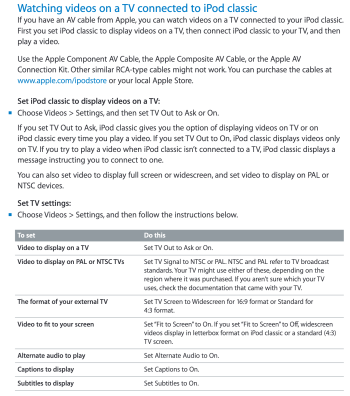
I'm no expert. But looking at the iPod user guide, could alternate audio be only available when the iPod is connected to an Apple Component AV-Cable? I don't own the TV cable to test it.
Do you have any reason to believe it should work without the TV adapter cable?
Unfortunately I don't have any official dual-audio iTunes movies for reference.
I tested an iPod Classic 5G and 7G and no matter the settings in Subler, I've never been able to play the 2nd embedded audio stream of custom videos (although I can select it in iTunes).
Do you have any reason to believe it should work without the TV adapter cable?
Unfortunately I don't have any official dual-audio iTunes movies for reference.
I tested an iPod Classic 5G and 7G and no matter the settings in Subler, I've never been able to play the 2nd embedded audio stream of custom videos (although I can select it in iTunes).
Attachments
Last edited:
@arw Sorry for not getting to your post sooner, I have been very busy with collage finals. I am going to try and see if the subtitle and alternate audio only work when connected to a av cable. The "fit to screen" option affects video on the ipod itself, when it detects 16:9 video playing, I have tested this part. I'll write my finding here soon. Also, if I may ask, where did you find that image?
arw
macrumors 65816
Correct. It's from the official iPod classic 160GB User Guide. Sorry for the not mentioning the source.
I just tired watching "Back to the future" on the ipod. Itunes sees 4 different audios tracks, and caption and subtitle tracks. But the ipod classic, even connected to the av cable, outputting to a tv, does not produce alternate audio, or subtitles. IT DOES show captions, but I am able to do this without the the av cable, with the ipod on its own. I am going to test the video out on a ipod nano 5th gen, and see if I get the same results.
Again, no luck with the ipod nano 5th gen, same issues as with the ipod classic 7th gen. I have 2 ideas about why these issues are occurring. One, the ipod classic share the same code for processing subtitles and alternate audio, and the said code may have broke in a update to the devices, im not saying that this feature worked on the ipod classic 5th, 6th/7th gen, but it may have worked on a 4th gen or a 3rd gen, and then broke somewhere in the development of the devices, this theory is a bit far stretch, and requires testing on different ipods (that I do not have) to see if the feature worked. The 2nd theory, and most likely one, is that there is a strange issue occurring with quick time atoms. Perhaps there is a quick time atom that the ipod's are looking for, and it simply can not see it, or perhaps said atoms are in a misaligned places, where some items like audio and subtitles have to alternate in a partition, or some other alignment issues. I do recall reading up that the ipod tv (first or 2nd gen) need to have the video stream in the first place, or it simply won't read the video file. I know almost nothing about quicktime atoms, and finding a program that can edit them is practicably impossible. I found 2 programs that can edit and view quicktime atoms, a windows program called "dumpster" and a Macintosh one called "atomic dumpster', but I can use nether due to the first one, dumpster, being a 16 bit program, and 16 bit exe files can not run on 64 bit machines. The 2nd one, "atomic dumpster" only runs on power pc macs, so that is another problem I have run into. I'll right more later, but for now I have to go.
Sana_das_Lama
macrumors newbie
Hello, I have a problem with my Ipod Nano 7th Gen too. With ffpmeg I am able to write a subtitle file .srt into a mp4 file. Now I can switch to subtitle in my Ipod. But the Ipod shows only a few of these subtitles, and the subtitles that are shown are in thw wrong time in the first 40 seconds of the movie... I have no idea how to fix it and I believe that it is very hard too fix due to its age 😀. If you have any questions how I tried it or tips, please write back ( and sorry for my english)
Hello, I have a problem with my Ipod Nano 7th Gen too. With ffpmeg I am able to write a subtitle file .srt into a mp4 file. Now I can switch to subtitle in my Ipod. But the Ipod shows only a few of these subtitles, and the subtitles that are shown are in thw wrong time in the first 40 seconds of the movie... I have no idea how to fix it and I believe that it is very hard too fix due to its age 😀. If you have any questions how I tried it or tips, please write back ( and sorry for my english)
Tl:dr, You are using the wrong text encoding, use the .srt Macintosh encoding to fix your issue like in the images below. Also use Itunes 9 to sync videos for alternative audio and subtitles, make sure your text encoding is set to Utf-8 in Macintosh in the srt file or it won’t play back properly. (And stay away from handbrake)
(Please make sure to read this entire reply before anyone downloads software or goes looking for programs, don’t use Batch 1.1 use Subtitle edit it has a batch feature that is better than Batch 1.1)
I know what your issue is. The source .srt file needs to be Utf-8, and you also NEED to make sure its in the "Macintosh" format. Look at the screenshot, use Subtitle edit (Free), or Batch 1.1 (Free if your a pirate), and set the "Encoding" to "Macintosh" If your using Japanese subs, you would use the "Japanese - Macintosh" setting in Subtitle edit or Batch 1.1. But as your are using English, just use the "10000: Western European (Mac)" Setting.
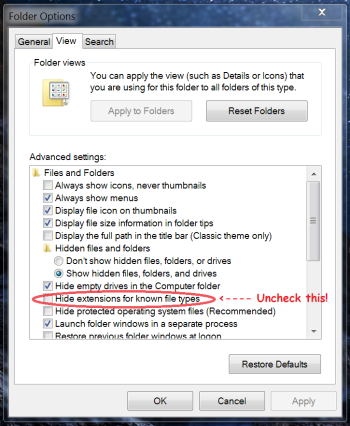
Using the wrong text encoding can cause the same errors you are referring too (I used to have them awhile ago). I am attaching a sample .srt file for you to test and see if it works with your ffmpeg process. (Something to take note, you HAVE to use Itunes 9, I think 10 does not work but I didn't try it. I cant remember what versions in Itunes 9 are the working one, I think I used the latest version of itunes 9, so good luck) in order for any most ipods (Not sure about the 7th gen nano) to display the subtitles or have the alternate audio to work. As itunes 9 sets a special quick time atom (that no one on Earth knows about, I had to consult the dead to figure this out, and surpass the illithid grand design, im not kidding. This took way to long to figure out, like 16 years of my life.) on the video file for the ipod classic/nano to read the audio file. I found out how to put the subtitles and alternate, all you have to do is use itunes 9, you can use .mp4s from ffmpeg, subler (mac only, subler is not that good, just use ffmpeg its free the cli interface its not hard to use), or apples compressor and final cut pro. (or anywhere as long as its not handbrake, pro tip avoid handbrake like the plague. It does not let you pass-through video and forces you to re-encode everything wasting time and cpu life, just use subler or ffmpeg (works on Windows 7) if you need to mux mp4/mkv videos.). If you are for some reason wondering out how to use the "608" "line 21" captions, all you need to do is use .scc files. Subtitle edit and Batch 1.1 both support .scc files, also subtitle edit supports batch conversions of subtitle files, making batch 1.1 obsolete. (I only just remembered this feature while writing this so plz dont hate me if you went and tried to find it without reading all the way).
Dont ever use these ".scc Captions" they are not the same thing as the .srt subtitles. After doing some testing and find out why the ipod has 608 support, I got so mad. (The reason why they do its because Steve jobs wanted it on there so bad, even though the 608 standard was garage (and still is), as it was originality made for crt tvs hence the name "Line 21" but in the 90s someone made it its own stream in a .mov file not encoded into the actual video stream. Just use .srt instead) The internal renderer for 608 captions does not work accurately on ipod classics and ipod nanos, as there is some multi second delay after from when they are supposed to go off. They also look way too big on the screen compared to the .srt subtitles. Id post a picture but I cant get itunes 9 to freaking put the quick time atom back correctly anymore when syncing with my nano 5th gen or classic 7th gen, not clue why. Bonus: The 608 captions support color text (the .srt subtitles do not. .ssa/.ass support color and fonts, the ipod classic.nano does not supports .ssa/.ass), white cyan red and yellow (I think thats all of them) there are more colors in the 608 stranded but they are not implemented in the ipods for some reason, I did test this myself this time last year. (Apple needs to fix this in a software update to the ipod classic 5th,6th,7th gen classics, and the 4th~7th nanos). The captions also support something called "forced" lines. Im not sure if srt supports this on the ipod, but I know for a fact the captions do. A cool trick to waste all of your teenage life, is to have the signs and songs into the captions stream, while having the full translation in the .srt portion. So people can understand whats happening, and still be able to turn it off if they want. (But again, captions are poorly made on the classics and nanos, so dont bother) This way you can have English and Japanese audio, and a English translation subtitle stream all in the same .mp4/.mov/.mkv video file.
There is ZERO information about the ipod classic/nano alternate audio and subtitle support. I had to look in the wayback machine for years to figure out how to do any of this. I have wasted what feels like my whole life finding out this issue. I hope that this post contains useful information to the sorry soul that gets entrapped with subtitles and duel audio on the ipod classic. Dont let those mind flayers posses you, its not worth the years of your teenage life they take for the knowledge, you'll regret it I promise you. I only ever log on about two times a year on the mac rumors form, if you want to find me out side of here look for “Jeff__9000” on if. Or “Jeff__100” on steam. Good luck. You’ll need it 4 years from now.
Attachments
Last edited: