
Got a tip for us?
Let us know
Become a MacRumors Supporter for $50/year with no ads, ability to filter front page stories, and private forums.
The New iPad Pre-Order Status Thread (UK) - All Models
- Thread starter Beardy man
- Start date
- Sort by reaction score
You are using an out of date browser. It may not display this or other websites correctly.
You should upgrade or use an alternative browser.
You should upgrade or use an alternative browser.

Even though my package is still "preparing for shipment" I now know its coming via UPS.
Used this method: http://www.everythingicafe.com/forum...ple-com.80285/
I get a page saying:
"Not all tracking information is available at this time. Please try again later. Your search found 1 package matching your package reference criteria."
People with shipping confirmation VIA UPS may want to use this method if their conventional tracking number doesn't work.
Used this method: http://www.everythingicafe.com/forum...ple-com.80285/
I get a page saying:
"Not all tracking information is available at this time. Please try again later. Your search found 1 package matching your package reference criteria."
People with shipping confirmation VIA UPS may want to use this method if their conventional tracking number doesn't work.
Wirelessly posted (Mozilla/5.0 (iPhone; CPU iPhone OS 5_1 like Mac OS X) AppleWebKit/534.46 (KHTML, like Gecko) Version/5.1 Mobile/9B176 Safari/7534.48.3)
Link isn't working for me. Can you summarise?
theking79 said:Even though my package is still "preparing for shipment" I now know its coming via UPS.
Used this method: http://www.everythingicafe.com/forum...ple-com.80285/
I get a page saying:
"Not all tracking information is available at this time. Please try again later. Your search found 1 package matching your package reference criteria."
People with shipping confirmation VIA UPS may want to use this method if their conventional tracking number doesn't work.
Link isn't working for me. Can you summarise?
Wirelessly posted (Mozilla/5.0 (iPhone; CPU iPhone OS 5_1 like Mac OS X) AppleWebKit/534.46 (KHTML, like Gecko) Version/5.1 Mobile/9B176 Safari/7534.48.3)
Link isn't working for me. Can you summarise?
1. Go to store.apple.com, click account in right hand corner, click "Track an Order".
1b. Log in (if you need to).
2. Copy your order number, which is on the left column of the page.
3. Go here, and click the "Track by Reference" dropdown.
4. Choose "Mail Innovations" under "Shipment Type".
5. Paste your order number in the "Shipment Reference" box, and remove the last two numbers.
6. Type in your full zip code (ex. 12345-6789).
7. Click "Track".
Broken link there 🙁Even though my package is still "preparing for shipment" I now know its coming via UPS.
Used this method: http://www.everythingicafe.com/forum...ple-com.80285/
I get a page saying:
"Not all tracking information is available at this time. Please try again later. Your search found 1 package matching your package reference criteria."
People with shipping confirmation VIA UPS may want to use this method if their conventional tracking number doesn't work.
Edit: Oops - just seen above post.
Even though my package is still "preparing for shipment" I now know its coming via UPS.
Used this method: http://www.everythingicafe.com/forum...ple-com.80285/
I get a page saying:
"Not all tracking information is available at this time. Please try again later. Your search found 1 package matching your package reference criteria."
People with shipping confirmation VIA UPS may want to use this method if their conventional tracking number doesn't work.
You can type in any reference number and it will come back the same, so I don't think it indicates it is coming by UPS.
1. Go to store.apple.com, click account in right hand corner, click "Track an Order".
1b. Log in (if you need to).
2. Copy your order number, which is on the left column of the page.
3. Go here, and click the "Track by Reference" dropdown.
4. Choose "Mail Innovations" under "Shipment Type".
5. Paste your order number in the "Shipment Reference" box, and remove the last two numbers.
6. Type in your full zip code (ex. 12345-6789).
7. Click "Track".
I get a completely different set of into. No 'track by reference options' I cant even view my order from my account. I have to manually go to its order details page by the URL they gave me in the email. Guessing it's cos it was a phone order.
Annoyingly mine gives a TNT reference...went to track it ans TNT's tracking is down for maintenance.
Edit: Oh. and here's the link TheKing was trying to post for us 🙂 http://www.everythingicafe.com/foru...s-tracking-info-ordered-from-apple-com.80285/
modelbehaviour
macrumors 6502
mine has been on preparing for shipment for nearly a day.
Me too, I checked my order status at 8:30am and it had changed to preparing for shipment....it's now 11pm and it still hasn't changed.
I don't know why it's taking so long, considering I ordered about 11:45pm on launch day.
You can type in any reference number and it will come back the same, so I don't think it indicates it is coming by UPS.
My order has just changed to shipped, coming by UPS.
Although that may be just coincidence

Me too, I checked my order status at 8:30am and it had changed to preparing for shipment....it's now 11pm and it still hasn't changed.
I don't know why it's taking so long, considering I ordered about 11:45pm on launch day.
Tens, if not hundreds, of thousands of iPads to put in boxes, and sort into groups for different carriers/sections of the country. I'd expect that we were all shipped to preparing when the shipment of iPads ours was in started sorting, and they just haven't gotten through the whole batch yet. Since they work with shipping companies maybe Syncreon only works Saturday mornings. Or maybe the area where they put the packed boxes is full and they need it to be moved/passed to the carriers before they can safely put more there. Or maybe they are going by the last digit of your postcode. Or some other system that for some reason makes sense for logistics reasons.
I'm sure we will (nearly, that many packages some driver will screw up somewhere,) all get them on Friday. I suspect they might not leave Hinckley till Wed/Thurs anyway, to ensure they don't get to us really early.


striker33
macrumors 65816
Still processing my 64 gb AT&T 🙁 I placed the order within 30 minutes of preorders going live 🙁
My 64 gb Verizon that I ordered Friday morning, however, is in the preparing stage 😕
Wrong thread.

steveza
macrumors 68000
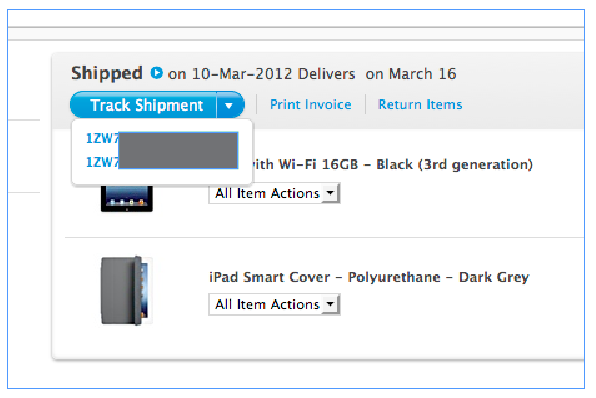
You won't be able to track it until TNT actually picks it up.Just received a shipment notification. It's been sent by TNT.
I cant track it on their website yet, any way to do it?

Me too, I checked my order status at 8:30am and it had changed to preparing for shipment....it's now 11pm and it still hasn't changed.
I don't know why it's taking so long, considering I ordered about 11:45pm on launch day.
what do you mean taking so long? its not due to arrive until the 16th..do you really think it'll take 6days to get to you?

iWannaBeAdored
macrumors 6502
It was early yesterday afternoon, I got an email from Apple to say that my dispatch will be moved to the 20th yet on my Apple account it is still estimated delivery for the 16th? I would assume Apple haven't got round to updating my account.
This happened to me. My iPad was being delayed until 21st March yet in my account it still showed 16th March. I then called Apple and they confirmed a note had been added to my order saying it will be delayed 🙁
Now going to queue at an Apple store on Friday.
http://www.slashgear.com/new-ipad-lines-form-outside-apple-stores-10217846/

These guys are lined up outside the London Apple Store. Um, I'm from the US but I'm pretty sure you guys that preordered are going to get yours before these n00bs.
These guys are lined up outside the London Apple Store. Um, I'm from the US but I'm pretty sure you guys that preordered are going to get yours before these n00bs.
http://www.slashgear.com/new-ipad-lines-form-outside-apple-stores-10217846/
Image
These guys are lined up outside the London Apple Store. Um, I'm from the US but I'm pretty sure you guys that preordered are going to get yours before these n00bs.
I really hope someone in London gets one a day early so they can go and lord it over them. Maybe that is just my inbuilt jerk speaking though.

CJM
macrumors 68000
http://www.slashgear.com/new-ipad-lines-form-outside-apple-stores-10217846/
Image
These guys are lined up outside the London Apple Store. Um, I'm from the US but I'm pretty sure you guys that preordered are going to get yours before these n00bs.
Dat BF3 hoodie.
Are they really lined up? What do they expect to do for a week?
Mine was shipped last night.
Dat BF3 hoodie.
Are they really lined up? What do they expect to do for a week?
Mine was shipped last night.
I'm guessing they are students (who else has both the cash to buy one, and also the time to sit there. Even scalpers wouldn't pay for them to be there a whole week). So maybe the street is better than whatever pit they normally live in.