
Got a tip for us?
Let us know
Become a MacRumors Supporter for $50/year with no ads, ability to filter front page stories, and private forums.
Upgrading 2013-2015 Macbook Pro SSD to M.2 NVMe
- Thread starter maxthackray
- WikiPost WikiPost
- Start date
- Sort by reaction score
You are using an out of date browser. It may not display this or other websites correctly.
You should upgrade or use an alternative browser.
You should upgrade or use an alternative browser.
- Status
- The first post of this thread is a WikiPost and can be edited by anyone with the appropiate permissions. Your edits will be public.
AFAIK there are no NVMe drivers pre-HS. So no, earlier than 10.13 very likely won't work
Thanks for response, even with the firmware flash with HFS APFS container vs partition?

Audit13
macrumors 604
If I recall correctly, you need the HS bootrom and the drive needs to be formatted in 4k clusters. Sierra supports 4k while High Sierra and Mojave support 512 and 4k.Can anyone tell if I will be able to run an OS earlier then 10.13 with a NVME SSD if I have a HFS partition or HFS on a APFS container? If this won’t work because of drivers then will it work if I do the EFI firmware flash? Any info is greatly appreciated. Thanks!


turbineseaplane
macrumors Penryn
2015 15" MacBook Pro 2.8ghz dual GPU
Original Apple 1TB SSD:
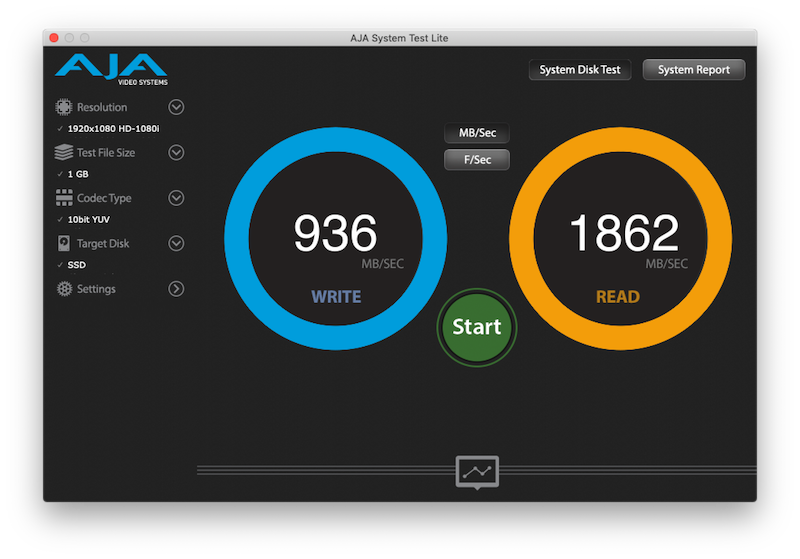
HP EX950 2TB NVMe SSD:
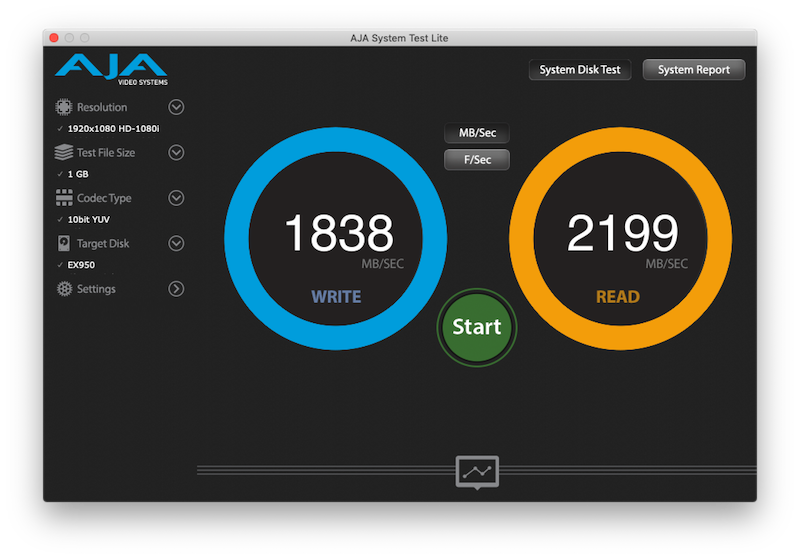
Amazingly, the Apple SSD feels every bit as snappy and responsive, if not more so at times..
As many here would attest...benchmarks are certainly not everything, especially for just normal day to day casual usage patterns.
Original Apple 1TB SSD:
HP EX950 2TB NVMe SSD:
Amazingly, the Apple SSD feels every bit as snappy and responsive, if not more so at times..
As many here would attest...benchmarks are certainly not everything, especially for just normal day to day casual usage patterns.
Audit13
macrumors 604
Great speeds with the ex950!2015 15" MacBook Pro 2.8ghz dual GPU
Original Apple 1TB SSD:
HP EX950 2TB NVMe SSD:
Amazingly, the Apple SSD feels every bit as snappy and responsive, if not more so at times..
As many here would attest...benchmarks are certainly not everything, especially for just normal day to day casual usage patterns.
I was using a stock 128 Apple SSD in an early 2015 Air. I installed a 256 GB Intel 600p. On benchmarks, the Intel was quite bit faster but, in daily use, I did not notice much of a difference at all.
turbineseaplane
macrumors Penryn
On benchmarks, the Intel was quite bit faster but, in daily use, I did not notice much of a difference at all.
Exactly my experience... in fact I think the Apple SSD feels snappier.
It makes me wonder if it's a function of cached data and long running install on the Apple 1TB vs the still new EX950 install?
Audit13
macrumors 604
Could be. Samsung has often managed to outperform its competitors and this may be one reason Apple/Samsung have such a symbiotic relationship when it comes to their SSD. Apple SSDs probably use MLC memory too.Exactly my experience... in fact I think the Apple SSD feels snappier.
It makes me wonder if it's a function of cached data and long running install on the Apple 1TB vs the still new EX950 install?
Hadn't read about the windows problem in the thread till now - must've missed it sadly. Is there a workaround documented anywhere?
I'll definitely look to dual boot windows 10 & mohave as that's what I do today and ideally with the extra space of a new nvme drive, would like to have a look at linux via triple boot too - maybe that's a bridge too far...
I agree that a sticky / summary of all the key info somewhere would be useful.
I have switched back to the original drive. But when I had the Samsung in I had to do some command line stuff to get it to finish installing windows.
Nope. There are no drivers for NVMe in the kernel.
If I recall correctly, you need the HS bootrom and the drive needs to be formatted in 4k clusters. Sierra supports 4k while High Sierra and Mojave support 512 and 4k.
Thanks to both of you for the info. I need an older version of Mac OS for some older software that won’t run well in a VM.
jackqueenking
macrumors regular
Neither did I on a 2014 MBPr going to a 760p 512gb. I cannot speak on behalf of the tasks you perform on your Mac on a daily basis but for the most part you will not notice a difference between the 2 drives, whether you're at 500mb/s or 1800mb/s read and write, the time difference for reading and writing files, apps etc.. is fractionally irrelevant and imperceptible. You will notice differences mainly on heavier tasks like loading video game levels, rendering large media files, or just loading the operating system. But if we're talking about loading and browsing with Safari or increasing storage capacity for pictures and music then this isn't really an accurate representation of how fast the drives really are.Great speeds with the ex950!
I was using a stock 128 Apple SSD in an early 2015 Air. I installed a 256 GB Intel 600p. On benchmarks, the Intel was quite bit faster but, in daily use, I did not notice much of a difference at all.
As such if there was SATA m.2 compatibility with this laptops/adapters i would have definitely opted for one of those instead for a 2014 since the read/write would not change much. On 2015+ though a SATA m.2 would be considered a downgrade due to PCIe lanes and speed.
Audit13
macrumors 604
On my air, I basically use it to check email, internet, iTunes, and office apps so SSD speed isn't going to really improve my user experience which is why I will be using an HP ex900 in a 2017 air.Neither did I on a 2014 MBPr going to a 760p 512gb. I cannot speak on behalf of the tasks you perform on your Mac on a daily basis but for the most part you will not notice a difference between the 2 drives, whether you're at 500mb/s or 1800mb/s read and write, the time difference for reading and writing files, apps etc.. is fractionally irrelevant and imperceptible. You will notice differences mainly on heavier tasks like loading video game levels, rendering large media files, or just loading the operating system. But if we're talking about loading and browsing with Safari or increasing storage capacity for pictures and music then this isn't really an accurate representation of how fast the drives really are.
As such if there was SATA m.2 compatibility with this laptops/adapters i would have definitely opted for one of those instead for a 2014 since the read/write would not change much. On 2015+ though a SATA m.2 would be considered a downgrade due to PCIe lanes and speed.
mydigitalssd?
I can't say from reading around this thread at different times (can anyone go the 138 pages straight through?), I've not seen any consensus of which NVMe SSD is THE best and without issues. An SSD with the advantages of the original APPLE SSD as far as battery performance, operating temperature, and maybe an improvement in performance. But, basically just works well, without problems.
I kind of settled on trying the Kickstarter company HATssd because it was designed and made for MACs with a built-on adapter and pre-loaded OS to make it truly hassle-free plug and play. Looked much the same as the XPG SX8200 which was another option, and then the other option the more expensive Samsung 970 PRO just because of its 'Samsung.'
Looking for the newest and greatest with the fast-changing NVMe market, came on the Mydigitalssd. They are using the latest Phison controller and Toshiba memory, and look very interesting. But I can not find any information about how these work with a MAC.
Any insight or thoughts would be appreciated.
https://www.mydigitaldiscount.com/m...-m-m.2-pcie-3.1-x4-nvme-ssd-mdnvme80-bpxp-1t/
I can't say from reading around this thread at different times (can anyone go the 138 pages straight through?), I've not seen any consensus of which NVMe SSD is THE best and without issues. An SSD with the advantages of the original APPLE SSD as far as battery performance, operating temperature, and maybe an improvement in performance. But, basically just works well, without problems.
I kind of settled on trying the Kickstarter company HATssd because it was designed and made for MACs with a built-on adapter and pre-loaded OS to make it truly hassle-free plug and play. Looked much the same as the XPG SX8200 which was another option, and then the other option the more expensive Samsung 970 PRO just because of its 'Samsung.'
Looking for the newest and greatest with the fast-changing NVMe market, came on the Mydigitalssd. They are using the latest Phison controller and Toshiba memory, and look very interesting. But I can not find any information about how these work with a MAC.
Any insight or thoughts would be appreciated.
https://www.mydigitaldiscount.com/m...-m-m.2-pcie-3.1-x4-nvme-ssd-mdnvme80-bpxp-1t/
turbineseaplane
macrumors Penryn
I kind of settled on trying the Kickstarter company HATssd because it was designed and made for MACs with a built-on adapter and pre-loaded OS to make it truly hassle-free plug and play.
You really want to trust your data on a kickstarter "startup" that is totally unproven and trying to build something basically nobody builds (the custom made for Mac pre-loaded OS part)?
I had to chuckle a little at the juxtaposition of "new unproven kickstarter product" and "truly hassle free and plug and play" 😉
You're much braver than I am.
I want storage solutions from major manufacturers that are proven and throughly and widely tested personally.
May fortune be your friend
You really want to trust your data on a kickstarter "startup" that is totally unproven and trying to build something basically nobody builds (the custom made for Mac pre-loaded OS part)?
I had to chuckle a little at the juxtaposition of "new unproven kickstarter product" and "truly hassle free and plug and play" 😉
You're much braver than I am.
I want storage solutions from major manufacturers that are proven and throughly and widely tested personally.
May fortune be your friend
So, my question is, what have you decided on, and why?
Yes, I understand what you say about a Kickstarter in general, and the unproven part also had me a bit apprehensive, and the reason I'm still looking (for cost alone they have gone down the list). Mydigitalssd is also a new company from what I understand, but unlike Hatssd gives a good amount of information about their products, and seems like a solid combination of the build. Still, it's also an unknown in the MAC NVMe SSD upgrade world. If I wanted to just go with a well-known company it would be Samsung, but they also have issues (battery life being the main concern) and are more expensive. I've been going through the options for a month or so now and there is no clear cut answer that I hear. I'm almost at the point of any good low priced SSD and just putting it in an external enclosure for files and use the 256gb internally for OS/applications.
turbineseaplane
macrumors Penryn
So, my question is, what have you decided on, and why?
So far I'm considering keeping this EX950 honestly.
Things are running very smoothly now that all indexing and transferring are complete.
It's also running much cooler (and thus quieter fans) than the EVO 970 did in here.
But...if I don't find this acceptable after another week or two, I'll simply keep my 1TB Apple SSD.

duke_83
macrumors newbie
Hi to all!
This is my first experience with Apple devices...
I've just bought MBP 2014 mid without original SSD. Then bought Samsung 970 EVO as it cheap and new, instead of original 655-1803D which is mostly used and expensive.
Then I plugged in 970 Evo with help of connector. Only High Sierra and Mojave bootable USB sticks see the drive but after first installation step and rebooting macbook can't see the new SSD and so can't continue with installing((((
Generally Yosemite easily installs on USB stick or SD card (I have 16GB, 32GB and 64GB for tests), but maximum what I can reach on them through appstore upgrade process is Sierra OS, so no drivers/firmware for new Samsung 970 with that version....
Does the only way for me is to but the old and used "Apple Part #: 661-8136, 661-8138 Manufacturer Part #:655-1803D" then recover from internet Yosemite and step by step upgrade to High Sierra, and just only after this plug-in my new Samsung 970 EVO?
Thank you for your help in advance!
This is my first experience with Apple devices...
I've just bought MBP 2014 mid without original SSD. Then bought Samsung 970 EVO as it cheap and new, instead of original 655-1803D which is mostly used and expensive.
Then I plugged in 970 Evo with help of connector. Only High Sierra and Mojave bootable USB sticks see the drive but after first installation step and rebooting macbook can't see the new SSD and so can't continue with installing((((
Generally Yosemite easily installs on USB stick or SD card (I have 16GB, 32GB and 64GB for tests), but maximum what I can reach on them through appstore upgrade process is Sierra OS, so no drivers/firmware for new Samsung 970 with that version....
Does the only way for me is to but the old and used "Apple Part #: 661-8136, 661-8138 Manufacturer Part #:655-1803D" then recover from internet Yosemite and step by step upgrade to High Sierra, and just only after this plug-in my new Samsung 970 EVO?
Thank you for your help in advance!

whg
macrumors regular
This is what I would do: buy the cheapest Apple SSD that fits your MBP from eBay, then use it to install the latest macOS to get your Boot ROM updated to the latest version. After this, you should be good to go with the adapter and NVMe SSD.Hi to all!
This is my first experience with Apple devices...
I've just bought MBP 2014 mid without original SSD. Then bought Samsung 970 EVO as it cheap and new, instead of original 655-1803D which is mostly used and expensive.
Then I plugged in 970 Evo with help of connector. Only High Sierra and Mojave bootable USB sticks see the drive but after first installation step and rebooting macbook can't see the new SSD and so can't continue with installing((((
Generally Yosemite easily installs on USB stick or SD card (I have 16GB, 32GB and 64GB for tests), but maximum what I can reach on them through appstore upgrade process is Sierra OS, so no drivers/firmware for new Samsung 970 with that version....
Does the only way for me is to but the old and used "Apple Part #: 661-8136, 661-8138 Manufacturer Part #:655-1803D" then recover from internet Yosemite and step by step upgrade to High Sierra, and just only after this plug-in my new Samsung 970 EVO?
Thank you for your help in advance!

gilles_polysoft
macrumors 6502
Can anyone tell if I will be able to run an OS earlier then 10.13 with a NVME SSD if I have a HFS partition or HFS on a APFS container? If this won’t work because of drivers then will it work if I do the EFI firmware flash? Any info is greatly appreciated. Thanks!
This has already been answered earlier...
Without any kext modification :
- macOS 10.11 can boot from any Apple NVMe SSD (ex : AP032, SM0512L, or SM2048L)
- macOS 10.12 adds the ability to boot from any tier 4K formatted tiers NVMe SSD
- macOS 10.13 and up are able to boot form any NVMe SSD.
So, if you want to run 10.12 from a NVMe SSD, you only have to get a 4K bloc compatible SSD (and you need to format it in 4K bloc, using the nvme-cli command under linux).
Exemples of 4K bloc compatibles SSDs are :
- Kingston A1000 and KC1000
- Toshiba XG3-XG4-XG5
- WD Black v1 and v2.
NVMe boot ability has nothing to do with HFS or APFS.Can anyone tell if I will be able to run an OS earlier then 10.13 with a NVME SSD if I have a HFS partition or HFS on a APFS container? If this won’t work because of drivers then will it work if I do the EFI firmware flash? Any info is greatly appreciated. Thanks!
An up to date BootRom gives you the ability to load the kernel and boot from APFS because it has a driver inside which allows reading APFS partitions.
An up to date BootRom gives also you the ability to load the kernel and boot from NVMe drives because is has been added inside the BootRom a DXE NVMe driver.
But once you have loaded the kernel, macOS needs to have full access to the whole filesystem. There comes the IONVMeFamily.kext .
The IONVMeFamily.kext from 10.11 only handles and recognize Apple NVMe SSDs (it can be patched)
The IONVMeFamily.kext from 10.12 only handles and recognize 4K bloc formated NVMe SSDs.
The IONVMeFamily.kext from 10.13 and up recognize and handles all NVMe SSDs of the market.
Last edited:
turbineseaplane
macrumors Penryn
My EX950 2TB has settled in really nicely and runs quite cool and quiet (not as cool as Apple SSD as expected)..
Now I'm doing some battery drain testing.
Does anyone know a place where we can find actual power consumption specs for native Apple SSD's?
I'm curious just how much better they are on paper and then also how that translates into real world battery run time. This is sort of a very hard to understand situation since these are all older machines with various levels of battery wear at this point.
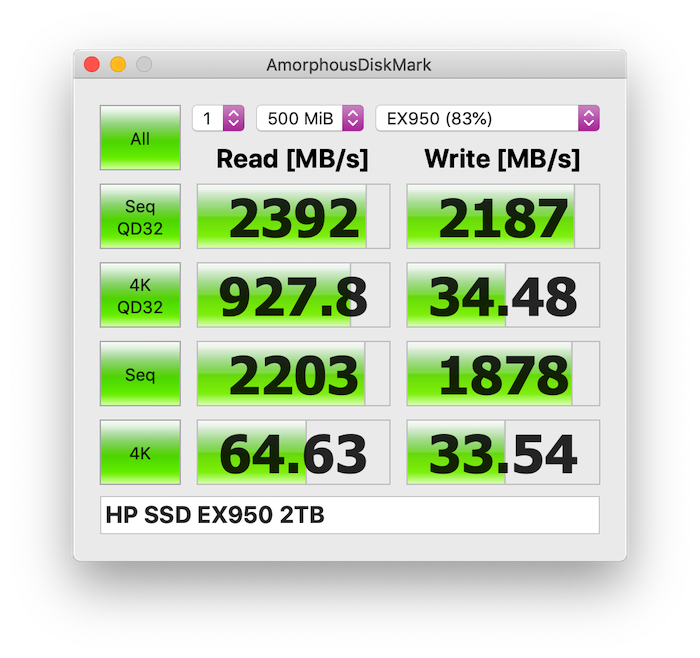
Below is my DiskMark score on the HP EX950 2TB in my 2.8ghz 15" 2015 MBP (Dual GPU model)
Now I'm doing some battery drain testing.
Does anyone know a place where we can find actual power consumption specs for native Apple SSD's?
I'm curious just how much better they are on paper and then also how that translates into real world battery run time. This is sort of a very hard to understand situation since these are all older machines with various levels of battery wear at this point.
Below is my DiskMark score on the HP EX950 2TB in my 2.8ghz 15" 2015 MBP (Dual GPU model)
Last edited:
This has already been answered earlier...
Without any kext modification :
Of course, if your Mac is made before 2015 you need to have its Bootrom up to date (you have an up-to-date bootrom if you run at least Sierra and regularly update your mac).
- macOS 10.11 can boot from any Apple NVMe SSD (ex : AP032, SM0512L, or SM2048L)
- macOS 10.12 adds the ability to boot from any tier 4K formatted tiers NVMe SSD
- macOS 10.13 and up are able to boot form any NVMe SSD.
So, if you want to run 10.12 from a NVMe SSD, you only have to get a 4K bloc compatible SSD (and you need to format it in 4K bloc, using the nvme-cli command under linux).
Exemples of 4K bloc compatibles SSDs are :
[doublepost=1550589178][/doublepost]
- Kingston A1000 and KC1000
- Toshiba XG3-XG4-XG5
- WD Black v1 and v2.
NVMe boot ability has nothing to do with HFS or APFS.
An up to date BootRom gives you the ability to load the kernel and boot from APFS because it has a driver inside which allows reading APFS partitions.
An up to date BootRom gives also you the ability to load the kernel and boot from NVMe drives because is has been added inside the BootRom a DXE NVMe driver.
But once you have loaded the kernel, macOS needs to have full access to the whole filesystem. There comes the IONVMeFamily.kext .
The IONVMeFamily.kext from 10.11 only handles and recognize Apple NVMe SSDs (it can be patched)
The IONVMeFamily.kext from 10.12 only handles and recognize 4K bloc formated NVMe SSDs.
The IONVMeFamily.kext from 10.13 and up recognize and handles all NVMe SSDs of the market.
Great info, thanks for taking the time to explain! I’ve done my best to browse/search this thread for info. So if you flash the ROM in pre 2015 models with a modified version it adds the ability to support hibernation with 3rd party NVME? Apple only officially pushed this update to 2015 models? Thanks again!

brdeveloper
macrumors 68030
I've installed a Toshiba XG5 (512GB) on a Macbook Air 13" 2015 (with the small Sintech adapter). No issues, despite its speed is not impressive, pairing with the original 128GB one. It's a pretty affordable SSD, though.I'm planning to replace my macbook air's ssd. Do you have any idea what is the best ssd for my macbook air 2015?