
EugW
macrumors P6
It's cheaper but not half the price, and it has a more generic chassis. Also, no reviews at all yet.Anyone ordering this one https://www.alibaba.com/x/1lAK6pQ?ck=pdp
This is half price of tcolor thought still allegedly 6k 32inch

It's cheaper but not half the price, and it has a more generic chassis. Also, no reviews at all yet.Anyone ordering this one https://www.alibaba.com/x/1lAK6pQ?ck=pdp
This is half price of tcolor thought still allegedly 6k 32inch

What is your verdict now that it’s been a week?I live in Finland and ordered a Tcolor SC-MZT-L32660 monitor from Alibaba for €733 (the price included all costs) two weeks ago, and the package was delivered to my door yesterday. I have now used the monitor for one day with a MacBook Pro M1 and a Mac mini M4, and I haven’t noticed any major issues so far.
Pics too if you have someWhat is your verdict now that it’s been a week?

I’m satisfied with the purchase. I’ve now used the monitor for a week for work with a MacBook Pro M1 and for leisure with a Mac mini M4. The brightness has been sufficient and overall it has worked well.What is your verdict now that it’s been a week?
Pics too if you have some
I’m not able to answer the 4:4:4 chroma question. However, this monitor only has 400 nits of brightness, so HDR is not really usable. In practice it would require around 600–1000 nits to be worthwhile.@pommac,
Looks good! How are the buttons and menu system? I see you have a Mac mini M4 and MBP M1. With both, do both 4:4:4 chroma (with 1:1 non-scaled resolutions) and HDR work?
If you’re interested, you can test 4:4:4 by switching to the 1:1 resolution non-scaled (6016x3144) and then downloading the test page at this link:I’m not able to answer the 4:4:4 chroma question. However, this monitor only has 400 nits of brightness, so HDR is not really usable. In practice it would require around 600–1000 nits to be worthwhile.
The buttons are located on the right side and feel like metal.
The OSD menu defaults to Chinese, but it is possible to switch it to English.
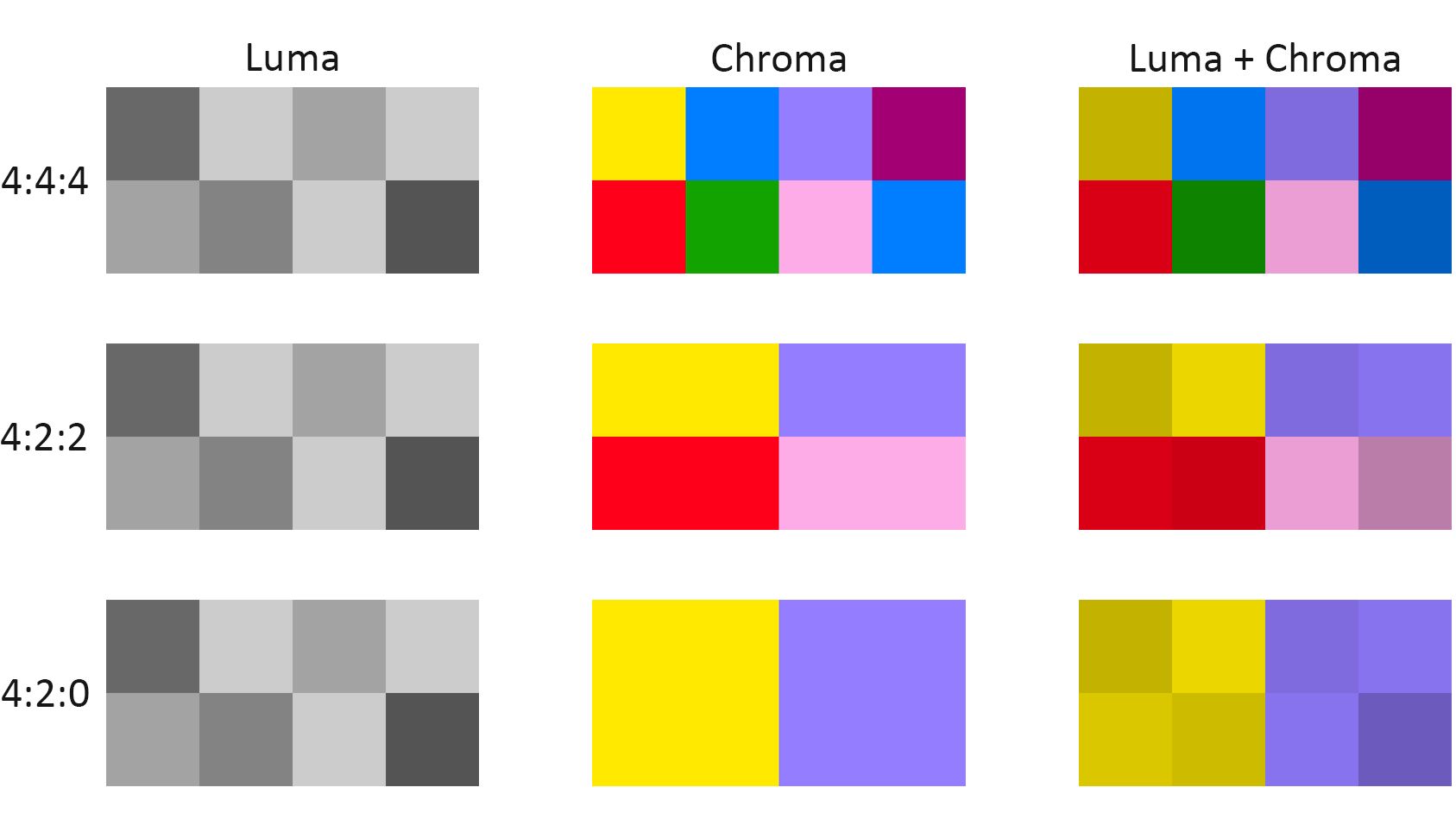
 www.rtings.com
Mac mini M4 6016 x 3384 resolution:If you’re interested, you can test 4:4:4 by switching to the 1:1 resolution non-scaled (6016x3144) and then downloading the test page at this link:
Chroma Subsampling: 4:4:4 vs. 4:2:2 vs. 4:2:0
What is Chroma Subsampling, and where is this visible? Chroma subsampling is a type of compression that reduces the color information in a signal in favor of luminance data.
Look at the test pattern at 100% without scaling and take a picture (not screengrab) to see if it is displayed correctly. If 4:4:4 isn’t working, the blue and red vertical lines will only display every second line.
Monitors do not incur extra tariffs in the US. They were specifically exempted.Yeah this monitor looks excellent value. Sadly I live in the US so I suspect I would get choked to death with tariffs if I tried to order one.
Monitors do not incur extra tariffs in the US. They were specifically exempted.
Adjusting the screen brightness may cause a high-pitched whining noise at certain brightness levels, which, as far as I understand, is a known phenomenon with some monitors and is related to the backlight control (Pulse Width Modulation).
I (and ChatGPT) believe the backlight control uses Pulse Width Modulation (PWM), which means the screen does not actually lower the lamp or LED power continuously, but instead turns the backlight on and off very rapidly to simulate lower brightness.What about the high-pitched whine? Could that be due to a defective unit?
The latest review on the Alibaba page includes a mention of buzzing sound ... might be the same issue @pommac is having:What about the high-pitched whine? Could that be due to a defective unit?
In my case the noise is not coming from the external power supply. The sound is clearly coming from inside the monitor itself, and it only appears when I reduce the hardware brightness. At higher brightness levels the monitor is quiet. This suggests it is related to the backlight control (likely PWM or internal electronics), not the external 24V adapter.The latest review on the Alibaba page includes a mention of buzzing sound ... might be the same issue @pommac is having:
"the power supply is external (24V 5A) and the one it came with was very noisy with an annoying buzzing sound, but you can just use another one"
From: https://www.alibaba.com/product-detail/Color-Accurate-6k-Monitors-32-Inch_1601525173783.html
Did you run the noise issue by Tcoior?In my case the noise is not coming from the external power supply. The sound is clearly coming from inside the monitor itself, and it only appears when I reduce the hardware brightness. At higher brightness levels the monitor is quiet. This suggests it is related to the backlight control (likely PWM or internal electronics), not the external 24V adapter.
Also, I noticed that the external power supply does not have a CE marking😱.
CE = Conformité Européenne or China Export🙂
With hardware dimming it can be hard to find a level without the whining sound, but if software dimming is enough, then it’s not really a problem.Hmmm. I forgot you mentioned that whine in your review.
The lack of any CE or similar marking is disappointing but the whine may be this product’s true Achilles’ heel if widespread. M1 series Mac Studio anyone?
I was in contact with the seller and provided a video upon request. They promised to investigate the issue, but I haven’t received any further response so far.Did you run the noise issue by Tcoior?

