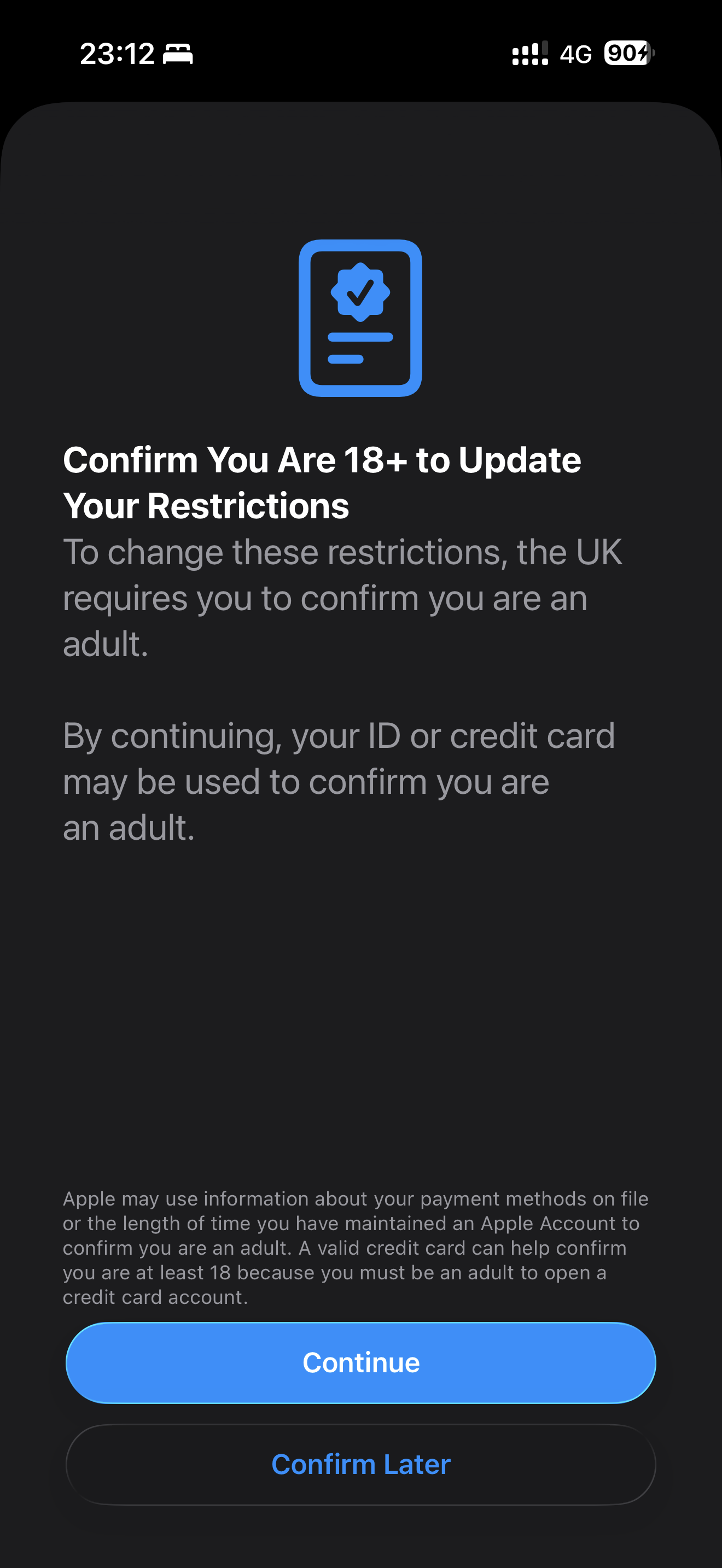
What ??? Both HSBC and Lloyds debit card did not work. I’m stuck now

Got a tip for us?
Let us know
Become a MacRumors Supporter for $50/year with no ads, ability to filter front page stories, and private forums.
iOS 26.4 RC ― Bug Fixes, Changes, and Improvements
- Thread starter Banglazed
- WikiPost WikiPost
- Start date
- Sort by reaction score
You are using an out of date browser. It may not display this or other websites correctly.
You should upgrade or use an alternative browser.
You should upgrade or use an alternative browser.
- Status
- The first post of this thread is a WikiPost and can be edited by anyone with the appropiate permissions. Your edits will be public.


Shin-Ra
macrumors 6502
The minimum age for debit card ownership seems to be 11 years compared to 18 for credit.

VSMacOne
macrumors 603
The only reason I’m not jumping on the RC is that battery life running 26.3.1 on 17PM has been spectacular! I’m talking about over 8hrs SOT with only 55% battery used. Crazy!
Same in Australia, can’t use debit cards so if you don’t have an actual credit card you gotta click enter manually then at the bottom use your ID.


MrRom92
macrumors 68000
There are some people who enjoy delicacies such as escargot and virgin boy eggs, it does not mean everyone will be interested in such thingsYet you continue to insist on using it over the highly stable and predictable OTA method. In all the years it’s been available not once have I ever experienced an issue that resulted in having to restart the update or restore the OS.
There was once a time when wired updates were highly stable and predictable too. I don’t like it anymore than you do, but don’t complain to me about it. Take it up with Apple!
Not to play the devil’s advocate here, but on the contrary, you’re the one complaining about Apple devices.There are some people who enjoy delicacies such as escargot and virgin boy eggs, it does not mean everyone will be interested in such things
There was once a time when wired updates were highly stable and predictable too. I don’t like it anymore than you do, but don’t complain to me about it. Take it up with Apple!
Most here use either Mac, OTA, or alternatives if on Windows. Rarely, if at all, do we hear someone having issues with the install process itself here. That alone says AD is the only thing that sucks. And even that seems to be an isolated incident according to another post earlier.So, of the handful of people who still use it, you’re the only one having issues.
Time to look inward and borrow a Mac and start from scratch. After you get that non-genuine battery sorted, of course.
ValerieDurden
macrumors 6502a
Still to early to judge, but performance has been great, a lot smoother than 26.3.1, I initially noticed some stuttering on the Home Screen but that seems to have gone away. Haven’t noticed any quirks either, if the public release is like this I think Apple might have done a good job finally.

Tomas1988
macrumors 6502
Strange but true OBC now works not only at 100%, but also at 80% or 90%.Anyone else seeing OBC not greyed out with limit set to less than 100%? It used to only be active when the limit’s set to 100%.
The text hasn’t changed which indicates it still only works when set to 100%. I think they just left it active to avoid confusing some people with automatic disabling under 100%.Strange but true OBC now works not only at 100%, but also at 80% or 90%.


iLuddite
macrumors 6502a
Just successfully clicked through to Concerts from both Home and Search 🤔Been seeing this for the last 3 hours when trying to access Concerts within Music…
View attachment 2614895
Sorry for your trouble.
Attachments

Interesting. Are you in the U.S.?Just successfully clicked through to Concerts from both Home and Search 🤔
Sorry for your trouble.

aperfectcircle
macrumors 6502a
Have you tried installing iTunes and using it instead of Apple Devices? I don’t think you need to shift everything back to iTunes if you do this - you’d just have iTunes installed alongside the other Apple apps and use it only for performing the updates. If you’re worried about it conflicting, you could always create another user account on your PC and install it just for that user. But I don’t think it will cause any issues if you’re just going to use it for the IPSW install. If I had a PC I’d test for you but I’m on Mac.There are some people who enjoy delicacies such as escargot and virgin boy eggs, it does not mean everyone will be interested in such things
There was once a time when wired updates were highly stable and predictable too. I don’t like it anymore than you do, but don’t complain to me about it. Take it up with Apple!
iLuddite
macrumors 6502a
Interesting. Every other aspect of Apple Music is working fine (including horizontal concert scrolling on the Home page). I’m sure it’ll fix itself at some point.Yep. I’m in Seattle

one more
macrumors 603
The only reason I’m not jumping on the RC is that battery life running 26.3.1 on 17PM has been spectacular! I’m talking about over 8hrs SOT with only 55% battery used. Crazy!
On my iPhone 17 the battery seems to be doing as well as it used to be on 26.3.1, with 0% loss overnight.

Radeon85
macrumors 68000
Seems 26.4 RC completely broke the communication with my Hue bridge pro when it's been working flawlessly for months, strange because in 26.4 B4 it was just fine. Only solution to this was to unlink Hue from the home app, remove the hub from the home app and then relink it from the Hue app.
So far everything is working just fine again, just a pain in ass as I had to add everything back one by one, as well as group lights and fix automations. Not sure how true this is, but looking into it, is seems Apple in 26.4 may have become stricter on how it handles matter devices which would explain it breaking immediately after updating.
I use the SwitchBot 2 Hub over matter and that was unaffected, I also use Tado for heating controls and Netatmo for my weather station, all those were unaffected as well.
On the plus side shortcuts are now working on my Ultra 3 again in the RC update. This was completely broken in 26.4 B4 where no shortcuts that I created to control devices would run from the watch, they would just hang and fail, they would run from the iPhone though. Now they run immediately without failing.
So far everything is working just fine again, just a pain in ass as I had to add everything back one by one, as well as group lights and fix automations. Not sure how true this is, but looking into it, is seems Apple in 26.4 may have become stricter on how it handles matter devices which would explain it breaking immediately after updating.
I use the SwitchBot 2 Hub over matter and that was unaffected, I also use Tado for heating controls and Netatmo for my weather station, all those were unaffected as well.
On the plus side shortcuts are now working on my Ultra 3 again in the RC update. This was completely broken in 26.4 B4 where no shortcuts that I created to control devices would run from the watch, they would just hang and fail, they would run from the iPhone though. Now they run immediately without failing.

LutzRFrank
macrumors 65816
Interesting. Every other aspect of Apple Music is working fine (including horizontal concert scrolling on the Home page). I’m sure it’ll fix itself at some point.
appears for the first time on my DE/DE device


JemTheWire
macrumors 6502
I was wondering why when I used my DEBIT card it failed validation. I didn’t realise that the minimum age to get one was 11 (in the UK at least), as I am sumwhat older than that. It verified fine when I used my CREDIT card.

BadMelonFarmer
macrumors 6502a
Same thing happened to me with hue pro, but with 26.4 beta 2Seems 26.4 RC completely broke the communication with my Hue bridge pro when it's been working flawlessly for months, strange because in 26.4 B4 it was just fine. Only solution to this was to unlink Hue from the home app, remove the hub from the home app and then relink it from the Hue app.
So far everything is working just fine again, just a pain in ass as I had to add everything back one by one, as well as group lights and fix automations. Not sure how true this is, but looking into it, is seems Apple in 26.4 may have become stricter on how it handles matter devices which would explain it breaking immediately after updating.
I use the SwitchBot 2 Hub over matter and that was unaffected, I also use Tado for heating controls and Netatmo for my weather station, all those were unaffected as well.
On the plus side shortcuts are now working on my Ultra 3 again in the RC update. This was completely broken in 26.4 B4 where no shortcuts that I created to control devices would run from the watch, they would just hang and fail, they would run from the iPhone though. Now they run immediately without failing.
I ended up having to unlink and set it all back up again.
I reported it to Philips and they have been looking into it.
MrRom92
macrumors 68000
The two programs do seem to conflict with eachother and alot of data that was previously in iTunes can’t seem to return now that it’s been migrated to the newer programs. Such has been the situation for the past couple of years.Have you tried installing iTunes and using it instead of Apple Devices? I don’t think you need to shift everything back to iTunes if you do this - you’d just have iTunes installed alongside the other Apple apps and use it only for performing the updates. If you’re worried about it conflicting, you could always create another user account on your PC and install it just for that user. But I don’t think it will cause any issues if you’re just going to use it for the IPSW install. If I had a PC I’d test for you but I’m on Mac.
But actually, now that I think of it, as of recently I got a new laptop and so far it hasn’t been tainted by either program. So I shouldn’t have any trouble installing iTunes on it and sticking to that, without it ever interacting with Apple Devices if it never exists on this laptop to begin with. So I may do it that way. Apple Devices on the PC for syncing, backups/restores, etc. and iTunes on the laptop only for installing IPSWs
Apple wants you to use the new program, so it makes sense that if it detects both errors, it will make you choose one. But choosing one or the other at this point is irrelevant; they both work exactly the same and produce the same errors. Apple devices also receive far more updates than iTunes, having updated twice in the last three months, while iTunes has only been updated once, and the time will come when they will abandon it.The two programs do seem to conflict with eachother and alot of data that was previously in iTunes can’t seem to return now that it’s been migrated to the newer programs. Such has been the situation for the past couple of years.
But actually, now that I think of it, as of recently I got a new laptop and so far it hasn’t been tainted by either program. So I shouldn’t have any trouble installing iTunes on it and sticking to that, without it ever interacting with Apple Devices if it never exists on this laptop to begin with. So I may do it that way. Apple Devices on the PC for syncing, backups/restores, etc. and iTunes on the laptop only for installing IPSWs
In short, neither of them will brick your phone because, as I said before, if it detects that you want to install a version the program isn't compatible with, it won't even start; it will ask you to update the program. If it does start, it updates the phone without problems. I still don't see what you're afraid of exactly. I also recommend that if you don't want to be an early adopter or don't have the necessary knowledge and precautions, you stick to stable versions and update programs and versions as they are officially released. But using iTunes to update with the IPSW file will give you twice the headaches, because Apple updates it less and less frequently, and a few months ago it took almost a month to make iTunes compatible with iOS 26.2, while Apple devices were updated a day before the final release to allow the phone to update to this version.