
Got a tip for us?
Let us know
Become a MacRumors Supporter for $50/year with no ads, ability to filter front page stories, and private forums.
watchOS 27 Beta Thread
- Thread starter goldmac2006
- Start date
- Sort by reaction score
You are using an out of date browser. It may not display this or other websites correctly.
You should upgrade or use an alternative browser.
You should upgrade or use an alternative browser.


iPhonNick
macrumors regular
Sorry, completely missed your post.Correct. Ain’t no documentation showing how it works in the new version so put feedback and put the number here.
FB22973967 - App switcher not opening when double pressing the Digital Crown.
I am having a weird issue and trying to determine if it happens every night. I noticed this a couple of times so far. When I wake up in the morning my watch is locked so when my alarm goes off it doesn't just alert me on my wrist but my iPhone will then sound an alarm. I like the silent alarm to not wake my wife up at 530am.
Anyone else notice this behavior?
I paid attention last night when I went to bed and the watch was unlocked but when I woke to my phone alarm (which should have been a silent watch alarm) my phone was locked.
I will submit a bug.
Anyone else notice this behavior?
I paid attention last night when I went to bed and the watch was unlocked but when I woke to my phone alarm (which should have been a silent watch alarm) my phone was locked.
I will submit a bug.
Last edited:
Jacoblee23
macrumors 68000
When I try to send a text message from my watch, it does not work. Is anyone else having this issue?

Alrighty great news here ! Y’all with compatible watches here’s a feedback number to reference in your case.Sorry, completely missed your post.
FB22973967 - App switcher not opening when double pressing the Digital Crown.
Updated my series 9 Apple Watch Saturday , i noticed bad battery life as soon as Sunday. I was able to use it normally (mail, tesla powerwall check, weather, a few walks/cycling during the day) and wearing it to sleep, now I have to recharge it a little before sleeping in order to fully recharge it in the morning after waking up. I can’t reach the full battery day anymore. Battery health was 84% before upgrading to iOS 27 and still is 84%.
Another glitch is Tesla Powerwall app becoming quite slow at moving between info pages. But this is a minor issue
Another glitch is Tesla Powerwall app becoming quite slow at moving between info pages. But this is a minor issue
My battery hasn't been great. It was definitely better on iOS 26. My main concern is what I wrote earlier. It is locking while I am sleeping so my alarm is sounding on my iPhone instead of silently waking me on my watch. I submitted a bug.
I am having a weird issue and trying to determine if it happens every night. I noticed this a couple of times so far. When I wake up in the morning my watch is locked so when my alarm goes off it doesn't just alert me on my wrist but my iPhone will then sound an alarm. I like the silent alarm to not wake my wife up at 530am.
Anyone else notice this behavior?
I paid attention last night when I went to bed and the watch was unlocked but when I woke to my phone alarm (which should have been a silent watch alarm) my phone was locked.
I will submit a bug.
Dang. I’m sorry to hear that.My battery hasn't been great. It was definitely better on iOS 26. My main concern is what I wrote earlier. It is locking while I am sleeping so my alarm is sounding on my iPhone instead of silently waking me on my watch. I submitted a bug.
Is your watch on properly and the band is secure?
Yep, double checked to make sure the band was snug and that it was not locked.Dang. I’m sorry to hear that.
Is your watch on properly and the band is secure?

eyespy03
macrumors 6502
I am having a similar issue with the App Switcher - or whatever is showing up now. It looks like the App Menu. There is no way to force-close an app as in the past. I added your report number to mine.Sorry, completely missed your post.
FB22973967 - App switcher not opening when double pressing the Digital Crown.

tsanchai
macrumors member
As far as I know, Apple decide to kill App Switcher in WatchOS 27, and replace it with the stupid AI app screen. To force close an app, the app has to be running in the foreground, then you will press the action button until the off scrrpeen show up. To force close that app, press the crown until the watch return you to either you watch face or the silly ai app screen.
I think Apple should bring back App Switcher. I don’t need AI everywhere. I want to control my watch, not let AI rule my life
I think Apple should bring back App Switcher. I don’t need AI everywhere. I want to control my watch, not let AI rule my life

Fr. Guido Sarducci
macrumors regular
It still works on my 11.What? There is no more double click to crown to open app switcher?
As far as I know, Apple decide to kill App Switcher in WatchOS 27, and replace it with the stupid AI app screen.
Never was a fan of any of these app starting screens that are sorted my apps by any type of "intelligent" algorithm.
My home screen on my iPhone and my Apple Watch are carefully arranged by myself so I don't have to search the app I want to start.
Always despised these "Siri" suggestions. Hope this feature can be switched off.
eyespy03
macrumors 6502
I have tried this on my AWU3 and the apps remain in that AI or whatever menu. I don't close out many of my apps, but some do not need to run/be open in the background if I am not using them that often.As far as I know, Apple decide to kill App Switcher in WatchOS 27, and replace it with the stupid AI app screen. To force close an app, the app has to be running in the foreground, then you will press the action button until the off scrrpeen show up. To force close that app, press the crown until the watch return you to either you watch face or the silly ai app screen.
I think Apple should bring back App Switcher. I don’t need AI everywhere. I want to control my watch, not let AI rule my life
Try turning wrist detection on and off, make sure if you wear any bracelets they don’t go underneath the watch and clean the back.Yep, double checked to make sure the band was snug and that it was not locked.
Action button? That’s only for Apple Watch Ultra users. But how about the series 10/11 wearers?As far as I know, Apple decide to kill App Switcher in WatchOS 27, and replace it with the stupid AI app screen. To force close an app, the app has to be running in the foreground, then you will press the action button until the off scrrpeen show up. To force close that app, press the crown until the watch return you to either you watch face or the silly ai app screen.
I think Apple should bring back App Switcher. I don’t need AI everywhere. I want to control my watch, not let AI rule my life

AppleForeverandEver
macrumors regular
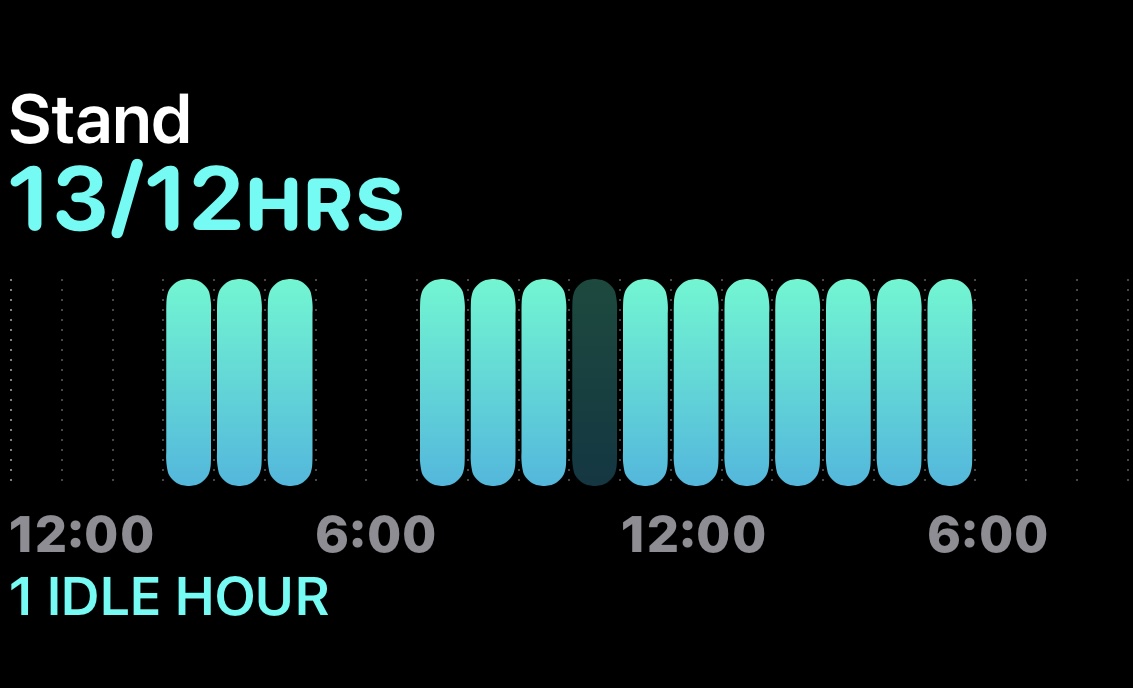
Not sure what happened here but never seen this before. There are two hours missing from my stand graphic yesterday. Strange.
Update from this weekend. Not sure if the watch was still indexing or doing something earlier in the week but after doing a reset on Thursday the alarm was back to normal the next day and has been working ever since. Kind of weird but I am good now with my watch.


coolaaron88
macrumors regular


jpsmith76
macrumors regular
The release notes (useless) for Beta 2 are out, but not the software. Maybe in 90 minutes.

DribbleCastle
macrumors 6502a
where are you seeing beta 2 notes? don't see any here.The release notes (useless) for Beta 2 are out, but not the software. Maybe in 90 minutes.

watchOS 27 Beta 6 Release Notes | Apple Developer Documentation
Update your apps to use new features, and test your apps against API changes.
jpsmith76
macrumors regular
Doh! You're right. I read them in the Feedback app, bust just realized (after you pointed it out) those were the 26.6 beta 2 notes that I never looked at since I didn't even install it.where are you seeing beta 2 notes? don't see any here.
watchOS 27 Beta 6 Release Notes | Apple Developer Documentation
Update your apps to use new features, and test your apps against API changes.developer.apple.com
Sorry all!